The Release
Pipeline Model
Applied to Managing Windows
Server and Microsoft Cloud
Michael Greene
Principal Program Manager
Microsoft Enterprise Cloud CAT
whoami
Michael Greene
Principal Program Manager
Enterprise Cloud Engineering CAT Team
(Customer Feedback, Technical Enablement)
CAT PM for PowerShell & DevOps
12 yrs at Microsoft
3 yrs BPOSD/O365D Ops
@migreene
Mgreenegit
http://aka.ms/thereleasepipelinemodel
When does a concept become a revolution?
First, the new candidate must seem to resolve some
outstanding and generally recognized problem that can be
met in no other way.
Second, the new paradigm must promise to preserve a
relatively large part of the concrete problem-solving ability
that has accrued to science through its predecessors.
(The Structure of Scientific Revolutions, Thomas S. Kuhn)
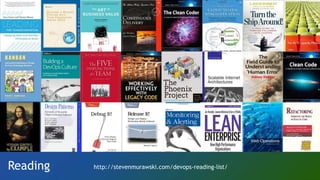
Reading http://stevenmurawski.com/devops-reading-list/
Customer Landscape
patterns & practices
how do we include
Windows Server?
that’s a little more on
the dev side, than IT
Pro?
Treat Servers like PaaS
service
consistency
fabric
consistency
Software
As a Service
consume service
Platform
As a Service
deploy apps, jobs,
data
Infrastructure
As a Service
custom baseline
manage binaries
SQL Azure
Azure App
Services
Azure Virtual
Machines
application
consistency
Increasing
opportunity
for
configuration
drift
Physical/Virtual
Servers
Configuration as Code
• Lots of API's
• Complex scenarios should be property:value
• Living documentation
• PowerShell DSC is the PLATFORM that all solutions can use to
deploy and manage Windows Server
• Azure Resource Manager is also Configuration as Code
• Nothing replaces knowledge about the systems you intend to
manage
The Release Pipeline
Who changed the environment?
What did they change, exactly?
When did the change occur?
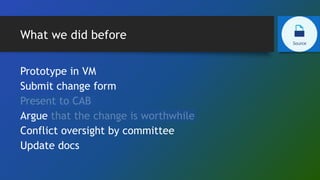
What we did before
Prototype in VM
Submit change form
Present to CAB
Argue that the change is worthwhile
Conflict oversight by committee
Update docs
What we do now
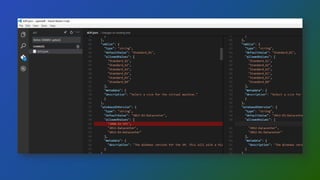
• Document everything in configuration as code
• Including automated deployment and testing
• Clone latest to workstation
• Make change
• Run tests locally
• Push to Source
• Who, What, When, Why (comments)
• Merge with Master, resolve conflicts if needed
How will I catch problems at the
earliest possible moment?
Can elements be combined cleanly
to produce the correct results?
How will I be notified of a problem?
What we did before
• Remote in on Saturday
• Make sure servers are listed in RDCMan
• Connect to servers and make changes
• Reboot in order
• Say a prayer / squeeze rabbit’s foot / perform
tribal dance
• Check that services still work correctly
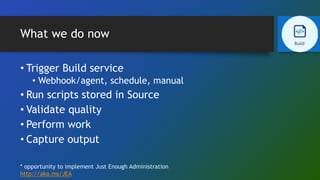
What we do now
• Trigger Build service
• Webhook/agent, schedule, manual
• Run scripts stored in Source
• Validate quality
• Perform work
• Capture output
* opportunity to implement Just Enough Administration
http://aka.ms/JEA
Engineer for Resiliency
• What will this project require on Day 2? Day 30? Day 100?
• Monitoring rules
• Monitoring alerts
• Automation runbooks
• JEA endpoints
• Onboard to backup services
• Operational Validation Tests
How do we check for regulatory
issues?
How do I know this change will not
cause an outage?
Will this change work across every
variation I have in my
environments?
Does this configuration meet our
business requirements?
What we did before
• Create VM
• Install OS
• Install app/service
• Implement change
• Manual, test OU, run script
• Try app/service
• Make an educated guess whether it still works
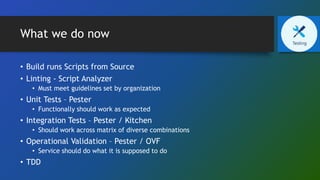
What we do now
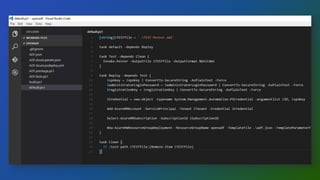
• Build runs Scripts from Source
• Linting - Script Analyzer
• Must meet guidelines set by organization
• Unit Tests – Pester
• Functionally should work as expected
• Integration Tests – Pester / Kitchen
• Should work across matrix of diverse combinations
• Operational Validation – Pester / OVF
• Service should do what it is supposed to do
• TDD
Integration Testing with Pester
All examples courtesy of the following blog post -
https://pshirwin.wordpress.com/2016/04/08/active-directory-operations-test/
$ADConfiguration = @{
Forest = @{
FQDN = 'pshirwin.local'
ForestMode = 'Windows2012R2Forest'
GlobalCatalogs = @(
'DC-DSC-01.pshirwin.local'
)
SchemaMaster = 'DC-DSC-01.pshirwin.local'
DomainNamingMaster = 'DC-DSC-01.pshirwin.local'
}
Domain = @{
NetBIOSName = 'PSHIRWIN'
DomainMode = 'Windows2012R2Domain'
RIDMaster = 'DC-DSC-01.pshirwin.local'
PDCEmulator = 'DC-DSC-01.pshirwin.local'
InfrastructureMaster = 'DC-DSC-01.pshirwin.local'
DistinguishedName = 'DC=pshirwin,DC=local'
DNSRoot = 'pshirwin.local'
DomainControllers = @('DC-DSC-01')
}
Describe 'Active Directory configuration operational readiness' {
Context 'Verifying Forest Configuration'{
it "Forest FQDN $($ADConfiguration.Forest.FQDN)" {
$ADConfiguration.Forest.FQDN |
Should be $SavedADReport.ForestInformation.RootDomain
}
it "ForestMode $($ADConfiguration.Forest.ForestMode)"{
$ADConfiguration.Forest.ForestMode |
Should be $SavedADReport.ForestInformation.ForestMode.ToString()
}
}
Context 'Verifying GlobalCatalogs'{
$ADConfiguration.Forest.GlobalCatalogs |
ForEach-Object{
it "Server $($_) is a GlobalCatalog"{
$SavedADReport.ForestInformation.GlobalCatalogs.Contains($_) |
Should be $true
}
}
}
POSHSpec
Describe 'Services' {
Service w32time Status { Should Be Running }
Service bits Status { Should Be Stopped }
}
Describe 'Files' {
File C:inetpubwwwrootiisstart.htm { Should Exist }
File C:inetpubwwwrootiisstart.htm { Should Contain 'text-align:center' }
}
Describe 'Registry' {
Registry HKLM:SOFTWAREMicrosoftRpcClientProtocols { Should Exist }
Registry HKLM:SYSTEMCurrentControlSetServicesTcpipParameters "SyncDomainWithMembership" { Should Be 1 }
Registry 'HKLM:SOFTWARECallahan Auto' { Should Not Exist }
}
Describe 'Http' {
TcpPort localhost 80 PingSucceeded { Should Be $true }
TcpPort localhost 80 TcpTestSucceeded { Should Be $true }
Http http://localhost StatusCode { Should Be 200 }
Http http://localhost RawContent { Should Match 'X-Powered-By: ASP.NET' }
Http http://localhost RawContent { Should Not Match 'X-Powered-By: Cobal' }
}
Describe 'Hotfix' {
Hotfix KB3116900 { Should Not BeNullOrEmpty}
Hotfix KB1112233 { Should BeNullOrEmpty}
}
https://github.com/Ticketmaster/poshspec
How do I make changes without
granting long term administrative
access?
Does anyone need to sign-off before
deployment?
How do I keep services consistent
across all my environments?
Can I integrate service management?
What we did before
• Request/create VM
• Request/manage environmental changes
• Install OS
• Install app/service (or defer to app/service owner)
• Onboard to patching, anti-malware, backup, monitoring
• Validate app/service is working
• Go Live
What we do now
• Build runs scripts from Source
• Potentially automatically releases when Tests pass
• Deploy artifacts to environment
• Simplify complex work through automation
• Promote through stages
• QA, Prod, Green/Blue
Getting Started Guide
• Use Source Control
• Don't expect to cutover instantly
• Require tests
• Keep options open
• Old and new tools can be integrated
Make change visible
• If change is happening fluidly, everyone needs to know
• Your peers are not going to go check reports, the way they
check Facebook
• Notify all stakeholders in the way they collaborate
Managing outages without randomizing servers
Map your requirements
Plaster
PSake
Pester
POSHSpec
OVF
PSDeploy
Lability
Community Projects
PowerShell
Slack
Finally
Everyone must be onboard for long term success but it
starts with one passionate engineer

WinOps Conf 2016 - Michael Greene - Release Pipelines

  • 1.
    The Release Pipeline Model Appliedto Managing Windows Server and Microsoft Cloud Michael Greene Principal Program Manager Microsoft Enterprise Cloud CAT
  • 2.
    whoami Michael Greene Principal ProgramManager Enterprise Cloud Engineering CAT Team (Customer Feedback, Technical Enablement) CAT PM for PowerShell & DevOps 12 yrs at Microsoft 3 yrs BPOSD/O365D Ops @migreene Mgreenegit http://aka.ms/thereleasepipelinemodel
  • 3.
    When does aconcept become a revolution? First, the new candidate must seem to resolve some outstanding and generally recognized problem that can be met in no other way. Second, the new paradigm must promise to preserve a relatively large part of the concrete problem-solving ability that has accrued to science through its predecessors. (The Structure of Scientific Revolutions, Thomas S. Kuhn)
  • 4.
  • 5.
    Customer Landscape patterns &practices how do we include Windows Server? that’s a little more on the dev side, than IT Pro?
  • 7.
    Treat Servers likePaaS service consistency fabric consistency Software As a Service consume service Platform As a Service deploy apps, jobs, data Infrastructure As a Service custom baseline manage binaries SQL Azure Azure App Services Azure Virtual Machines application consistency Increasing opportunity for configuration drift Physical/Virtual Servers
  • 8.
    Configuration as Code •Lots of API's • Complex scenarios should be property:value • Living documentation • PowerShell DSC is the PLATFORM that all solutions can use to deploy and manage Windows Server • Azure Resource Manager is also Configuration as Code • Nothing replaces knowledge about the systems you intend to manage
  • 9.
  • 10.
    Who changed theenvironment? What did they change, exactly? When did the change occur?
  • 11.
    What we didbefore Prototype in VM Submit change form Present to CAB Argue that the change is worthwhile Conflict oversight by committee Update docs
  • 12.
    What we donow • Document everything in configuration as code • Including automated deployment and testing • Clone latest to workstation • Make change • Run tests locally • Push to Source • Who, What, When, Why (comments) • Merge with Master, resolve conflicts if needed
  • 17.
    How will Icatch problems at the earliest possible moment? Can elements be combined cleanly to produce the correct results? How will I be notified of a problem?
  • 18.
    What we didbefore • Remote in on Saturday • Make sure servers are listed in RDCMan • Connect to servers and make changes • Reboot in order • Say a prayer / squeeze rabbit’s foot / perform tribal dance • Check that services still work correctly
  • 19.
    What we donow • Trigger Build service • Webhook/agent, schedule, manual • Run scripts stored in Source • Validate quality • Perform work • Capture output * opportunity to implement Just Enough Administration http://aka.ms/JEA
  • 28.
    Engineer for Resiliency •What will this project require on Day 2? Day 30? Day 100? • Monitoring rules • Monitoring alerts • Automation runbooks • JEA endpoints • Onboard to backup services • Operational Validation Tests
  • 29.
    How do wecheck for regulatory issues? How do I know this change will not cause an outage? Will this change work across every variation I have in my environments? Does this configuration meet our business requirements?
  • 30.
    What we didbefore • Create VM • Install OS • Install app/service • Implement change • Manual, test OU, run script • Try app/service • Make an educated guess whether it still works
  • 31.
    What we donow • Build runs Scripts from Source • Linting - Script Analyzer • Must meet guidelines set by organization • Unit Tests – Pester • Functionally should work as expected • Integration Tests – Pester / Kitchen • Should work across matrix of diverse combinations • Operational Validation – Pester / OVF • Service should do what it is supposed to do • TDD
  • 32.
    Integration Testing withPester All examples courtesy of the following blog post - https://pshirwin.wordpress.com/2016/04/08/active-directory-operations-test/ $ADConfiguration = @{ Forest = @{ FQDN = 'pshirwin.local' ForestMode = 'Windows2012R2Forest' GlobalCatalogs = @( 'DC-DSC-01.pshirwin.local' ) SchemaMaster = 'DC-DSC-01.pshirwin.local' DomainNamingMaster = 'DC-DSC-01.pshirwin.local' } Domain = @{ NetBIOSName = 'PSHIRWIN' DomainMode = 'Windows2012R2Domain' RIDMaster = 'DC-DSC-01.pshirwin.local' PDCEmulator = 'DC-DSC-01.pshirwin.local' InfrastructureMaster = 'DC-DSC-01.pshirwin.local' DistinguishedName = 'DC=pshirwin,DC=local' DNSRoot = 'pshirwin.local' DomainControllers = @('DC-DSC-01') } Describe 'Active Directory configuration operational readiness' { Context 'Verifying Forest Configuration'{ it "Forest FQDN $($ADConfiguration.Forest.FQDN)" { $ADConfiguration.Forest.FQDN | Should be $SavedADReport.ForestInformation.RootDomain } it "ForestMode $($ADConfiguration.Forest.ForestMode)"{ $ADConfiguration.Forest.ForestMode | Should be $SavedADReport.ForestInformation.ForestMode.ToString() } } Context 'Verifying GlobalCatalogs'{ $ADConfiguration.Forest.GlobalCatalogs | ForEach-Object{ it "Server $($_) is a GlobalCatalog"{ $SavedADReport.ForestInformation.GlobalCatalogs.Contains($_) | Should be $true } } }
  • 37.
    POSHSpec Describe 'Services' { Servicew32time Status { Should Be Running } Service bits Status { Should Be Stopped } } Describe 'Files' { File C:inetpubwwwrootiisstart.htm { Should Exist } File C:inetpubwwwrootiisstart.htm { Should Contain 'text-align:center' } } Describe 'Registry' { Registry HKLM:SOFTWAREMicrosoftRpcClientProtocols { Should Exist } Registry HKLM:SYSTEMCurrentControlSetServicesTcpipParameters "SyncDomainWithMembership" { Should Be 1 } Registry 'HKLM:SOFTWARECallahan Auto' { Should Not Exist } } Describe 'Http' { TcpPort localhost 80 PingSucceeded { Should Be $true } TcpPort localhost 80 TcpTestSucceeded { Should Be $true } Http http://localhost StatusCode { Should Be 200 } Http http://localhost RawContent { Should Match 'X-Powered-By: ASP.NET' } Http http://localhost RawContent { Should Not Match 'X-Powered-By: Cobal' } } Describe 'Hotfix' { Hotfix KB3116900 { Should Not BeNullOrEmpty} Hotfix KB1112233 { Should BeNullOrEmpty} } https://github.com/Ticketmaster/poshspec
  • 38.
    How do Imake changes without granting long term administrative access? Does anyone need to sign-off before deployment? How do I keep services consistent across all my environments? Can I integrate service management?
  • 39.
    What we didbefore • Request/create VM • Request/manage environmental changes • Install OS • Install app/service (or defer to app/service owner) • Onboard to patching, anti-malware, backup, monitoring • Validate app/service is working • Go Live
  • 40.
    What we donow • Build runs scripts from Source • Potentially automatically releases when Tests pass • Deploy artifacts to environment • Simplify complex work through automation • Promote through stages • QA, Prod, Green/Blue
  • 42.
    Getting Started Guide •Use Source Control • Don't expect to cutover instantly • Require tests • Keep options open • Old and new tools can be integrated
  • 43.
    Make change visible •If change is happening fluidly, everyone needs to know • Your peers are not going to go check reports, the way they check Facebook • Notify all stakeholders in the way they collaborate Managing outages without randomizing servers
  • 44.
  • 45.
    Finally Everyone must beonboard for long term success but it starts with one passionate engineer