Shallow Copy and Deep Copy
CHAPTER – 4
THE BASICS OF SEARCH ENGINE FRIENDLY DESIGN & DEVELOPMENT
Copyright @ 2019 Learntek. All Rights Reserved. 3
Shallow Copy and Deep Copy
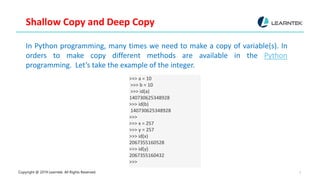
In Python programming, many times we need to make a copy of variable(s). In
orders to make copy different methods are available in the Python
programming. Let’s take the example of the integer.
>>> a = 10
>>> b = 10
>>> id(a)
140730625348928
>>> id(b)
140730625348928
>>>
>>> x = 257
>>> y = 257
>>> id(x)
2067355160528
>>> id(y)
2067355160432
>>>
Copyright @ 2019 Learntek. All Rights Reserved.
4
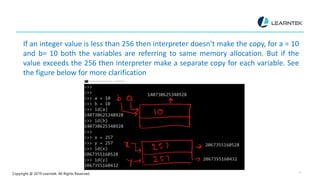
If an integer value is less than 256 then interpreter doesn’t make the copy, for a = 10
and b= 10 both the variables are referring to same memory allocation. But if the
value exceeds the 256 then interpreter make a separate copy for each variable. See
the figure below for more clarification
Copyright @ 2019 Learntek. All Rights Reserved. 5
Let us take the example of Python list.
See the following example
>>> list1 = [1,2,3]
>>> list2 = [1,2,3]
>>> id(list1)
2067355168648
>>> id(list2)
2067353438600
>>>
Copyright @ 2019 Learntek. All Rights Reserved. 6
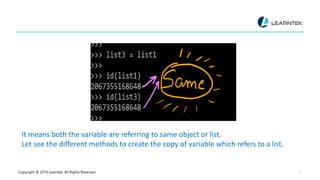
Addresses of both the lists are different. Let us create the copy of one variable
>>> list1 = [1,2,3]
>>> list3 = list1
>>> >>> id(list1)
2067355168648
>>> id(list3)
2067355168648
Copyright @ 2019 Learntek. All Rights Reserved. 7
It means both the variable are referring to same object or list.
Let see the different methods to create the copy of variable which refers to a list.
Copyright @ 2019 Learntek. All Rights Reserved. 8
First method
>>> list4 = list1[:]
>>> list4
[1, 2, 3]
>>> id(list4)
2067355181192
>>> id(list1)
2067355168648
>>>
Copyright @ 2019 Learntek. All Rights Reserved. 9
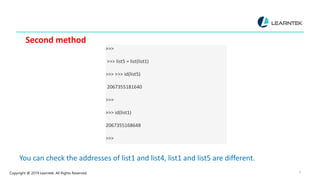
Second method
>>>
>>> list5 = list(list1)
>>> >>> id(list5)
2067355181640
>>>
>>> id(list1)
2067355168648
>>>
You can check the addresses of list1 and list4, list1 and list5 are different.
Copyright @ 2019 Learntek. All Rights Reserved. 10
Let us see one more example. >>> list1 = [1,2,["a","b"]]
>>>
>>> list2 = list1[:]
>>> list2
[1, 2, ['a', 'b’]]
>>> id(list2)
2067355167944
>>> id(list1)
2067355168136
>>>
Copyright @ 2019 Learntek. All Rights Reserved. 11
Up to this level, nothing is surprising. Both the Python copy lists depicting different
Python lists. >>> list1[2]
['a', 'b’]
>>> id(list1[2])
2067323314824
>>>
>>> id(list2[2])
2067323314824
>>>
>>> list2[2] ['a', 'b’]
>>>
Copyright @ 2019 Learntek. All Rights Reserved. 12
The above code is very surprising. It means list1 and list2 contain the same sub-list.
Copyright @ 2019 Learntek. All Rights Reserved. 13
This type of copy is called shallow copy. The inner sub-list address is same for the
list1 and list2.
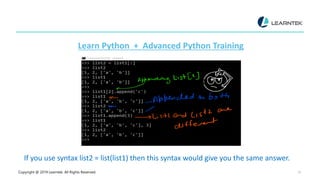
Let us append the inner sub-list.
>>> list1 = [1,2,["a","b"]]
>>> list2 = list1
>>>
>>> list2 = list1[:]
>>> list2
[1, 2, ['a', 'b’]]
[
>>> list1
Copyright @ 2019 Learntek. All Rights Reserved. 14
[1, 2, ['a', 'b’]]
>>>
>>> list1[2].append('c’)
>>> list1
[1, 2, ['a', 'b', 'c’]]
>>> list2
[1, 2, ['a', 'b', 'c’]]
>>>
You can see if the sub-list list1[2] is updated then the impact also reflected to the
list2[2].
Copyright @ 2019 Learntek. All Rights Reserved. 15
Learn Python + Advanced Python Training
If you use syntax list2 = list(list1) then this syntax would give you the same answer.
Copyright @ 2019 Learntek. All Rights Reserved. 16
Deep Copy
Now, what is the solution of shallow copy problem? The solution is a deep copy
which allows a complete copy of the list. In other words, It means first
constructing a new collection object and then recursively populating it with
copies of the child objects found in the original.
Fortunately, in Python, we have copy module to accomplish the task.
See the following series of commands
Copyright @ 2019 Learntek. All Rights Reserved.
17
>>> list1 = [1,2,["a","b"]]
>>> from copy import deepcopy
>>> list2 = deepcopy(list1)
>>> id(list1)
1724712551368
>>> id(list2)
1724744113928
>>>
>>> id(list1[2])
1724712051336
>>> id(list2[2])
1724713319304
Copyright @ 2019 Learntek. All Rights Reserved. 18
You can see in both the Python list, list1 and list2, the sub-list is at different addresses.
>>> list2[2] ['a', 'b’]
>>> list2[2].append("c")
>>> list2 [1, 2, ['a', 'b', 'c’]]
>>>
>>> list1 [1, 2, ['a', 'b’]]
>>>
If we append something in the sub-list of list2 then it does not reflect on the sub-list
of list1.
Let us take a complex example
Copyright @ 2019 Learntek. All Rights Reserved. 19
>>> list1 = [1,2,("a","b",[1,2],3),4]
>>> list1
[1, 2, ('a', 'b', [1, 2], 3), 4]
>>> import copy
>>> list2 = copy.deepcopy(list1)
>>> list2
[1, 2, ('a', 'b', [1, 2], 3), 4]
>>> list1[2][2] [1, 2]
>>> list1[2][2].append(5)
>>> list1
[1, 2, ('a', 'b', [1, 2, 5], 3), 4]
>>> list2
[1, 2, ('a', 'b', [1, 2], 3), 4]
>>>
Copyright @ 2019 Learntek. All Rights Reserved. 20
We can say the deep copy is working fine.
Let us take the case of Dictionary. In the dictionary, with the help of method copy, we
can produce a copy of the dictionary. Let us see an example.
>>> dict1 = {1: 'a', 2: 'b', 3: ['C', 'D’]}
>>>
>>> dict2 = dict1.copy()
>>>
>>> dict2[3] ['C', 'D’]
>>>
>>> dict2 {1: 'a', 2: 'b', 3: ['C', 'D’]}
>>>
Copyright @ 2019 Learntek. All Rights Reserved. 21
>>> dict2[3].append("E")
>>> dict2
{1: 'a', 2: 'b', 3: ['C', 'D', 'E’]}
>>> dict1
{1: 'a', 2: 'b', 3: ['C', 'D', 'E’]}
>>> >
>> id(dict1[3])
1724744113864
>>>
>>> id(dict2[3])
1724744113864
>>>
Copyright @ 2019 Learntek. All Rights Reserved. 22
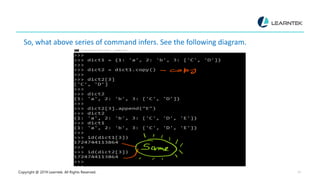
So, what above series of command infers. See the following diagram.
Copyright @ 2019 Learntek. All Rights Reserved. 23
It means the dict method copy also produce the shallow copy.
Let take the help of deep copy to produce to a deep copy.
>>> dict3 = deepcopy(dict1)
>>> dict3
{1: 'a', 2: 'b', 3: ['C', 'D', 'E’]}
>>> dict1[3].append("L")
>>>
>>> dict1
{1: 'a', 2: 'b', 3: ['C', 'D', 'E', 'L’]}
>>>
>>> dict3
{1: 'a', 2: 'b', 3: ['C', 'D', 'E’]}
>>>
Copyright @ 2019 Learntek. All Rights Reserved. 24
Means changes of dict1 are not reflecting dict3.
In the end we can conclude that
Making a shallow copy of an object won’t clone internal objects. Therefore, the
copy is not fully independent of the original.
A deep copy of an object will recursively clone internal objects. The clone is fully
independent of the original, but creating a python deep copy is slower.
Copyright @ 2019 Learntek. All Rights Reserved. 25
For more Training Information , Contact Us
Email : info@learntek.org
USA : +1734 418 2465
INDIA : +40 4018 1306
+7799713624

Shallow copy and deep copy

  • 1.
  • 2.
    CHAPTER – 4 THEBASICS OF SEARCH ENGINE FRIENDLY DESIGN & DEVELOPMENT
  • 3.
    Copyright @ 2019Learntek. All Rights Reserved. 3 Shallow Copy and Deep Copy In Python programming, many times we need to make a copy of variable(s). In orders to make copy different methods are available in the Python programming. Let’s take the example of the integer. >>> a = 10 >>> b = 10 >>> id(a) 140730625348928 >>> id(b) 140730625348928 >>> >>> x = 257 >>> y = 257 >>> id(x) 2067355160528 >>> id(y) 2067355160432 >>>
  • 4.
    Copyright @ 2019Learntek. All Rights Reserved. 4 If an integer value is less than 256 then interpreter doesn’t make the copy, for a = 10 and b= 10 both the variables are referring to same memory allocation. But if the value exceeds the 256 then interpreter make a separate copy for each variable. See the figure below for more clarification
  • 5.
    Copyright @ 2019Learntek. All Rights Reserved. 5 Let us take the example of Python list. See the following example >>> list1 = [1,2,3] >>> list2 = [1,2,3] >>> id(list1) 2067355168648 >>> id(list2) 2067353438600 >>>
  • 6.
    Copyright @ 2019Learntek. All Rights Reserved. 6 Addresses of both the lists are different. Let us create the copy of one variable >>> list1 = [1,2,3] >>> list3 = list1 >>> >>> id(list1) 2067355168648 >>> id(list3) 2067355168648
  • 7.
    Copyright @ 2019Learntek. All Rights Reserved. 7 It means both the variable are referring to same object or list. Let see the different methods to create the copy of variable which refers to a list.
  • 8.
    Copyright @ 2019Learntek. All Rights Reserved. 8 First method >>> list4 = list1[:] >>> list4 [1, 2, 3] >>> id(list4) 2067355181192 >>> id(list1) 2067355168648 >>>
  • 9.
    Copyright @ 2019Learntek. All Rights Reserved. 9 Second method >>> >>> list5 = list(list1) >>> >>> id(list5) 2067355181640 >>> >>> id(list1) 2067355168648 >>> You can check the addresses of list1 and list4, list1 and list5 are different.
  • 10.
    Copyright @ 2019Learntek. All Rights Reserved. 10 Let us see one more example. >>> list1 = [1,2,["a","b"]] >>> >>> list2 = list1[:] >>> list2 [1, 2, ['a', 'b’]] >>> id(list2) 2067355167944 >>> id(list1) 2067355168136 >>>
  • 11.
    Copyright @ 2019Learntek. All Rights Reserved. 11 Up to this level, nothing is surprising. Both the Python copy lists depicting different Python lists. >>> list1[2] ['a', 'b’] >>> id(list1[2]) 2067323314824 >>> >>> id(list2[2]) 2067323314824 >>> >>> list2[2] ['a', 'b’] >>>
  • 12.
    Copyright @ 2019Learntek. All Rights Reserved. 12 The above code is very surprising. It means list1 and list2 contain the same sub-list.
  • 13.
    Copyright @ 2019Learntek. All Rights Reserved. 13 This type of copy is called shallow copy. The inner sub-list address is same for the list1 and list2. Let us append the inner sub-list. >>> list1 = [1,2,["a","b"]] >>> list2 = list1 >>> >>> list2 = list1[:] >>> list2 [1, 2, ['a', 'b’]] [ >>> list1
  • 14.
    Copyright @ 2019Learntek. All Rights Reserved. 14 [1, 2, ['a', 'b’]] >>> >>> list1[2].append('c’) >>> list1 [1, 2, ['a', 'b', 'c’]] >>> list2 [1, 2, ['a', 'b', 'c’]] >>> You can see if the sub-list list1[2] is updated then the impact also reflected to the list2[2].
  • 15.
    Copyright @ 2019Learntek. All Rights Reserved. 15 Learn Python + Advanced Python Training If you use syntax list2 = list(list1) then this syntax would give you the same answer.
  • 16.
    Copyright @ 2019Learntek. All Rights Reserved. 16 Deep Copy Now, what is the solution of shallow copy problem? The solution is a deep copy which allows a complete copy of the list. In other words, It means first constructing a new collection object and then recursively populating it with copies of the child objects found in the original. Fortunately, in Python, we have copy module to accomplish the task. See the following series of commands
  • 17.
    Copyright @ 2019Learntek. All Rights Reserved. 17 >>> list1 = [1,2,["a","b"]] >>> from copy import deepcopy >>> list2 = deepcopy(list1) >>> id(list1) 1724712551368 >>> id(list2) 1724744113928 >>> >>> id(list1[2]) 1724712051336 >>> id(list2[2]) 1724713319304
  • 18.
    Copyright @ 2019Learntek. All Rights Reserved. 18 You can see in both the Python list, list1 and list2, the sub-list is at different addresses. >>> list2[2] ['a', 'b’] >>> list2[2].append("c") >>> list2 [1, 2, ['a', 'b', 'c’]] >>> >>> list1 [1, 2, ['a', 'b’]] >>> If we append something in the sub-list of list2 then it does not reflect on the sub-list of list1. Let us take a complex example
  • 19.
    Copyright @ 2019Learntek. All Rights Reserved. 19 >>> list1 = [1,2,("a","b",[1,2],3),4] >>> list1 [1, 2, ('a', 'b', [1, 2], 3), 4] >>> import copy >>> list2 = copy.deepcopy(list1) >>> list2 [1, 2, ('a', 'b', [1, 2], 3), 4] >>> list1[2][2] [1, 2] >>> list1[2][2].append(5) >>> list1 [1, 2, ('a', 'b', [1, 2, 5], 3), 4] >>> list2 [1, 2, ('a', 'b', [1, 2], 3), 4] >>>
  • 20.
    Copyright @ 2019Learntek. All Rights Reserved. 20 We can say the deep copy is working fine. Let us take the case of Dictionary. In the dictionary, with the help of method copy, we can produce a copy of the dictionary. Let us see an example. >>> dict1 = {1: 'a', 2: 'b', 3: ['C', 'D’]} >>> >>> dict2 = dict1.copy() >>> >>> dict2[3] ['C', 'D’] >>> >>> dict2 {1: 'a', 2: 'b', 3: ['C', 'D’]} >>>
  • 21.
    Copyright @ 2019Learntek. All Rights Reserved. 21 >>> dict2[3].append("E") >>> dict2 {1: 'a', 2: 'b', 3: ['C', 'D', 'E’]} >>> dict1 {1: 'a', 2: 'b', 3: ['C', 'D', 'E’]} >>> > >> id(dict1[3]) 1724744113864 >>> >>> id(dict2[3]) 1724744113864 >>>
  • 22.
    Copyright @ 2019Learntek. All Rights Reserved. 22 So, what above series of command infers. See the following diagram.
  • 23.
    Copyright @ 2019Learntek. All Rights Reserved. 23 It means the dict method copy also produce the shallow copy. Let take the help of deep copy to produce to a deep copy. >>> dict3 = deepcopy(dict1) >>> dict3 {1: 'a', 2: 'b', 3: ['C', 'D', 'E’]} >>> dict1[3].append("L") >>> >>> dict1 {1: 'a', 2: 'b', 3: ['C', 'D', 'E', 'L’]} >>> >>> dict3 {1: 'a', 2: 'b', 3: ['C', 'D', 'E’]} >>>
  • 24.
    Copyright @ 2019Learntek. All Rights Reserved. 24 Means changes of dict1 are not reflecting dict3. In the end we can conclude that Making a shallow copy of an object won’t clone internal objects. Therefore, the copy is not fully independent of the original. A deep copy of an object will recursively clone internal objects. The clone is fully independent of the original, but creating a python deep copy is slower.
  • 25.
    Copyright @ 2019Learntek. All Rights Reserved. 25 For more Training Information , Contact Us Email : info@learntek.org USA : +1734 418 2465 INDIA : +40 4018 1306 +7799713624