70-290: MCSE Guide to Managing a Microsoft Windows Server 2003 Environment Managing and Implementing  SHADOW COPY
Shadow Copies of Shared Folders Purpose of this utility is to make recovery of user files in shared folders easy without requiring an administrator Advantages for users: Restoration of accidentally deleted files Recovery of previous versions of files Comparison of previous version to current version Shadow Copies not enabled by default, must be explicitly enabled from Properties of a drive
Shadow Copies of Shared Folders (continued) Shadow Copies is enabled for entire volume (cannot shadow specific files or folders) Copies are made on a pre-defined schedule By default, Shadow Copies uses 10% of available disk space (minimum 100 MB) When limit is reached, older copies are deleted
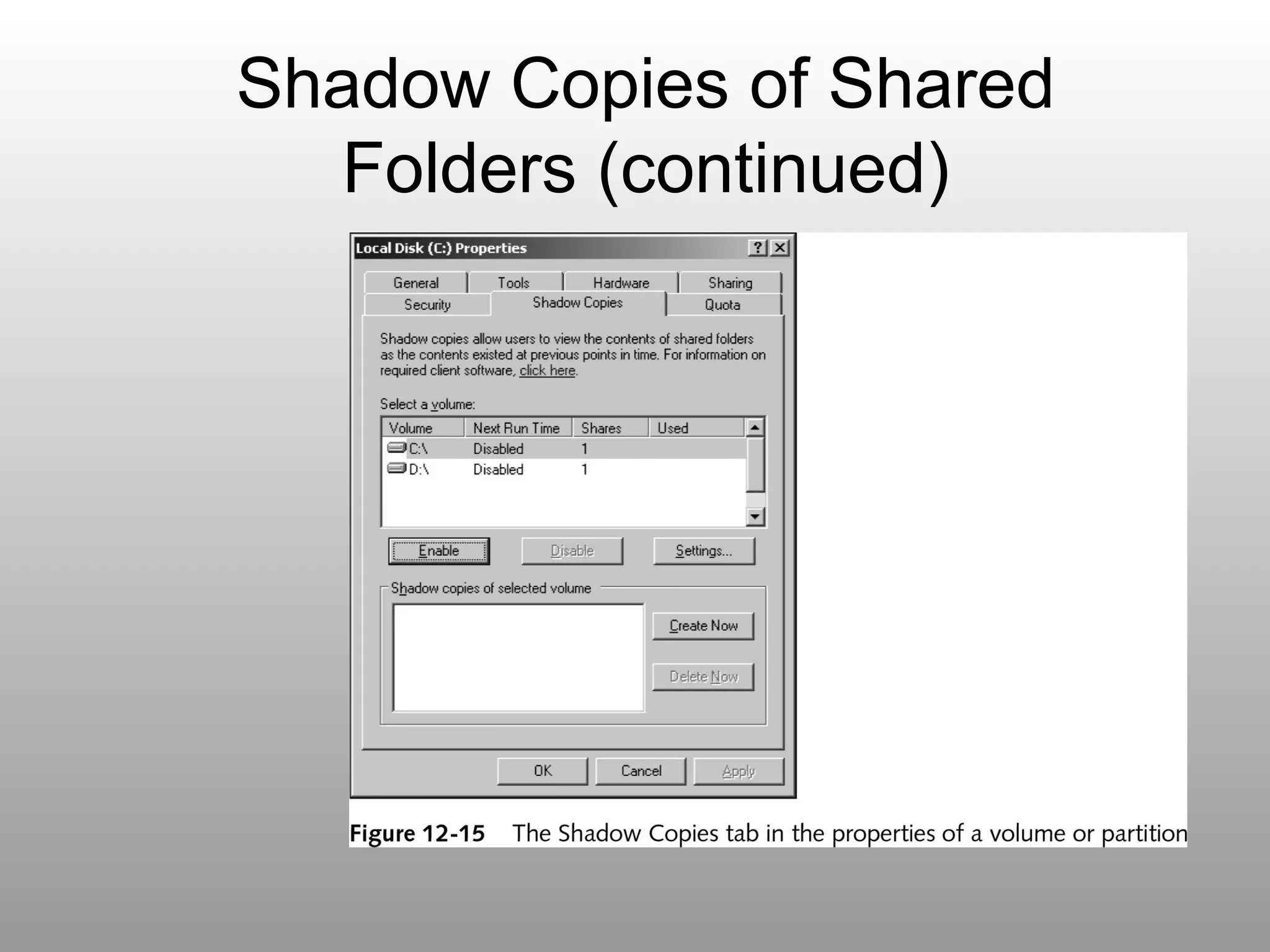
Shadow Copies of Shared Folders (continued)
Enabling and Configuring Shadow Copies of Shared Folder Settings Create a new shared folder with appropriate permissions  Create a text document in the folder Enable Shadow Copying Explore and configure settings and schedules
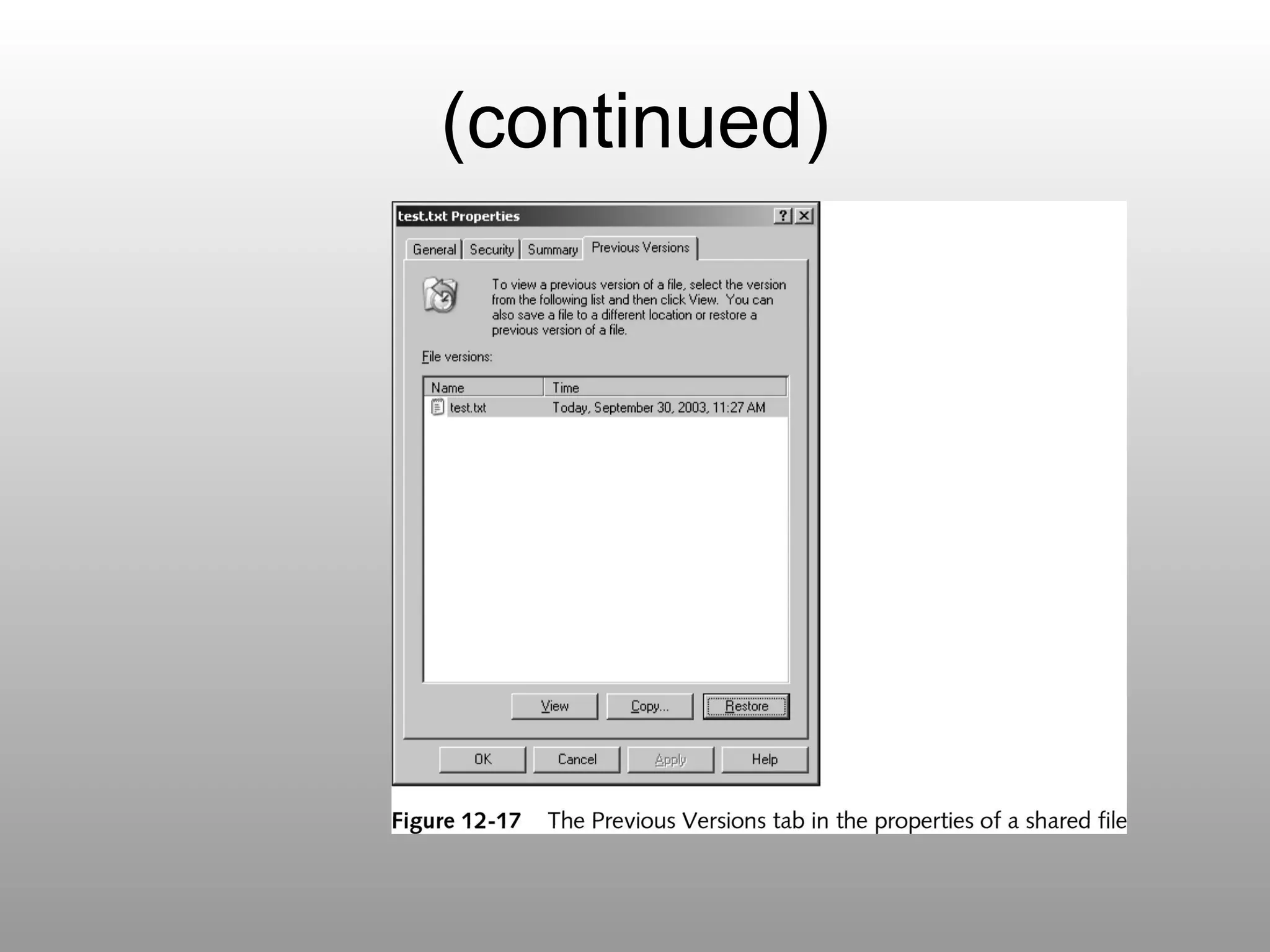
Previous Versions Network users must install additional software on their systems to access previous versions of files via Shadow Copies Client software provided in MSI format at %systemroot%\system32\clients\twclient\X86 (for Intel-based system) Adds an additional tab (Previous Versions) to Properties of files stored in shared Folders
Installing and Using the Previous Versions Client Objective: To install and use the Previous Versions Client and explore using it to restore a previous version of a file Locate and launch the installation file and complete installation Locate the Previous Versions tab in the Properties of the file created in Activity 12-5 Review and restore the file using the Previous Versions dialog box
(continued)

Shadow copy

  • 1.
    70-290: MCSE Guideto Managing a Microsoft Windows Server 2003 Environment Managing and Implementing SHADOW COPY
  • 2.
    Shadow Copies ofShared Folders Purpose of this utility is to make recovery of user files in shared folders easy without requiring an administrator Advantages for users: Restoration of accidentally deleted files Recovery of previous versions of files Comparison of previous version to current version Shadow Copies not enabled by default, must be explicitly enabled from Properties of a drive
  • 3.
    Shadow Copies ofShared Folders (continued) Shadow Copies is enabled for entire volume (cannot shadow specific files or folders) Copies are made on a pre-defined schedule By default, Shadow Copies uses 10% of available disk space (minimum 100 MB) When limit is reached, older copies are deleted
  • 4.
    Shadow Copies ofShared Folders (continued)
  • 5.
    Enabling and ConfiguringShadow Copies of Shared Folder Settings Create a new shared folder with appropriate permissions Create a text document in the folder Enable Shadow Copying Explore and configure settings and schedules
  • 6.
    Previous Versions Networkusers must install additional software on their systems to access previous versions of files via Shadow Copies Client software provided in MSI format at %systemroot%\system32\clients\twclient\X86 (for Intel-based system) Adds an additional tab (Previous Versions) to Properties of files stored in shared Folders
  • 7.
    Installing and Usingthe Previous Versions Client Objective: To install and use the Previous Versions Client and explore using it to restore a previous version of a file Locate and launch the installation file and complete installation Locate the Previous Versions tab in the Properties of the file created in Activity 12-5 Review and restore the file using the Previous Versions dialog box
  • 8.