차례
SGL 소개및 개발 동기
SGL 구현 기능
SGL 렌더링 파이프 라인
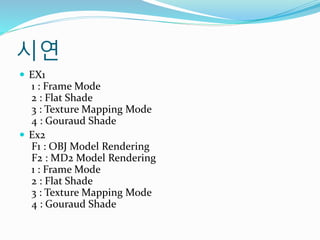
시연
The End
3.
SGL 소개 및개발 동기
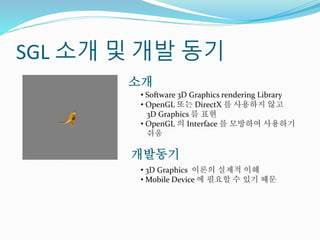
• Software 3D Graphics rendering Library
• OpenGL 또는 DirectX 를 사용하지 않고
3D Graphics 를 표현
• OpenGL 의 Interface 를 모방하여 사용하기
쉬움
소개
개발동기
• 3D Graphics 이론의 실제적 이해
• Mobile Device 에 필요할 수 있기 때문
4.
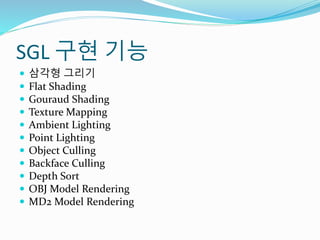
SGL 구현 기능
삼각형 그리기
Flat Shading
Gouraud Shading
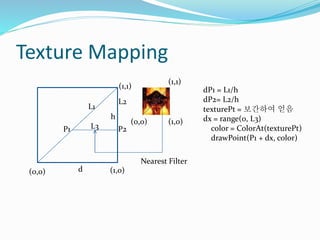
Texture Mapping
Ambient Lighting
Point Lighting
Object Culling
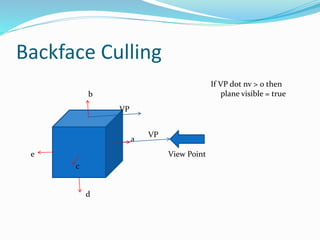
Backface Culling
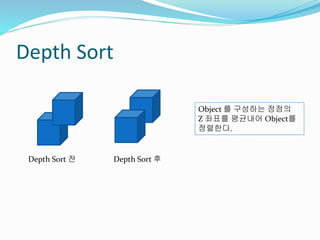
Depth Sort
OBJ Model Rendering
MD2 Model Rendering
5.
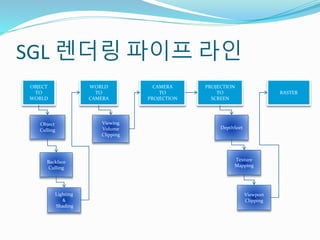
SGL 렌더링 파이프라인
OBJECT
TO
WORLD
WORLD
TO
CAMERA
CAMERA
TO
PROJECTION
PROJECTION
TO
SCREEN
Object
Culling
Backface
Culling
Lighting
&
Shading
Viewing
Volume
Clipping
Texture
Mapping
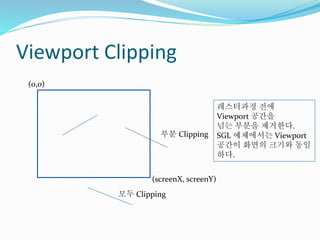
RASTER
Viewport
Clipping
DepthSort
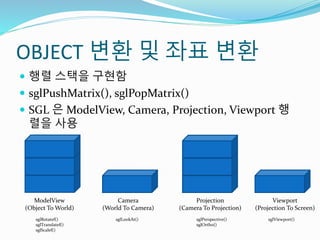
OBJECT 변환 및좌표 변환
행렬 스택을 구현함
sglPushMatrix(), sglPopMatrix()
SGL 은 ModelView, Camera, Projection, Viewport 행
렬을 사용
ModelView
(Object To World)
Camera
(World To Camera)
Projection
(Camera To Projection)
Viewport
(Projection To Screen)
sglRotatef()
sglTranslatef()
sglScalef()
sglLookAt() sglPerspective()
sglOrtho()
sglViewport()
8.
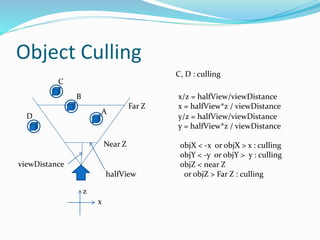
Object Culling
A
B
C
Near Z
FarZ
D
C, D : culling
viewDistance
x
z
halfView
x/z = halfView/viewDistance
x = halfView*z / viewDistance
y/z = halfView/viewDistance
y = halfView*z / viewDistance
objX < -x or objX > x : culling
objY < -y or objY > y : culling
objZ < near Z
or objZ > Far Z : culling
Lighting And Shading
Ambient Lighting
- 빛의 색상에 Ambient 성분 곱
Point Lighting
- 표면의 법선과 내적하여 빛의 강약 성분 계산
d = n.dot(gp.light.diffuse);
if(d>0)
{
lightColor = gp.light.color;
lightColor.R *= gp.light.ambient.x;
lightColor.G *= gp.light.ambient.y;
lightColor.B *= gp.light.ambient.z;
intencity = (n.dot(gp.light.diffuse) + 1.0f) / 2.0f; //0도 1, 90도 0.5, 180도 0
lightColor *= intencity;
obj.localVertices[obj.plist[i].indexList[0]].color += lightColor;
obj.localVertices[obj.plist[i].indexList[1]].color += lightColor;
obj.localVertices[obj.plist[i].indexList[2]].color += lightColor;
if(obj.objectType == SGL_QUADS)
{
obj.localVertices[obj.plist[i].indexList[3]].color += lightColor;
}
}
L n
11.
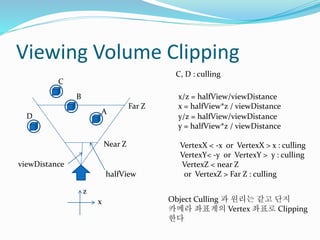
Viewing Volume Clipping
A
B
C
NearZ
Far Z
D
C, D : culling
viewDistance
x
z
halfView
x/z = halfView/viewDistance
x = halfView*z / viewDistance
y/z = halfView/viewDistance
y = halfView*z / viewDistance
VertexX < -x or VertexX > x : culling
VertexY< -y or VertexY > y : culling
VertexZ < near Z
or VertexZ > Far Z : culling
Object Culling 과 원리는 같고 단지
카메라 좌표계의 Vertex 좌표로 Clipping
한다

![OBJECT 정의
sglPushMatrix();
sglTranslatef(0.0, 0.0, 0.0);
sglRotatef(a, 0, 0, 1);
sglBegin(SGL_TRIANGLES);
sglSetTexture(texId);
sglTexCoord2f(0.0f, 0.0f);
sglColor3f(1.0, 0.0, 0.0);
sglVertex3f(-1.0, -1.0, 1.0); //0
sglTexCoord2f(1.0f, 0.0f);
sglColor3f(0.0, 1.0, 0.0);
sglVertex3f( 1.0, -1.0, 1.0); //1
sglTexCoord2f(1.0f, 1.0f);
sglColor3f(0.0, 0.0, 1.0);
sglVertex3f( 1.0, 1.0, 1.0); //2
sglTexCoord2f(0.0f, 0.0f);
sglColor3f(0.0, 0.0, 1.0);
sglVertex3f(-1.0, -1.0, 1.0); //3
sglTexCoord2f(1.0f, 1.0f);
sglVertex3f( 1.0, 1.0,1.0); //4
sglTexCoord2f(0.0f, 1.0f);
sglVertex3f(-1.0, 1.0,1.0); //5
sglEnd();
sglPopMatrix();
1. 정점 정의 2. 인덱스 정의
SGLVertex pts[8] =
{
SGLVertex(-1.0, -1.0, 1.0, 0.0f, 0.0f), //0
SGLVertex( 1.0, -1.0, 1.0, 1.0f, 0.0f), //1
SGLVertex( 1.0, 1.0, 1.0, 1.0f, 1.0f), //2
SGLVertex(-1.0, 1.0, 1.0, 0.0f, 1.0f), //3
SGLVertex(-1.0, -1.0, 3.0, 0.0f, 0.0f), //4
SGLVertex( 1.0, -1.0, 3.0, 1.0f, 0.0f), //5
SGLVertex( 1.0, 1.0, 3.0, 1.0f, 1.0f), //6
SGLVertex(-1.0, 1.0, 3.0, 0.0f, 1.0f), //7
}; //정점(로컬좌표와 텍스춰좌표)
sglPushMatrix();
sglTranslatef(0, 0, 0);
sglScalef(3.0f, 3.0f, 3.0f);
sglRotatef(a, 1, 0, 1);
sglBegin(SGL_QUADS);
sglVertices(pts, 8);
sglSetTexture(texId);
sglIndex4i(0, 1, 2, 3); // FRONT
sglIndex4i(1, 5, 6, 2); // RIGHT
sglIndex4i(5, 4, 7, 6); // BACK
sglIndex4i(4, 0, 3, 7); // LEFT
sglIndex4i(4, 5, 1, 0); // DOWN
sglIndex4i(3, 2, 6, 7); // UP
sglEnd();
sglPopMatrix();](https://image.slidesharecdn.com/sgl-170718173031/85/SGL-3D-6-320.jpg)
![Lighting And Shading
Ambient Lighting
- 빛의 색상에 Ambient 성분 곱
Point Lighting
- 표면의 법선과 내적하여 빛의 강약 성분 계산
d = n.dot(gp.light.diffuse);
if(d>0)
{
lightColor = gp.light.color;
lightColor.R *= gp.light.ambient.x;
lightColor.G *= gp.light.ambient.y;
lightColor.B *= gp.light.ambient.z;
intencity = (n.dot(gp.light.diffuse) + 1.0f) / 2.0f; //0도 1, 90도 0.5, 180도 0
lightColor *= intencity;
obj.localVertices[obj.plist[i].indexList[0]].color += lightColor;
obj.localVertices[obj.plist[i].indexList[1]].color += lightColor;
obj.localVertices[obj.plist[i].indexList[2]].color += lightColor;
if(obj.objectType == SGL_QUADS)
{
obj.localVertices[obj.plist[i].indexList[3]].color += lightColor;
}
}
L n](https://image.slidesharecdn.com/sgl-170718173031/85/SGL-3D-10-320.jpg)


![[0326 박민근] deferred shading](https://cdn.slidesharecdn.com/ss_thumbnails/0326deferredshading-110327212141-phpapp02-thumbnail.jpg?width=640&height=640&fit=bounds)


![[1023 박민수] 깊이_버퍼_그림자_1](https://cdn.slidesharecdn.com/ss_thumbnails/10231-101028122527-phpapp01-thumbnail.jpg?width=640&height=640&fit=bounds)


![[week11] R_ggmap, leaflet](https://cdn.slidesharecdn.com/ss_thumbnails/datadesigner-r-07-150923032312-lva1-app6891-thumbnail.jpg?width=640&height=640&fit=bounds)

![[0212 박민수]환경 매핑](https://cdn.slidesharecdn.com/ss_thumbnails/0212-110213220855-phpapp01-thumbnail.jpg?width=640&height=640&fit=bounds)


![[Paper] eXplainable ai(xai) in computer vision](https://cdn.slidesharecdn.com/ss_thumbnails/paperexplainableaixaiincomputervision-210411093712-thumbnail.jpg?width=640&height=640&fit=bounds)


![[1023 박민수] 깊이_버퍼_그림자](https://cdn.slidesharecdn.com/ss_thumbnails/1023-101109093507-phpapp01-thumbnail.jpg?width=640&height=640&fit=bounds)


![[박민근] 3 d렌더링 옵티마이징_2](https://cdn.slidesharecdn.com/ss_thumbnails/3d2-111117021812-phpapp01-thumbnail.jpg?width=640&height=640&fit=bounds)

![[Shader study] the rendering technology of lords of the fallen - 발표메모(14.06.23)](https://cdn.slidesharecdn.com/ss_thumbnails/shaderstudytherenderingtechnologyoflordsofthefallen-14-140728052906-phpapp02-thumbnail.jpg?width=640&height=640&fit=bounds)


![[Kgc2012] deferred forward 이창희](https://cdn.slidesharecdn.com/ss_thumbnails/kgc2012deferredforward-121010214035-phpapp02-thumbnail.jpg?width=640&height=640&fit=bounds)


![[GEG1] 3.volumetric representation of virtual environments](https://cdn.slidesharecdn.com/ss_thumbnails/geg13-volumetricrepresentationofvirtualenvironments-111030115748-phpapp01-thumbnail.jpg?width=640&height=640&fit=bounds)

![2017 12 09_데브루키_리얼타임 렌더링_입문편(3차원 그래픽스[저자 : 한정현] 참조)](https://cdn.slidesharecdn.com/ss_thumbnails/20171209-171227014347-thumbnail.jpg?width=640&height=640&fit=bounds)
![[12 0324] 빛과 그림자](https://cdn.slidesharecdn.com/ss_thumbnails/12-0324-120326192245-phpapp01-thumbnail.jpg?width=640&height=640&fit=bounds)

