exponential backoff
?
Serverless on AWS
lessons learned #8
Are you really
production-ready?
Rate limiting* and
Retries** are common
patterns in distributed
systems.
But there is more to
know about them.
*lessons learned #5 **#7
In Serverless apps you
can create a lot of
parallel requests,
which could easily
exceed certain service
rate limits.
Whenever you exceed
a rate limit you may
retry your request,
after a short delay.
This delay is called
Backoff.
To decrease the load
for the services, the
delay should grow
with every retry.
That gives the services
time to process other
competing requests or
simply wait for
autoscaling.
e.g. DynamoDB (OnDemand)
Exponential?
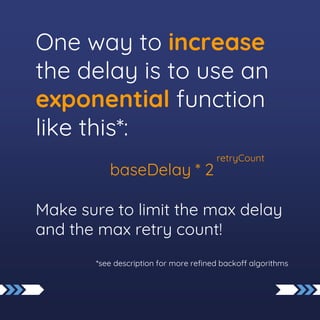
One way to increase
the delay is to use an
exponential function
like this*:
baseDelay * 2
Make sure to limit the max delay
and the max retry count!
*see description for more refined backoff algorithms
retryCount
Collisions and Jitter
When parallel
requests start at the
same time they will
get the same backoff
delay and retry again
at the same time.
Collisions
parallel requests, exp backoff:
request 1:
request …:
request n:
time
1
1
1
2
2
2
3
3
3
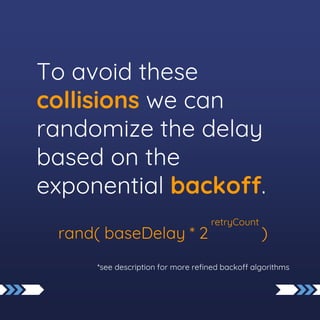
To avoid these
collisions we can
randomize the delay
based on the
exponential backoff.
rand( baseDelay * 2 )
*see description for more refined backoff algorithms
retryCount
This is called Jitter
parallel requests with Jitter:
request 1:
request …:
request n:
time
1
1
1
2
2
2
AWS SDK
Retries and backoff
are already
implemented in the
AWS SDK.
It is important to
know that this exists
and why.
You can change the
default behavior with
different backoff
strategies or even a
custom backoff
function.*
*see description for more information
exponential backoff
?
thumbs up, comment, share
What are your thoughts?
Is anything important missing?
If you liked it, please leave a comment.
connect with me!

Serverless lessons learned #8 backoff

  • 1.
    exponential backoff ? Serverless onAWS lessons learned #8 Are you really production-ready?
  • 2.
    Rate limiting* and Retries**are common patterns in distributed systems. But there is more to know about them. *lessons learned #5 **#7
  • 3.
    In Serverless appsyou can create a lot of parallel requests, which could easily exceed certain service rate limits.
  • 4.
    Whenever you exceed arate limit you may retry your request, after a short delay. This delay is called Backoff.
  • 5.
    To decrease theload for the services, the delay should grow with every retry.
  • 6.
    That gives theservices time to process other competing requests or simply wait for autoscaling. e.g. DynamoDB (OnDemand)
  • 7.
  • 8.
    One way toincrease the delay is to use an exponential function like this*: baseDelay * 2 Make sure to limit the max delay and the max retry count! *see description for more refined backoff algorithms retryCount
  • 9.
  • 10.
    When parallel requests startat the same time they will get the same backoff delay and retry again at the same time.
  • 11.
    Collisions parallel requests, expbackoff: request 1: request …: request n: time 1 1 1 2 2 2 3 3 3
  • 12.
    To avoid these collisionswe can randomize the delay based on the exponential backoff. rand( baseDelay * 2 ) *see description for more refined backoff algorithms retryCount
  • 13.
    This is calledJitter parallel requests with Jitter: request 1: request …: request n: time 1 1 1 2 2 2
  • 14.
  • 15.
    Retries and backoff arealready implemented in the AWS SDK. It is important to know that this exists and why.
  • 16.
    You can changethe default behavior with different backoff strategies or even a custom backoff function.* *see description for more information
  • 17.
  • 18.
    thumbs up, comment,share What are your thoughts? Is anything important missing? If you liked it, please leave a comment. connect with me!