objects      MAXIMISING THE USE OF OBJECTS
      fonts
               Note : Right-click is the biggest editing shortcut
   motion
               01 Create a rounded rectangle
    anima
     tion      02 See what we can do with it
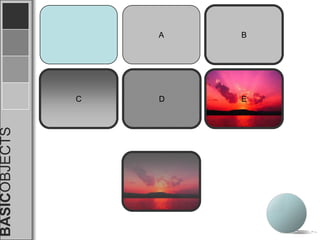
                      A. Change the fill color
BASICOBJECTS


                      B. Change the border color and width
                      C. Working with gradient
                      D. Working with patterns
                      E. Working with pictures fill
                      F. Transparency
BASICOBJECTS


               C
                   A


               D
               E
                   B
WHAT WE CAN DO WITH OBJECTS

               01. Cover parts of the slide page like sheets of
                     paper cut into shapes
               02. Create new shapes
                      A. Irregular border width shapes
                      B. Shape combinations (eg. Spirals, stripes)
               03. Create 3D effects using gradient
BASICOBJECTS


               04. Use for buttons and navigation
01

02

03

04
     Mainpage
     table of contents | menu page | navigation bar
01

 02

 03


       01
 04


home
01

 02

 03


       02
 04


home
01

 02

 03


       03
 04


home
01

 02

 03


       04
 04


home
BASICOBJECTS
BASICOBJECTS

Sena workshop 02

  • 1.
    objects MAXIMISING THE USE OF OBJECTS fonts Note : Right-click is the biggest editing shortcut motion 01 Create a rounded rectangle anima tion 02 See what we can do with it A. Change the fill color BASICOBJECTS B. Change the border color and width C. Working with gradient D. Working with patterns E. Working with pictures fill F. Transparency
  • 2.
    BASICOBJECTS C A D E B
  • 3.
    WHAT WE CANDO WITH OBJECTS 01. Cover parts of the slide page like sheets of paper cut into shapes 02. Create new shapes A. Irregular border width shapes B. Shape combinations (eg. Spirals, stripes) 03. Create 3D effects using gradient BASICOBJECTS 04. Use for buttons and navigation
  • 6.
    01 02 03 04 Mainpage table of contents | menu page | navigation bar
  • 7.
    01 02 03 01 04 home
  • 8.
    01 02 03 02 04 home
  • 9.
    01 02 03 03 04 home
  • 10.
    01 02 03 04 04 home
  • 11.
  • 12.