Selenium Introduction
TIB Academy
Experience New Way of Learning program
AGENDA
Introduction to Selenium
Selenium
Selenium
Selenium
and its
Core
RC
Forms






Deployment
Object locators
Features
Add On's
Selenium IDE
Locator tools.


Demo
Q & A


SELENIUM AND
ITS FORMS
Selenium
Selenium
Selenium
Selenium
Core
RC
IDE
GRID




SELENIUM CORE
A Functional testing tool for web applications
Tests run directly in the browser
Selenium is implemented entirely with browser technology



JavaScript
DHTML


 Frames
Works by looking at the DOM
Selenium deploys its BrowserBot alongside your application
Selenium uses JavaScript and IFrames to embed the BrowserBot
your browser
Works with virtually any JavaScript-enabled browser
The engine is tweaked to support a wide range of browsers on
Windows, Mac OS X and Linux


 in


SELENIUM RC
Where the browser is under the control of another process
Drivers exist for Java, .NET, Python, and Ruby
The Browser Bot takes instructions from the adjacent process



However, JavaScript cannot open sockets (Cross-site scripting issues)
The Selenese driver continuously requests pages from the driving
process, delivered as plain text
This is reply/request (rather than request/reply)



DEPLOYMENT
DEPLOYMENT
FEATURES
Multi Platform support
Windows,Linux,Mac
Multi browser support
IE, Firefox, Safari, Netscape
Multiple programming Language support
C#, Java, Ruby, Python
Xpath, Htmlid, DOM, Css selector
Support Ajax
ProxyInjection Mode
Experimental Browsers provided to test secured
Easy to use, small learning curve
Free-Open source
Matured Community







sites
OBJECT

LOCATOR
HTML-ID’s
Id=LoginButton
xpath= xpathExpression
Locate an element using an XPath expression. XPath locators must
begin with "//".
xpath=//img[@alt='The image alt text']
xpath=//table[@id='table1']//tr[4]/td[2]




link= textPattern
Select the link (anchor) element which contains text matching the specified pattern.
link=The link text


css=cssSelectorSyntax
Select the element using css selectors.
css=a[href="#id3"]
css=span#firstChild + span



ADD ON'S:
LOCATORTOOLS
XPather
https://addons.mozilla.org/extensions/moreinfo.php?id=1192
XPath Checker
https://addons.mozilla.org/extensions/moreinfo.php?id=1095
FireBug
https://addons.mozilla.org/en-US/firefox/addon/1843



ADD ON'
SSELENIUM
•
•
•
•
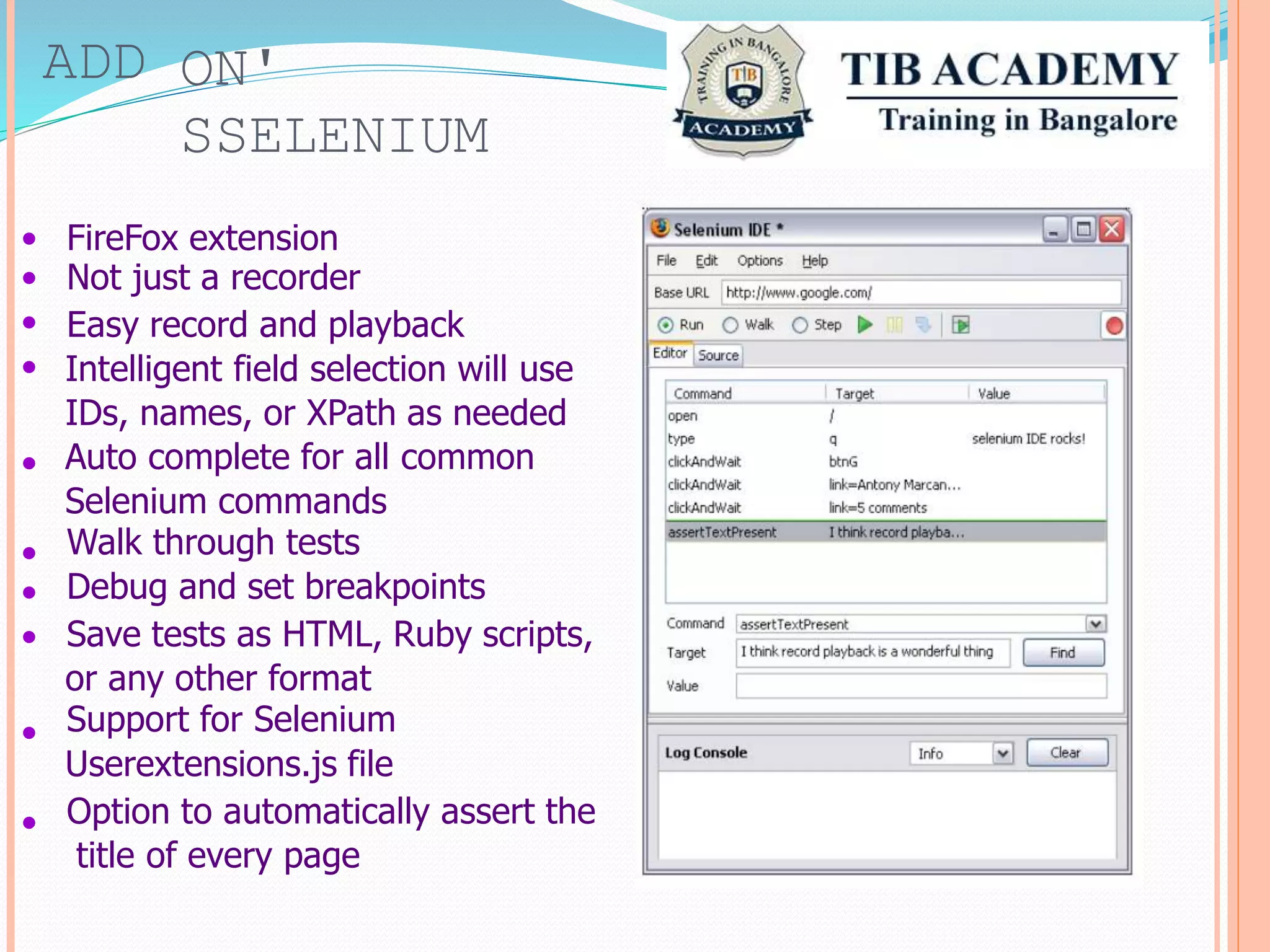
FireFox extension
Not just a recorder
Easy record and playback
Intelligent field selection will use
IDs, names, or XPath as needed
Auto complete for all common
Selenium commands
Walk through tests
Debug and set breakpoints
Save tests as HTML, Ruby scripts,
or any other format
Support for Selenium
Userextensions.js file
Option to automatically assert the
title of every page
•
•
•
•
•
•
HOW TO START SELENIUM RC SERVER
Dependencies : Java must be installed on your machine
and java home is configured in PATH.
Command to be typed on command prompt.
Java –jar Selenium-server.jar
By Default Selenium server runs on port 4444.
We can make Selenium port use configurable. Start
Selenium server with above command
Java –jar Selenium-server.jar –port 9000




When we do this we also need to modify port while instanstbase class where we modify
port.
E.g. Iselenium selenium = new
DefaultSelenium(“localhost”,9000,”*firefox”,”http://www.google.com”)
SAVING TEST RESULTS IN SELENIUM
Selenium RC allow you to dump all script execution
in one file.
Java –jar Selenium-server.jar –log debug.txt
Log shown in file look like this
TIMESTAMP LEVEL [THREAD] LOGGER-MESSAGE
log

The Java implementation of the Selenium Server logs plenty of logging
messages, but the JavaScript on the browser side (Selenium Core) also logs
important messages; in many cases, these can be more useful to the end-user
than the regular Selenium Server log
Thank you
E-Mail-
tibacademy1@gmail.com
Contact:-
9513332303/04

Selenium training for beginners

  • 1.
  • 2.
    AGENDA Introduction to Selenium Selenium Selenium Selenium andits Core RC Forms       Deployment Object locators Features Add On's Selenium IDE Locator tools.   Demo Q & A  
  • 3.
  • 4.
    SELENIUM CORE A Functionaltesting tool for web applications Tests run directly in the browser Selenium is implemented entirely with browser technology    JavaScript DHTML    Frames Works by looking at the DOM Selenium deploys its BrowserBot alongside your application Selenium uses JavaScript and IFrames to embed the BrowserBot your browser Works with virtually any JavaScript-enabled browser The engine is tweaked to support a wide range of browsers on Windows, Mac OS X and Linux    in  
  • 5.
    SELENIUM RC Where thebrowser is under the control of another process Drivers exist for Java, .NET, Python, and Ruby The Browser Bot takes instructions from the adjacent process    However, JavaScript cannot open sockets (Cross-site scripting issues) The Selenese driver continuously requests pages from the driving process, delivered as plain text This is reply/request (rather than request/reply)   
  • 6.
  • 7.
  • 8.
    FEATURES Multi Platform support Windows,Linux,Mac Multibrowser support IE, Firefox, Safari, Netscape Multiple programming Language support C#, Java, Ruby, Python Xpath, Htmlid, DOM, Css selector Support Ajax ProxyInjection Mode Experimental Browsers provided to test secured Easy to use, small learning curve Free-Open source Matured Community        sites
  • 9.
    OBJECT  LOCATOR HTML-ID’s Id=LoginButton xpath= xpathExpression Locate anelement using an XPath expression. XPath locators must begin with "//". xpath=//img[@alt='The image alt text'] xpath=//table[@id='table1']//tr[4]/td[2]     link= textPattern Select the link (anchor) element which contains text matching the specified pattern. link=The link text   css=cssSelectorSyntax Select the element using css selectors. css=a[href="#id3"] css=span#firstChild + span   
  • 10.
  • 11.
    ADD ON' SSELENIUM • • • • FireFox extension Notjust a recorder Easy record and playback Intelligent field selection will use IDs, names, or XPath as needed Auto complete for all common Selenium commands Walk through tests Debug and set breakpoints Save tests as HTML, Ruby scripts, or any other format Support for Selenium Userextensions.js file Option to automatically assert the title of every page • • • • • •
  • 12.
    HOW TO STARTSELENIUM RC SERVER Dependencies : Java must be installed on your machine and java home is configured in PATH. Command to be typed on command prompt. Java –jar Selenium-server.jar By Default Selenium server runs on port 4444. We can make Selenium port use configurable. Start Selenium server with above command Java –jar Selenium-server.jar –port 9000     When we do this we also need to modify port while instanstbase class where we modify port. E.g. Iselenium selenium = new DefaultSelenium(“localhost”,9000,”*firefox”,”http://www.google.com”)
  • 13.
    SAVING TEST RESULTSIN SELENIUM Selenium RC allow you to dump all script execution in one file. Java –jar Selenium-server.jar –log debug.txt Log shown in file look like this TIMESTAMP LEVEL [THREAD] LOGGER-MESSAGE log  The Java implementation of the Selenium Server logs plenty of logging messages, but the JavaScript on the browser side (Selenium Core) also logs important messages; in many cases, these can be more useful to the end-user than the regular Selenium Server log
  • 14.