What's coming our
way?
- Hitesh Prajapati
AGENDA
 I n t r o d u c t i o n
 S e l e n i u m 4 F e a t u r e s
 Relative Locators (Friendly Locators
Prev.)
 Capturing Element Screenshot
 Windows/Tab Handling
 Chrome Dev Tools
 Selenium Grid
 T r a n s i t i o n f r o m 3 . X t o 4 . X
 Q & A
2
3
3
INTRODUCTION
4
SELENIUM 4 : WHAT’S
NEW?
 Relative Locators (Friendly
Locators Prev.)
 Capturing Element Screenshot
 Windows/Tab Handling
 Chrome Dev Tools
 Selenium Grid
5
RELATIVE LOCATORS
• Above
• Below
• ToLeftOf
• ToRightOf
• Near
6
RELATIVE LOCATORS : BAD
EXAMPLE
Link To Source Code
7
RELATIVE LOCATORS : BAD EXAMPLE -
RESULT
8
RELATIVE LOCATORS : GOOD
EXAMPLE
Link To Source Code
9
RELATIVE LOCATORS : GOOD EXAMPLE -
RESULT
10
11
TECH
STACK
12
RELATIVE LOCATORS : HOW DOES IT
WORK?
 Selenium uses the JavaScript function getBoundingClientRect() to find the relative
elements
 The Element.getBoundingClientRect() method returns a DOMRect object providing information
about the size of an element and its position relative to the viewport.
 The returned DOMRect value contains the left, top, right, bottom, x, y, width and height.
 In case of near(), it makes use of getBoundingClientRect() and tries to locate an element
which is at most 50px away from the specified element.
 The overloaded method of near(), let’s you override default behavior of locating an
element (which is 50px) by passing pixels value that you want to use.
RelativeLocator.withTagName().near()
https://www.selenium.dev/documentation/en/getting_started_with_webdriver/locating
13
RELATIVE LOCATORS : HOW DOES IT
WORK?
Syntax
https://developer.mozilla.org/en-
14
CAPTURING ELEMENT SCREENSHOT
Link To Source
15
WINDOW HANDLING
16
TAB HANDLING
17
CHROME DEV
TOOLS
 Basic Authentication
 Access Console Logs
 Mocking Geo-Location
 Load In-Secure Web Sites
 Block Specific Resources/URLs
 Simulate Network Speed
 Simulate Device Mode
 Changing User Agents
 Capture HTTP Requests
 Simulate Time Zones
18
WHAT’S CHANGED?
ChromeDriver / EdgeDriver 
RemoteWebDriver
Selenium 3.x
Selenium 4.x ChromeDriver / EdgeDriver  ChromiumDriver 
RemoteWebDriver
19
WHAT’S CHANGED?
ChromeDriver  ChromiumDriver 
RemoteWebDriver
https://github.com/SeleniumHQ/selenium/tree/trunk/java/client/src/org/openqa/sele
20
CDP : BASIC AUTHENTICATION
http://UserName:Password@WebSiteUrl
Selenium 3.x
Selenium 4.x
Chrome DevTools Protocol : Network
21
CDP : ACCESS CONSOLE LOGS
Chrome DevTools Protocol : Log Domain
22
CDP : MOCK GEO-LOCATION
Chrome DevTools Protocol : Emulation
23
CDP : LOAD INSECURE WEBSITES
Chrome DevTools Protocol : Security
24
CDP : BLOCK SPECIFIC RESOURCE /
URL
Chrome DevTools Protocol : Network
25
CDP : SIMULATE NETWORK SPEED
Chrome DevTools Protocol : Network
26
CDP : SIMULATE DEVICE MODE
Chrome DevTools Protocol : Emulation
27
CDP : CHANGING USER AGENTS
https://www.whoishostingthis.com/tools/user-
The user agent application - is Mozilla version 5.0, or a piece of software compatible with
it.
The operating system - is OS X version 10.2.2 (and is running on a Mac).
The client - is Chrome version 51.0.2704.84 and is based on Safari version 537.36.
The engine - responsible for displaying content on this device is AppleWebKit version
537.36 (and KHTML, an open-source layout engine, is present too).
What is User Agent?
The user agent string contains information about the user’s web browser name, operating
system, device type, and other information.
Take this UA string as an example :
Mozilla/5.0 (Macintosh; Intel Mac OS X 10_10_2) AppleWebKit/537.36 (KHTML, like Gecko) Chrome/51.0.2704.84 Safari/537.36
28
CDP : CHANGING USER AGENTS
User Agent String
Chrome DevTools Protocol : Network
29
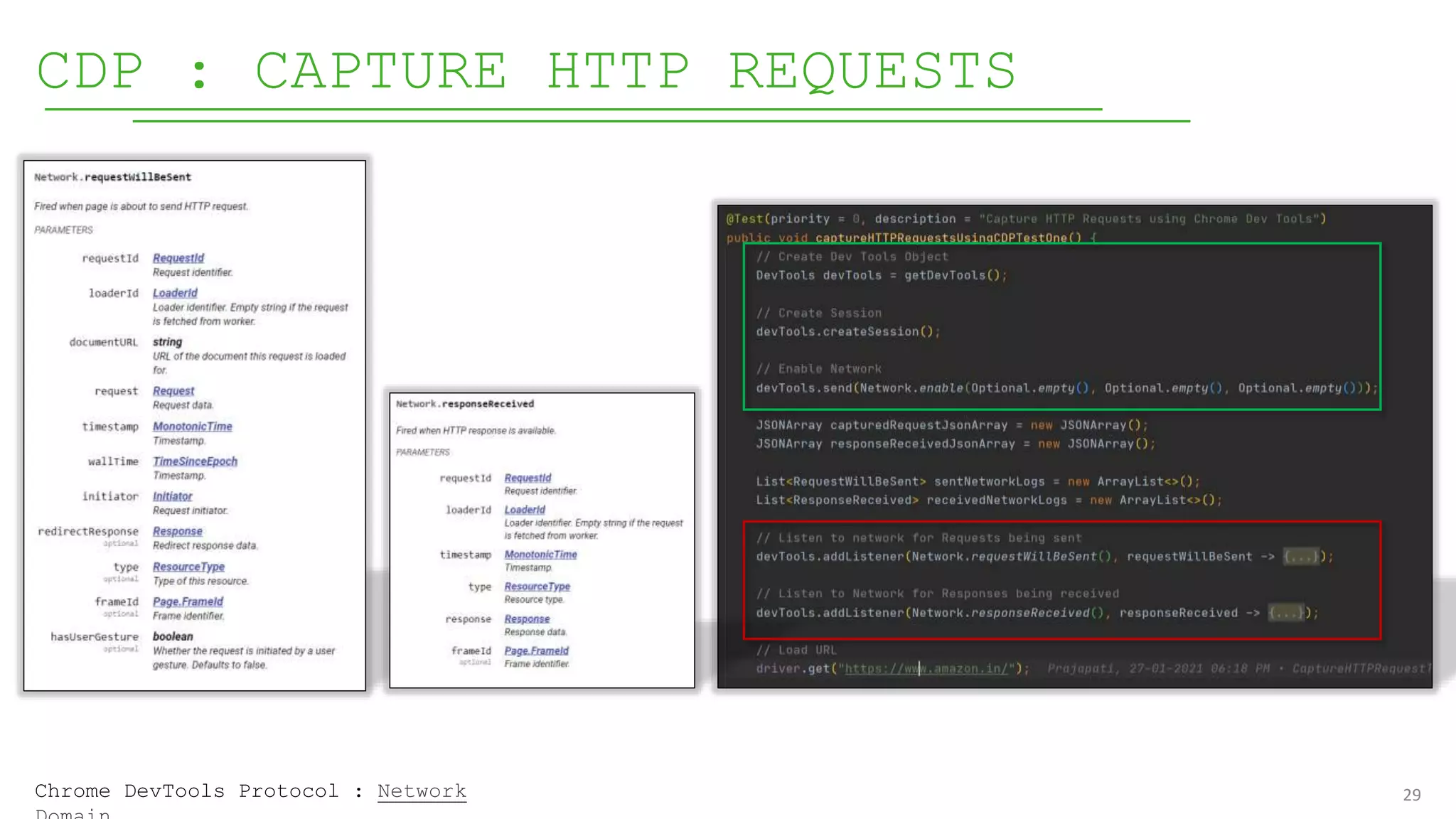
CDP : CAPTURE HTTP REQUESTS
Chrome DevTools Protocol : Network
30
CDP : SIMULATE TIME-ZONE
Chrome DevTools Protocol : Emulation
TRANSITION
FROM 3.X TO
4.X
31
32
SELENIUM 3 ARCHITECTURE
Selenium Language
Bindings
JSON
Wire
Protoco
l
elenium Clients
ChromeDr
iver
FirefoxD
river
EdgeDriv
er
SafariDr
iver
OperaDri
ver
Browser Drivers Real Browsers
Server
HTTP
Request(s)
HTTP
Response(s)
Over HTTP Server
HTTP
Protocol
REST
APIs
https://github.com/SeleniumHQ/selenium/wi
ki/JsonWireProtocol
200 OK
W3C WEB-DRIVER
SPECIFICATION
https://www.w3.org/TR/webdriver
2/
 W h a t i s W 3 C ?
 W h y W 3 C ?
 W h a t i s W 3 C W e b D r i v e r
S p e c i f i c a t i o n ?
Selenium W3C WebDriver protocol defines the
ways that browser actions are executed.
WebDriver is a remote control interface that
enables introspection and control of user
agents. It provides a platform and language-
neutral wire protocol as a way for out-of-
34
SELENIUM 4 ARCHITECTURE
Selenium Language
Bindings
W3C
Protoc
ol
Selenium Clients
ChromeDr
iver
FirefoxD
river
EdgeDriv
er
SafariDr
iver
Browser Drivers Real Browsers
Server
https://www.w3.org/TR/we
bdriver2/
35
TRANSITION FROM 3.X TO 4.X : WHAT’S
CHANGED?
>= 3.8.0 to
3.141.59
>= 4.X
<
3.8
Protocol
ChromeDriv
er
<
v75.x
>=
v75.x
>=
v75.x
GeckoDrive
r
<
v47.x
>=
v47.x
>=
v47.x
<
v47.x
https://firefox-source-
(SE <
v3.11)
(SE >=
v3.11)
36
SELENIUM 4.0 : WEB-DRIVER TEST
RESULTS
http://webdriver-herald.herokuapp.com/
37
ADVANTAGES OF W3C -
WD
 Standards
• Your tests should run more
consistently between browsers
because this is a standard that
all browser vendors will
develop. This means common code
for all browsers.
 Stability
• More stable test case execution
• Less number of exceptions while
executing tests across various
browsers.
38
TRANSITION FROM 3.X TO 4.X : ACTION
API
< v4.x
package
org.openqa.selenium.interactions
Click
>=
v4.x
.moveToElement(WebElement).click() .click(WebElement)
Click And
Hold
.moveToElement(WebElement).clickAndHold() .clickAndHold(WebElement)
Context
Click
.moveToElement(WebElement).contextClick() .contextClick(WebElement)
Double
Click
.moveToElement(WebElement).doubleClick() .doubleClick(WebElement)
Release Left
Mouse
.moveToElement(WebElement).release() .release(WebElement)
https://www.selenium.dev/selenium/docs/api/java/index
39
40
41
REFERENCES
Demo Source Code : https://github.com/HItesh007/selenium4-
demo
Relative Locator :
https://www.selenium.dev/documentation/en/getting_started_with_webdriver/locati
ng_elements/
Bounding Client Doc : https://developer.mozilla.org/en-
US/docs/Web/API/Element/getBoundingClientRect
Network Domain : https://chromedevtools.github.io/devtools-
protocol/tot/Network/
Log Domain : https://chromedevtools.github.io/devtools-
protocol/tot/Log/
Emulation Domain :
https://chromedevtools.github.io/devtools-
protocol/tot/Emulation/
Security Domain :
Chrome Dev Tools
Documentation
JSON Wire Protocol :
https://github.com/SeleniumHQ/selenium/wiki/JsonWireProtocol
W3C WebDriver Specification : https://www.w3.org/TR/webdriver2/
Selenium 4 - WD Test Results : http://webdriver-herald.herokuapp.com/
Selenium 4 – Deprecated List :
https://www.selenium.dev/selenium/docs/api/java/index.html?deprecated-
list.html
User Agent : https://www.whoishostingthis.com/tools/user-agent/
Explore User Agent String :
https://developers.whatismybrowser.com/useragents/explore/
THANK YOU
H I T E S H P R A J A P A T I
h i t e s h p r a j a p a t i 1 9 9 2 @ g m a i
l . c o m
/ i n / h i t e s h p r a j a p a t i 0 0 7 /
/ H I t e s h 0 0 7
/ H i t e s h _ p r a j a p a t i 1 9 9 2

Selenium 4 - What's coming our way - v1.0.pptx

  • 1.
    What's coming our way? -Hitesh Prajapati
  • 2.
    AGENDA  I nt r o d u c t i o n  S e l e n i u m 4 F e a t u r e s  Relative Locators (Friendly Locators Prev.)  Capturing Element Screenshot  Windows/Tab Handling  Chrome Dev Tools  Selenium Grid  T r a n s i t i o n f r o m 3 . X t o 4 . X  Q & A 2
  • 3.
  • 4.
    4 SELENIUM 4 :WHAT’S NEW?  Relative Locators (Friendly Locators Prev.)  Capturing Element Screenshot  Windows/Tab Handling  Chrome Dev Tools  Selenium Grid
  • 5.
    5 RELATIVE LOCATORS • Above •Below • ToLeftOf • ToRightOf • Near
  • 6.
    6 RELATIVE LOCATORS :BAD EXAMPLE Link To Source Code
  • 7.
    7 RELATIVE LOCATORS :BAD EXAMPLE - RESULT
  • 8.
    8 RELATIVE LOCATORS :GOOD EXAMPLE Link To Source Code
  • 9.
    9 RELATIVE LOCATORS :GOOD EXAMPLE - RESULT
  • 10.
  • 11.
  • 12.
    12 RELATIVE LOCATORS :HOW DOES IT WORK?  Selenium uses the JavaScript function getBoundingClientRect() to find the relative elements  The Element.getBoundingClientRect() method returns a DOMRect object providing information about the size of an element and its position relative to the viewport.  The returned DOMRect value contains the left, top, right, bottom, x, y, width and height.  In case of near(), it makes use of getBoundingClientRect() and tries to locate an element which is at most 50px away from the specified element.  The overloaded method of near(), let’s you override default behavior of locating an element (which is 50px) by passing pixels value that you want to use. RelativeLocator.withTagName().near() https://www.selenium.dev/documentation/en/getting_started_with_webdriver/locating
  • 13.
    13 RELATIVE LOCATORS :HOW DOES IT WORK? Syntax https://developer.mozilla.org/en-
  • 14.
  • 15.
  • 16.
  • 17.
    17 CHROME DEV TOOLS  BasicAuthentication  Access Console Logs  Mocking Geo-Location  Load In-Secure Web Sites  Block Specific Resources/URLs  Simulate Network Speed  Simulate Device Mode  Changing User Agents  Capture HTTP Requests  Simulate Time Zones
  • 18.
    18 WHAT’S CHANGED? ChromeDriver /EdgeDriver  RemoteWebDriver Selenium 3.x Selenium 4.x ChromeDriver / EdgeDriver  ChromiumDriver  RemoteWebDriver
  • 19.
    19 WHAT’S CHANGED? ChromeDriver ChromiumDriver  RemoteWebDriver https://github.com/SeleniumHQ/selenium/tree/trunk/java/client/src/org/openqa/sele
  • 20.
    20 CDP : BASICAUTHENTICATION http://UserName:Password@WebSiteUrl Selenium 3.x Selenium 4.x Chrome DevTools Protocol : Network
  • 21.
    21 CDP : ACCESSCONSOLE LOGS Chrome DevTools Protocol : Log Domain
  • 22.
    22 CDP : MOCKGEO-LOCATION Chrome DevTools Protocol : Emulation
  • 23.
    23 CDP : LOADINSECURE WEBSITES Chrome DevTools Protocol : Security
  • 24.
    24 CDP : BLOCKSPECIFIC RESOURCE / URL Chrome DevTools Protocol : Network
  • 25.
    25 CDP : SIMULATENETWORK SPEED Chrome DevTools Protocol : Network
  • 26.
    26 CDP : SIMULATEDEVICE MODE Chrome DevTools Protocol : Emulation
  • 27.
    27 CDP : CHANGINGUSER AGENTS https://www.whoishostingthis.com/tools/user- The user agent application - is Mozilla version 5.0, or a piece of software compatible with it. The operating system - is OS X version 10.2.2 (and is running on a Mac). The client - is Chrome version 51.0.2704.84 and is based on Safari version 537.36. The engine - responsible for displaying content on this device is AppleWebKit version 537.36 (and KHTML, an open-source layout engine, is present too). What is User Agent? The user agent string contains information about the user’s web browser name, operating system, device type, and other information. Take this UA string as an example : Mozilla/5.0 (Macintosh; Intel Mac OS X 10_10_2) AppleWebKit/537.36 (KHTML, like Gecko) Chrome/51.0.2704.84 Safari/537.36
  • 28.
    28 CDP : CHANGINGUSER AGENTS User Agent String Chrome DevTools Protocol : Network
  • 29.
    29 CDP : CAPTUREHTTP REQUESTS Chrome DevTools Protocol : Network
  • 30.
    30 CDP : SIMULATETIME-ZONE Chrome DevTools Protocol : Emulation
  • 31.
  • 32.
    32 SELENIUM 3 ARCHITECTURE SeleniumLanguage Bindings JSON Wire Protoco l elenium Clients ChromeDr iver FirefoxD river EdgeDriv er SafariDr iver OperaDri ver Browser Drivers Real Browsers Server HTTP Request(s) HTTP Response(s) Over HTTP Server HTTP Protocol REST APIs https://github.com/SeleniumHQ/selenium/wi ki/JsonWireProtocol 200 OK
  • 33.
    W3C WEB-DRIVER SPECIFICATION https://www.w3.org/TR/webdriver 2/  Wh a t i s W 3 C ?  W h y W 3 C ?  W h a t i s W 3 C W e b D r i v e r S p e c i f i c a t i o n ? Selenium W3C WebDriver protocol defines the ways that browser actions are executed. WebDriver is a remote control interface that enables introspection and control of user agents. It provides a platform and language- neutral wire protocol as a way for out-of-
  • 34.
    34 SELENIUM 4 ARCHITECTURE SeleniumLanguage Bindings W3C Protoc ol Selenium Clients ChromeDr iver FirefoxD river EdgeDriv er SafariDr iver Browser Drivers Real Browsers Server https://www.w3.org/TR/we bdriver2/
  • 35.
    35 TRANSITION FROM 3.XTO 4.X : WHAT’S CHANGED? >= 3.8.0 to 3.141.59 >= 4.X < 3.8 Protocol ChromeDriv er < v75.x >= v75.x >= v75.x GeckoDrive r < v47.x >= v47.x >= v47.x < v47.x https://firefox-source- (SE < v3.11) (SE >= v3.11)
  • 36.
    36 SELENIUM 4.0 :WEB-DRIVER TEST RESULTS http://webdriver-herald.herokuapp.com/
  • 37.
    37 ADVANTAGES OF W3C- WD  Standards • Your tests should run more consistently between browsers because this is a standard that all browser vendors will develop. This means common code for all browsers.  Stability • More stable test case execution • Less number of exceptions while executing tests across various browsers.
  • 38.
    38 TRANSITION FROM 3.XTO 4.X : ACTION API < v4.x package org.openqa.selenium.interactions Click >= v4.x .moveToElement(WebElement).click() .click(WebElement) Click And Hold .moveToElement(WebElement).clickAndHold() .clickAndHold(WebElement) Context Click .moveToElement(WebElement).contextClick() .contextClick(WebElement) Double Click .moveToElement(WebElement).doubleClick() .doubleClick(WebElement) Release Left Mouse .moveToElement(WebElement).release() .release(WebElement) https://www.selenium.dev/selenium/docs/api/java/index
  • 39.
  • 40.
  • 41.
    41 REFERENCES Demo Source Code: https://github.com/HItesh007/selenium4- demo Relative Locator : https://www.selenium.dev/documentation/en/getting_started_with_webdriver/locati ng_elements/ Bounding Client Doc : https://developer.mozilla.org/en- US/docs/Web/API/Element/getBoundingClientRect Network Domain : https://chromedevtools.github.io/devtools- protocol/tot/Network/ Log Domain : https://chromedevtools.github.io/devtools- protocol/tot/Log/ Emulation Domain : https://chromedevtools.github.io/devtools- protocol/tot/Emulation/ Security Domain : Chrome Dev Tools Documentation JSON Wire Protocol : https://github.com/SeleniumHQ/selenium/wiki/JsonWireProtocol W3C WebDriver Specification : https://www.w3.org/TR/webdriver2/ Selenium 4 - WD Test Results : http://webdriver-herald.herokuapp.com/ Selenium 4 – Deprecated List : https://www.selenium.dev/selenium/docs/api/java/index.html?deprecated- list.html User Agent : https://www.whoishostingthis.com/tools/user-agent/ Explore User Agent String : https://developers.whatismybrowser.com/useragents/explore/
  • 42.
    THANK YOU H IT E S H P R A J A P A T I h i t e s h p r a j a p a t i 1 9 9 2 @ g m a i l . c o m / i n / h i t e s h p r a j a p a t i 0 0 7 / / H I t e s h 0 0 7 / H i t e s h _ p r a j a p a t i 1 9 9 2