Practical Training Report

Project    :   Job Portal Website
Technology :   PHP
Taken At   :   Masters Infosoft Pvt. Ltd. , Jaipur


                              Name : Arjun lal Kumawat
                              Branch : CS
                              Roll No. : 08ESOCS021


   Sobhasaria Engineering College, Sikar
 PHP (Hypertext Preprocessor)
 Simple and powerful SSSL
 Dynamic web pages.
 PHP scripts are executed on the server
 PHP files have a file extension of ".php", ".php3",
 or ".phtml".
 PHP runs on different platforms (Windows, Linux,
    Unix, etc.)
   PHP is compatible with almost all servers used
    today (Apache, IIS, etc.)
   PHP is FREE to download from the official PHP
    resource: www.php.net
   Can be placed any where within a document.
   PHP is easy to learn and runs efficiently on the
    server side
 Server Side Scripting
 Can be used from a command line interface
 Especially suited for web development
 Can be embedded into HTML
 Runs on a web server
 Can be deployed on most web servers
 Supports almost every operating system and
 platform free of charge.
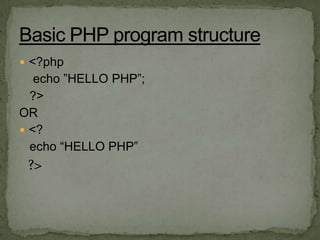
 <?php
   echo ”HELLO PHP”;
  ?>
OR
 <?
  echo “HELLO PHP”
 ?>
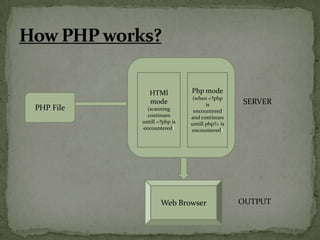
HTMl           Php mode
                             (when <?php
              mode                  is         SERVER
PHP File     (scanning        encountered
             continues       and continues
           untill <?php is   untill php?> is
           encountered)      encountered)


                   Web Browser                 OUTPUT
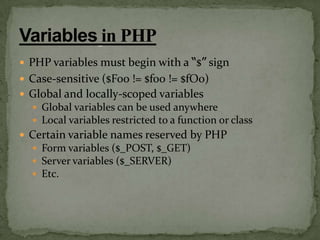
 PHP variables must begin with a “$” sign
 Case-sensitive ($Foo != $foo != $fOo)
 Global and locally-scoped variables
   Global variables can be used anywhere
   Local variables restricted to a function or class
 Certain variable names reserved by PHP
   Form variables ($_POST, $_GET)
   Server variables ($_SERVER)
   Etc.
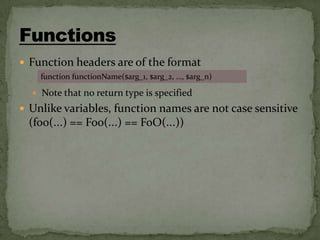
 Function headers are of the format
    function functionName($arg_1, $arg_2, …, $arg_n)

   Note that no return type is specified
 Unlike variables, function names are not case sensitive
 (foo(…) == Foo(…) == FoO(…))
 Sessions store their identifier in a cookie in the client’s browser
 Every page that uses session data must be proceeded by the
  session_start() function
 Session variables are then set and retrieved by accessing the global
  $_SESSION[]
Ex :-
        <?php
        session_start();
        if (!$_SESSION["count"])
            $_SESSION["count"] = 0;
        if ($_GET["count"] == "yes")
            $_SESSION["count"] = $_SESSION["count"] + 1;
        echo "<h1>".$_SESSION["count"]."</h1>";
   ?>
 MySQL is the most popular open source
  Database server.
 MySQL is developed by SUN Microsystems.
 MySQL is a Database and defines structure for
  storing information.
 MySQL can retrieve data from Database.
 MySQL can Insert, delete & update records in a
  database.
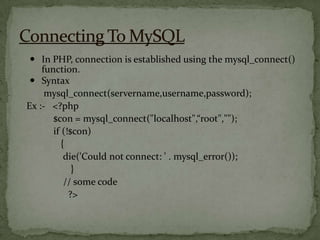
 In PHP, connection is established using the mysql_connect()
    function.
  Syntax
     mysql_connect(servername,username,password);
Ex :- <?php
       $con = mysql_connect("localhost",“root","");
       if (!$con)
          {
           die('Could not connect: ' . mysql_error());
             }
           // some code
            ?>
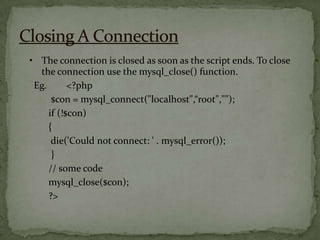
• The connection is closed as soon as the script ends. To close
  the connection use the mysql_close() function.
 Eg.       <?php
      $con = mysql_connect("localhost",“root","");
     if (!$con)
     {
      die('Could not connect: ' . mysql_error());
      }
     // some code
     mysql_close($con);
     ?>
Introduction To My Project


   JOB PORTAL WEBSITE
        PROJECT
 Objective & Scope
 Problem Definition
 System Analysis & Design
 Hardware and Software
 Data Flow Diagram
 TESTING
 Objective
                The purpose of designing the online job portal is to
  give the job seekers a platform for finding a right and a
  satisfactory job according to their qualification. It also connects
  the job seekers with the major agencies
 Scope
          The scope of the online job portal includes
          The Online job Portal System that is to be developed
  provides the members with jobs information, online applying for
  jobs and many other facilities. The basic scope of the project is
  given as under
        Job Seekers Area
        Agency's Area
        Administrator's panel
 An Online Job Portal where the job seekers can
  register themselves at the website and search jobs
  which are suitable for them where as the employers
  register with the website and upload jobs which are
  vacant at their company.
 Viewing available jobs, or applying for the job at the
  agency can be done for which job seekers has to go to
  the agency and check the available jobs at the agency.
  Job seekers check the list of jobs available and apply
  the job. Then the agency will show available jobs for
  the job seeker for his qualifications and then updates
  the jobs database
 System development life cycle
                                         The System Development Life
  Cycle framework provides system designers and developers to
  follow a sequence of activities. It consists of a set of steps or phases
  in which each phase of the SDLC uses the results of the previous
  one. A Systems Development Life Cycle (SDLC) adheres to
  important phases that are essential for developers, such as planning,
  analysis, design, and implementation, and are explained in the
  section below. A number of system development life cycle (SDLC)
  models have been created: waterfall, fountain and spiral build and
  fix, rapid prototyping, incremental, and synchronize and stabilize.
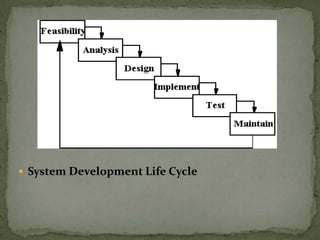
  The oldest of these, and the best known, is the waterfall model: a
  sequence of stages in which the output of each stage becomes the
  input for the next.
 System Development Life Cycle
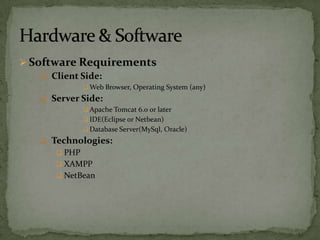
 Software Requirements
     Client Side:
               Web Browser, Operating System (any)
    Server Side:
               Apache Tomcat 6.0 or later
               IDE(Eclipse or Netbean)
               Database Server(MySql, Oracle)
    Technologies:
       PHP
       XAMPP
       NetBean
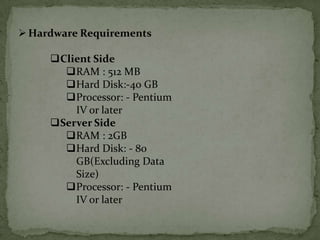
 Hardware Requirements

     Client Side
       RAM : 512 MB
       Hard Disk:-40 GB
       Processor: - Pentium
         IV or later
     Server Side
       RAM : 2GB
       Hard Disk: - 80
         GB(Excluding Data
         Size)
       Processor: - Pentium
         IV or later
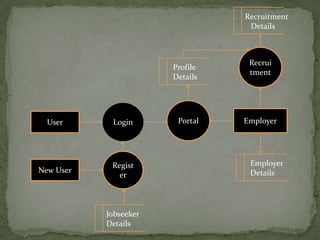
 The DFD takes an input process output view of a system. That

    is data objects flow into the software is transformed by
    processing elements, and resultant data injects flow out of the
    software. The purpose of the DFD is to provide a semantic
    bridge between users and semantic developers.

    Similarly database design depicts the various tables that are
    created according to the system to be developed. Theses tables
    are collection of intenerated data organized in tabular form.
Recruitment
                                  Details


                                  Recrui
                       Profile
                                  tment
                       Details


  User      Login       Portal   Employer


            Regist                Employer
New User                          Details
              er


           Jobseeker
           Details
 Before actually implementing the new system into
 operations, a test run of tile system is done removing all
 the bugs, if any. It is all important phase of a successful
 system. After codifying the whole programs of the system,
 a test plan should be developed and run on a given set of
 test data. The output of tile test run should match the
 expected results. Unit test: When tile programs have been
 coded and compiled and brought to working conditions,
 they must be individually tested with the prepared test
 data. Any undesirable happening must be noted and
 debugged (error connections).
My Saminar On Php

My Saminar On Php

  • 1.
    Practical Training Report Project : Job Portal Website Technology : PHP Taken At : Masters Infosoft Pvt. Ltd. , Jaipur Name : Arjun lal Kumawat Branch : CS Roll No. : 08ESOCS021 Sobhasaria Engineering College, Sikar
  • 2.
     PHP (HypertextPreprocessor)  Simple and powerful SSSL  Dynamic web pages.  PHP scripts are executed on the server  PHP files have a file extension of ".php", ".php3", or ".phtml".
  • 3.
     PHP runson different platforms (Windows, Linux, Unix, etc.)  PHP is compatible with almost all servers used today (Apache, IIS, etc.)  PHP is FREE to download from the official PHP resource: www.php.net  Can be placed any where within a document.  PHP is easy to learn and runs efficiently on the server side
  • 4.
     Server SideScripting  Can be used from a command line interface  Especially suited for web development  Can be embedded into HTML  Runs on a web server  Can be deployed on most web servers  Supports almost every operating system and platform free of charge.
  • 5.
     <?php echo ”HELLO PHP”; ?> OR  <? echo “HELLO PHP” ?>
  • 6.
    HTMl Php mode (when <?php mode is SERVER PHP File (scanning encountered continues and continues untill <?php is untill php?> is encountered) encountered) Web Browser OUTPUT
  • 7.
     PHP variablesmust begin with a “$” sign  Case-sensitive ($Foo != $foo != $fOo)  Global and locally-scoped variables  Global variables can be used anywhere  Local variables restricted to a function or class  Certain variable names reserved by PHP  Form variables ($_POST, $_GET)  Server variables ($_SERVER)  Etc.
  • 8.
     Function headersare of the format function functionName($arg_1, $arg_2, …, $arg_n)  Note that no return type is specified  Unlike variables, function names are not case sensitive (foo(…) == Foo(…) == FoO(…))
  • 9.
     Sessions storetheir identifier in a cookie in the client’s browser  Every page that uses session data must be proceeded by the session_start() function  Session variables are then set and retrieved by accessing the global $_SESSION[] Ex :- <?php session_start(); if (!$_SESSION["count"]) $_SESSION["count"] = 0; if ($_GET["count"] == "yes") $_SESSION["count"] = $_SESSION["count"] + 1; echo "<h1>".$_SESSION["count"]."</h1>"; ?>
  • 10.
     MySQL isthe most popular open source Database server.  MySQL is developed by SUN Microsystems.  MySQL is a Database and defines structure for storing information.  MySQL can retrieve data from Database.  MySQL can Insert, delete & update records in a database.
  • 11.
     In PHP,connection is established using the mysql_connect() function.  Syntax mysql_connect(servername,username,password); Ex :- <?php $con = mysql_connect("localhost",“root",""); if (!$con) { die('Could not connect: ' . mysql_error()); } // some code ?>
  • 12.
    • The connectionis closed as soon as the script ends. To close the connection use the mysql_close() function. Eg. <?php $con = mysql_connect("localhost",“root",""); if (!$con) { die('Could not connect: ' . mysql_error()); } // some code mysql_close($con); ?>
  • 13.
    Introduction To MyProject JOB PORTAL WEBSITE PROJECT
  • 14.
     Objective &Scope  Problem Definition  System Analysis & Design  Hardware and Software  Data Flow Diagram  TESTING
  • 15.
     Objective The purpose of designing the online job portal is to give the job seekers a platform for finding a right and a satisfactory job according to their qualification. It also connects the job seekers with the major agencies  Scope The scope of the online job portal includes The Online job Portal System that is to be developed provides the members with jobs information, online applying for jobs and many other facilities. The basic scope of the project is given as under Job Seekers Area Agency's Area Administrator's panel
  • 16.
     An OnlineJob Portal where the job seekers can register themselves at the website and search jobs which are suitable for them where as the employers register with the website and upload jobs which are vacant at their company.  Viewing available jobs, or applying for the job at the agency can be done for which job seekers has to go to the agency and check the available jobs at the agency. Job seekers check the list of jobs available and apply the job. Then the agency will show available jobs for the job seeker for his qualifications and then updates the jobs database
  • 17.
     System developmentlife cycle The System Development Life Cycle framework provides system designers and developers to follow a sequence of activities. It consists of a set of steps or phases in which each phase of the SDLC uses the results of the previous one. A Systems Development Life Cycle (SDLC) adheres to important phases that are essential for developers, such as planning, analysis, design, and implementation, and are explained in the section below. A number of system development life cycle (SDLC) models have been created: waterfall, fountain and spiral build and fix, rapid prototyping, incremental, and synchronize and stabilize. The oldest of these, and the best known, is the waterfall model: a sequence of stages in which the output of each stage becomes the input for the next.
  • 18.
  • 19.
     Software Requirements  Client Side:  Web Browser, Operating System (any)  Server Side:  Apache Tomcat 6.0 or later  IDE(Eclipse or Netbean)  Database Server(MySql, Oracle)  Technologies:  PHP  XAMPP  NetBean
  • 20.
     Hardware Requirements Client Side RAM : 512 MB Hard Disk:-40 GB Processor: - Pentium IV or later Server Side RAM : 2GB Hard Disk: - 80 GB(Excluding Data Size) Processor: - Pentium IV or later
  • 21.
     The DFDtakes an input process output view of a system. That is data objects flow into the software is transformed by processing elements, and resultant data injects flow out of the software. The purpose of the DFD is to provide a semantic bridge between users and semantic developers.  Similarly database design depicts the various tables that are created according to the system to be developed. Theses tables are collection of intenerated data organized in tabular form.
  • 22.
    Recruitment Details Recrui Profile tment Details User Login Portal Employer Regist Employer New User Details er Jobseeker Details
  • 23.
     Before actuallyimplementing the new system into operations, a test run of tile system is done removing all the bugs, if any. It is all important phase of a successful system. After codifying the whole programs of the system, a test plan should be developed and run on a given set of test data. The output of tile test run should match the expected results. Unit test: When tile programs have been coded and compiled and brought to working conditions, they must be individually tested with the prepared test data. Any undesirable happening must be noted and debugged (error connections).