Securing the Elastic Stack
for free
Aris Papadopoulos
Senior Product Manager, Kibana
Fabio Busatto
Senior Product Manager, Elasticsearch
This presentation and the accompanying oral presentation contain forward-looking statements, including statements
concerning plans for future offerings; the expected strength, performance or benefits of our offerings; and our future
operations and expected performance. These forward-looking statements are subject to the safe harbor provisions
under the Private Securities Litigation Reform Act of 1995. Our expectations and beliefs in light of currently
available information regarding these matters may not materialize. Actual outcomes and results may differ materially
from those contemplated by these forward-looking statements due to uncertainties, risks, and changes in
circumstances, including, but not limited to those related to: the impact of the COVID-19 pandemic on our business
and our customers and partners; our ability to continue to deliver and improve our offerings and successfully
develop new offerings, including security-related product offerings and SaaS offerings; customer acceptance and
purchase of our existing offerings and new offerings, including the expansion and adoption of our SaaS offerings;
our ability to realize value from investments in the business, including R&D investments; our ability to maintain and
expand our user and customer base; our international expansion strategy; our ability to successfully execute our
go-to-market strategy and expand in our existing markets and into new markets, and our ability to forecast customer
retention and expansion; and general market, political, economic and business conditions.
Additional risks and uncertainties that could cause actual outcomes and results to differ materially are included in
our filings with the Securities and Exchange Commission (the “SEC”), including our Annual Report on Form 10-K for
the most recent fiscal year, our quarterly report on Form 10-Q for the most recent fiscal quarter, and any
subsequent reports filed with the SEC. SEC filings are available on the Investor Relations section of Elastic’s
website at ir.elastic.co and the SEC’s website at www.sec.gov.
Any features or functions of services or products referenced in this presentation, or in any presentations, press
releases or public statements, which are not currently available or not currently available as a general availability
release, may not be delivered on time or at all. The development, release, and timing of any features or functionality
described for our products remains at our sole discretion. Customers who purchase our products and services
should make the purchase decisions based upon services and product features and functions that are currently
available.
All statements are made only as of the date of the presentation, and Elastic assumes no obligation to, and does not
currently intend to, update any forward-looking statements or statements relating to features or functions of services
or products, except as required by law.
Forward-Looking Statements
Data leaks never happ… oh, nevermind
https://www.informationisbeautiful.net/visualizations/worlds-biggest-data-breaches-hacks/
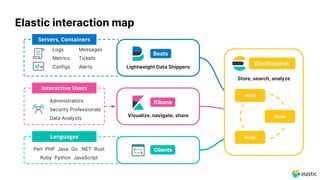
Elastic interaction map
Kibana
Interactive Users
Visualize, navigate, share
Administrators
Security Professionals
Data Analysts
Languages
ClientsPerl PHP Java Go .NET Rust
Ruby Python JavaScript
Servers, Containers
Lightweight Data Shippers
Logs
Metrics
Configs
Messages
Tickets
Alerts
Node
Store, search, analyze
Beats
Elasticsearch
Node
Node
How can we protect our data?
431 2
Encryption Authentication MultitenancyAuthorization
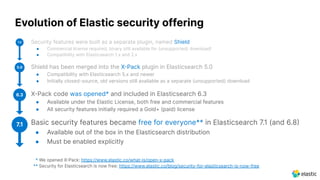
● Security features were built as a separate plugin, named Shield
● Commercial license required, binary still available for (unsupported) download!
● Compatibility with Elasticsearch 1.x and 2.x
● Shield has been merged into the XPack plugin in Elasticsearch 5.0
● Compatibility with Elasticsearch 5.x and newer
● Initially closed-source, old versions still available as a separate (unsupported) download
● XPack code was opened* and included in Elasticsearch 6.3
● Available under the Elastic License, both free and commercial features
● All security features initially required a Gold+ (paid) license
● Basic security features became free for everyone** in Elasticsearch 7.1 (and 6.8
● Available out of the box in the Elasticsearch distribution
● Must be enabled explicitly
Evolution of Elastic security offering
1.0
5.0
6.3
7.1
* We opened XPack: https://www.elastic.co/what-is/open-x-pack
** Security for Elasticsearch is now free: https://www.elastic.co/blog/security-for-elasticsearch-is-now-free
Enable security in
just 3 steps
Encryption & Authentication
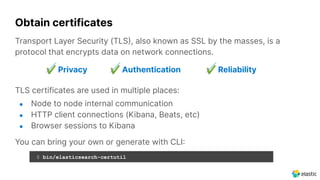
Obtain certificates
Transport Layer Security (TLS, also known as SSL by the masses, is a
protocol that encrypts data on network connections.
✔ Privacy ✔ Authentication ✔ Reliability
TLS certificates are used in multiple places:
● Node to node internal communication
● HTTP client connections (Kibana, Beats, etc)
● Browser sessions to Kibana
You can bring your own or generate with CLI
$ bin/elasticsearch-certutil
Passwords for built-in users (elastic, kibana_system, etc) can be
configured with CLI
Enable Elasticsearch security
Elasticsearch should force requests to be encrypted and authenticated
with user credentials to avoid unauthorized access.
$ bin/elasticsearch-setup-passwords
# Enable security features
xpack.security.enabled: true
# Configure node to node encryption
xpack.security.transport.ssl.enabled: true
xpack.security.transport.ssl.keystore.path: certs/elastic-certificates.p12
xpack.security.transport.ssl.truststore.path: certs/elastic-certificates.p12
# Configure HTTP client encryption
xpack.security.http.ssl.enabled: true
xpack.security.http.ssl.keystore.path: certs/elastic-certificates.p12
Kibana is the primary interface to Elasticsearch for interactive users.
As such, it has to guarantee a secure user experience.
Users authenticate to Kibana, using Elasticsearch as the backend.
The tight integration makes the end to end flow secure and flexible.
Secure Kibana communications
# Enable secure connection with browsers
server.ssl.enabled: true
server.ssl.keystore.path: "config/certs/http.p12"
# Configure secure connection with Elasticsearch
elasticsearch.hosts: [ "https://es01:9200" ]
elasticsearch.ssl.certificateAuthorities: [ "config/certs/elasticsearch-ca.pem" ]
elasticsearch.username: "kibana_system"
elasticsearch.password: "R?^8WXL^-2fRP5y2"
Browsers Kibana Elasticsearch
Secure your data
using RBAC
Authorization
Role-based access control
● Role
A set of permissions
● Permission
A set of privileges
against the secured resource
● Privilege
A set of actions
that a user can execute
against the secured resource
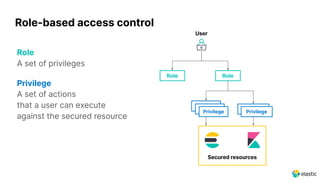
Role-based access control
Role
A set of privileges
Privilege
A set of actions
that a user can execute
against the secured resource
Role
Privilege Privilege
Secured resources
Role
User
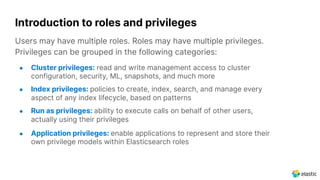
Users may have multiple roles. Roles may have multiple privileges.
Privileges can be grouped in the following categories:
● Cluster privileges: read and write management access to cluster
configuration, security, ML, snapshots, and much more
● Index privileges: policies to create, index, search, and manage every
aspect of any index lifecycle, based on patterns
● Run as privileges: ability to execute calls on behalf of other users,
actually using their privileges
● Application privileges: enable applications to represent and store their
own privilege models within Elasticsearch roles
Introduction to roles and privileges
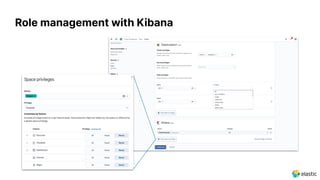
Role management with Kibana
Dashboards
Canvas
Maps
APM
Index patterns
Dashboards
Canvas
Maps
APM
Index patterns
Dashboards
Canvas
Maps
APM
Index patterns
Role 1 Role 2
Kibana space privileges
ALL
ALL
READ
NONE
+ =
ALL
ALL
ALL
READ
READ
ALL
NONE
READ
NONE
READ
READ
Meet organization
needs with Spaces
Multitenancy
Overview of Spaces use cases
Organization Phasing Multitenancy
• Help users access the
objects relevant to them
more easily
• Each Space can have
different saved objects
• Spaces for sandbox, QA,
dev and production
• Work on new objects and
move to production space
once ready
• Isolate different teams or
customers
• Objects in the space will
be visible only to the roles
that have privileges to that
space
Kibana Spaces for your organizational needs
● Need
Organise your work to
reflect your team's needs
● Pain point
Long lists of saved objects
Secure Spaces with Role Based Access Control
● Need:
Control access to Spaces
based on user’s role
● Limit access to:
⎻ Departments
⎻ Teams
⎻ Levels
⎻ or even individual users
to meet your organizational
and security needs
Multitenancy conceptual model with Spaces
ALL
Space
1
ALL
READ
NONE
ALL
Dashboards Index patterns
Canvas APM
Maps
READ
Space
2
READ
NONE
READ
NONE
Dashboards Index patterns
Canvas APM
Maps
Spaces can define
different privilege sets
for the same role
Role 1
Additional resources
Elasticsearch Service on cloud
https://www.elastic.co/products/elasticsearch/service
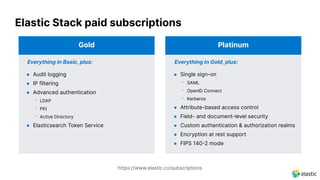
Everything in Gold, plus:
● Single sign-on
⎻ SAML
⎻ OpenID Connect
⎻ Kerberos
● Attribute-based access control
● Field- and document-level security
● Custom authentication & authorization realms
● Encryption at rest support
● FIPS 1402 mode
Platinum
Elastic Stack paid subscriptions
Everything in Basic, plus:
● Audit logging
● IP filtering
● Advanced authentication
⎻ LDAP
⎻ PKI
⎻ Active Directory
● Elasticsearch Token Service
Gold
https://www.elastic.co/subscriptions
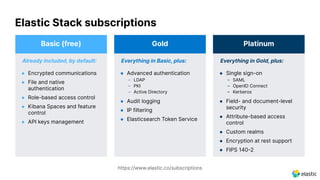
Elastic Stack subscriptions
https://www.elastic.co/subscriptions
Everything in Gold, plus:
● Single sign-on
– SAML
– OpenID Connect
– Kerberos
● Field- and document-level
security
● Attribute-based access
control
● Custom realms
● Encryption at rest support
● FIPS 1402
Platinum
Everything in Basic, plus:
● Advanced authentication
– LDAP
– PKI
– Active Directory
● Audit logging
● IP filtering
● Elasticsearch Token Service
Gold
Already included, by default:
● Encrypted communications
● File and native
authentication
● Role-based access control
● Kibana Spaces and feature
control
● API keys management
Basic (free)
Further reading
● Webinars
⎻ Elasticsearch security: Best practices to keep your data safe
https://www.elastic.co/webinars/elasticsearch-security-best-practices-to-keep-your-data-safe
⎻ Kibana security: Access management, spaces, and feature controls
https://www.elastic.co/webinars/kibana-security-access-management-spaces-and-feature-controls
● Tutorials
⎻ Secure a cluster
https://www.elastic.co/guide/en/elasticsearch/reference/current/elasticsearch-security.html
⎻ Configure security in Kibana
https://www.elastic.co/guide/en/kibana/current/using-kibana-with-security.html
● Trainings
⎻ Fundamentals of Securing Elasticsearch
https://www.elastic.co/training/fundamentals-of-securing-elasticsearch
Demo time!
Thank you!
Aris Papadopoulos
Senior Product Manager, Kibana
Fabio Busatto
Senior Product Manager, Elasticsearch

Securing the Elastic Stack for free

  • 1.
    Securing the ElasticStack for free Aris Papadopoulos Senior Product Manager, Kibana Fabio Busatto Senior Product Manager, Elasticsearch
  • 2.
    This presentation andthe accompanying oral presentation contain forward-looking statements, including statements concerning plans for future offerings; the expected strength, performance or benefits of our offerings; and our future operations and expected performance. These forward-looking statements are subject to the safe harbor provisions under the Private Securities Litigation Reform Act of 1995. Our expectations and beliefs in light of currently available information regarding these matters may not materialize. Actual outcomes and results may differ materially from those contemplated by these forward-looking statements due to uncertainties, risks, and changes in circumstances, including, but not limited to those related to: the impact of the COVID-19 pandemic on our business and our customers and partners; our ability to continue to deliver and improve our offerings and successfully develop new offerings, including security-related product offerings and SaaS offerings; customer acceptance and purchase of our existing offerings and new offerings, including the expansion and adoption of our SaaS offerings; our ability to realize value from investments in the business, including R&D investments; our ability to maintain and expand our user and customer base; our international expansion strategy; our ability to successfully execute our go-to-market strategy and expand in our existing markets and into new markets, and our ability to forecast customer retention and expansion; and general market, political, economic and business conditions. Additional risks and uncertainties that could cause actual outcomes and results to differ materially are included in our filings with the Securities and Exchange Commission (the “SEC”), including our Annual Report on Form 10-K for the most recent fiscal year, our quarterly report on Form 10-Q for the most recent fiscal quarter, and any subsequent reports filed with the SEC. SEC filings are available on the Investor Relations section of Elastic’s website at ir.elastic.co and the SEC’s website at www.sec.gov. Any features or functions of services or products referenced in this presentation, or in any presentations, press releases or public statements, which are not currently available or not currently available as a general availability release, may not be delivered on time or at all. The development, release, and timing of any features or functionality described for our products remains at our sole discretion. Customers who purchase our products and services should make the purchase decisions based upon services and product features and functions that are currently available. All statements are made only as of the date of the presentation, and Elastic assumes no obligation to, and does not currently intend to, update any forward-looking statements or statements relating to features or functions of services or products, except as required by law. Forward-Looking Statements
  • 3.
    Data leaks neverhapp… oh, nevermind https://www.informationisbeautiful.net/visualizations/worlds-biggest-data-breaches-hacks/
  • 4.
    Elastic interaction map Kibana InteractiveUsers Visualize, navigate, share Administrators Security Professionals Data Analysts Languages ClientsPerl PHP Java Go .NET Rust Ruby Python JavaScript Servers, Containers Lightweight Data Shippers Logs Metrics Configs Messages Tickets Alerts Node Store, search, analyze Beats Elasticsearch Node Node
  • 5.
    How can weprotect our data? 431 2 Encryption Authentication MultitenancyAuthorization
  • 6.
    ● Security featureswere built as a separate plugin, named Shield ● Commercial license required, binary still available for (unsupported) download! ● Compatibility with Elasticsearch 1.x and 2.x ● Shield has been merged into the XPack plugin in Elasticsearch 5.0 ● Compatibility with Elasticsearch 5.x and newer ● Initially closed-source, old versions still available as a separate (unsupported) download ● XPack code was opened* and included in Elasticsearch 6.3 ● Available under the Elastic License, both free and commercial features ● All security features initially required a Gold+ (paid) license ● Basic security features became free for everyone** in Elasticsearch 7.1 (and 6.8 ● Available out of the box in the Elasticsearch distribution ● Must be enabled explicitly Evolution of Elastic security offering 1.0 5.0 6.3 7.1 * We opened XPack: https://www.elastic.co/what-is/open-x-pack ** Security for Elasticsearch is now free: https://www.elastic.co/blog/security-for-elasticsearch-is-now-free
  • 7.
    Enable security in just3 steps Encryption & Authentication
  • 8.
    Obtain certificates Transport LayerSecurity (TLS, also known as SSL by the masses, is a protocol that encrypts data on network connections. ✔ Privacy ✔ Authentication ✔ Reliability TLS certificates are used in multiple places: ● Node to node internal communication ● HTTP client connections (Kibana, Beats, etc) ● Browser sessions to Kibana You can bring your own or generate with CLI $ bin/elasticsearch-certutil
  • 9.
    Passwords for built-inusers (elastic, kibana_system, etc) can be configured with CLI Enable Elasticsearch security Elasticsearch should force requests to be encrypted and authenticated with user credentials to avoid unauthorized access. $ bin/elasticsearch-setup-passwords # Enable security features xpack.security.enabled: true # Configure node to node encryption xpack.security.transport.ssl.enabled: true xpack.security.transport.ssl.keystore.path: certs/elastic-certificates.p12 xpack.security.transport.ssl.truststore.path: certs/elastic-certificates.p12 # Configure HTTP client encryption xpack.security.http.ssl.enabled: true xpack.security.http.ssl.keystore.path: certs/elastic-certificates.p12
  • 10.
    Kibana is theprimary interface to Elasticsearch for interactive users. As such, it has to guarantee a secure user experience. Users authenticate to Kibana, using Elasticsearch as the backend. The tight integration makes the end to end flow secure and flexible. Secure Kibana communications # Enable secure connection with browsers server.ssl.enabled: true server.ssl.keystore.path: "config/certs/http.p12" # Configure secure connection with Elasticsearch elasticsearch.hosts: [ "https://es01:9200" ] elasticsearch.ssl.certificateAuthorities: [ "config/certs/elasticsearch-ca.pem" ] elasticsearch.username: "kibana_system" elasticsearch.password: "R?^8WXL^-2fRP5y2" Browsers Kibana Elasticsearch
  • 11.
    Secure your data usingRBAC Authorization
  • 12.
    Role-based access control ●Role A set of permissions ● Permission A set of privileges against the secured resource ● Privilege A set of actions that a user can execute against the secured resource
  • 13.
    Role-based access control Role Aset of privileges Privilege A set of actions that a user can execute against the secured resource Role Privilege Privilege Secured resources Role User
  • 14.
    Users may havemultiple roles. Roles may have multiple privileges. Privileges can be grouped in the following categories: ● Cluster privileges: read and write management access to cluster configuration, security, ML, snapshots, and much more ● Index privileges: policies to create, index, search, and manage every aspect of any index lifecycle, based on patterns ● Run as privileges: ability to execute calls on behalf of other users, actually using their privileges ● Application privileges: enable applications to represent and store their own privilege models within Elasticsearch roles Introduction to roles and privileges
  • 15.
  • 16.
    Dashboards Canvas Maps APM Index patterns Dashboards Canvas Maps APM Index patterns Dashboards Canvas Maps APM Indexpatterns Role 1 Role 2 Kibana space privileges ALL ALL READ NONE + = ALL ALL ALL READ READ ALL NONE READ NONE READ READ
  • 17.
    Meet organization needs withSpaces Multitenancy
  • 18.
    Overview of Spacesuse cases Organization Phasing Multitenancy • Help users access the objects relevant to them more easily • Each Space can have different saved objects • Spaces for sandbox, QA, dev and production • Work on new objects and move to production space once ready • Isolate different teams or customers • Objects in the space will be visible only to the roles that have privileges to that space
  • 19.
    Kibana Spaces foryour organizational needs ● Need Organise your work to reflect your team's needs ● Pain point Long lists of saved objects
  • 20.
    Secure Spaces withRole Based Access Control ● Need: Control access to Spaces based on user’s role ● Limit access to: ⎻ Departments ⎻ Teams ⎻ Levels ⎻ or even individual users to meet your organizational and security needs
  • 21.
    Multitenancy conceptual modelwith Spaces ALL Space 1 ALL READ NONE ALL Dashboards Index patterns Canvas APM Maps READ Space 2 READ NONE READ NONE Dashboards Index patterns Canvas APM Maps Spaces can define different privilege sets for the same role Role 1
  • 22.
  • 23.
    Elasticsearch Service oncloud https://www.elastic.co/products/elasticsearch/service
  • 24.
    Everything in Gold,plus: ● Single sign-on ⎻ SAML ⎻ OpenID Connect ⎻ Kerberos ● Attribute-based access control ● Field- and document-level security ● Custom authentication & authorization realms ● Encryption at rest support ● FIPS 1402 mode Platinum Elastic Stack paid subscriptions Everything in Basic, plus: ● Audit logging ● IP filtering ● Advanced authentication ⎻ LDAP ⎻ PKI ⎻ Active Directory ● Elasticsearch Token Service Gold https://www.elastic.co/subscriptions
  • 25.
    Elastic Stack subscriptions https://www.elastic.co/subscriptions Everythingin Gold, plus: ● Single sign-on – SAML – OpenID Connect – Kerberos ● Field- and document-level security ● Attribute-based access control ● Custom realms ● Encryption at rest support ● FIPS 1402 Platinum Everything in Basic, plus: ● Advanced authentication – LDAP – PKI – Active Directory ● Audit logging ● IP filtering ● Elasticsearch Token Service Gold Already included, by default: ● Encrypted communications ● File and native authentication ● Role-based access control ● Kibana Spaces and feature control ● API keys management Basic (free)
  • 26.
    Further reading ● Webinars ⎻Elasticsearch security: Best practices to keep your data safe https://www.elastic.co/webinars/elasticsearch-security-best-practices-to-keep-your-data-safe ⎻ Kibana security: Access management, spaces, and feature controls https://www.elastic.co/webinars/kibana-security-access-management-spaces-and-feature-controls ● Tutorials ⎻ Secure a cluster https://www.elastic.co/guide/en/elasticsearch/reference/current/elasticsearch-security.html ⎻ Configure security in Kibana https://www.elastic.co/guide/en/kibana/current/using-kibana-with-security.html ● Trainings ⎻ Fundamentals of Securing Elasticsearch https://www.elastic.co/training/fundamentals-of-securing-elasticsearch
  • 27.
  • 28.
    Thank you! Aris Papadopoulos SeniorProduct Manager, Kibana Fabio Busatto Senior Product Manager, Elasticsearch