Here is where your workshop begins!
Sangam Biradar
Blogger :- engineItops.com
Founder :- KubeDaily
- Docker Community Leader , B’lore
- Traefik Ambassador
- Okteto Community Lead , India
- Course Author:- “Lightweight Kubernetes – K3s”
Packt Publication UK
@BiradarSangam | @KubeDaily
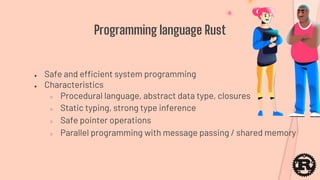
Programming language Rust
● Safe and efficient system programming
● Characteristics
○ Procedural language, abstract data type, closures
○ Static typing, strong type inference
○ Safe pointer operations
○ Parallel programming with message passing / shared memory
● Set up
● Online compiler: http://play.rust-lang.org/
● Install Rust compiler to your own environment, if
you want to do it offline.
Setup Rust
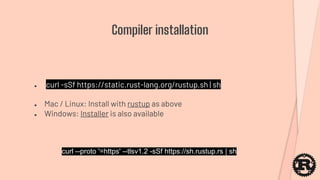
● curl -sSf https://static.rust-lang.org/rustup.sh | sh
● Mac / Linux: Install with rustup as above
● Windows: Installer is also available
Compiler installation
curl --proto '=https' --tlsv1.2 -sSf https://sh.rustup.rs | sh
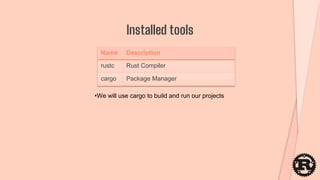
Installed tools
Name Description
rustc Rust Compiler
cargo Package Manager
•We will use cargo to build and run our projects
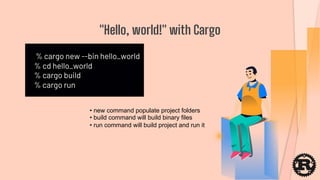
% cargo new --bin hello_world
% cd hello_world
% cargo build
% cargo run
"Hello, world!" with Cargo
• new command populate project folders
• build command will build binary files
• run command will build project and run it
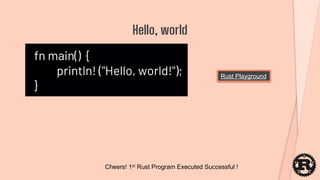
fn main() {
println! ("Hello, world!");
}
Hello, world
Rust Playground
Cheers! 1st Rust Program Executed Successful !
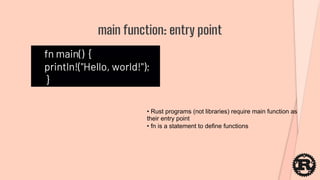
fn main() {
println!("Hello, world!");
}
main function: entry point
• Rust programs (not libraries) require main function as
their entry point
• fn is a statement to define functions
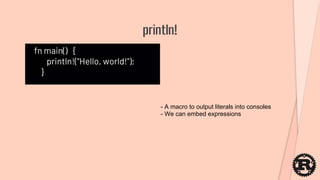
fn main() {
println!("Hello, world!");
}
println!
- A macro to output literals into consoles
- We can embed expressions
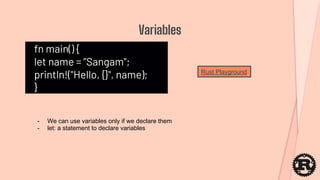
fn main() {
let name = ”Sangam";
println!("Hello, {}", name);
}
Variables
- We can use variables only if we declare them
- let: a statement to declare variables
Rust Playground
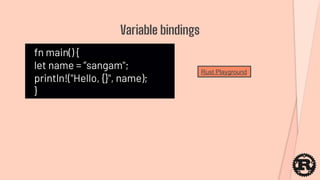
fn main() {
let name = ”sangam";
println!("Hello, {}", name);
}
Variable bindings
Rust Playground
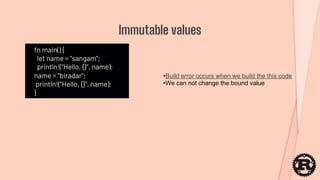
fn main() {
let name = "sangam";
println!("Hello, {}", name);
name = "biradar";
println!("Hello, {}", name);
}
Immutable values
•Build error occurs when we build the this code
•We can not change the bound value
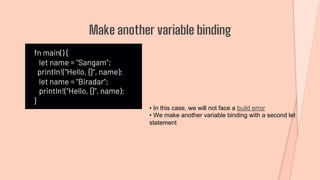
fn main() {
let name = "Sangam";
println!("Hello, {}", name);
let name = "Biradar";
println!("Hello, {}", name);
}
Make another variable binding
• In this case, we will not face a build error
• We make another variable binding with a second let
statement
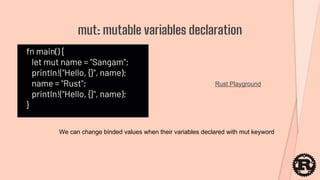
fn main() {
let mut name = "Sangam";
println!("Hello, {}", name);
name = "Rust";
println!("Hello, {}", name);
}
mut: mutable variables declaration
Rust Playground
We can change binded values when their variables declared with mut keyword
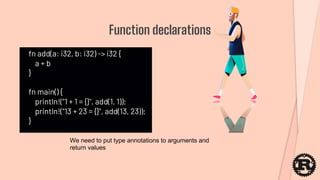
fn add(a: i32, b: i32) -> i32 {
a + b
}
fn main() {
println!("1 + 1 = {}", add(1, 1));
println!("13 + 23 = {}", add(13, 23));
}
Function declarations
We need to put type annotations to arguments and
return values
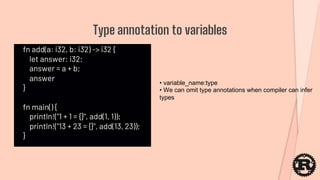
fn add(a: i32, b: i32) -> i32 {
let answer: i32;
answer = a + b;
answer
}
fn main() {
println!("1 + 1 = {}", add(1, 1));
println!("13 + 23 = {}", add(13, 23));
}
Type annotation to variables
• variable_name:type
• We can omit type annotations when compiler can infer
types
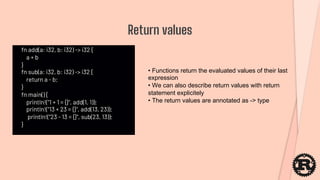
fn add(a: i32, b: i32) -> i32 {
a + b
}
fn sub(a: i32, b: i32) -> i32 {
return a - b;
}
fn main() {
println!("1 + 1 = {}", add(1, 1));
println!("13 + 23 = {}", add(13, 23));
println!("23 - 13 = {}", sub(23, 13));
}
Return values
• Functions return the evaluated values of their last
expression
• We can also describe return values with return
statement explicitely
• The return values are annotated as -> type
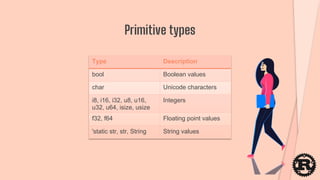
Primitive types
Type Description
bool Boolean values
char Unicode characters
i8, i16, i32, u8, u16,
u32, u64, isize, usize
Integers
f32, f64 Floating point values
'static str, str, String String values
let a = [1, 2, 3]; // a: [i32; 3]
let mut m = [1, 2, 3]; // m: [i32; 3]
Access to each item with its index
• Fixed length, every item belong to same type
• Annotated as [type; size]
• We need to declare a mutable object when we want to
change its items
Arrays
fn main() {
let a = [1, 2, 3];
println!("0th element {}", a[0]);
println!("1th element : {}", a[1]);
println!("2th element: {}", a[2]);
}
fn main() {
let a = [1, 2, 3];
println!("# of items in a: {}", a.len());
}
len() to refer # of items
We can refer to the arrays length by calling its len method
fn main() {
let a = [0, 1, 2, 3, 4, 5];
let middle = &a[1..4];
println!("a.len() = {}", a.len());
println!("middle.len() = {}", middle.len());
}
Slice: reference to another structure
Create an slice as &array_name[start_index..end_index]
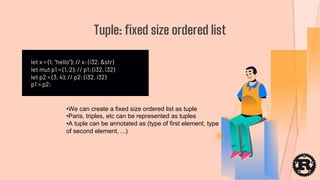
let x = (1, "hello"); // x: (i32, &str)
let mut p1 = (1, 2); // p1: (i32, i32)
let p2 = (3, 4); // p2: (i32, i32)
p1 = p2;
Tuple: fixed size ordered list
•We can create a fixed size ordered list as tuple
•Paris, triples, etc can be represented as tuples
•A tuple can be annotated as (type of first element, type
of second element, ...)
let p = (1, 2, 3);
let (x, y, z) = p;
let x = p.0;
let y = p.1;
let z = p.2;
Access to tuple elements
•We can access each field by destructuring
•Also each items can also be accessed with their
indexes
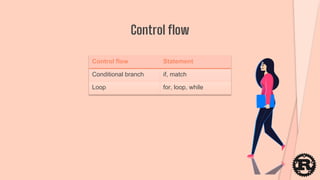
Control flow
Control flow Statement
Conditional branch if, match
Loop for, loop, while
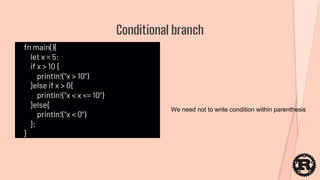
fn main(){
let x = 5;
if x > 10 {
println!("x > 10")
}else if x > 0{
println!("x < x <= 10")
}else{
println!("x < 0")
};
}
Conditional branch
We need not to write condition within parenthesis
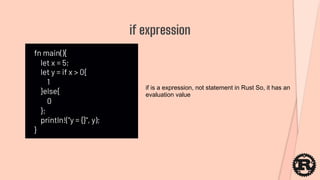
fn main(){
let x = 5;
let y = if x > 0{
1
}else{
0
};
println!("y = {}", y);
}
if expression
if is a expression, not statement in Rust So, it has an
evaluation value
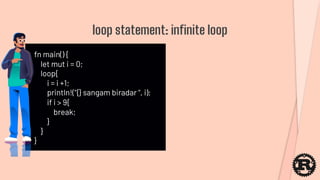
fn main() {
let mut i = 0;
loop{
i = i +1;
println!("{} sangam biradar ", i);
if i > 9{
break;
}
}
}
loop statement: infinite loop
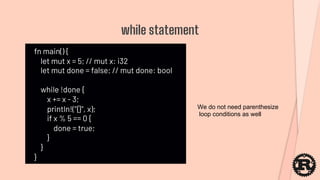
fn main() {
let mut x = 5; // mut x: i32
let mut done = false; // mut done: bool
while !done {
x += x - 3;
println!("{}", x);
if x % 5 == 0 {
done = true;
}
}
}
while statement
We do not need parenthesize
loop conditions as well
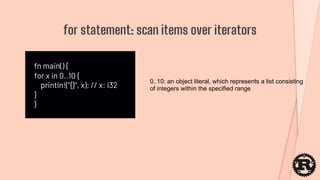
fn main() {
for x in 0..10 {
println!("{}", x); // x: i32
}
}
for statement: scan items over iterators
0..10: an object literal, which represents a list consisting
of integers within the specified range
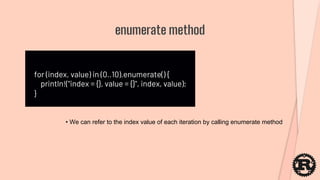
for (index, value) in (0..10).enumerate() {
println!("index = {}, value = {}", index, value);
}
enumerate method
• We can refer to the index value of each iteration by calling enumerate method
fn main() {
let v = vec![1, 2, 3, 4, 5];
let zeroes = vec![0; 10];
for i in 0..v.len() {
println!("v[{}] = {}", i, v[i]);
}
for i in 0..zeroes.len() {
println!("zeroes[{}] = {}", i, zeroes[i]);
}
}
Vector: variable length list
Vec more Details:
https://doc.rust-lang.org/stable/std/vec/
Created with vec! macro
fn main() {
let v = vec![1, 2, 3, 4, 5];
for (index, value) in v.iter().enumerate() {
println!("v[{}] = {}", index, value);
}
}
Scaning a vector
Create an iterator by calling vector's iter method
fn main() {
let v = vec![1, 2, 3, 4, 5];
let result = v.iter().filter(|&n| n % 2 != 0).map(|n| n + 1);
for (index, value) in result.enumerate() {
println!("result[{}]:{}", index, value);
}
}
filter / map
An iterator has several methods to create other iterators such as filter and map
fn main() {
let v = vec![1, 2, 3];
println!("v[1] = {}", v[1]);
let v2 = v;
println!("v2[1] = {}", v2[1]);
println!("v[1] = {}", v[1]);
}
Ownership and move semantics
This code cannot be compiled
Because ownership against vec![1, 2, 3] is moved
from v to v2 Variable binding means "binded value
is a possesion of the biding variable"
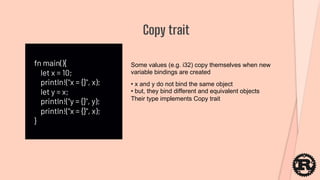
fn main(){
let x = 10;
println!("x = {}", x);
let y = x;
println!("y = {}", y);
println!("x = {}", x);
}
Copy trait
Some values (e.g. i32) copy themselves when new
variable bindings are created
• x and y do not bind the same object
• but, they bind different and equivalent objects
Their type implements Copy trait
fn sum_vec(memo:Vec<i32>)->i32{
let mut sum = 0;
for i in memo.iter(){
sum = sum + i;
}
sum
}
fn main() {
let v = vec![1, 2, 3];
println!("sum = {}",sum_vec(v));
}
Owenership transfer via function calls
Causes build error
Ownership of vec![1, 2, 3] has been moved to the first
argument of sum_vec, when its first call
fn sum_vec(memo:Vec<i32>)->(i32, Vec<i32>){
let mut sum = 0;
for i in memo.iter(){
sum = sum + i;
}
(sum, memo)
}
fn main() {
let v = vec![1, 2, 3];
let (sum, v) = sum_vec(v);
println!("sum = {}", sum);
let (sum, _) = sum_vec(v);
println!("sum = {}", sum);
}
Return arguments' ownership with tuples
fn sum_vec(memo: &Vec<i32>) -> i32 {}
fn main() {
let v = vec![1, 2, 3];
println!("sum = {}", sum_vec(&v));
}
Reference
• We can get a reference to a value by specifying &
before its name
• References are annoted as &Typename
• Functions borrow values' ownership when their
reference are passed
• The ownership automatically returns when borrwing
function returns
fn foo(v: &Vec<i32>){
v.push(5);
}
fn main(){
let v = vec![];
foo(&v);
}
Borrowed values are immutable
fn foo(v: &mut Vec<i32>){
v.push(5);
}
fn main(){
let mut v = vec![];
println!("v.len() = {}", v.len());
foo(&mut v);
println!("v.len() = {}", v.len());
}
Mutable borrowed values
• We can get mutable references with &mut
• Only if the values are mutable
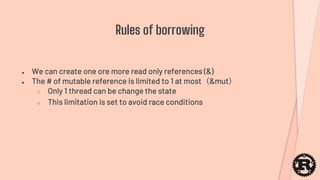
● We can create one ore more read only references (&)
● The # of mutable reference is limited to 1 at most(&mut)
○ Only 1 thread can be change the state
○ This limitation is set to avoid race conditions
Rules of borrowing
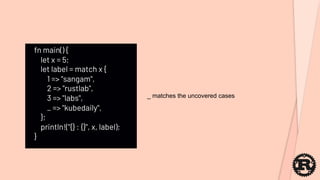
fn main() {
let x = 5;
let label = match x {
1 => "sangam",
2 => "rustlab",
3 => "labs",
_ => "kubedaily",
};
println!("{} : {}", x, label);
}
_ matches the uncovered cases
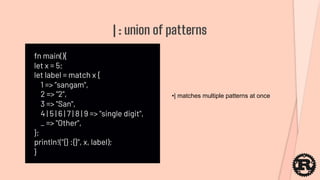
fn main(){
let x = 5;
let label = match x {
1 => ”sangam",
2 => "2",
3 => "San",
4 | 5 | 6 | 7 | 8 | 9 => "single digit",
_ => "Other",
};
println!("{} :{}", x, label);
}
| : union of patterns
•| matches multiple patterns at once
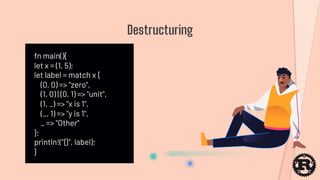
fn main(){
let x = (1, 5);
let label = match x {
(0, 0) => "zero",
(1, 0) | (0, 1) => "unit",
(1, _) => "x is 1",
(_, 1) => "y is 1",
_ => "Other"
};
println!("{}", label);
}
Destructuring
let car = “red “
let red = &car[0..5];
str: how to create a slice from a static text
We Will Contd Next topics in future Session
https://discord.gg/aU3yAmFJoin RustLabs Community:-
https://rustlabs.kubedaily.com/
THANKS!Do you have any questions?
@KubeDaily
Sangam Biradar
@Biradar Sangam
Rustlabs.kubedaily.com

Rustlabs Quick Start

  • 1.
    Here is whereyour workshop begins!
  • 2.
    Sangam Biradar Blogger :-engineItops.com Founder :- KubeDaily - Docker Community Leader , B’lore - Traefik Ambassador - Okteto Community Lead , India - Course Author:- “Lightweight Kubernetes – K3s” Packt Publication UK @BiradarSangam | @KubeDaily
  • 3.
    Programming language Rust ●Safe and efficient system programming ● Characteristics ○ Procedural language, abstract data type, closures ○ Static typing, strong type inference ○ Safe pointer operations ○ Parallel programming with message passing / shared memory
  • 4.
    ● Set up ●Online compiler: http://play.rust-lang.org/ ● Install Rust compiler to your own environment, if you want to do it offline. Setup Rust
  • 5.
    ● curl -sSfhttps://static.rust-lang.org/rustup.sh | sh ● Mac / Linux: Install with rustup as above ● Windows: Installer is also available Compiler installation curl --proto '=https' --tlsv1.2 -sSf https://sh.rustup.rs | sh
  • 6.
    Installed tools Name Description rustcRust Compiler cargo Package Manager •We will use cargo to build and run our projects
  • 7.
    % cargo new--bin hello_world % cd hello_world % cargo build % cargo run "Hello, world!" with Cargo • new command populate project folders • build command will build binary files • run command will build project and run it
  • 8.
    fn main() { println!("Hello, world!"); } Hello, world Rust Playground Cheers! 1st Rust Program Executed Successful !
  • 9.
    fn main() { println!("Hello,world!"); } main function: entry point • Rust programs (not libraries) require main function as their entry point • fn is a statement to define functions
  • 10.
    fn main() { println!("Hello,world!"); } println! - A macro to output literals into consoles - We can embed expressions
  • 11.
    fn main() { letname = ”Sangam"; println!("Hello, {}", name); } Variables - We can use variables only if we declare them - let: a statement to declare variables Rust Playground
  • 12.
    fn main() { letname = ”sangam"; println!("Hello, {}", name); } Variable bindings Rust Playground
  • 13.
    fn main() { letname = "sangam"; println!("Hello, {}", name); name = "biradar"; println!("Hello, {}", name); } Immutable values •Build error occurs when we build the this code •We can not change the bound value
  • 14.
    fn main() { letname = "Sangam"; println!("Hello, {}", name); let name = "Biradar"; println!("Hello, {}", name); } Make another variable binding • In this case, we will not face a build error • We make another variable binding with a second let statement
  • 15.
    fn main() { letmut name = "Sangam"; println!("Hello, {}", name); name = "Rust"; println!("Hello, {}", name); } mut: mutable variables declaration Rust Playground We can change binded values when their variables declared with mut keyword
  • 16.
    fn add(a: i32,b: i32) -> i32 { a + b } fn main() { println!("1 + 1 = {}", add(1, 1)); println!("13 + 23 = {}", add(13, 23)); } Function declarations We need to put type annotations to arguments and return values
  • 17.
    fn add(a: i32,b: i32) -> i32 { let answer: i32; answer = a + b; answer } fn main() { println!("1 + 1 = {}", add(1, 1)); println!("13 + 23 = {}", add(13, 23)); } Type annotation to variables • variable_name:type • We can omit type annotations when compiler can infer types
  • 18.
    fn add(a: i32,b: i32) -> i32 { a + b } fn sub(a: i32, b: i32) -> i32 { return a - b; } fn main() { println!("1 + 1 = {}", add(1, 1)); println!("13 + 23 = {}", add(13, 23)); println!("23 - 13 = {}", sub(23, 13)); } Return values • Functions return the evaluated values of their last expression • We can also describe return values with return statement explicitely • The return values are annotated as -> type
  • 19.
    Primitive types Type Description boolBoolean values char Unicode characters i8, i16, i32, u8, u16, u32, u64, isize, usize Integers f32, f64 Floating point values 'static str, str, String String values
  • 20.
    let a =[1, 2, 3]; // a: [i32; 3] let mut m = [1, 2, 3]; // m: [i32; 3] Access to each item with its index • Fixed length, every item belong to same type • Annotated as [type; size] • We need to declare a mutable object when we want to change its items Arrays fn main() { let a = [1, 2, 3]; println!("0th element {}", a[0]); println!("1th element : {}", a[1]); println!("2th element: {}", a[2]); }
  • 21.
    fn main() { leta = [1, 2, 3]; println!("# of items in a: {}", a.len()); } len() to refer # of items We can refer to the arrays length by calling its len method
  • 22.
    fn main() { leta = [0, 1, 2, 3, 4, 5]; let middle = &a[1..4]; println!("a.len() = {}", a.len()); println!("middle.len() = {}", middle.len()); } Slice: reference to another structure Create an slice as &array_name[start_index..end_index]
  • 23.
    let x =(1, "hello"); // x: (i32, &str) let mut p1 = (1, 2); // p1: (i32, i32) let p2 = (3, 4); // p2: (i32, i32) p1 = p2; Tuple: fixed size ordered list •We can create a fixed size ordered list as tuple •Paris, triples, etc can be represented as tuples •A tuple can be annotated as (type of first element, type of second element, ...)
  • 24.
    let p =(1, 2, 3); let (x, y, z) = p; let x = p.0; let y = p.1; let z = p.2; Access to tuple elements •We can access each field by destructuring •Also each items can also be accessed with their indexes
  • 25.
    Control flow Control flowStatement Conditional branch if, match Loop for, loop, while
  • 26.
    fn main(){ let x= 5; if x > 10 { println!("x > 10") }else if x > 0{ println!("x < x <= 10") }else{ println!("x < 0") }; } Conditional branch We need not to write condition within parenthesis
  • 27.
    fn main(){ let x= 5; let y = if x > 0{ 1 }else{ 0 }; println!("y = {}", y); } if expression if is a expression, not statement in Rust So, it has an evaluation value
  • 28.
    fn main() { letmut i = 0; loop{ i = i +1; println!("{} sangam biradar ", i); if i > 9{ break; } } } loop statement: infinite loop
  • 29.
    fn main() { letmut x = 5; // mut x: i32 let mut done = false; // mut done: bool while !done { x += x - 3; println!("{}", x); if x % 5 == 0 { done = true; } } } while statement We do not need parenthesize loop conditions as well
  • 30.
    fn main() { forx in 0..10 { println!("{}", x); // x: i32 } } for statement: scan items over iterators 0..10: an object literal, which represents a list consisting of integers within the specified range
  • 31.
    for (index, value)in (0..10).enumerate() { println!("index = {}, value = {}", index, value); } enumerate method • We can refer to the index value of each iteration by calling enumerate method
  • 32.
    fn main() { letv = vec![1, 2, 3, 4, 5]; let zeroes = vec![0; 10]; for i in 0..v.len() { println!("v[{}] = {}", i, v[i]); } for i in 0..zeroes.len() { println!("zeroes[{}] = {}", i, zeroes[i]); } } Vector: variable length list Vec more Details: https://doc.rust-lang.org/stable/std/vec/ Created with vec! macro
  • 33.
    fn main() { letv = vec![1, 2, 3, 4, 5]; for (index, value) in v.iter().enumerate() { println!("v[{}] = {}", index, value); } } Scaning a vector Create an iterator by calling vector's iter method
  • 34.
    fn main() { letv = vec![1, 2, 3, 4, 5]; let result = v.iter().filter(|&n| n % 2 != 0).map(|n| n + 1); for (index, value) in result.enumerate() { println!("result[{}]:{}", index, value); } } filter / map An iterator has several methods to create other iterators such as filter and map
  • 35.
    fn main() { letv = vec![1, 2, 3]; println!("v[1] = {}", v[1]); let v2 = v; println!("v2[1] = {}", v2[1]); println!("v[1] = {}", v[1]); } Ownership and move semantics This code cannot be compiled Because ownership against vec![1, 2, 3] is moved from v to v2 Variable binding means "binded value is a possesion of the biding variable"
  • 36.
    fn main(){ let x= 10; println!("x = {}", x); let y = x; println!("y = {}", y); println!("x = {}", x); } Copy trait Some values (e.g. i32) copy themselves when new variable bindings are created • x and y do not bind the same object • but, they bind different and equivalent objects Their type implements Copy trait
  • 37.
    fn sum_vec(memo:Vec<i32>)->i32{ let mutsum = 0; for i in memo.iter(){ sum = sum + i; } sum } fn main() { let v = vec![1, 2, 3]; println!("sum = {}",sum_vec(v)); println!("sum = {}",sum_vec(v)); } Owenership transfer via function calls Causes build error Ownership of vec![1, 2, 3] has been moved to the first argument of sum_vec, when its first call
  • 38.
    fn sum_vec(memo:Vec<i32>)->(i32, Vec<i32>){ letmut sum = 0; for i in memo.iter(){ sum = sum + i; } (sum, memo) } fn main() { let v = vec![1, 2, 3]; let (sum, v) = sum_vec(v); println!("sum = {}", sum); let (sum, _) = sum_vec(v); println!("sum = {}", sum); } Return arguments' ownership with tuples
  • 39.
    fn sum_vec(memo: &Vec<i32>)-> i32 {} fn main() { let v = vec![1, 2, 3]; println!("sum = {}", sum_vec(&v)); println!("sum = {}", sum_vec(&v)); } Reference • We can get a reference to a value by specifying & before its name • References are annoted as &Typename • Functions borrow values' ownership when their reference are passed • The ownership automatically returns when borrwing function returns
  • 40.
    fn foo(v: &Vec<i32>){ v.push(5); } fnmain(){ let v = vec![]; foo(&v); } Borrowed values are immutable
  • 41.
    fn foo(v: &mutVec<i32>){ v.push(5); } fn main(){ let mut v = vec![]; println!("v.len() = {}", v.len()); foo(&mut v); println!("v.len() = {}", v.len()); } Mutable borrowed values • We can get mutable references with &mut • Only if the values are mutable
  • 42.
    ● We cancreate one ore more read only references (&) ● The # of mutable reference is limited to 1 at most(&mut) ○ Only 1 thread can be change the state ○ This limitation is set to avoid race conditions Rules of borrowing
  • 43.
    fn main() { letx = 5; let label = match x { 1 => "sangam", 2 => "rustlab", 3 => "labs", _ => "kubedaily", }; println!("{} : {}", x, label); } _ matches the uncovered cases
  • 44.
    fn main(){ let x= 5; let label = match x { 1 => ”sangam", 2 => "2", 3 => "San", 4 | 5 | 6 | 7 | 8 | 9 => "single digit", _ => "Other", }; println!("{} :{}", x, label); } | : union of patterns •| matches multiple patterns at once
  • 45.
    fn main(){ let x= (1, 5); let label = match x { (0, 0) => "zero", (1, 0) | (0, 1) => "unit", (1, _) => "x is 1", (_, 1) => "y is 1", _ => "Other" }; println!("{}", label); } Destructuring
  • 46.
    let car =“red “ let red = &car[0..5]; str: how to create a slice from a static text
  • 47.
    We Will ContdNext topics in future Session https://discord.gg/aU3yAmFJoin RustLabs Community:- https://rustlabs.kubedaily.com/
  • 48.
    THANKS!Do you haveany questions? @KubeDaily Sangam Biradar @Biradar Sangam Rustlabs.kubedaily.com