SAP S/4 Condition Contract
Management
By
Venkat Mannam
 Promotions and rebates play a critical role in increasing sales, and businesses often dedicate a considerable
amount of effort to develop the strategies and utilize them optimally — effort that can increase
substantially when there are multiple product lines and a complex network of channels
 Significant time and resources are required for managing retroactive rebates, which can occur when rebate
negotiations are not completed before the start of the sales period or when business users could not create
a rebate agreement on time, and organizations often must offer rebates retroactively.
 Setting up and calculating rebates retroactively in ECC can be daunting and compiling the database can be
problematic if the configuration isn’t complete before transactions begin.
 SAP S/4HANA Enterprise Management simplifies this task for both customer and vendor rebates with the
new condition contract management and settlement functionality
 Adopting this new functionality, organizations can provide special financial settlement services for business
partners, such as pooled payments, brokerage and trading business and chargebacks
 Settlement Management Supports all types of core business processes that need to be fully integrated in
the OTC cycle or with in a PTP scenario, such as rebate settlement, as well as standalone processes, whereby
you provide special financial settlement services for your business partners.
….Continued
INTRODUCTION
1
 Settlement Management Supports all types of core business processes that need to be fully integrated in the
OTC cycle or with in a PTP scenario, such as rebate settlement, as well as standalone processes, whereby you
provide special financial settlement services for your business partners.
 Condition Contract Management provides a central, Standardized solution for administration of customer
and supplier conditions of S4 Sales and Procurement processes
 SAP S/4H Settlement management (SAP Note 2481672) uses Central Contract Administration as the single
point of entry for contract data and contract related conditions for
- Full support of business volume related scenarios
- Calendar based settlement
- Accrual conditions can be defined independent from settlement conditions
- Intuitive data entry of settlement information with full transparence of involved documents
 Condition Contract Management – Best Practices: 1B6 – Sales Rebate Processing, 2R7 – Purchase Rebate
Processing, 2TT – Sales Commissions for Ex. Agents
 System Requirements: S4CORE Level SP1 or above
 CCM requires a fresh implementation, didn’t not support conversion process as it is now a central function
INTRODUCTION
2
 Single Condition Contract can be defined for both Supplier and Customer if an organization does
business with a partner
 Document type drives the Customer rebates / Supplier chargebacks based on the mandatory
information provided to ensure all important criteria have been entered
 Business Volume is automatically calculated (Key figure: Real time data) based on application
documents not with reference to conditions and it is utilized as basis for providing rebates /
calculating chargebacks
 New Customers & Vendors easily extended to the rebate process as the rebates index has been
eliminated (In memory Database) and previous businesses can be retroactively considered
 Default settlement calendars can be defined pegged to a factor calendar that generates a set of
settlement dates for easy user maintenance, also can be changed if needed
 Rebate conditions and accruals can be defined with any set of criteria across the OTC and PTP
processes.
A Condition maybe based off customer, material, bundles of materials and a custom business field
with scales. This flexibility allows the business to model the rebates to a highly changing dynamic
criteria
Overview
3
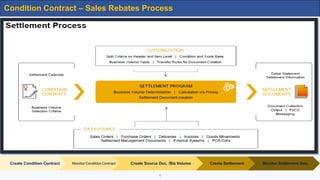
Create Condition Contract Monitor Condition Contract Create Source Doc. /Biz Volume Create Settlement Monitor Settlement Doc.
Condition Contract – Sales Rebates Process
4
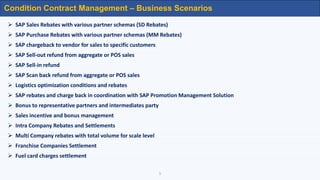
 SAP Sales Rebates with various partner schemas (SD Rebates)
 SAP Purchase Rebates with various partner schemas (MM Rebates)
 SAP chargeback to vendor for sales to specific customers
 SAP Sell-out refund from aggregate or POS sales
 SAP Sell-in refund
 SAP Scan back refund from aggregate or POS sales
 Logistics optimization conditions and rebates
 SAP rebates and charge back in coordination with SAP Promotion Management Solution
 Bonus to representative partners and intermediates party
 Sales incentive and bonus management
 Intra Company Rebates and Settlements
 Multi Company rebates with total volume for scale level
 Franchise Companies Settlement
 Fuel card charges settlement
Condition Contract Management – Business Scenarios
5
6
RELEASE
SALES
PROCESS
DOCUM ENT
SETTLEMENT
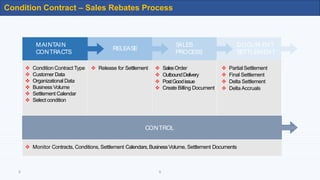
Condition Contract – Sales Rebates Process
MAINTAIN
CONTRACTS
RELEASE
SALES
PROCESS
DOCUM ENT
SETTLEMENT
 Condition Contract Type
 Customer Data
 Organizational Data
 Business Volume
 Settlement Calendar
 Select condition
 Release for Settlement  SalesOrder
 OutboundDelivery
 PostGoodissue
 Create Billing Document
 PartialSettlement
 Final Settlement
 Delta Settlement
 Delta Accruals
CONTROL
 Monitor Contracts, Conditions, Settlement Calendars,BusinessVolume, Settlement Documents
Condition Contract – Sales Rebates Process
6
7
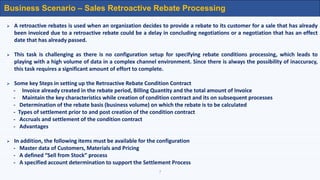
Business Scenario – Sales Retroactive Rebate Processing
 A retroactive rebates is used when an organization decides to provide a rebate to its customer for a sale that has already
been invoiced due to a retroactive rebate could be a delay in concluding negotiations or a negotiation that has an effect
date that has already passed.
 This task is challenging as there is no configuration setup for specifying rebate conditions processing, which leads to
playing with a high volume of data in a complex channel environment. Since there is always the possibility of inaccuracy,
this task requires a significant amount of effort to complete.
 Some key Steps in setting up the Retroactive Rebate Condition Contract
- Invoice already created in the rebate period, Billing Quantity and the total amount of Invoice
- Maintain the key characteristics while creation of condition contract and its on subsequent processes
- Determination of the rebate basis (business volume) on which the rebate is to be calculated
- Types of settlement prior to and post creation of the condition contract
- Accruals and settlement of the condition contract
- Advantages
 In addition, the following items must be available for the configuration
- Master data of Customers, Materials and Pricing
- A defined “Sell from Stock” process
- A specified account determination to support the Settlement Process
8
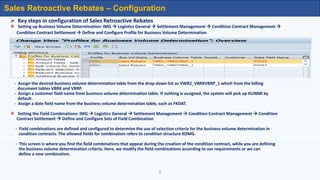
 Key steps in configuration of Sales Retroactive Rebates
 Setting up Business Volume Determination: IMG  Logistics General  Settlement Management  Condition Contract Management 
Condition Contract Settlement  Define and Configure Profile for Business Volume Determination
- Assign the desired business volume determination table from the drop-down list as VWB2_VBRKVBRP_1 which from the billing
document tables VBRK and VBRP.
- Assign a customer field name from business volume determination table. If nothing is assigned, the system will pick up KUNNR by
default.
- Assign a date field name from the business volume determination table, such as FKDAT.
 Setting the Field Combinations: IMG  Logistics General  Settlement Management  Condition Contract Management  Condition
Contract Settlement  Define and Configure Sets of Field Combination
- Field combinations are defined and configured to determine the use of selection criteria for the business volume determination in
condition contracts. The allowed fields for combination refers to condition structure KOMG.
- This screen is where you find the field combinations that appear during the creation of the condition contract, while you are defining
the business volume determination criteria. Here, we modify the field combinations according to our requirements or we can
define a new combination.
Sales Retroactive Rebates – Configuration
9
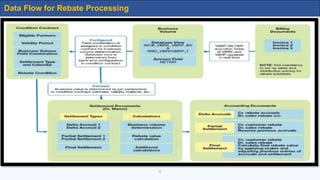
Data Flow for Rebate Processing
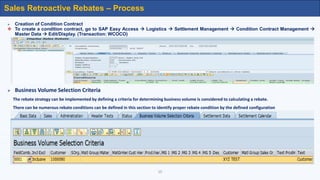
 Creation of Condition Contract
 To create a condition contract, go to SAP Easy Access  Logistics  Settlement Management  Condition Contract Management 
Master Data  Edit/Display. (Transaction: WCOCO)
 Business Volume Selection Criteria
The rebate strategy can be implemented by defining a criteria for determining business volume is considered to calculating a rebate.
There can be numerous rebate conditions can be defined in this section to identify proper rebate condition by the defined configuration
10
Sales Retroactive Rebates – Process
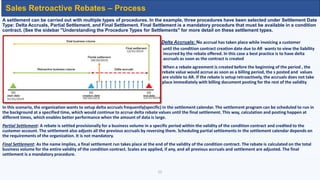
A settlement can be carried out with multiple types of procedures. In the example, three procedures have been selected under Settlement Date
Type: Delta Accruals, Partial Settlement, and Final Settlement. Final Settlement is a mandatory procedure that must be available in a condition
contract. (See the sidebar "Understanding the Procedure Types for Settlements" for more detail on these settlement types.
Delta Accruals: No accrual has taken place while invoicing a customer
vvvvvvvvvvvvvv until the condition contract creation date due to AR wants to view the liability
incurred by the rebate offered. In this case a best practice is to have delta
accruals as soon as the contract is created
When a rebate agreement is created before the beginning of the period , the
rebate value would accrue as soon as a billing period, the s posted and values
valuesare are with billing document posting for the rest of the validity period are visible to AR. If the rebate is setup retroactively, the accruals does not take
place immediately with billing document posting for the rest of the validity
In this scenario, the organization wants to setup delta accruals frequently(specific) in the settlement calendar. The settlement program can be scheduled to run in
the background at a specified time, which would continue to accrue delta rebate values until the final settlement. This way, calculation and posting happen at
different times, which enables better performance when the amount of data is large.
Partial Settlement: A rebate is settled provisionally for a business volume in a specific period within the validity of the condition contract and credited to the
customer account. The settlement also adjusts all the previous accruals by reversing them. Scheduling partial settlements in the settlement calendar depends on
the requirements of the organization. It is not mandatory.
Final Settlement: As the name implies, a final settlement run takes place at the end of the validity of the condition contract. The rebate is calculated on the total
business volume for the entire validity of the condition contract. Scales are applied, if any, and all previous accruals and settlement are adjusted. The final
settlement is a mandatory procedure.
11
Sales Retroactive Rebates – Process
12
Sales Retroactive Rebates – Process
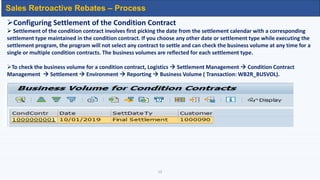
Configuring Settlement of the Condition Contract
 Settlement of the condition contract involves first picking the date from the settlement calendar with a corresponding
settlement type maintained in the condition contract. If you choose any other date or settlement type while executing the
settlement program, the program will not select any contract to settle and can check the business volume at any time for a
single or multiple condition contracts. The business volumes are reflected for each settlement type.
To check the business volume for a condition contract, Logistics  Settlement Management  Condition Contract
Management  Settlement  Environment  Reporting  Business Volume ( Transaction: WB2R_BUSVOL).
13
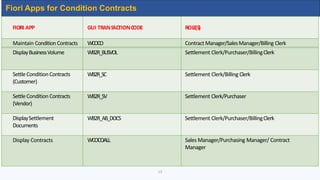
Fiori Apps for Condition Contracts
FIORI APP GUI TRANS
ACTIONC
ODE ROLE(S)
Maintain ConditionContracts WCOCO Contract Manager/SalesManager/Billing Clerk
DisplayBusinessVolume WB2R_BUSVOL Settlement Clerk/Purchaser/BillingClerk
SettleConditionContracts
(Customer)
WB2R_SC Settlement Clerk/Billing Clerk
SettleCondition Contracts
(Vendor)
WB2R_SV Settlement Clerk/Purchaser
DisplaySettlement
Documents
WB2R_AB_DOCS Settlement Clerk/Purchaser/BillingClerk
Display Contracts WCOCOALL Sales Manager/Purchasing Manager/ Contract
Manager
14
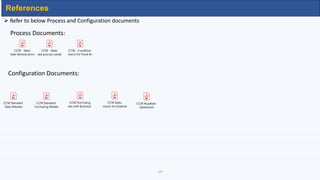
 Refer to below Process and Configuration documents
Process Documents:
Configuration Documents:
References
CCM - Sales
Rebate General process
CCM - Sales
Rebate process variations
CCM - Condition
Contracts for Fixed Amou
CCM Standard
Sales Rebates
CCM Standard
Purchasing Rebates
CCM Purchaing
Rebates with Business Volu
CCM Sales
Commission for External Sales
CCM Royalties
Settlement
Thank you
There are risks and costs to action
But they are far less than the long-range risks of comfortable inaction
- John F. Kennedy
15

saps4ccmconceptforsalesandpurchasing-200329184440.pdf

  • 1.
    SAP S/4 ConditionContract Management By Venkat Mannam
  • 2.
     Promotions andrebates play a critical role in increasing sales, and businesses often dedicate a considerable amount of effort to develop the strategies and utilize them optimally — effort that can increase substantially when there are multiple product lines and a complex network of channels  Significant time and resources are required for managing retroactive rebates, which can occur when rebate negotiations are not completed before the start of the sales period or when business users could not create a rebate agreement on time, and organizations often must offer rebates retroactively.  Setting up and calculating rebates retroactively in ECC can be daunting and compiling the database can be problematic if the configuration isn’t complete before transactions begin.  SAP S/4HANA Enterprise Management simplifies this task for both customer and vendor rebates with the new condition contract management and settlement functionality  Adopting this new functionality, organizations can provide special financial settlement services for business partners, such as pooled payments, brokerage and trading business and chargebacks  Settlement Management Supports all types of core business processes that need to be fully integrated in the OTC cycle or with in a PTP scenario, such as rebate settlement, as well as standalone processes, whereby you provide special financial settlement services for your business partners. ….Continued INTRODUCTION 1
  • 3.
     Settlement ManagementSupports all types of core business processes that need to be fully integrated in the OTC cycle or with in a PTP scenario, such as rebate settlement, as well as standalone processes, whereby you provide special financial settlement services for your business partners.  Condition Contract Management provides a central, Standardized solution for administration of customer and supplier conditions of S4 Sales and Procurement processes  SAP S/4H Settlement management (SAP Note 2481672) uses Central Contract Administration as the single point of entry for contract data and contract related conditions for - Full support of business volume related scenarios - Calendar based settlement - Accrual conditions can be defined independent from settlement conditions - Intuitive data entry of settlement information with full transparence of involved documents  Condition Contract Management – Best Practices: 1B6 – Sales Rebate Processing, 2R7 – Purchase Rebate Processing, 2TT – Sales Commissions for Ex. Agents  System Requirements: S4CORE Level SP1 or above  CCM requires a fresh implementation, didn’t not support conversion process as it is now a central function INTRODUCTION 2
  • 4.
     Single ConditionContract can be defined for both Supplier and Customer if an organization does business with a partner  Document type drives the Customer rebates / Supplier chargebacks based on the mandatory information provided to ensure all important criteria have been entered  Business Volume is automatically calculated (Key figure: Real time data) based on application documents not with reference to conditions and it is utilized as basis for providing rebates / calculating chargebacks  New Customers & Vendors easily extended to the rebate process as the rebates index has been eliminated (In memory Database) and previous businesses can be retroactively considered  Default settlement calendars can be defined pegged to a factor calendar that generates a set of settlement dates for easy user maintenance, also can be changed if needed  Rebate conditions and accruals can be defined with any set of criteria across the OTC and PTP processes. A Condition maybe based off customer, material, bundles of materials and a custom business field with scales. This flexibility allows the business to model the rebates to a highly changing dynamic criteria Overview 3
  • 5.
    Create Condition ContractMonitor Condition Contract Create Source Doc. /Biz Volume Create Settlement Monitor Settlement Doc. Condition Contract – Sales Rebates Process 4
  • 6.
     SAP SalesRebates with various partner schemas (SD Rebates)  SAP Purchase Rebates with various partner schemas (MM Rebates)  SAP chargeback to vendor for sales to specific customers  SAP Sell-out refund from aggregate or POS sales  SAP Sell-in refund  SAP Scan back refund from aggregate or POS sales  Logistics optimization conditions and rebates  SAP rebates and charge back in coordination with SAP Promotion Management Solution  Bonus to representative partners and intermediates party  Sales incentive and bonus management  Intra Company Rebates and Settlements  Multi Company rebates with total volume for scale level  Franchise Companies Settlement  Fuel card charges settlement Condition Contract Management – Business Scenarios 5
  • 7.
    6 RELEASE SALES PROCESS DOCUM ENT SETTLEMENT Condition Contract– Sales Rebates Process MAINTAIN CONTRACTS RELEASE SALES PROCESS DOCUM ENT SETTLEMENT  Condition Contract Type  Customer Data  Organizational Data  Business Volume  Settlement Calendar  Select condition  Release for Settlement  SalesOrder  OutboundDelivery  PostGoodissue  Create Billing Document  PartialSettlement  Final Settlement  Delta Settlement  Delta Accruals CONTROL  Monitor Contracts, Conditions, Settlement Calendars,BusinessVolume, Settlement Documents Condition Contract – Sales Rebates Process 6
  • 8.
    7 Business Scenario –Sales Retroactive Rebate Processing  A retroactive rebates is used when an organization decides to provide a rebate to its customer for a sale that has already been invoiced due to a retroactive rebate could be a delay in concluding negotiations or a negotiation that has an effect date that has already passed.  This task is challenging as there is no configuration setup for specifying rebate conditions processing, which leads to playing with a high volume of data in a complex channel environment. Since there is always the possibility of inaccuracy, this task requires a significant amount of effort to complete.  Some key Steps in setting up the Retroactive Rebate Condition Contract - Invoice already created in the rebate period, Billing Quantity and the total amount of Invoice - Maintain the key characteristics while creation of condition contract and its on subsequent processes - Determination of the rebate basis (business volume) on which the rebate is to be calculated - Types of settlement prior to and post creation of the condition contract - Accruals and settlement of the condition contract - Advantages  In addition, the following items must be available for the configuration - Master data of Customers, Materials and Pricing - A defined “Sell from Stock” process - A specified account determination to support the Settlement Process
  • 9.
    8  Key stepsin configuration of Sales Retroactive Rebates  Setting up Business Volume Determination: IMG  Logistics General  Settlement Management  Condition Contract Management  Condition Contract Settlement  Define and Configure Profile for Business Volume Determination - Assign the desired business volume determination table from the drop-down list as VWB2_VBRKVBRP_1 which from the billing document tables VBRK and VBRP. - Assign a customer field name from business volume determination table. If nothing is assigned, the system will pick up KUNNR by default. - Assign a date field name from the business volume determination table, such as FKDAT.  Setting the Field Combinations: IMG  Logistics General  Settlement Management  Condition Contract Management  Condition Contract Settlement  Define and Configure Sets of Field Combination - Field combinations are defined and configured to determine the use of selection criteria for the business volume determination in condition contracts. The allowed fields for combination refers to condition structure KOMG. - This screen is where you find the field combinations that appear during the creation of the condition contract, while you are defining the business volume determination criteria. Here, we modify the field combinations according to our requirements or we can define a new combination. Sales Retroactive Rebates – Configuration
  • 10.
    9 Data Flow forRebate Processing
  • 11.
     Creation ofCondition Contract  To create a condition contract, go to SAP Easy Access  Logistics  Settlement Management  Condition Contract Management  Master Data  Edit/Display. (Transaction: WCOCO)  Business Volume Selection Criteria The rebate strategy can be implemented by defining a criteria for determining business volume is considered to calculating a rebate. There can be numerous rebate conditions can be defined in this section to identify proper rebate condition by the defined configuration 10 Sales Retroactive Rebates – Process
  • 12.
    A settlement canbe carried out with multiple types of procedures. In the example, three procedures have been selected under Settlement Date Type: Delta Accruals, Partial Settlement, and Final Settlement. Final Settlement is a mandatory procedure that must be available in a condition contract. (See the sidebar "Understanding the Procedure Types for Settlements" for more detail on these settlement types. Delta Accruals: No accrual has taken place while invoicing a customer vvvvvvvvvvvvvv until the condition contract creation date due to AR wants to view the liability incurred by the rebate offered. In this case a best practice is to have delta accruals as soon as the contract is created When a rebate agreement is created before the beginning of the period , the rebate value would accrue as soon as a billing period, the s posted and values valuesare are with billing document posting for the rest of the validity period are visible to AR. If the rebate is setup retroactively, the accruals does not take place immediately with billing document posting for the rest of the validity In this scenario, the organization wants to setup delta accruals frequently(specific) in the settlement calendar. The settlement program can be scheduled to run in the background at a specified time, which would continue to accrue delta rebate values until the final settlement. This way, calculation and posting happen at different times, which enables better performance when the amount of data is large. Partial Settlement: A rebate is settled provisionally for a business volume in a specific period within the validity of the condition contract and credited to the customer account. The settlement also adjusts all the previous accruals by reversing them. Scheduling partial settlements in the settlement calendar depends on the requirements of the organization. It is not mandatory. Final Settlement: As the name implies, a final settlement run takes place at the end of the validity of the condition contract. The rebate is calculated on the total business volume for the entire validity of the condition contract. Scales are applied, if any, and all previous accruals and settlement are adjusted. The final settlement is a mandatory procedure. 11 Sales Retroactive Rebates – Process
  • 13.
    12 Sales Retroactive Rebates– Process Configuring Settlement of the Condition Contract  Settlement of the condition contract involves first picking the date from the settlement calendar with a corresponding settlement type maintained in the condition contract. If you choose any other date or settlement type while executing the settlement program, the program will not select any contract to settle and can check the business volume at any time for a single or multiple condition contracts. The business volumes are reflected for each settlement type. To check the business volume for a condition contract, Logistics  Settlement Management  Condition Contract Management  Settlement  Environment  Reporting  Business Volume ( Transaction: WB2R_BUSVOL).
  • 14.
    13 Fiori Apps forCondition Contracts FIORI APP GUI TRANS ACTIONC ODE ROLE(S) Maintain ConditionContracts WCOCO Contract Manager/SalesManager/Billing Clerk DisplayBusinessVolume WB2R_BUSVOL Settlement Clerk/Purchaser/BillingClerk SettleConditionContracts (Customer) WB2R_SC Settlement Clerk/Billing Clerk SettleCondition Contracts (Vendor) WB2R_SV Settlement Clerk/Purchaser DisplaySettlement Documents WB2R_AB_DOCS Settlement Clerk/Purchaser/BillingClerk Display Contracts WCOCOALL Sales Manager/Purchasing Manager/ Contract Manager
  • 15.
    14  Refer tobelow Process and Configuration documents Process Documents: Configuration Documents: References CCM - Sales Rebate General process CCM - Sales Rebate process variations CCM - Condition Contracts for Fixed Amou CCM Standard Sales Rebates CCM Standard Purchasing Rebates CCM Purchaing Rebates with Business Volu CCM Sales Commission for External Sales CCM Royalties Settlement
  • 16.
    Thank you There arerisks and costs to action But they are far less than the long-range risks of comfortable inaction - John F. Kennedy 15