Implementing High Availability for SAP
Business Objects CMS and Audit Databases
An introduction to CMS and Audit database mirroring to achieve high
availability during server failover
2
Table of Contents
Introduction.......................................................................................................................................3
Software Prerequisites........................................................................................................................3
Default Credentials.............................................................................................................................4
Database Mirroring Architecture.........................................................................................................5
Database Mirroring Setup...................................................................................................................7
Setting up the Mirror Partners for the CMS Database........................................................................7
Setting up the Mirror Partners for the Audit Database ....................................................................14
Starting up the Mirror and Arbiter Database Servers.......................................................................20
Changing the ODBC DSN Connections................................................................................................21
Adding Services to Sybase Central .....................................................................................................25
Comfirming Mirroring Database Servers ............................................................................................39
Summary & Additional Resources......................................................................................................42
3
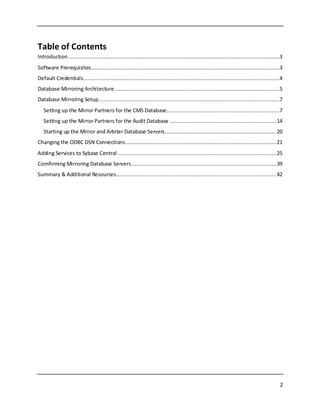
INTRODUCTION
SAPSQL Anywhere isusedasthe defaultdatabase serverforthe Central ManagementServer(CMS) and
Auditdata storesinSAPBusinessObjects4.1(orhigher) and3.1 (SP5or higher). One of the many
advantages of usingSQL Anywhere (SQLA) inBusinessObjects(BOBJ) isitshighavailability (HA)
capability.Withthe growingneedof 24/7 operationsandminimal downtime,itisvital forBOBJ
administrators toaccountfor highavailabilityduringdeployment. Key featuresof ahighavailability
environmentincludesystem backups,datastorage, andfailoverprocessing.This documentstrictly
focusesonimplementingfailoverprocessingbymirroringthe CMSand AuditDatabases. There are three
componentsrequiredtohave a successful mirroringconfiguration.A Primarydatabase server,aMirror
database serverandan Arbiterdatabase server - theyall communicate togethertomake sure that the
CMS and Auditdatabasesare alwaysactive.Tofindmore informationongeneral database mirroring,
please refertothe documentationhere(DocCommentXchange).Please note thatitis equally important
to safeguardothercomponentsof BOBJsuchas the In/OutFile RepositorySystems (FRS) andBOBJ
server. More informationaboutotherhighavailabilityoptionssuchasBOBJ serverclusteringcanbe
foundonthe SAPBusinessObjectsDeploymentandConfigurationGuide available atthe SAPwebsite.
Users interestedin learninghowtoback upthe CMS and Auditdatabasestoprevent datalosscan take a
lookat the article (BackingUp the CMS andAuditDatabasesUsingSQL Anywhere Maintenance Plans).
SOFTWAREPREREQUISITES
 SAPBusinessObjects3.1(SP5 or higher) or 4.1 (orhigher).
 The SQLA 12.0.1 database administrationtoolsSybaseCentral andInteractiveSQLthat are
includedinthe SQLAnywhere Client software (seethisblogpostonhow to install it:-Database
AdministrationToolsforSQLAnywhere CMSandAuditDBs).
 SQL Anywhere database serverwithhighavailabilityoptionenabled(seeimportantnote below).
The edition of SQL Anywhere 12.0.1usedinthis documentisthe free DeveloperEdition asit
includes the highavailabilityoption. The DeveloperEditionisperfectfordevelopmentand
testingpurposes. Youcandownloada copyof SQL Anywhere 12.0.1DeveloperEditionhere:
http://scn.sap.com/docs/DOC-31795.
4
DEFAULTCREDENTIALS
Throughoutthisdocumentthere are manystepswhere the useris askedforcredentials suchas
hostname, database userID& password,CMS clustername,ODBCdata source information,etc.The
credentialsusedare listedbelowforreference.
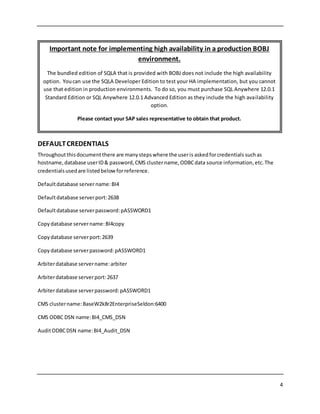
Defaultdatabase servername:BI4
Defaultdatabase serverport:2638
Defaultdatabase serverpassword:pASSWORD1
Copydatabase servername:BI4copy
Copydatabase serverport:2639
Copydatabase serverpassword:pASSWORD1
Arbiterdatabase servername:arbiter
Arbiterdatabase serverport:2637
Arbiterdatabase serverpassword:pASSWORD1
CMS clustername:BaseW2k8r2EnterpriseSeldon:6400
CMS ODBC DSN name:BI4_CMS_DSN
AuditODBCDSN name:BI4_Audit_DSN
Important note for implementing high availability in a production BOBJ
environment.
The bundled edition of SQLA that is provided with BOBJ does not include the high availability
option. Youcan use the SQLA Developer Edition to test your HA implementation, but you cannot
use that edition in production environments. To do so, you must purchase SQL Anywhere 12.0.1
Standard Edition or SQL Anywhere 12.0.1 Advanced Edition as they include the high availability
option.
Please contact your SAP sales representative to obtain that product.
5
DATABASEMIRRORING ARCHITECTURE
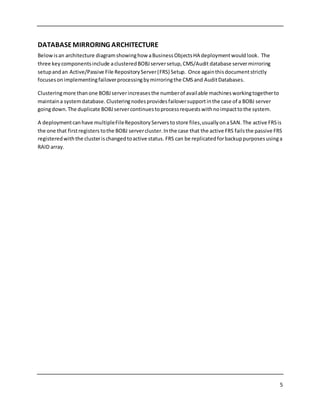
Belowisan architecture diagramshowinghow aBusinessObjectsHA deploymentwouldlook. The
three key componentsinclude aclusteredBOBJserversetup,CMS/Audit database servermirroring
setupandan Active/Passive File RepositoryServer(FRS) Setup. Once againthisdocumentstrictly
focusesonimplementingfailoverprocessingbymirroringthe CMSand AuditDatabases.
Clusteringmore thanone BOBJserverincreasesthe numberof available machinesworkingtogetherto
maintaina systemdatabase. Clusteringnodesprovidesfailoversupportinthe case of a BOBJ server
goingdown.The duplicate BOBJservercontinuestoprocessrequestswithnoimpacttothe system.
A deploymentcanhave multipleFileRepositoryServers tostore files,usuallyonaSAN. The active FRSis
the one that firstregisters tothe BOBJ servercluster.Inthe case that the active FRS failsthe passive FRS
registeredwiththe clusterischangedtoactive status. FRS can be replicatedforbackuppurposesusinga
RAID array.
6
Load Server
BOBJ Server/Node 1
FRS
(Active)
FRS
(Passive)
BOBJ Server/Node 2
Database
Server 1
(primary)
BI4_CMS.db
Database
Server 2
(mirror)
Arbiter
Server
BI4_Audit.db
BI4_CMS.db
BI4_Audit.db
Pictures from TEC1103.pptx by José Ramos
7
DATABASEMIRRORING SETUP
In a BOBJ deploymentthere are twoimportantdatabases(BI4_CMSandBI4_Audit) thatalwaysconnect
to a runningdatabase server.If this database serverwere toevershutdownorfail,these databases
wouldbe inaccessible resultingin dataloss. SQLA database mirroringallowsthe usertocreate an
alternate database serverthatautomaticallyconnectstothese databasesif thiswere tooccur.
There are some preliminary stepsthatmustbe completed before the setupcanbe started.
1. The BOBJ serverneedstobe shutdown.Itisrecommendedthisisdone whenhe BOBJserver
loadis low.
2. There shouldbe an existingdirectorywiththe SQLA databasesandtransitionlogfiles.The
defaultlocationforthese filesare:
 Location:C:ProgramFiles(x86)SAPBusinessObjectssqlanywheredatabase.
 File names:BI4_CMS.db,BI4_CMS.log,BI4_Audit.db,andBI4_Audit.log.
3. The user mustcreate similardirectoryforthe mirrorand arbiterservers tohold additional
databases.The directoriesusedforthis paperare:
 C:arbiter
 C:t1
Setting up the Mirror Partners for the CMS Database
Please note thatthis paperassumesthe useriscomfortable usingthe CommandPromptandSQL
Anywhere commands.The firststeptodatabase mirroringistostart upthe default database serverwith
itsmirroringproperties.
1. Opena CommandPromptand start the defaultdatabase withthe followingcommand:
dbsrv12 -n BI4 -xtcpip(PORT=2638) -su pASSWORD1 "C:Program Files(x86)SAP
BusinessObjectssqlanywheredatabaseBI4_CMS.db" -xpon"C:Program Files(x86)SAP
BusinessObjectssqlanywheredatabaseBI4_Audit.db" -xpon
The “–xp on” switchindicatesthatthe serverisable toparticipate indatabase mirroring.
**If the High Availability optionis notenabledwithinyoureditionof SQLA the use of the “–xp”
switchinthe command above will returnanerror!**
2. Connectto the defaultCMSdatabase fromInteractive SQL(ISQL) todefine the mirroring
parameters:
dbisql -c "UID=DBA;PWD=pASSWORD1;SERVER=BI4;DBN=BI4_CMS.db"
8
An Interactive SQL(ISQL) window openslikethe following:
3. Define the default database server“BI4” as a partner serverforthe “BI4_CMS” database. This
statementalsocreatesastate file forthe serverthatkeepstrackof what state the serverisin.
Hit the Execute buttonorF5 to run the SQL statements.
CREATE MIRROR SERVER BI4
AS PARTNER
connection_string='SERVER=BI4;host=localhost:2638'
state_file='C:ProgramFiles(x86)SAP
BusinessObjectssqlanywheredatabaseBI4.state';
9
10
4. Create a database serveranddefine itasa partner to the original database server.Thiswill be
the database serverthatwill act as a mirror andwill become the active database serverinthe
case of a failover. Pleasemake sure this database serverstartsona differenthostport.
CREATE MIRROR SERVER BI4copy
AS PARTNER
connection_string='SERVER=BI4copy;host=localhost:2639'
state_file='c:t1BI4copy.state'
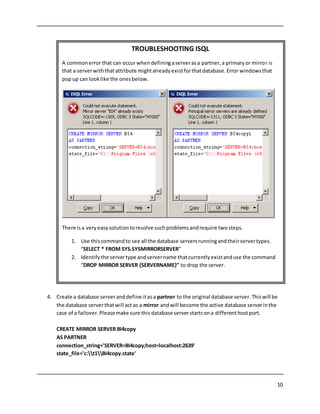
TROUBLESHOOTING ISQL
A commonerror that can occur whendefiningaserverasa partner,a primaryor mirror is
that a serverwiththatattribute mightalreadyexistforthatdatabase.Error windowsthat
popup can looklike the onesbelow.
There isa veryeasysolutiontoresolve suchproblemsandrequire twosteps.
1. Use thiscommandto see all the database serversrunningandtheirservertypes.
“SELECT * FROM SYS.SYSMIRRORSERVER”
2. Identifythe servertype andservername thatcurrentlyexistanduse the command
“DROP MIRROR SERVER {SERVERNAME}” to drop the server.
11
5. Execute the followingstatementtodefine “BI4primary1” as the logical Primary Serverfor BI4’s
CMS database. BI4primary1 isthe name that clientsuse toconnectto the database server
associatedwiththe CMS database thatis actingas the Primary Server.Make sure to specify
boththe portsusedfor the defaultandcopy database servers.
CREATE MIRROR SERVER BI4primary1
AS PRIMARY
connection_string='SERVER=BI4primary1;HOST=localhost:2638,localhost:2639';
12
6. The nextstepisto define “BI4mirror1” as the logical mirrorserverforBI4’sCMS database.
BI4mirror1 is the name that clientsuse toconnectto the database server associatedwiththe
CMS database that is actingas the Mirror Server.Make sure to specifyboththe portsusedfor
the defaultandcopy database servers.
CREATE MIRROR SERVER BI4mirror1
AS PRIMARY
connection_string='SERVER=BI4mirror1;HOST=localhost:2638,localhost:2639';
13
7. Seta mirroroptionforthe database mirroringsystemtoconnectwiththe ArbiterServer.Once
done disconnectandclose Interactive SQLwindows.
SET MIRROR OPTION authentication_string='abc';
14
8. The last stepisto make a backupcopy of the CMS database andCMS transactionloginthe
mirrordatabase serverdirectory. Inputthe followingcommandintothe CommandPrompt.
dbbackup -c "UID=DBA;PWD=pASSWORD1;SERVER=BI4;DBN=BI4_CMS" c:t1
Setting up the Mirror Partners for the Audit Database
Similartosettingupthe mirror database serverpartnersforthe CMS database the usermust do the
same for the Auditdatabase.
1. Connectto the default Auditdatabase fromInteractive SQL(ISQL) todefine the mirroring
parameters:
15
dbisql -c "UID=DBA;PWD=pASSWORD1;SERVER=BI4;DBN=BI4_Audit.db
2. Define the defaultserver“BI4”as a partnerserverforthe “BI4_Audit” database.Thisstatement
alsocreatesa state file forthe serverthatkeepstrackof whatstate the serverisin. Hit the
Execute buttonorF5 to run the SQL statements.
CREATE MIRROR SERVER BI4
AS PARTNER
connection_string='SERVER=BI4;host=localhost:2638'
state_file='C:ProgramFiles(x86)SAP
BusinessObjectssqlanywheredatabaseBI4.state';
16
3. Create a database serveranddefine itasa partner to the original database server. Thiswill be
the database serverthatwill act as a mirror andwill become the active database serverinthe
case of a failover.Pleasemake sure this database serverstartsonanotherhost port.
CREATE MIRROR SERVER BI4copy
AS PARTNER
connection_string='SERVER=BI4copy;host=localhost:2639'
state_file='c:t1BI4copy.state'
17
4. Execute the followingstatementtodefine “BI4primary2” as the logical Primary Serverfor BI4’s
Auditdatabase. BI4primary2 isthe name that clientsuse toconnectto the database server
associatedwiththe Auditdatabase thatisactingas the Primary Server.Make sure to specify
boththe portsusedfor the defaultandcopy database servers.
CREATE MIRROR SERVER BI4primary2
AS PRIMARY
connection_string='SERVER=BI4primary2;HOST=localhost:2638,localhost:2639';
18
5. The nextstepisto define “BI4mirror2” as the logical mirrorserverforBI4’s Auditdatabase.
BI4mirror2 is the name that clientsuse toconnectto the database server associatedwiththe
CMS database that is actingas the Mirror Server.Make sure to specifyboththe portsusedfor
the defaultandcopy database servers.
CREATE MIRROR SERVER BI4mirror2
AS PRIMARY
connection_string='SERVER=BI4mirror2;HOST=localhost:2638,localhost:2639';
19
6. Seta mirroroptionforthe database mirroringsystemtoconnectwiththe ArbiterServer.This
shouldbe differentfromthe one definedforthe CMSdatabase.Once done disconnectandclose
Interactive SQLwindows.
SET MIRROR OPTION authentication_string='def';
20
7. The last stepisto make a backupcopy of the Auditdatabase andAudittransactionloginthe
mirrordatabase serverdirectory.Inputthe followingcommandintothe CommandPrompt.
dbbackup -c "UID=DBA;PWD=pASSWORD1;SERVER=BI4;DBN=BI4_Audit" c:t1
Starting up the Mirrorand Arbiter Database Servers
To start up these database serversopenthe CommandPromptandenterthe followingcommands.
Mirror database server:dbsrv12 BI4copy -x tcpip(PORT=2639) -su pASSWORD1 "C:t1BI4_CMS" -xp
on "C:t1BI4_Audit" -xp on
 The “-xp on” switchindicatesthatthe serverisable toparticipate indatabase mirroring.
Arbiterdatabase server:dbsrv12 –n arbiter -supASSWORD1 -x"tcpip(PORT=2637)" -xf
"c:arbiterarbiter.state" -xa "AUTH=abc,def;DBN=BI4_CMS,BI4_Audit"
 The “-xf” switchspecifiesthe locationof the state file forthe arbiter.
 The “-xa” switchidentifiesthe namesof the databasesbeingmirroredandthe authentication
stringfor the arbiter.
At thisstage the usershouldhave the three database serversrunningwiththe default database server
“BI4” as the primaryserverandthe alternate server“BI4copy” as the mirrorserver.To see the current
state of a database serveror a specificdatabase onadatabase serveruse the followingcommands:
21
dbping-c "UID=DBA;PWD=pASSWORD1;SERVER=BI4primary1" -ps ServerName -pd
MirrorRole,MirrorState,PartnerState,ArbiterState
or
dbping-c "UID=DBA;PWD=pASSWORD1;SERVER=BI4copy;DBN=BI4_Audit" -ps ServerName -pd
MirrorRole,MirrorState,PartnerState,ArbiterState
CHANGING THEODBC DSN CONNECTIONS
Once the database mirroring of the CMS and Auditdatabasesare complete the ODBC DSN connection
mustbe changedto connectto the Primaryserver.
22
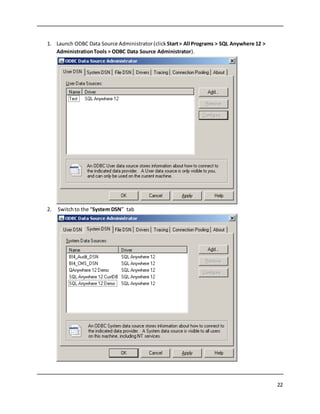
1. Launch ODBC Data Source Administrator (click Start> All Programs > SQL Anywhere 12 >
AdministrationTools > ODBC Data Source Administrator).
2. Switchto the “System DSN” tab
23
3. Clickon BI4_CMS_DSN and thenclick Configure
24
4. Switchoverto the “Login” tab
5. There are twochangesthat need tobe made.The firstisthat the Port mustbe leftblankand
the secondisto change the ServerName to the name giventothe Primary server. Forthis
25
paperthat is“BI4Primary”.
6. Click“OK” once complete andrepeatssteps1-5forthe AuditSystem DSN (BI4_CMS_DSN).
Make sure to inputthe correct database servername. Forthispaperthat wouldbe
“BI4primary2”.
ADDING SERVICES TO SYBASECENTRAL
At thispointthe database servershave beencreatedthoughthe CommandPrompt,butthe goal isto
have these database serversrunningasservicessothattheyautomaticallystartup.In Sybase Central
usersare allowedto create andmodifyWindows Servicesnecessarytodothis.
1. Launch Sybase Central (clickStart> All Programs > SQL Anywhere 12 > AdministrationTools>
Sybase Central).Close the Welcome dialogif itappears.
26
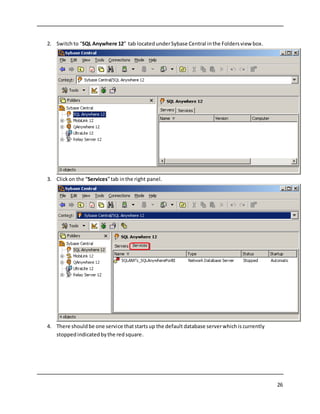
2. Switchto “SQL Anywhere 12” tab locatedunderSybase Central inthe Foldersview box.
3. Clickon the “Services”tab inthe right panel.
4. There shouldbe one service thatstartsup the default database serverwhichis currently
stoppedindicatedbythe redsquare.
27
5. Double clickon “SQLANY’s_SQLAnywhereForBI”to openupthe service properties.The useris
able to editthe propertiesof the service underthe differenttabs.
6. Switchoverto the “Configuration”tab to change the current service startupexecutable and
parameters.Currentlythe service isrunningthe database serverthroughthe dbsrv12
executable located withinthe SapBusinessObjectprogramfolder.Thisneedtobe changedso
that the service runsthoughthe dbsrv12 executablelocatedinthe SQLAnywhere client
program folder.The parametersneedtobe changedto the commandused instepone of the
Settingupthe Mirror Partnersfor the CMS Database section.Thiswill letthe database server
participate indatabase mirroring.Below are beforeandafterpicturesof whatthe
configurationsshouldlooklike.
28
Before
After
29
7. Clickapplyandclose the propertiesbox. The usershouldbe backinSybase Central underthe
Servicessection.
30
8. The nextstepisto add newservicesforthe mirrorand arbiter database servers.Right-clickon
an emptyspace and select New> Service fromthe popupmenu.
31
9. The Create Service Wizardappears.Name the new service
"SQLANY’s_SQLAnywhereForBIMirror".ClickNexttocontinue.
32
10. SelectNetworkDatabase Server formthe listof servicesandclick Next.
33
11. Enter the directorypathto dbsrv12.exe withinthe SQL Anywhere 12 program folder.Click Next
to continue.
12. The user needstospecify the parametersforthe mirrordatabase server.These parameterswill
be the exactsame to the onesusedinthe section“Starting up the Mirror and Arbiter Servers “.
34
ClickFinishto complete the Create Service Wizard.
13. The user shouldbe backin Sybase Central andthe Servicessection shouldnow have two
services.
14. The nextstep isto create a service forthe Arbiterserver.The processisexactlythe same as the
one above withjusta minorchange to the service name andparameters. Right-clickonan
35
emptyspace and selectaNew> Service fromthe popupmenu.
36
15. The Create Service Wizardappears.Name the new service
"SQLANY’s_SQLAnywhereForBIArbiter".ClickNexttocontinue.
37
16. SelectNetworkDatabase Server formthe listof servicesandclick Next.
38
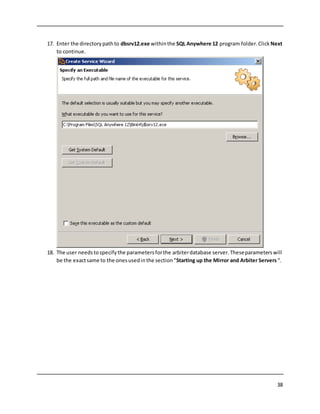
17. Enter the directorypathto dbsrv12.exe withinthe SQL Anywhere 12 program folder.Click Next
to continue.
18. The user needstospecifythe parametersforthe arbiterdatabase server.Theseparameterswill
be the exactsame to the onesusedinthe section“Starting up the Mirror and Arbiter Servers “.
39
ClickFinishto complete the Create Service Wizard.
19. Nowthe useris back inSybase Central andwithinthe Servicessectionthere are three sevices.
One for eachof the database servers.
COMFIRMING MIRRORING DATABASE SERVERS
The last and final stepsare tostart up the three database serversthroughtheirservicesandchecktosee
if theyare working.There are twowaysto turn on the services;eithermanuallyturningthemon
throughSybase central or restartingthe computer. Tostart up the service throughSybase Central,right-
clickon the name of the service andthenclickStart fromthe popupmenu.The order to follow when
40
turningon the servicesisArbiter,DefaultandthenMirror.
Once all of the serviceshave beenstartedthe usershouldmake sure thatthe serversare runningand
that BusinessObjects isconnectedtothe primary database server. One waytocheck isto logineitherto
the Central ManagementConsole (CMC) orthe QueryBuilder (QB).
 Central ManagementConsole canbe foundatthe URL: “http://MyServer:Port.BOE/CMC”
 QueryBuildercanbe foundat the following URL:“http://MyServer:Port/AdminTools”
If the userisgettingerrorslike the onesbelow there couldbe anindication thatthe services weren’t
setupproperly orhaven’tbeenstarted.
41
42
To testout the failoverprocedure of the mirrored database servers, disconnectthe defaultdatabase
server“BI4” bydisablingitsService andkeepthe remainingtwoservicesrunning. The alternate
database server“BI4copy” should become the primary database serverandthe usershould be able to
logintothe CMC and the QB. Startingup the Service for“BI4” turns the database serverbackon and
putsit intoa mirroringstate ready to become the primary database serverif “BI4copy” turns off.
SUMMARY &ADDITIONAL RESOURCES
Implementingdatabase mirroringforthe CMSand Auditdatabasescanbe a veryhelpful tool when
consideringahighavailabilityenvironmentwithinBusinessObjects. Itisimportantto make sure that
the Arbiterdatabase serverisalwaysrunningsothatthe mirroring database serversknow whichstate
theyare in. Don't forgettotest yourmirroringsystemtoensure the procedure executesproperlyand
behavesas expected.
Additional Resources:
SQL Anywhere Database MirroringTutorial: http://dcx.sybase.com/index.html#sa160/en/dbadmin/da-
highavailability-s-4980336.html
BusinessIntelligence HelpPortal: http://help.sap.com/bobi
SQL Anywhere Community: http://scn.sap.com/community/sybase-sql-anywhere
© 2014 SAP AG or an SAP affiliate company. All rights reserved.
No part of this publication may be reproduced or transmitted in any
form or for any purpose without the express permission of SAP AG.
The information contained herein may be changed without prior notice.
Some software products marketed by SAP AG and its distributors contain
proprietary software components ofother software vendors. National product
specifications may vary.
These materials are provided by SAP AG and its affiliated companies (“SAP
Group”) for informational purposes only, without representation or warranty of
any kind, and SAP Group shall not be liable for errors or omissions with
respect to the materials. The only warranties for SAP Group products and
services are those that are set forth in the express warranty statements
accompanying such products and services,if any. Nothing herein should be
construed as constituting an additional warranty.
SAP and other SAP products and services mentioned herein as well as their
respective logos are trademarks or registered trademarks of SAP AG in
Germany and other countries.
Please see
http://www.sap.com/corporate-en/legal/copyright/index.epx#trademark
for additional trademark information and notices.

SAP SQL Anywhere High Availability Tutorial for Business Objects

  • 1.
    Implementing High Availabilityfor SAP Business Objects CMS and Audit Databases An introduction to CMS and Audit database mirroring to achieve high availability during server failover
  • 2.
    2 Table of Contents Introduction.......................................................................................................................................3 SoftwarePrerequisites........................................................................................................................3 Default Credentials.............................................................................................................................4 Database Mirroring Architecture.........................................................................................................5 Database Mirroring Setup...................................................................................................................7 Setting up the Mirror Partners for the CMS Database........................................................................7 Setting up the Mirror Partners for the Audit Database ....................................................................14 Starting up the Mirror and Arbiter Database Servers.......................................................................20 Changing the ODBC DSN Connections................................................................................................21 Adding Services to Sybase Central .....................................................................................................25 Comfirming Mirroring Database Servers ............................................................................................39 Summary & Additional Resources......................................................................................................42
  • 3.
    3 INTRODUCTION SAPSQL Anywhere isusedasthedefaultdatabase serverforthe Central ManagementServer(CMS) and Auditdata storesinSAPBusinessObjects4.1(orhigher) and3.1 (SP5or higher). One of the many advantages of usingSQL Anywhere (SQLA) inBusinessObjects(BOBJ) isitshighavailability (HA) capability.Withthe growingneedof 24/7 operationsandminimal downtime,itisvital forBOBJ administrators toaccountfor highavailabilityduringdeployment. Key featuresof ahighavailability environmentincludesystem backups,datastorage, andfailoverprocessing.This documentstrictly focusesonimplementingfailoverprocessingbymirroringthe CMSand AuditDatabases. There are three componentsrequiredtohave a successful mirroringconfiguration.A Primarydatabase server,aMirror database serverandan Arbiterdatabase server - theyall communicate togethertomake sure that the CMS and Auditdatabasesare alwaysactive.Tofindmore informationongeneral database mirroring, please refertothe documentationhere(DocCommentXchange).Please note thatitis equally important to safeguardothercomponentsof BOBJsuchas the In/OutFile RepositorySystems (FRS) andBOBJ server. More informationaboutotherhighavailabilityoptionssuchasBOBJ serverclusteringcanbe foundonthe SAPBusinessObjectsDeploymentandConfigurationGuide available atthe SAPwebsite. Users interestedin learninghowtoback upthe CMS and Auditdatabasestoprevent datalosscan take a lookat the article (BackingUp the CMS andAuditDatabasesUsingSQL Anywhere Maintenance Plans). SOFTWAREPREREQUISITES  SAPBusinessObjects3.1(SP5 or higher) or 4.1 (orhigher).  The SQLA 12.0.1 database administrationtoolsSybaseCentral andInteractiveSQLthat are includedinthe SQLAnywhere Client software (seethisblogpostonhow to install it:-Database AdministrationToolsforSQLAnywhere CMSandAuditDBs).  SQL Anywhere database serverwithhighavailabilityoptionenabled(seeimportantnote below). The edition of SQL Anywhere 12.0.1usedinthis documentisthe free DeveloperEdition asit includes the highavailabilityoption. The DeveloperEditionisperfectfordevelopmentand testingpurposes. Youcandownloada copyof SQL Anywhere 12.0.1DeveloperEditionhere: http://scn.sap.com/docs/DOC-31795.
  • 4.
    4 DEFAULTCREDENTIALS Throughoutthisdocumentthere are manystepswherethe useris askedforcredentials suchas hostname, database userID& password,CMS clustername,ODBCdata source information,etc.The credentialsusedare listedbelowforreference. Defaultdatabase servername:BI4 Defaultdatabase serverport:2638 Defaultdatabase serverpassword:pASSWORD1 Copydatabase servername:BI4copy Copydatabase serverport:2639 Copydatabase serverpassword:pASSWORD1 Arbiterdatabase servername:arbiter Arbiterdatabase serverport:2637 Arbiterdatabase serverpassword:pASSWORD1 CMS clustername:BaseW2k8r2EnterpriseSeldon:6400 CMS ODBC DSN name:BI4_CMS_DSN AuditODBCDSN name:BI4_Audit_DSN Important note for implementing high availability in a production BOBJ environment. The bundled edition of SQLA that is provided with BOBJ does not include the high availability option. Youcan use the SQLA Developer Edition to test your HA implementation, but you cannot use that edition in production environments. To do so, you must purchase SQL Anywhere 12.0.1 Standard Edition or SQL Anywhere 12.0.1 Advanced Edition as they include the high availability option. Please contact your SAP sales representative to obtain that product.
  • 5.
    5 DATABASEMIRRORING ARCHITECTURE Belowisan architecturediagramshowinghow aBusinessObjectsHA deploymentwouldlook. The three key componentsinclude aclusteredBOBJserversetup,CMS/Audit database servermirroring setupandan Active/Passive File RepositoryServer(FRS) Setup. Once againthisdocumentstrictly focusesonimplementingfailoverprocessingbymirroringthe CMSand AuditDatabases. Clusteringmore thanone BOBJserverincreasesthe numberof available machinesworkingtogetherto maintaina systemdatabase. Clusteringnodesprovidesfailoversupportinthe case of a BOBJ server goingdown.The duplicate BOBJservercontinuestoprocessrequestswithnoimpacttothe system. A deploymentcanhave multipleFileRepositoryServers tostore files,usuallyonaSAN. The active FRSis the one that firstregisters tothe BOBJ servercluster.Inthe case that the active FRS failsthe passive FRS registeredwiththe clusterischangedtoactive status. FRS can be replicatedforbackuppurposesusinga RAID array.
  • 6.
    6 Load Server BOBJ Server/Node1 FRS (Active) FRS (Passive) BOBJ Server/Node 2 Database Server 1 (primary) BI4_CMS.db Database Server 2 (mirror) Arbiter Server BI4_Audit.db BI4_CMS.db BI4_Audit.db Pictures from TEC1103.pptx by José Ramos
  • 7.
    7 DATABASEMIRRORING SETUP In aBOBJ deploymentthere are twoimportantdatabases(BI4_CMSandBI4_Audit) thatalwaysconnect to a runningdatabase server.If this database serverwere toevershutdownorfail,these databases wouldbe inaccessible resultingin dataloss. SQLA database mirroringallowsthe usertocreate an alternate database serverthatautomaticallyconnectstothese databasesif thiswere tooccur. There are some preliminary stepsthatmustbe completed before the setupcanbe started. 1. The BOBJ serverneedstobe shutdown.Itisrecommendedthisisdone whenhe BOBJserver loadis low. 2. There shouldbe an existingdirectorywiththe SQLA databasesandtransitionlogfiles.The defaultlocationforthese filesare:  Location:C:ProgramFiles(x86)SAPBusinessObjectssqlanywheredatabase.  File names:BI4_CMS.db,BI4_CMS.log,BI4_Audit.db,andBI4_Audit.log. 3. The user mustcreate similardirectoryforthe mirrorand arbiterservers tohold additional databases.The directoriesusedforthis paperare:  C:arbiter  C:t1 Setting up the Mirror Partners for the CMS Database Please note thatthis paperassumesthe useriscomfortable usingthe CommandPromptandSQL Anywhere commands.The firststeptodatabase mirroringistostart upthe default database serverwith itsmirroringproperties. 1. Opena CommandPromptand start the defaultdatabase withthe followingcommand: dbsrv12 -n BI4 -xtcpip(PORT=2638) -su pASSWORD1 "C:Program Files(x86)SAP BusinessObjectssqlanywheredatabaseBI4_CMS.db" -xpon"C:Program Files(x86)SAP BusinessObjectssqlanywheredatabaseBI4_Audit.db" -xpon The “–xp on” switchindicatesthatthe serverisable toparticipate indatabase mirroring. **If the High Availability optionis notenabledwithinyoureditionof SQLA the use of the “–xp” switchinthe command above will returnanerror!** 2. Connectto the defaultCMSdatabase fromInteractive SQL(ISQL) todefine the mirroring parameters: dbisql -c "UID=DBA;PWD=pASSWORD1;SERVER=BI4;DBN=BI4_CMS.db"
  • 8.
    8 An Interactive SQL(ISQL)window openslikethe following: 3. Define the default database server“BI4” as a partner serverforthe “BI4_CMS” database. This statementalsocreatesastate file forthe serverthatkeepstrackof what state the serverisin. Hit the Execute buttonorF5 to run the SQL statements. CREATE MIRROR SERVER BI4 AS PARTNER connection_string='SERVER=BI4;host=localhost:2638' state_file='C:ProgramFiles(x86)SAP BusinessObjectssqlanywheredatabaseBI4.state';
  • 9.
  • 10.
    10 4. Create adatabase serveranddefine itasa partner to the original database server.Thiswill be the database serverthatwill act as a mirror andwill become the active database serverinthe case of a failover. Pleasemake sure this database serverstartsona differenthostport. CREATE MIRROR SERVER BI4copy AS PARTNER connection_string='SERVER=BI4copy;host=localhost:2639' state_file='c:t1BI4copy.state' TROUBLESHOOTING ISQL A commonerror that can occur whendefiningaserverasa partner,a primaryor mirror is that a serverwiththatattribute mightalreadyexistforthatdatabase.Error windowsthat popup can looklike the onesbelow. There isa veryeasysolutiontoresolve suchproblemsandrequire twosteps. 1. Use thiscommandto see all the database serversrunningandtheirservertypes. “SELECT * FROM SYS.SYSMIRRORSERVER” 2. Identifythe servertype andservername thatcurrentlyexistanduse the command “DROP MIRROR SERVER {SERVERNAME}” to drop the server.
  • 11.
    11 5. Execute thefollowingstatementtodefine “BI4primary1” as the logical Primary Serverfor BI4’s CMS database. BI4primary1 isthe name that clientsuse toconnectto the database server associatedwiththe CMS database thatis actingas the Primary Server.Make sure to specify boththe portsusedfor the defaultandcopy database servers. CREATE MIRROR SERVER BI4primary1 AS PRIMARY connection_string='SERVER=BI4primary1;HOST=localhost:2638,localhost:2639';
  • 12.
    12 6. The nextstepistodefine “BI4mirror1” as the logical mirrorserverforBI4’sCMS database. BI4mirror1 is the name that clientsuse toconnectto the database server associatedwiththe CMS database that is actingas the Mirror Server.Make sure to specifyboththe portsusedfor the defaultandcopy database servers. CREATE MIRROR SERVER BI4mirror1 AS PRIMARY connection_string='SERVER=BI4mirror1;HOST=localhost:2638,localhost:2639';
  • 13.
    13 7. Seta mirroroptionforthedatabase mirroringsystemtoconnectwiththe ArbiterServer.Once done disconnectandclose Interactive SQLwindows. SET MIRROR OPTION authentication_string='abc';
  • 14.
    14 8. The laststepisto make a backupcopy of the CMS database andCMS transactionloginthe mirrordatabase serverdirectory. Inputthe followingcommandintothe CommandPrompt. dbbackup -c "UID=DBA;PWD=pASSWORD1;SERVER=BI4;DBN=BI4_CMS" c:t1 Setting up the Mirror Partners for the Audit Database Similartosettingupthe mirror database serverpartnersforthe CMS database the usermust do the same for the Auditdatabase. 1. Connectto the default Auditdatabase fromInteractive SQL(ISQL) todefine the mirroring parameters:
  • 15.
    15 dbisql -c "UID=DBA;PWD=pASSWORD1;SERVER=BI4;DBN=BI4_Audit.db 2.Define the defaultserver“BI4”as a partnerserverforthe “BI4_Audit” database.Thisstatement alsocreatesa state file forthe serverthatkeepstrackof whatstate the serverisin. Hit the Execute buttonorF5 to run the SQL statements. CREATE MIRROR SERVER BI4 AS PARTNER connection_string='SERVER=BI4;host=localhost:2638' state_file='C:ProgramFiles(x86)SAP BusinessObjectssqlanywheredatabaseBI4.state';
  • 16.
    16 3. Create adatabase serveranddefine itasa partner to the original database server. Thiswill be the database serverthatwill act as a mirror andwill become the active database serverinthe case of a failover.Pleasemake sure this database serverstartsonanotherhost port. CREATE MIRROR SERVER BI4copy AS PARTNER connection_string='SERVER=BI4copy;host=localhost:2639' state_file='c:t1BI4copy.state'
  • 17.
    17 4. Execute thefollowingstatementtodefine “BI4primary2” as the logical Primary Serverfor BI4’s Auditdatabase. BI4primary2 isthe name that clientsuse toconnectto the database server associatedwiththe Auditdatabase thatisactingas the Primary Server.Make sure to specify boththe portsusedfor the defaultandcopy database servers. CREATE MIRROR SERVER BI4primary2 AS PRIMARY connection_string='SERVER=BI4primary2;HOST=localhost:2638,localhost:2639';
  • 18.
    18 5. The nextstepistodefine “BI4mirror2” as the logical mirrorserverforBI4’s Auditdatabase. BI4mirror2 is the name that clientsuse toconnectto the database server associatedwiththe CMS database that is actingas the Mirror Server.Make sure to specifyboththe portsusedfor the defaultandcopy database servers. CREATE MIRROR SERVER BI4mirror2 AS PRIMARY connection_string='SERVER=BI4mirror2;HOST=localhost:2638,localhost:2639';
  • 19.
    19 6. Seta mirroroptionforthedatabase mirroringsystemtoconnectwiththe ArbiterServer.This shouldbe differentfromthe one definedforthe CMSdatabase.Once done disconnectandclose Interactive SQLwindows. SET MIRROR OPTION authentication_string='def';
  • 20.
    20 7. The laststepisto make a backupcopy of the Auditdatabase andAudittransactionloginthe mirrordatabase serverdirectory.Inputthe followingcommandintothe CommandPrompt. dbbackup -c "UID=DBA;PWD=pASSWORD1;SERVER=BI4;DBN=BI4_Audit" c:t1 Starting up the Mirrorand Arbiter Database Servers To start up these database serversopenthe CommandPromptandenterthe followingcommands. Mirror database server:dbsrv12 BI4copy -x tcpip(PORT=2639) -su pASSWORD1 "C:t1BI4_CMS" -xp on "C:t1BI4_Audit" -xp on  The “-xp on” switchindicatesthatthe serverisable toparticipate indatabase mirroring. Arbiterdatabase server:dbsrv12 –n arbiter -supASSWORD1 -x"tcpip(PORT=2637)" -xf "c:arbiterarbiter.state" -xa "AUTH=abc,def;DBN=BI4_CMS,BI4_Audit"  The “-xf” switchspecifiesthe locationof the state file forthe arbiter.  The “-xa” switchidentifiesthe namesof the databasesbeingmirroredandthe authentication stringfor the arbiter. At thisstage the usershouldhave the three database serversrunningwiththe default database server “BI4” as the primaryserverandthe alternate server“BI4copy” as the mirrorserver.To see the current state of a database serveror a specificdatabase onadatabase serveruse the followingcommands:
  • 21.
    21 dbping-c "UID=DBA;PWD=pASSWORD1;SERVER=BI4primary1" -psServerName -pd MirrorRole,MirrorState,PartnerState,ArbiterState or dbping-c "UID=DBA;PWD=pASSWORD1;SERVER=BI4copy;DBN=BI4_Audit" -ps ServerName -pd MirrorRole,MirrorState,PartnerState,ArbiterState CHANGING THEODBC DSN CONNECTIONS Once the database mirroring of the CMS and Auditdatabasesare complete the ODBC DSN connection mustbe changedto connectto the Primaryserver.
  • 22.
    22 1. Launch ODBCData Source Administrator (click Start> All Programs > SQL Anywhere 12 > AdministrationTools > ODBC Data Source Administrator). 2. Switchto the “System DSN” tab
  • 23.
    23 3. Clickon BI4_CMS_DSNand thenclick Configure
  • 24.
    24 4. Switchoverto the“Login” tab 5. There are twochangesthat need tobe made.The firstisthat the Port mustbe leftblankand the secondisto change the ServerName to the name giventothe Primary server. Forthis
  • 25.
    25 paperthat is“BI4Primary”. 6. Click“OK”once complete andrepeatssteps1-5forthe AuditSystem DSN (BI4_CMS_DSN). Make sure to inputthe correct database servername. Forthispaperthat wouldbe “BI4primary2”. ADDING SERVICES TO SYBASECENTRAL At thispointthe database servershave beencreatedthoughthe CommandPrompt,butthe goal isto have these database serversrunningasservicessothattheyautomaticallystartup.In Sybase Central usersare allowedto create andmodifyWindows Servicesnecessarytodothis. 1. Launch Sybase Central (clickStart> All Programs > SQL Anywhere 12 > AdministrationTools> Sybase Central).Close the Welcome dialogif itappears.
  • 26.
    26 2. Switchto “SQLAnywhere 12” tab locatedunderSybase Central inthe Foldersview box. 3. Clickon the “Services”tab inthe right panel. 4. There shouldbe one service thatstartsup the default database serverwhichis currently stoppedindicatedbythe redsquare.
  • 27.
    27 5. Double clickon“SQLANY’s_SQLAnywhereForBI”to openupthe service properties.The useris able to editthe propertiesof the service underthe differenttabs. 6. Switchoverto the “Configuration”tab to change the current service startupexecutable and parameters.Currentlythe service isrunningthe database serverthroughthe dbsrv12 executable located withinthe SapBusinessObjectprogramfolder.Thisneedtobe changedso that the service runsthoughthe dbsrv12 executablelocatedinthe SQLAnywhere client program folder.The parametersneedtobe changedto the commandused instepone of the Settingupthe Mirror Partnersfor the CMS Database section.Thiswill letthe database server participate indatabase mirroring.Below are beforeandafterpicturesof whatthe configurationsshouldlooklike.
  • 28.
  • 29.
    29 7. Clickapplyandclose thepropertiesbox. The usershouldbe backinSybase Central underthe Servicessection.
  • 30.
    30 8. The nextstepistoadd newservicesforthe mirrorand arbiter database servers.Right-clickon an emptyspace and select New> Service fromthe popupmenu.
  • 31.
    31 9. The CreateService Wizardappears.Name the new service "SQLANY’s_SQLAnywhereForBIMirror".ClickNexttocontinue.
  • 32.
    32 10. SelectNetworkDatabase Serverformthe listof servicesandclick Next.
  • 33.
    33 11. Enter thedirectorypathto dbsrv12.exe withinthe SQL Anywhere 12 program folder.Click Next to continue. 12. The user needstospecify the parametersforthe mirrordatabase server.These parameterswill be the exactsame to the onesusedinthe section“Starting up the Mirror and Arbiter Servers “.
  • 34.
    34 ClickFinishto complete theCreate Service Wizard. 13. The user shouldbe backin Sybase Central andthe Servicessection shouldnow have two services. 14. The nextstep isto create a service forthe Arbiterserver.The processisexactlythe same as the one above withjusta minorchange to the service name andparameters. Right-clickonan
  • 35.
    35 emptyspace and selectaNew>Service fromthe popupmenu.
  • 36.
    36 15. The CreateService Wizardappears.Name the new service "SQLANY’s_SQLAnywhereForBIArbiter".ClickNexttocontinue.
  • 37.
    37 16. SelectNetworkDatabase Serverformthe listof servicesandclick Next.
  • 38.
    38 17. Enter thedirectorypathto dbsrv12.exe withinthe SQL Anywhere 12 program folder.Click Next to continue. 18. The user needstospecifythe parametersforthe arbiterdatabase server.Theseparameterswill be the exactsame to the onesusedinthe section“Starting up the Mirror and Arbiter Servers “.
  • 39.
    39 ClickFinishto complete theCreate Service Wizard. 19. Nowthe useris back inSybase Central andwithinthe Servicessectionthere are three sevices. One for eachof the database servers. COMFIRMING MIRRORING DATABASE SERVERS The last and final stepsare tostart up the three database serversthroughtheirservicesandchecktosee if theyare working.There are twowaysto turn on the services;eithermanuallyturningthemon throughSybase central or restartingthe computer. Tostart up the service throughSybase Central,right- clickon the name of the service andthenclickStart fromthe popupmenu.The order to follow when
  • 40.
    40 turningon the servicesisArbiter,DefaultandthenMirror. Onceall of the serviceshave beenstartedthe usershouldmake sure thatthe serversare runningand that BusinessObjects isconnectedtothe primary database server. One waytocheck isto logineitherto the Central ManagementConsole (CMC) orthe QueryBuilder (QB).  Central ManagementConsole canbe foundatthe URL: “http://MyServer:Port.BOE/CMC”  QueryBuildercanbe foundat the following URL:“http://MyServer:Port/AdminTools” If the userisgettingerrorslike the onesbelow there couldbe anindication thatthe services weren’t setupproperly orhaven’tbeenstarted.
  • 41.
  • 42.
    42 To testout thefailoverprocedure of the mirrored database servers, disconnectthe defaultdatabase server“BI4” bydisablingitsService andkeepthe remainingtwoservicesrunning. The alternate database server“BI4copy” should become the primary database serverandthe usershould be able to logintothe CMC and the QB. Startingup the Service for“BI4” turns the database serverbackon and putsit intoa mirroringstate ready to become the primary database serverif “BI4copy” turns off. SUMMARY &ADDITIONAL RESOURCES Implementingdatabase mirroringforthe CMSand Auditdatabasescanbe a veryhelpful tool when consideringahighavailabilityenvironmentwithinBusinessObjects. Itisimportantto make sure that the Arbiterdatabase serverisalwaysrunningsothatthe mirroring database serversknow whichstate theyare in. Don't forgettotest yourmirroringsystemtoensure the procedure executesproperlyand behavesas expected. Additional Resources: SQL Anywhere Database MirroringTutorial: http://dcx.sybase.com/index.html#sa160/en/dbadmin/da- highavailability-s-4980336.html BusinessIntelligence HelpPortal: http://help.sap.com/bobi SQL Anywhere Community: http://scn.sap.com/community/sybase-sql-anywhere
  • 43.
    © 2014 SAPAG or an SAP affiliate company. All rights reserved. No part of this publication may be reproduced or transmitted in any form or for any purpose without the express permission of SAP AG. The information contained herein may be changed without prior notice. Some software products marketed by SAP AG and its distributors contain proprietary software components ofother software vendors. National product specifications may vary. These materials are provided by SAP AG and its affiliated companies (“SAP Group”) for informational purposes only, without representation or warranty of any kind, and SAP Group shall not be liable for errors or omissions with respect to the materials. The only warranties for SAP Group products and services are those that are set forth in the express warranty statements accompanying such products and services,if any. Nothing herein should be construed as constituting an additional warranty. SAP and other SAP products and services mentioned herein as well as their respective logos are trademarks or registered trademarks of SAP AG in Germany and other countries. Please see http://www.sap.com/corporate-en/legal/copyright/index.epx#trademark for additional trademark information and notices.