SAP BusinessSuite Innovation 2010 and SAP BusinessObjects
Disclaimer This presentation outlines our general product direction and should not be relied on in making a purchase decision. This presentation is not subject to your license agreement or any other agreement with SAP. SAP has no obligation to pursue any course of business outlined in this presentation or to develop or release any functionality mentioned in this presentation. This presentation and SAP's strategy and possible future developments are subject to change and may be changed by SAP at any time for any reason without notice. This document is provided without a warranty of any kind, either express or implied, including but not limited to, the implied  warranties of merchantability, fitness for a particular purpose, or non-infringement. SAP assumes no responsibility for errors or omissions in this document, except if such damages were caused by SAP intentionally or grossly negligent.
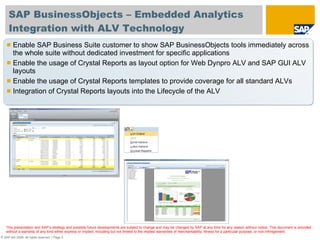
SAP BusinessObjects – Embedded Analytics  Integration with ALV Technology Enable SAP Business Suite customer to show SAP BusinessObjects tools immediately across the whole suite without dedicated investment for specific applications  Enable the usage of Crystal Reports as layout option for Web Dynpro ALV and SAP GUI ALV layouts Enable the usage of Crystal Reports templates to provide coverage for all standard ALVs Integration of Crystal Reports layouts into the Lifecycle of the ALV
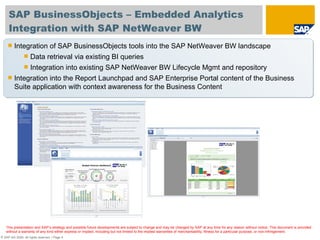
SAP BusinessObjects – Embedded Analytics  Integration with SAP NetWeaver BW Integration of SAP BusinessObjects tools into the SAP NetWeaver BW landscape Data retrieval via existing BI queries Integration into existing SAP NetWeaver BW Lifecycle Mgmt and repository Integration into the Report Launchpad and SAP Enterprise Portal content of the Business Suite application with context awareness for the Business Content
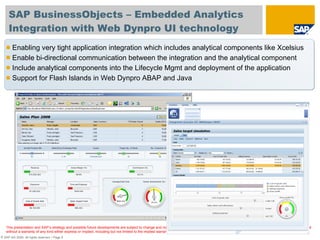
SAP BusinessObjects – Embedded Analytics  Integration with Web Dynpro UI technology Enabling very tight application integration which includes analytical components like Xcelsius Enable bi-directional communication between the integration and the analytical component Include analytical components into the Lifecycle Mgmt and deployment of the application Support for Flash Islands in Web Dynpro ABAP and Java

SAP BusinessObjects Embedded analytics

  • 1.
    SAP BusinessSuite Innovation2010 and SAP BusinessObjects
  • 2.
    Disclaimer This presentationoutlines our general product direction and should not be relied on in making a purchase decision. This presentation is not subject to your license agreement or any other agreement with SAP. SAP has no obligation to pursue any course of business outlined in this presentation or to develop or release any functionality mentioned in this presentation. This presentation and SAP's strategy and possible future developments are subject to change and may be changed by SAP at any time for any reason without notice. This document is provided without a warranty of any kind, either express or implied, including but not limited to, the implied warranties of merchantability, fitness for a particular purpose, or non-infringement. SAP assumes no responsibility for errors or omissions in this document, except if such damages were caused by SAP intentionally or grossly negligent.
  • 3.
    SAP BusinessObjects –Embedded Analytics Integration with ALV Technology Enable SAP Business Suite customer to show SAP BusinessObjects tools immediately across the whole suite without dedicated investment for specific applications Enable the usage of Crystal Reports as layout option for Web Dynpro ALV and SAP GUI ALV layouts Enable the usage of Crystal Reports templates to provide coverage for all standard ALVs Integration of Crystal Reports layouts into the Lifecycle of the ALV
  • 4.
    SAP BusinessObjects –Embedded Analytics Integration with SAP NetWeaver BW Integration of SAP BusinessObjects tools into the SAP NetWeaver BW landscape Data retrieval via existing BI queries Integration into existing SAP NetWeaver BW Lifecycle Mgmt and repository Integration into the Report Launchpad and SAP Enterprise Portal content of the Business Suite application with context awareness for the Business Content
  • 5.
    SAP BusinessObjects –Embedded Analytics Integration with Web Dynpro UI technology Enabling very tight application integration which includes analytical components like Xcelsius Enable bi-directional communication between the integration and the analytical component Include analytical components into the Lifecycle Mgmt and deployment of the application Support for Flash Islands in Web Dynpro ABAP and Java

Editor's Notes

  • #4 In the first scenario we will use the SAP List Viewer / ABAP List Viewer in combination with Crystal Reports. By creating an integration on top of the SAP list viewer we enable you to use Crystal Reports across all your SAP applications. You will be able to use Crystal Reports templates allowing you to set a standard style for reports that all your users can leverage. But you can also create custom reports using the Crystal Reports designer.
  • #5 The second integration area is focusing on the he integration of BusinessObjects tools with SAP NetWeaver BW as part of your SAP application landscape.This does not only mean to connect to the data from BW but also to integrate into the tools into typical workflows of BW. For example activating and updating Business Content or translating your content. In addition we are delivering an integration of the tools into the Report Launchpad of the BusinessSuite. Here you will be able to integrate reports into the Launchpad and enable to passing of an application context to the report itself.
  • #6 In the third scenario the focus is more on a developer oriented integration into Web Dynpro. This integration allows you and the SAP application developers to create a very tight integration between the actual application itself and the analytics created by Xcelsius. You can leverage the data from the application and use it as data source for your dashboard as well as create a bi-directional communication between the application and the Xcelsius dashboard. In the given example a simple selection in the table is passing the selected record to the Xcelsius dashboard and a change in the Xcelsius dashboard by simply moving some slides is changing the forecast in the backend system.