Wir unternehmen IT.
"...do it like the user!"
Simon Meggle
March 1st 2016
icinga camp berlin 2016
Agenda
www.consol.de
•  definition of "E2E" monitoring / differentiation
•  motivation
•  functionality of Sahi & Sikuli => synergy in Sakuli
•  Demo I: Sakuli on Win7
Ø functionality test
Ø anatomy of a Sakuli script
Ø how to "record" steps
Ø connecting to the Icinga2 API
•  Demo II: Sakuli on Docker
•  Video: a Sakuli test on a web store
•  performance graphs
"E2E": definition / differentiation
www.consol.de
•  test applications from the user's perspective
–  functionality (application internal)
–  performance (loading times etc)
•  testing environment at least similar to real environment
•  excellent addition to conventional monitoring
E2E does not mean...
•  load testing
•  replacing common monitoring
motivation
www.consol.de
•  founded in February 2014
•  goals:
–  combine two Open Source automation tools1) into one
–  modular interfaces to receiving systems
–  platform independent (Linux/Windows)
•  Open Source (Apache)
1) http://en.wikipedia.org/wiki/List_of_GUI_testing_tools
component 1: Sahi
www.consol.de
method based DOM access:
_assertContainsText("Logged in as: T_NAGIOS_APP", _div(4));
_click(_span("Loaded Run Ids"));
_assertExists(_table("cross_table_fixed"));
localhost:9999
Webserver
<table>
<tbody>
<tr>
<td>Alice</td>
<td>Bob</td>
</tr>
</tbody>
</table>
{js}
Web testing tool (http://sahi.co.in)
component 2: Sikuli
www.consol.de
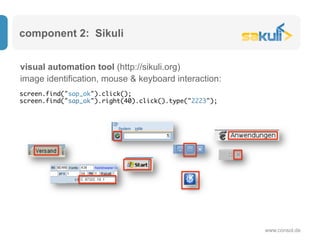
visual automation tool (http://sikuli.org)
screen.find("sap_ok").click();
screen.find("sap_ok").right(40).click().type("2223");
image identification, mouse & keyboard interaction:
comparison: Sahi & Sikuli
•  universal, complete screen content
•  more resource-intensive
•  always needs clear view
•  limited to pure web,
(no Flash, Java applets...)
•  fast
•  efficient to write, included
recorder
Sikuli Sahi
synergy with Sakuli
www.consol.de
•  allows to use both tools within one test
•  step-by-step code (JavaScript)
•  screenshot on failure
•  headless tests: xvnc & docker
•  "forwarder" module concept:
–  monitoring systems (Nagios, Icinga, ...)
–  logging systems (Splunk, Logstash, ...)
–  CI systems (Jenkins...)
–  databases (MySQL/MariaDB, ...)
–  [-?-]
Demo I (Windows7)
www.consol.de
•  functionality test
•  anatomy of a Sakuli script
•  how to "record" steps
•  connecting to the Icinga2 API
www.consol.de
Demo II: Sakuli in a Docker container
www.consol.de
•  Container lifetime
–  normally for only one test
–  for demonstration, Sakuli runs with "-loop 10"
•  Results are sent to a Naemon instance running in OMD inside Docker
•  screenshot on error
Video: a Sakuli test on a web store
www.consol.de
•  login
•  empty basket
•  order items
•  print order summary into pdf
•  check pdf
performance graphs
www.consol.de
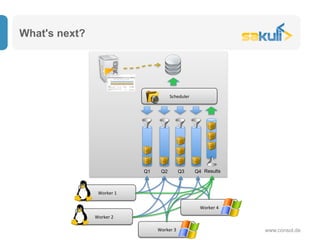
What's next?
www.consol.de
Scheduler	
Q1 Q2 Q3 Q4
Worker	1	
Worker	2	
Worker	3	
Results
Worker	4
Join us!
www.consol.de
https://github.com/ConSol/sakuli
http://www.sakuli.org
https://twitter.com/sakuli_e2e
www.consol.de
Questions
www.consol.de
Thanks!
www.consol.de
ConSol* Software GmbH
Franziskanerstraße 38
D-81669 München
Tel: +49-89-45841-100
Fax: +49-89-45841-111
info@consol.de
www.consol.de

Saluki - do it like a user

  • 1.
    Wir unternehmen IT. "...doit like the user!" Simon Meggle March 1st 2016 icinga camp berlin 2016
  • 2.
    Agenda www.consol.de •  definition of"E2E" monitoring / differentiation •  motivation •  functionality of Sahi & Sikuli => synergy in Sakuli •  Demo I: Sakuli on Win7 Ø functionality test Ø anatomy of a Sakuli script Ø how to "record" steps Ø connecting to the Icinga2 API •  Demo II: Sakuli on Docker •  Video: a Sakuli test on a web store •  performance graphs
  • 3.
    "E2E": definition /differentiation www.consol.de •  test applications from the user's perspective –  functionality (application internal) –  performance (loading times etc) •  testing environment at least similar to real environment •  excellent addition to conventional monitoring E2E does not mean... •  load testing •  replacing common monitoring
  • 4.
    motivation www.consol.de •  founded inFebruary 2014 •  goals: –  combine two Open Source automation tools1) into one –  modular interfaces to receiving systems –  platform independent (Linux/Windows) •  Open Source (Apache) 1) http://en.wikipedia.org/wiki/List_of_GUI_testing_tools
  • 5.
    component 1: Sahi www.consol.de methodbased DOM access: _assertContainsText("Logged in as: T_NAGIOS_APP", _div(4)); _click(_span("Loaded Run Ids")); _assertExists(_table("cross_table_fixed")); localhost:9999 Webserver <table> <tbody> <tr> <td>Alice</td> <td>Bob</td> </tr> </tbody> </table> {js} Web testing tool (http://sahi.co.in)
  • 6.
    component 2: Sikuli www.consol.de visualautomation tool (http://sikuli.org) screen.find("sap_ok").click(); screen.find("sap_ok").right(40).click().type("2223"); image identification, mouse & keyboard interaction:
  • 7.
    comparison: Sahi &Sikuli •  universal, complete screen content •  more resource-intensive •  always needs clear view •  limited to pure web, (no Flash, Java applets...) •  fast •  efficient to write, included recorder Sikuli Sahi
  • 8.
    synergy with Sakuli www.consol.de • allows to use both tools within one test •  step-by-step code (JavaScript) •  screenshot on failure •  headless tests: xvnc & docker •  "forwarder" module concept: –  monitoring systems (Nagios, Icinga, ...) –  logging systems (Splunk, Logstash, ...) –  CI systems (Jenkins...) –  databases (MySQL/MariaDB, ...) –  [-?-]
  • 9.
    Demo I (Windows7) www.consol.de • functionality test •  anatomy of a Sakuli script •  how to "record" steps •  connecting to the Icinga2 API
  • 10.
  • 11.
    Demo II: Sakuliin a Docker container www.consol.de •  Container lifetime –  normally for only one test –  for demonstration, Sakuli runs with "-loop 10" •  Results are sent to a Naemon instance running in OMD inside Docker •  screenshot on error
  • 12.
    Video: a Sakulitest on a web store www.consol.de •  login •  empty basket •  order items •  print order summary into pdf •  check pdf
  • 13.
  • 14.
    What's next? www.consol.de Scheduler Q1 Q2Q3 Q4 Worker 1 Worker 2 Worker 3 Results Worker 4
  • 15.
  • 16.
  • 17.
  • 18.
    www.consol.de ConSol* Software GmbH Franziskanerstraße38 D-81669 München Tel: +49-89-45841-100 Fax: +49-89-45841-111 info@consol.de www.consol.de