www.vrpinc.com
www.vrpinc.com
Presentation Content
• General Enhancements
• Mobile
• Chatter
• Communities
• Sales
• Service
• Analytics
• Force.com Customization
• Force.com Development
www.vrpinc.com
General Enhancements
Attach Larger Files, Up to 25 MB, to Objects
The size limit for attachments to objects has been increased from 5 MB to
25 MB. Collaborate more easily with larger attachments to cases, accounts,
orders, and other objects.
Receive Incoming Emails of up to 25 MB
The size limit for incoming email messages has been increased from 10
MB to 25 MB
www.vrpinc.com
General Enhancements
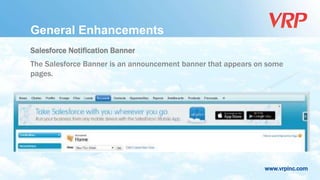
Salesforce Notification Banner
The Salesforce Banner is an announcement banner that appears on some
pages.
www.vrpinc.com
General Enhancements
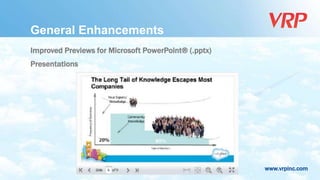
Improved Previews for Microsoft PowerPoint® (.pptx)
Presentations
www.vrpinc.com
General Enhancements
Updates to Translated Terminology (Russian included).
Middle Name and Suffix Fields Available for Person Objects
The Middle Name and Suffix fields are available for the following person
objects: Contact, Lead, Person Account, and User.
www.vrpinc.com
General Enhancements
Increased App Limits with Expansion Pack (for Professional Edition) and
Unlimited Apps Pack (for Enterprise Edition)
www.vrpinc.com
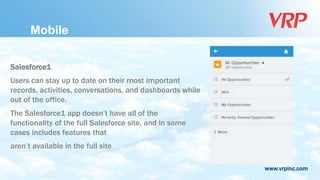
Salesforce1
Users can stay up to date on their most important
records, activities, conversations, and dashboards while
out of the office.
The Salesforce1 app doesn’t have all of the
functionality of the full Salesforce site, and in some
cases includes features that
aren’t available in the full site
Mobile
www.vrpinc.com
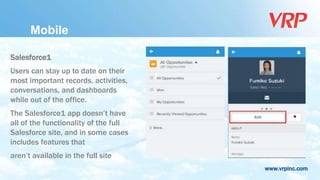
Salesforce1
Users can stay up to date on their
most important records, activities,
conversations, and dashboards
while out of the office.
The Salesforce1 app doesn’t have
all of the functionality of the full
Salesforce site, and in some cases
includes features that
aren’t available in the full site
Mobile
www.vrpinc.com
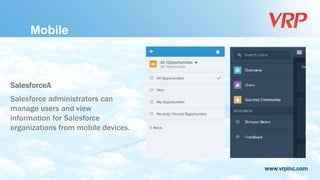
SalesforceA
Salesforce administrators can
manage users and view
information for Salesforce
organizations from mobile devices.
Mobile
www.vrpinc.com
 Users can install a desktop client called Salesforce Files for securely store,
sync, and share files between Chatter, their desktops, and mobile devices.
 You can see how many times a file has been downloaded, shared, liked,
and commented on from the File Detail Page.
Chatter
www.vrpinc.com
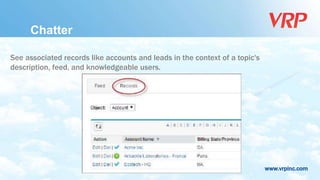
See associated records like accounts and leads in the context of a topic's
description, feed, and knowledgeable users.
Chatter
www.vrpinc.com
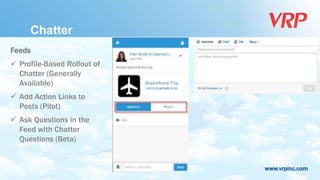
Feeds
 Profile-Based Rollout of
Chatter (Generally
Available)
 Add Action Links to
Posts (Pilot)
 Ask Questions in the
Feed with Chatter
Questions (Beta)
Chatter
www.vrpinc.com
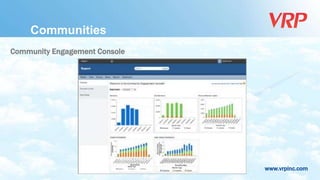
Community Engagement Console
Communities
www.vrpinc.com
Reputation
You can take advantage of a new, easy-to-use reputation system that builds on our
existing gamification capabilities. Simply use the default levels and point values that
appear when you enable reputation, or customize them to meet your needs.
Communities
www.vrpinc.com
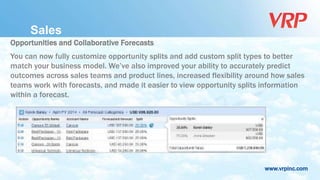
Opportunities and Collaborative Forecasts
You can now fully customize opportunity splits and add custom split types to better
match your business model. We’ve also improved your ability to accurately predict
outcomes across sales teams and product lines, increased flexibility around how sales
teams work with forecasts, and made it easier to view opportunity splits information
within a forecast.
Sales
www.vrpinc.com
Track and Predict Revenue from Custom Opportunity Fields
Now, your sales teams can forecast on custom currency fields on opportunities.
Sales
www.vrpinc.com
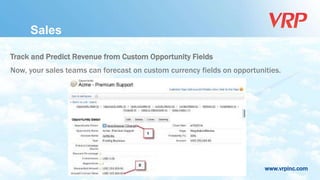
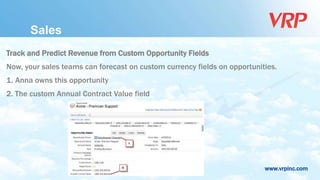
Track and Predict Revenue from Custom Opportunity Fields
Now, your sales teams can forecast on custom currency fields on opportunities.
1. Anna owns this opportunity
2. The custom Annual Contract Value field
Sales
www.vrpinc.com
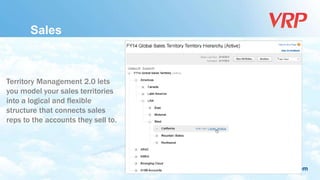
Territory Management 2.0 lets
you model your sales territories
into a logical and flexible
structure that connects sales
reps to the accounts they sell to.
Sales
www.vrpinc.com
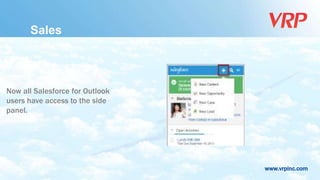
Now all Salesforce for Outlook
users have access to the side
panel.
Sales
www.vrpinc.com
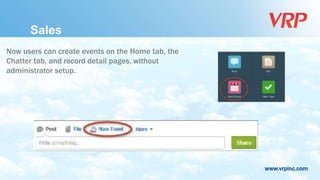
Now users can create events on the Home tab, the
Chatter tab, and record detail pages, without
administrator setup.
Sales
www.vrpinc.com
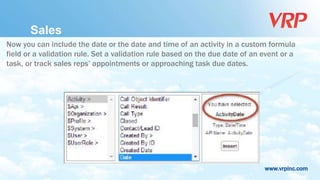
Now you can include the date or the date and time of an activity in a custom formula
field or a validation rule. Set a validation rule based on the due date of an event or a
task, or track sales reps’ appointments or approaching task due dates.
Sales
www.vrpinc.com
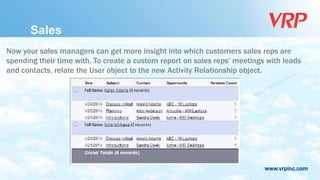
Now your sales managers can get more insight into which customers sales reps are
spending their time with. To create a custom report on sales reps’ meetings with leads
and contacts, relate the User object to the new Activity Relationship object.
Sales
www.vrpinc.com
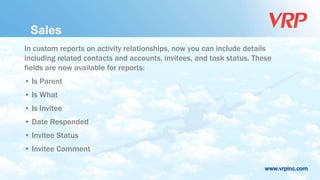
In custom reports on activity relationships, now you can include details
including related contacts and accounts, invitees, and task status. These
fields are now available for reports:
• Is Parent
• Is What
• Is Invitee
• Date Responded
• Invitee Status
• Invitee Comment
Sales
www.vrpinc.com
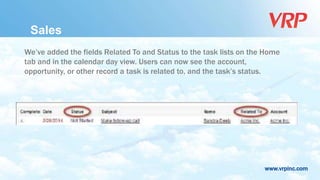
We’ve added the fields Related To and Status to the task lists on the Home
tab and in the calendar day view. Users can now see the account,
opportunity, or other record a task is related to, and the task’s status.
Sales
www.vrpinc.com
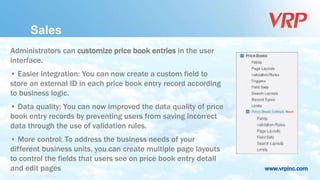
Administrators can customize price book entries in the user
interface.
• Easier integration: You can now create a custom field to
store an external ID in each price book entry record according
to business logic.
• Data quality: You can now improved the data quality of price
book entry records by preventing users from saving incorrect
data through the use of validation rules.
• More control: To address the business needs of your
different business units, you can create multiple page layouts
to control the fields that users see on price book entry detail
and edit pages
Sales
www.vrpinc.com
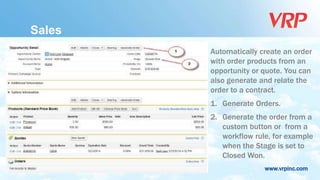
Automatically create an order
with order products from an
opportunity or quote. You can
also generate and relate the
order to a contract.
1. Generate Orders.
2. Generate the order from a
custom button or from a
workflow rule, for example
when the Stage is set to
Closed Won.
Sales
www.vrpinc.com
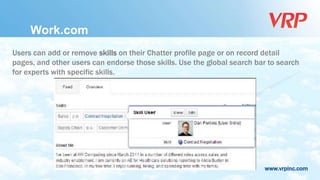
Users can add or remove skills on their Chatter profile page or on record detail
pages, and other users can endorse those skills. Use the global search bar to search
for experts with specific skills.
Work.com
www.vrpinc.com
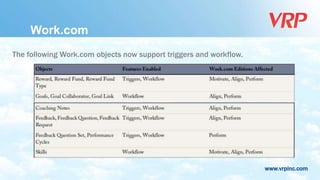
The following Work.com objects now support triggers and workflow.
Work.com
www.vrpinc.com
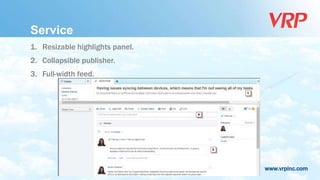
Service
1. Resizable highlights panel.
2. Collapsible publisher.
3. Full-width feed.
www.vrpinc.com
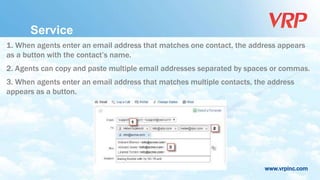
Service
1. When agents enter an email address that matches one contact, the address appears
as a button with the contact’s name.
2. Agents can copy and paste multiple email addresses separated by spaces or commas.
3. When agents enter an email address that matches multiple contacts, the address
appears as a button.
www.vrpinc.com
Service
Receive Larger Emails with On-Demand Email-to-Case
The size limit for email messages that come in through On-Demand Email-to-
Case had been increased from 10MB to 25MB, so customers can now send
longer emails and more attachments.
The 25MB per message limit applies to the entire message: the headers, the
body, all attachments, and the encoding.
www.vrpinc.com
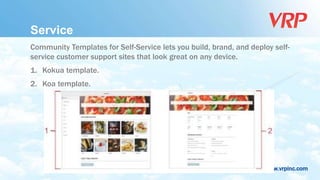
Service
Community Templates for Self-Service lets you build, brand, and deploy self-
service customer support sites that look great on any device.
1. Kokua template.
2. Koa template.
www.vrpinc.com
Service
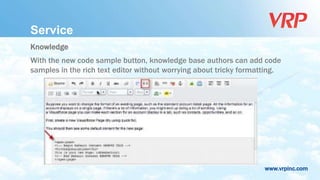
Knowledge
With the new code sample button, knowledge base authors can add code
samples in the rich text editor without worrying about tricky formatting.
www.vrpinc.com
Service
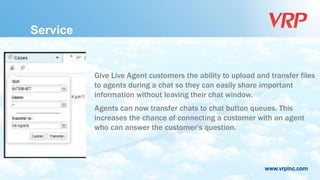
Give Live Agent customers the ability to upload and transfer files
to agents during a chat so they can easily share important
information without leaving their chat window.
Agents can now transfer chats to chat button queues. This
increases the chance of connecting a customer with an agent
who can answer the customer’s question.
www.vrpinc.com
Service
The Live Agent articles tool has been replaced with the improved Knowledge
One widget to give your agents better access to articles they can share with their
chat customers.
www.vrpinc.com
Service
Related Lists as Console Components
Add related lists to the sidebars of a Salesforce console to display relevant
information next to specific pages. For example, add related lists to a console’s
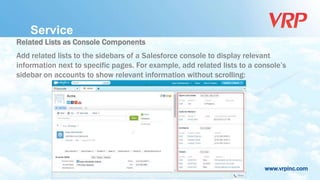
sidebar on accounts to show relevant information without scrolling:
www.vrpinc.com
Service
 Ask questions and get answers in Chatter with Chatter Questions.
 Social Customer Service allows you to respond to your customers via social
networks and capture important case information
www.vrpinc.com
Service
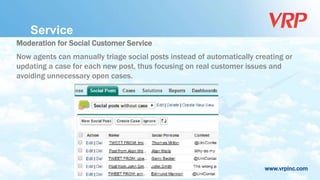
Moderation for Social Customer Service
Now agents can manually triage social posts instead of automatically creating or
updating a case for each new post, thus focusing on real customer issues and
avoiding unnecessary open cases.
www.vrpinc.com
Analytics
The REST-based Analytics Dashboards API gives you programmatic access to your
Salesforce dashboards. You can easily
integrate dashboard data into any web or mobile application, inside or outside the
Salesforce platform.
The Dashboards API enables you to:
• Retrieve a list of recently used dashboards
• Get metadata, data, and status for a specified dashboard
• Trigger a dashboard refresh
www.vrpinc.com
Analytics
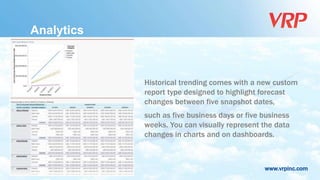
Historical trending comes with a new custom
report type designed to highlight forecast
changes between five snapshot dates,
such as five business days or five business
weeks. You can visually represent the data
changes in charts and on dashboards.
www.vrpinc.com
Analytics
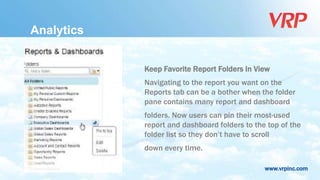
Keep Favorite Report Folders In View
Navigating to the report you want on the
Reports tab can be a bother when the folder
pane contains many report and dashboard
folders. Now users can pin their most-used
report and dashboard folders to the top of the
folder list so they don’t have to scroll
down every time.
www.vrpinc.com
Force.com Customization
Create custom permissions to give users access to custom processes or apps.
Custom permissions give you a way to provide access to custom processes or apps.
After you’ve created a custom permission and associated it with a process or app,
you can enable the permission in permission sets
www.vrpinc.com
Force.com Customization
General Administration
 Description Field Added to Login IP Ranges
 Limit Raised for External IDs
 More Specific Permissions for Managing Users
www.vrpinc.com
Force.com Customization
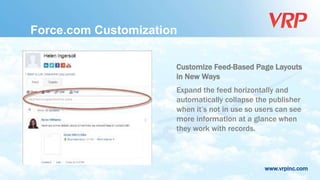
Customize Feed-Based Page Layouts
in New Ways
Expand the feed horizontally and
automatically collapse the publisher
when it’s not in use so users can see
more information at a glance when
they work with records.
www.vrpinc.com
Force.com Customization
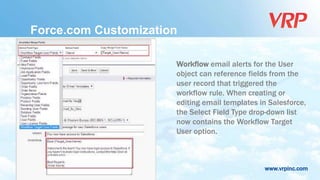
Workflow email alerts for the User
object can reference fields from the
user record that triggered the
workflow rule. When creating or
editing email templates in Salesforce,
the Select Field Type drop-down list
now contains the Workflow Target
User option.
www.vrpinc.com
Force.com Customization
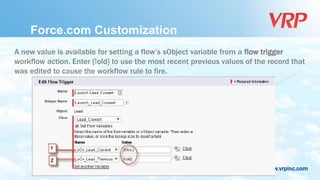
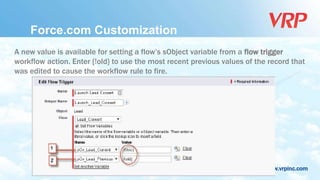
A new value is available for setting a flow’s sObject variable from a flow trigger
workflow action. Enter {!old} to use the most recent previous values of the record that
was edited to cause the workflow rule to fire.
www.vrpinc.com
Force.com Customization
A new value is available for setting a flow’s sObject variable from a flow trigger
workflow action. Enter {!old} to use the most recent previous values of the record that
was edited to cause the workflow rule to fire.
www.vrpinc.com
Thank you for
your attention

Salesforce Summer 14 Release Notes (Alexandra Vilks)

  • 1.
  • 2.
    www.vrpinc.com Presentation Content • GeneralEnhancements • Mobile • Chatter • Communities • Sales • Service • Analytics • Force.com Customization • Force.com Development
  • 3.
    www.vrpinc.com General Enhancements Attach LargerFiles, Up to 25 MB, to Objects The size limit for attachments to objects has been increased from 5 MB to 25 MB. Collaborate more easily with larger attachments to cases, accounts, orders, and other objects. Receive Incoming Emails of up to 25 MB The size limit for incoming email messages has been increased from 10 MB to 25 MB
  • 4.
    www.vrpinc.com General Enhancements Salesforce NotificationBanner The Salesforce Banner is an announcement banner that appears on some pages.
  • 5.
    www.vrpinc.com General Enhancements Improved Previewsfor Microsoft PowerPoint® (.pptx) Presentations
  • 6.
    www.vrpinc.com General Enhancements Updates toTranslated Terminology (Russian included). Middle Name and Suffix Fields Available for Person Objects The Middle Name and Suffix fields are available for the following person objects: Contact, Lead, Person Account, and User.
  • 7.
    www.vrpinc.com General Enhancements Increased AppLimits with Expansion Pack (for Professional Edition) and Unlimited Apps Pack (for Enterprise Edition)
  • 8.
    www.vrpinc.com Salesforce1 Users can stayup to date on their most important records, activities, conversations, and dashboards while out of the office. The Salesforce1 app doesn’t have all of the functionality of the full Salesforce site, and in some cases includes features that aren’t available in the full site Mobile
  • 9.
    www.vrpinc.com Salesforce1 Users can stayup to date on their most important records, activities, conversations, and dashboards while out of the office. The Salesforce1 app doesn’t have all of the functionality of the full Salesforce site, and in some cases includes features that aren’t available in the full site Mobile
  • 10.
    www.vrpinc.com SalesforceA Salesforce administrators can manageusers and view information for Salesforce organizations from mobile devices. Mobile
  • 11.
    www.vrpinc.com  Users caninstall a desktop client called Salesforce Files for securely store, sync, and share files between Chatter, their desktops, and mobile devices.  You can see how many times a file has been downloaded, shared, liked, and commented on from the File Detail Page. Chatter
  • 12.
    www.vrpinc.com See associated recordslike accounts and leads in the context of a topic's description, feed, and knowledgeable users. Chatter
  • 13.
    www.vrpinc.com Feeds  Profile-Based Rolloutof Chatter (Generally Available)  Add Action Links to Posts (Pilot)  Ask Questions in the Feed with Chatter Questions (Beta) Chatter
  • 14.
  • 15.
    www.vrpinc.com Reputation You can takeadvantage of a new, easy-to-use reputation system that builds on our existing gamification capabilities. Simply use the default levels and point values that appear when you enable reputation, or customize them to meet your needs. Communities
  • 16.
    www.vrpinc.com Opportunities and CollaborativeForecasts You can now fully customize opportunity splits and add custom split types to better match your business model. We’ve also improved your ability to accurately predict outcomes across sales teams and product lines, increased flexibility around how sales teams work with forecasts, and made it easier to view opportunity splits information within a forecast. Sales
  • 17.
    www.vrpinc.com Track and PredictRevenue from Custom Opportunity Fields Now, your sales teams can forecast on custom currency fields on opportunities. Sales
  • 18.
    www.vrpinc.com Track and PredictRevenue from Custom Opportunity Fields Now, your sales teams can forecast on custom currency fields on opportunities. 1. Anna owns this opportunity 2. The custom Annual Contract Value field Sales
  • 19.
    www.vrpinc.com Territory Management 2.0lets you model your sales territories into a logical and flexible structure that connects sales reps to the accounts they sell to. Sales
  • 20.
    www.vrpinc.com Now all Salesforcefor Outlook users have access to the side panel. Sales
  • 21.
    www.vrpinc.com Now users cancreate events on the Home tab, the Chatter tab, and record detail pages, without administrator setup. Sales
  • 22.
    www.vrpinc.com Now you caninclude the date or the date and time of an activity in a custom formula field or a validation rule. Set a validation rule based on the due date of an event or a task, or track sales reps’ appointments or approaching task due dates. Sales
  • 23.
    www.vrpinc.com Now your salesmanagers can get more insight into which customers sales reps are spending their time with. To create a custom report on sales reps’ meetings with leads and contacts, relate the User object to the new Activity Relationship object. Sales
  • 24.
    www.vrpinc.com In custom reportson activity relationships, now you can include details including related contacts and accounts, invitees, and task status. These fields are now available for reports: • Is Parent • Is What • Is Invitee • Date Responded • Invitee Status • Invitee Comment Sales
  • 25.
    www.vrpinc.com We’ve added thefields Related To and Status to the task lists on the Home tab and in the calendar day view. Users can now see the account, opportunity, or other record a task is related to, and the task’s status. Sales
  • 26.
    www.vrpinc.com Administrators can customizeprice book entries in the user interface. • Easier integration: You can now create a custom field to store an external ID in each price book entry record according to business logic. • Data quality: You can now improved the data quality of price book entry records by preventing users from saving incorrect data through the use of validation rules. • More control: To address the business needs of your different business units, you can create multiple page layouts to control the fields that users see on price book entry detail and edit pages Sales
  • 27.
    www.vrpinc.com Automatically create anorder with order products from an opportunity or quote. You can also generate and relate the order to a contract. 1. Generate Orders. 2. Generate the order from a custom button or from a workflow rule, for example when the Stage is set to Closed Won. Sales
  • 28.
    www.vrpinc.com Users can addor remove skills on their Chatter profile page or on record detail pages, and other users can endorse those skills. Use the global search bar to search for experts with specific skills. Work.com
  • 29.
    www.vrpinc.com The following Work.comobjects now support triggers and workflow. Work.com
  • 30.
    www.vrpinc.com Service 1. Resizable highlightspanel. 2. Collapsible publisher. 3. Full-width feed.
  • 31.
    www.vrpinc.com Service 1. When agentsenter an email address that matches one contact, the address appears as a button with the contact’s name. 2. Agents can copy and paste multiple email addresses separated by spaces or commas. 3. When agents enter an email address that matches multiple contacts, the address appears as a button.
  • 32.
    www.vrpinc.com Service Receive Larger Emailswith On-Demand Email-to-Case The size limit for email messages that come in through On-Demand Email-to- Case had been increased from 10MB to 25MB, so customers can now send longer emails and more attachments. The 25MB per message limit applies to the entire message: the headers, the body, all attachments, and the encoding.
  • 33.
    www.vrpinc.com Service Community Templates forSelf-Service lets you build, brand, and deploy self- service customer support sites that look great on any device. 1. Kokua template. 2. Koa template.
  • 34.
    www.vrpinc.com Service Knowledge With the newcode sample button, knowledge base authors can add code samples in the rich text editor without worrying about tricky formatting.
  • 35.
    www.vrpinc.com Service Give Live Agentcustomers the ability to upload and transfer files to agents during a chat so they can easily share important information without leaving their chat window. Agents can now transfer chats to chat button queues. This increases the chance of connecting a customer with an agent who can answer the customer’s question.
  • 36.
    www.vrpinc.com Service The Live Agentarticles tool has been replaced with the improved Knowledge One widget to give your agents better access to articles they can share with their chat customers.
  • 37.
    www.vrpinc.com Service Related Lists asConsole Components Add related lists to the sidebars of a Salesforce console to display relevant information next to specific pages. For example, add related lists to a console’s sidebar on accounts to show relevant information without scrolling:
  • 38.
    www.vrpinc.com Service  Ask questionsand get answers in Chatter with Chatter Questions.  Social Customer Service allows you to respond to your customers via social networks and capture important case information
  • 39.
    www.vrpinc.com Service Moderation for SocialCustomer Service Now agents can manually triage social posts instead of automatically creating or updating a case for each new post, thus focusing on real customer issues and avoiding unnecessary open cases.
  • 40.
    www.vrpinc.com Analytics The REST-based AnalyticsDashboards API gives you programmatic access to your Salesforce dashboards. You can easily integrate dashboard data into any web or mobile application, inside or outside the Salesforce platform. The Dashboards API enables you to: • Retrieve a list of recently used dashboards • Get metadata, data, and status for a specified dashboard • Trigger a dashboard refresh
  • 41.
    www.vrpinc.com Analytics Historical trending comeswith a new custom report type designed to highlight forecast changes between five snapshot dates, such as five business days or five business weeks. You can visually represent the data changes in charts and on dashboards.
  • 42.
    www.vrpinc.com Analytics Keep Favorite ReportFolders In View Navigating to the report you want on the Reports tab can be a bother when the folder pane contains many report and dashboard folders. Now users can pin their most-used report and dashboard folders to the top of the folder list so they don’t have to scroll down every time.
  • 43.
    www.vrpinc.com Force.com Customization Create custompermissions to give users access to custom processes or apps. Custom permissions give you a way to provide access to custom processes or apps. After you’ve created a custom permission and associated it with a process or app, you can enable the permission in permission sets
  • 44.
    www.vrpinc.com Force.com Customization General Administration Description Field Added to Login IP Ranges  Limit Raised for External IDs  More Specific Permissions for Managing Users
  • 45.
    www.vrpinc.com Force.com Customization Customize Feed-BasedPage Layouts in New Ways Expand the feed horizontally and automatically collapse the publisher when it’s not in use so users can see more information at a glance when they work with records.
  • 46.
    www.vrpinc.com Force.com Customization Workflow emailalerts for the User object can reference fields from the user record that triggered the workflow rule. When creating or editing email templates in Salesforce, the Select Field Type drop-down list now contains the Workflow Target User option.
  • 47.
    www.vrpinc.com Force.com Customization A newvalue is available for setting a flow’s sObject variable from a flow trigger workflow action. Enter {!old} to use the most recent previous values of the record that was edited to cause the workflow rule to fire.
  • 48.
    www.vrpinc.com Force.com Customization A newvalue is available for setting a flow’s sObject variable from a flow trigger workflow action. Enter {!old} to use the most recent previous values of the record that was edited to cause the workflow rule to fire.
  • 49.