Sakai WebApp Structure Aaron Zeckoski [email_address]
What are we talking about? Let’s review some basics about web applications  (to get on the same page) 3-tier architecture  (or n-tier where n=3) Look at the basics of Sakai webapps Go over some Sakai app file structure conventions Talk about some package naming conventions
3-tier Application Architecture External 3-tier architecture Presentation Business Logic Data Access Database User Other Apps
Presentation Layer This is what the user sees and interacts with Sometimes called the GUI or client view Should not contain business logic or data access code 3-tier architecture Presentation Business Logic Data Access
Logic (Business) Layer The set of rules for processing business information Sometimes called middle tier or backend Should not contain presentation or data access code 3-tier architecture Presentation Business Logic Data Access
Data Access Layer The physical storage layer for data persistence Manages access to DB or file system Should not contain presentation or business logic code 3-tier architecture Presentation Business Logic Data Access
The 3-tier keys Each tier should be independent and should not expose dependencies related to the implementation Unconnected tiers should not communicate 3-tier architecture Presentation Business Logic Data Access
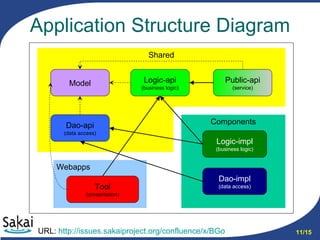
Application Structure and Dependencies Implementing the 3-tier structure in Sakai requires use of 3 deployment areas Shared - Tomcat shared library space More things than you would think will have to go here for your app to work Components - Sakai application context This is how Sakai maintains its collection of beans WebApp - Tomcat webapps (for your app/tool) Anything specific to your app gets deployed the same way it would if it were outside Sakai Note:   Deployment areas do not map to tiers URL:  http://issues.sakaiproject.org/confluence/x/BGo
More about Shared  and Components Shared Spring framework Hibernate Some commons libraries Almost all APIs Components Framework Services All other service level libraries
More about the Webapp Should contain your presentation framework (RSF, JSF, etc.) This should not be in shared! No direct access to the Sakai database Use a logic/dao layer for this Move business logic out of here Put it in the logic service layer
Application Structure Diagram URL:  http://issues.sakaiproject.org/confluence/x/BGo Webapps Components Shared Logic-impl (business logic) Tool (presentation) Dao-impl (data access) Public-api (service) Logic-api (business logic) Dao-api (data access) Model
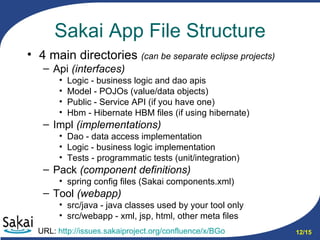
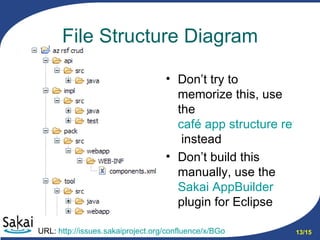
Sakai App File Structure 4 main directories  (can be separate eclipse projects) Api  (interfaces) Logic - business logic and dao apis Model - POJOs (value/data objects) Public - Service API (if you have one) Hbm - Hibernate HBM files (if using hibernate) Impl  (implementations) Dao - data access implementation Logic - business logic implementation Tests - programmatic tests (unit/integration) Pack  (component definitions) spring config files (Sakai components.xml) Tool  (webapp) src/java - java classes used by your tool only src/webapp - xml, jsp, html, other meta files URL:  http://issues.sakaiproject.org/confluence/x/BGo
File Structure Diagram Don’t try to memorize this, use the  café app structure reference   instead Don’t build this manually, use the  Sakai  AppBuilder   plugin  for Eclipse URL:  http://issues.sakaiproject.org/confluence/x/BGo
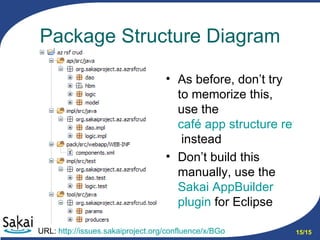
Sakai App Package Structure org.sakaiproject - base package prefix You could also use your local prefix (e.g. uk.ac.cam.caret) org.sakaiproject .app-name Use something unique for app-name, long is good dao - data access hbm - hibernate mapping files logic - business logic model - value/data objects service - public api tool - webapp Add  impl  to represent implementations URL:  http://issues.sakaiproject.org/confluence/x/BGo
Package Structure Diagram As before, don’t try to memorize this, use the  café app structure reference   instead Don’t build this manually, use the  Sakai  AppBuilder   plugin   for Eclipse URL:  http://issues.sakaiproject.org/confluence/x/BGo
Reference Materials Refer to the  Programmers Café Use the  café app structure reference  Try out the  Sakai  AppBuilder   plugin   Take advantage of the power of Eclipse to auto-complete and organize Use the Package Explorer Java view
Questions?

Sakai App Structure

  • 1.
    Sakai WebApp StructureAaron Zeckoski [email_address]
  • 2.
    What are wetalking about? Let’s review some basics about web applications (to get on the same page) 3-tier architecture (or n-tier where n=3) Look at the basics of Sakai webapps Go over some Sakai app file structure conventions Talk about some package naming conventions
  • 3.
    3-tier Application ArchitectureExternal 3-tier architecture Presentation Business Logic Data Access Database User Other Apps
  • 4.
    Presentation Layer Thisis what the user sees and interacts with Sometimes called the GUI or client view Should not contain business logic or data access code 3-tier architecture Presentation Business Logic Data Access
  • 5.
    Logic (Business) LayerThe set of rules for processing business information Sometimes called middle tier or backend Should not contain presentation or data access code 3-tier architecture Presentation Business Logic Data Access
  • 6.
    Data Access LayerThe physical storage layer for data persistence Manages access to DB or file system Should not contain presentation or business logic code 3-tier architecture Presentation Business Logic Data Access
  • 7.
    The 3-tier keysEach tier should be independent and should not expose dependencies related to the implementation Unconnected tiers should not communicate 3-tier architecture Presentation Business Logic Data Access
  • 8.
    Application Structure andDependencies Implementing the 3-tier structure in Sakai requires use of 3 deployment areas Shared - Tomcat shared library space More things than you would think will have to go here for your app to work Components - Sakai application context This is how Sakai maintains its collection of beans WebApp - Tomcat webapps (for your app/tool) Anything specific to your app gets deployed the same way it would if it were outside Sakai Note: Deployment areas do not map to tiers URL: http://issues.sakaiproject.org/confluence/x/BGo
  • 9.
    More about Shared and Components Shared Spring framework Hibernate Some commons libraries Almost all APIs Components Framework Services All other service level libraries
  • 10.
    More about theWebapp Should contain your presentation framework (RSF, JSF, etc.) This should not be in shared! No direct access to the Sakai database Use a logic/dao layer for this Move business logic out of here Put it in the logic service layer
  • 11.
    Application Structure DiagramURL: http://issues.sakaiproject.org/confluence/x/BGo Webapps Components Shared Logic-impl (business logic) Tool (presentation) Dao-impl (data access) Public-api (service) Logic-api (business logic) Dao-api (data access) Model
  • 12.
    Sakai App FileStructure 4 main directories (can be separate eclipse projects) Api (interfaces) Logic - business logic and dao apis Model - POJOs (value/data objects) Public - Service API (if you have one) Hbm - Hibernate HBM files (if using hibernate) Impl (implementations) Dao - data access implementation Logic - business logic implementation Tests - programmatic tests (unit/integration) Pack (component definitions) spring config files (Sakai components.xml) Tool (webapp) src/java - java classes used by your tool only src/webapp - xml, jsp, html, other meta files URL: http://issues.sakaiproject.org/confluence/x/BGo
  • 13.
    File Structure DiagramDon’t try to memorize this, use the café app structure reference instead Don’t build this manually, use the Sakai AppBuilder plugin for Eclipse URL: http://issues.sakaiproject.org/confluence/x/BGo
  • 14.
    Sakai App PackageStructure org.sakaiproject - base package prefix You could also use your local prefix (e.g. uk.ac.cam.caret) org.sakaiproject .app-name Use something unique for app-name, long is good dao - data access hbm - hibernate mapping files logic - business logic model - value/data objects service - public api tool - webapp Add impl to represent implementations URL: http://issues.sakaiproject.org/confluence/x/BGo
  • 15.
    Package Structure DiagramAs before, don’t try to memorize this, use the café app structure reference instead Don’t build this manually, use the Sakai AppBuilder plugin for Eclipse URL: http://issues.sakaiproject.org/confluence/x/BGo
  • 16.
    Reference Materials Referto the Programmers Café Use the café app structure reference Try out the Sakai AppBuilder plugin Take advantage of the power of Eclipse to auto-complete and organize Use the Package Explorer Java view
  • 17.