How to collect your web history using Apple Safari Monica Bulger, Oxford Internet Institute RIN Project, August 2010
Collecting your web history ~  We ask that you collect your web activities over a  2-3 day period.  Choosing days when you are most actively working on your research (as opposed to teaching   or service) would be ideal. ~  Please use login information provided in e-mail. ~  You may opt out or pause recording at any time.
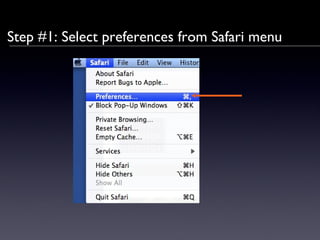
Step #1: Select preferences from Safari menu
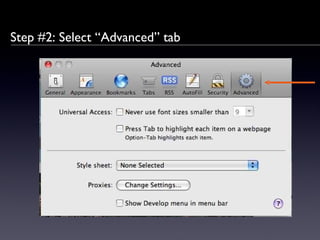
Step #2: Select “Advanced” tab
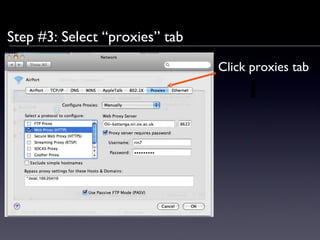
Step #3: Select “proxies” tab Click proxies tab
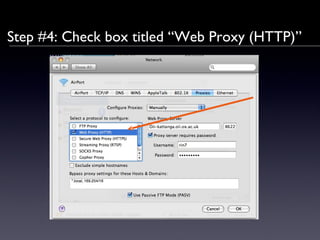
Step #4: Check box titled “Web Proxy (HTTP)”
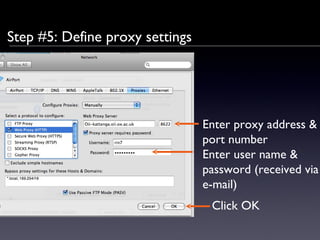
Step #5: Define proxy settings Enter proxy address & port number Enter user name & password (received via e-mail) Click OK
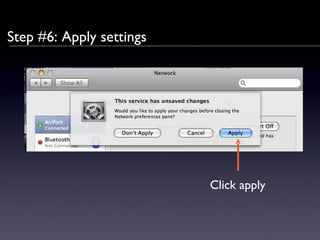
Step #6: Apply settings Click apply
Step #7: Quit Safari & re-launch
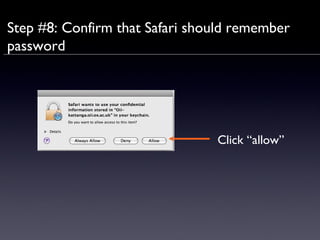
Step #8: Confirm that Safari should remember password Click “allow”
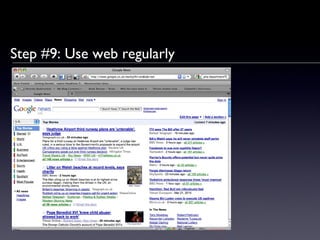
Step #9: Use web regularly
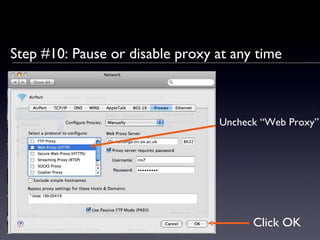
Step #10: Pause or disable proxy at any time Uncheck “Web Proxy” Click OK
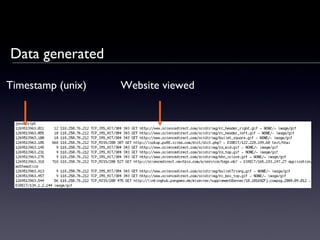
Data generated Timestamp (unix) Website viewed
Frequently asked questions ~  The proxy server should not slow down your access beyond possibly a second or two. If a website fails to load, disable the proxy server. ~  Regarding privacy: We will not collect keystrokes. None of your personally identifying information will be recorded.
Frequently asked questions (continued) ~  If using multiple computers, please feel free to use our proxy server for each of them (even at the same time). ~   If you forget the password, or the password does not work, click  “ c ancel ”   when prompted for a password, enter the settings menu, and un-check “Web Proxy ”  box  to disable the proxy server. Please send us an e-mail to receive a new password.
Many thanks for your help! Please contact Monica Bulger  ( [email_address] )  if you have any questions or encounter any difficulties.

Safari instructions

  • 1.
    How to collectyour web history using Apple Safari Monica Bulger, Oxford Internet Institute RIN Project, August 2010
  • 2.
    Collecting your webhistory ~ We ask that you collect your web activities over a 2-3 day period. Choosing days when you are most actively working on your research (as opposed to teaching or service) would be ideal. ~ Please use login information provided in e-mail. ~ You may opt out or pause recording at any time.
  • 3.
    Step #1: Selectpreferences from Safari menu
  • 4.
    Step #2: Select“Advanced” tab
  • 5.
    Step #3: Select“proxies” tab Click proxies tab
  • 6.
    Step #4: Checkbox titled “Web Proxy (HTTP)”
  • 7.
    Step #5: Defineproxy settings Enter proxy address & port number Enter user name & password (received via e-mail) Click OK
  • 8.
    Step #6: Applysettings Click apply
  • 9.
    Step #7: QuitSafari & re-launch
  • 10.
    Step #8: Confirmthat Safari should remember password Click “allow”
  • 11.
    Step #9: Useweb regularly
  • 12.
    Step #10: Pauseor disable proxy at any time Uncheck “Web Proxy” Click OK
  • 13.
    Data generated Timestamp(unix) Website viewed
  • 14.
    Frequently asked questions~ The proxy server should not slow down your access beyond possibly a second or two. If a website fails to load, disable the proxy server. ~ Regarding privacy: We will not collect keystrokes. None of your personally identifying information will be recorded.
  • 15.
    Frequently asked questions(continued) ~ If using multiple computers, please feel free to use our proxy server for each of them (even at the same time). ~ If you forget the password, or the password does not work, click “ c ancel ” when prompted for a password, enter the settings menu, and un-check “Web Proxy ” box to disable the proxy server. Please send us an e-mail to receive a new password.
  • 16.
    Many thanks foryour help! Please contact Monica Bulger ( [email_address] ) if you have any questions or encounter any difficulties.