Embest S3CEV40 GettingStart
使*用*说*明
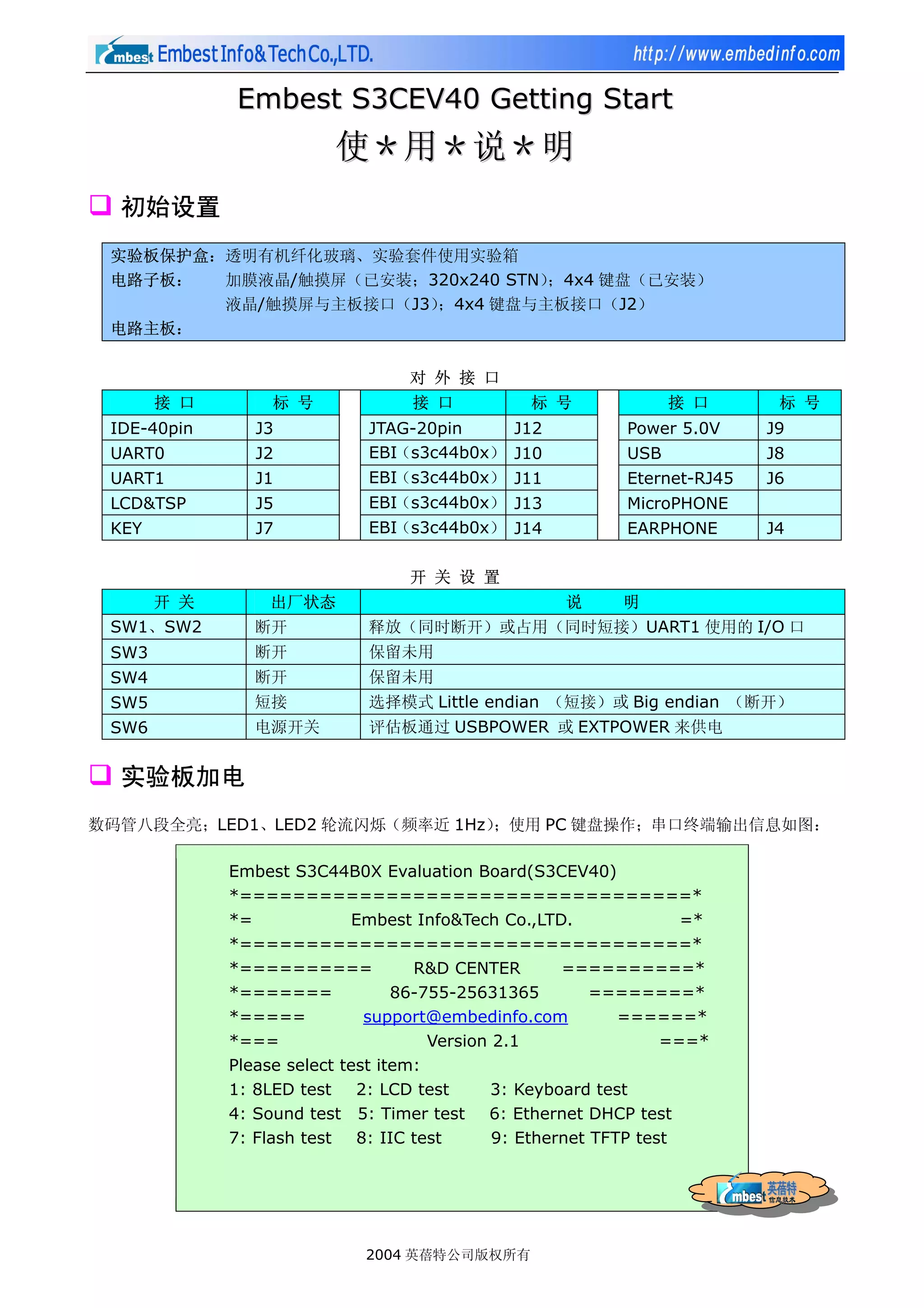
初始设置
实验板保护盒:透明有机纤化玻璃、实验套件使用实验箱
电路子板: 加膜液晶/触摸屏(已安装;320x240 STN);4x4 键盘(已安装)
液晶/触摸屏与主板接口(J3);4x4 键盘与主板接口(J2)
电路主板:
对 外 接 口
接 口 标 号 接 口 标 号 接 口 标 号
IDE-40pin J3 JTAG-20pin J12 Power 5.0V J9
UART0 J2 EBI(s3c44b0x) J10 USB J8
UART1 J1 EBI(s3c44b0x) J11 Eternet-RJ45 J6
LCD&TSP J5 EBI(s3c44b0x) J13 MicroPHONE
KEY J7 EBI(s3c44b0x) J14 EARPHONE J4
开 关 设 置
开 关 出厂状态 说 明
SW1、SW2 断开 释放(同时断开)或占用(同时短接)UART1 使用的 I/O 口
SW3 断开 保留未用
SW4 断开 保留未用
SW5 短接 选择模式 Little endian (短接)或 Big endian (断开)
SW6 电源开关 评估板通过 USBPOWER 或 EXTPOWER 来供电
实验板加电
数码管八段全亮;LED1、LED2 轮流闪烁(频率近 1Hz);使用 PC 键盘操作;串口终端输出信息如图:
Embest S3C44B0X Evaluation Board(S3CEV40)
*==================================*
*= Embest Info&Tech Co.,LTD. =*
*==================================*
*========== R&D CENTER ==========*
*======= 86-755-25631365 ========*
*===== support@embedinfo.com ======*
*=== Version 2.1 ===*
Please select test item:
1: 8LED test 2: LCD test 3: Keyboard test
4: Sound test 5: Timer test 6: Ethernet DHCP test
7: Flash test 8: IIC test 9: Ethernet TFTP test
0: TouchScreen test
>
2004 英蓓特公司版权所有
2.
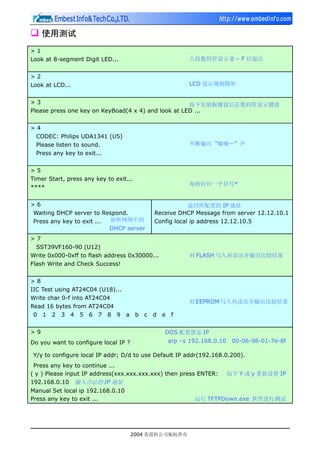
使用测试
>1
Look at 8-segmentDigit LED... 八段数码管显示 0 – F 后退出
>2
Look at LCD... LCD 显示规则图形
>3 按下实验板键盘后在数码管显示键值
Please press one key on KeyBoad(4 x 4) and look at LED ...
>4
CODEC: Philips UDA1341 (U5)
Please listen to sound. 不断输出 ”嘀嘀…” 声
Press any key to exit...
>5
Timer Start, press any key to exit...
每秒打印一个符号*
****
>6 返回所配置的 IP 地址
Waiting DHCP server to Respond. Receive DHCP Message from server 12.12.10.1
Press any key to exit ... 侦听网络中的 Config local ip address 12.12.10.5
DHCP server
>7
SST39VF160-90 (U12)
Write 0x000-0xff to flash address 0x30000... 对 FLASH 写入再读出并输出比较结果
Flash Write and Check Success!
>8
IIC Test using AT24C04 (U18)...
Write char 0-f into AT24C04
对 EEPROM 写入再读出并输出比较结果
Read 16 bytes from AT24C04
0 1 2 3 4 5 6 7 8 9 a b c d e f
>9 DOS 配置静态 IP
Do you want to configure local IP ? arp –s 192.168.0.10 00-06-98-01-7e-8f
Y/y to configure local IP addr; D/d to use Default IP addr(192.168.0.200).
Press any key to continue ...
( y ) Please input IP address(xxx.xxx.xxx.xxx) then press ENTER: 按下 Y 或 y 重新设置 IP
192.168.0.10 输入合法的 IP 地址
Manual Set local ip 192.168.0.10
Press any key to exit ... 运行 TFTPDown.exe 软件进行测试
2004 英蓓特公司版权所有
3.
>0
Touch Screen coordinateRang in: LCD 显示 16 小格
(Xmin,Ymin) is :(xxx,xxx) 触摸后串口输出
(Xmax,Ymax) is :(xxx,xxx) 所在坐标值
To use current settings. Press N/n key.
Want to Set Again(Y/N)? Y 或 y 按下后再触摸显示屏的任意对角进行坐标定位
Touch TSP's Cornor to ensure Xmax,Ymax,Xmax,Xmin
User touch coordinate(X,Y) is :(0239,0679) 第一个顶角坐标
User touch coordinate(X,Y) is :(0608,0303) 第二个顶角坐标
Touch Screen coordinate Rang in:
(Xmin,Ymin) is :(0239,0303) (x1,y1)
(Xmax,Ymax) is :(0608,0679) (x2,y2)
To use current settings. Press N/n key.
Want to Set Again(Y/N)? N 或 n 按下后用户可以触摸显示屏输出所在坐标值
* 如果定位范围误差过大,按下 Y 或 y 重新定位即可,正常 x2-x1 略大于 320;y2-y1 略大于 240
Pixel: 320 X 240. Coordinate Rang in: (0,0) - (320,240)
LCD TouchScreen Test Example(please touch LCD screen)
press any key to exit...
X-Posion[AIN1] is 0097 Y-Posion[AIN0] is 0132
X-Posion[AIN1] is 0117 Y-Posion[AIN0] is 0132
实验板加电后,LCD 屏显示箭头图及测试功能选项,并通知用户使用 PC 键盘进行测试。信息界面如下:
(箭头图形位置)
Embest S3C44B0X Evaluation Board(S3CEV40)
*==== Embest Info&Tech Co.,LTD. ====*
Please select test item:
1: 8LED test 2: LCD test 3: Keyboard test
4: Sound test 5: Timer test 6: Ethernet DHCP test
7: Flash test 8: IIC test 9: Ethernet TFTP test
0: TouchScreen test
>
Note: Please connect UART0(115.2K,8,N,1) to PC COMx
2004 英蓓特公司版权所有
4.
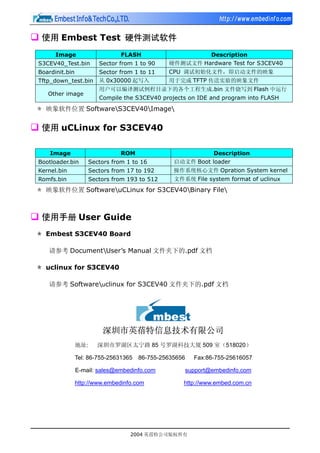
使用 Embest Test硬件测试软件
Image FLASH Description
S3CEV40_Test.bin Sector from 1 to 90 硬件测试文件 Hardware Test for S3CEV40
Boardinit.bin Sector from 1 to 11 CPU 调试初始化文件,即启动文件的映象
Tftp_down_test.bin 从 0x30000 起写入 用于完成 TFTP 传送实验的映象文件
用户可以编译测试例程目录下的各个工程生成.bin 文件烧写到 Flash 中运行
Other image
Compile the S3CEV40 projects on IDE and program into FLASH
* 映象软件位置 SoftwareS3CEV40Image
使用 uCLinux for S3CEV40
Image ROM Description
Bootloader.bin Sectors from 1 to 16 启动文件 Boot loader
Kernel.bin Sectors from 17 to 192 操作系统核心文件 Opration System kernel
Romfs.bin Sectors from 193 to 512 文件系统 File system format of uclinux
* 映象软件位置 SoftwareuCLinux for S3CEV40Binary File
使用手册 User Guide
* Embest S3CEV40 Board
请参考 DocumentUser’s Manual 文件夹下的.pdf 文档
* uclinux for S3CEV40
请参考 Softwareuclinux for S3CEV40 文件夹下的.pdf 文档
深圳市英蓓特信息技术有限公司
地址: 深圳市罗湖区太宁路 85 号罗湖科技大厦 509 室(518020)
Tel: 86-755-25631365 86-755-25635656 Fax:86-755-25616057
E-mail: sales@embedinfo.com support@embedinfo.com
http://www.embedinfo.com http://www.embed.com.cn
2004 英蓓特公司版权所有

![>0
Touch Screen coordinate Rang in: LCD 显示 16 小格
(Xmin,Ymin) is :(xxx,xxx) 触摸后串口输出
(Xmax,Ymax) is :(xxx,xxx) 所在坐标值
To use current settings. Press N/n key.
Want to Set Again(Y/N)? Y 或 y 按下后再触摸显示屏的任意对角进行坐标定位
Touch TSP's Cornor to ensure Xmax,Ymax,Xmax,Xmin
User touch coordinate(X,Y) is :(0239,0679) 第一个顶角坐标
User touch coordinate(X,Y) is :(0608,0303) 第二个顶角坐标
Touch Screen coordinate Rang in:
(Xmin,Ymin) is :(0239,0303) (x1,y1)
(Xmax,Ymax) is :(0608,0679) (x2,y2)
To use current settings. Press N/n key.
Want to Set Again(Y/N)? N 或 n 按下后用户可以触摸显示屏输出所在坐标值
* 如果定位范围误差过大,按下 Y 或 y 重新定位即可,正常 x2-x1 略大于 320;y2-y1 略大于 240
Pixel: 320 X 240. Coordinate Rang in: (0,0) - (320,240)
LCD TouchScreen Test Example(please touch LCD screen)
press any key to exit...
X-Posion[AIN1] is 0097 Y-Posion[AIN0] is 0132
X-Posion[AIN1] is 0117 Y-Posion[AIN0] is 0132
实验板加电后,LCD 屏显示箭头图及测试功能选项,并通知用户使用 PC 键盘进行测试。信息界面如下:
(箭头图形位置)
Embest S3C44B0X Evaluation Board(S3CEV40)
*==== Embest Info&Tech Co.,LTD. ====*
Please select test item:
1: 8LED test 2: LCD test 3: Keyboard test
4: Sound test 5: Timer test 6: Ethernet DHCP test
7: Flash test 8: IIC test 9: Ethernet TFTP test
0: TouchScreen test
>
Note: Please connect UART0(115.2K,8,N,1) to PC COMx
2004 英蓓特公司版权所有](https://image.slidesharecdn.com/s3cev40gettingstartv2-1cn-110322051940-phpapp02/85/S3-cev40getting-startv2-1-cn-3-320.jpg)