
R.D.SIVAKUMAR, M.Sc.,M.Phil.,M.Tech.,
Assistant Professor of Computer Science &
Assistant Professor and Head, Department of M.Com.(CA),
Ayya Nadar Janaki Ammal College,
Sivakasi – 626 124.
Mobile: 099440-42243
e-mail : sivamsccsit@gmail.com
website: www.rdsivakumar.blogspot.in
RUNCOMMAND
RUNCOMMAND
The Run command on the Start menu offers an alternate method to start applications
or open data files.
 There is one advantage in using the Run command.
When you use the Run command to open a data file, say a word processing document or
a paint picture, it automatically starts the corresponding application also.
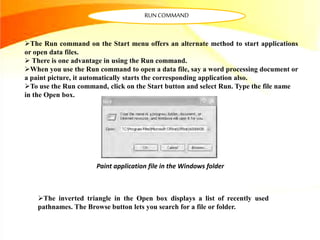
To use the Run command, click on the Start button and select Run. Type the file name
in the Open box.
Paint application file in the Windows folder
The inverted triangle in the Open box displays a list of recently used
pathnames. The Browse button lets you search for a file or folder.
Thankyou..!!

Run Command - R.D.Sivakumar

  • 1.
    R.D.SIVAKUMAR, M.Sc.,M.Phil.,M.Tech., Assistant Professorof Computer Science & Assistant Professor and Head, Department of M.Com.(CA), Ayya Nadar Janaki Ammal College, Sivakasi – 626 124. Mobile: 099440-42243 e-mail : sivamsccsit@gmail.com website: www.rdsivakumar.blogspot.in RUNCOMMAND
  • 2.
    RUNCOMMAND The Run commandon the Start menu offers an alternate method to start applications or open data files.  There is one advantage in using the Run command. When you use the Run command to open a data file, say a word processing document or a paint picture, it automatically starts the corresponding application also. To use the Run command, click on the Start button and select Run. Type the file name in the Open box. Paint application file in the Windows folder The inverted triangle in the Open box displays a list of recently used pathnames. The Browse button lets you search for a file or folder.
  • 3.