Robot Framework
What is Robot Framework
Robot framework is a generic test automation framework for acceptance testing
Easy to use tabular syntax which utilize the keyword driven testing approach
Comes with lots of pre existing test libraries to perform different types of
application automation
We can extend libraries either in Java or Python programming language
Access our videos :
Robot framework Selenium https://urlzs.com/ZKz4
Robot Framework API Testing https://urlzs.com/C9ph
For One to One Training by Industry Experts : Call or
Whatsapp : +91-8743-913-121
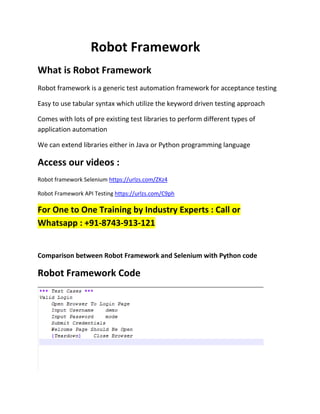
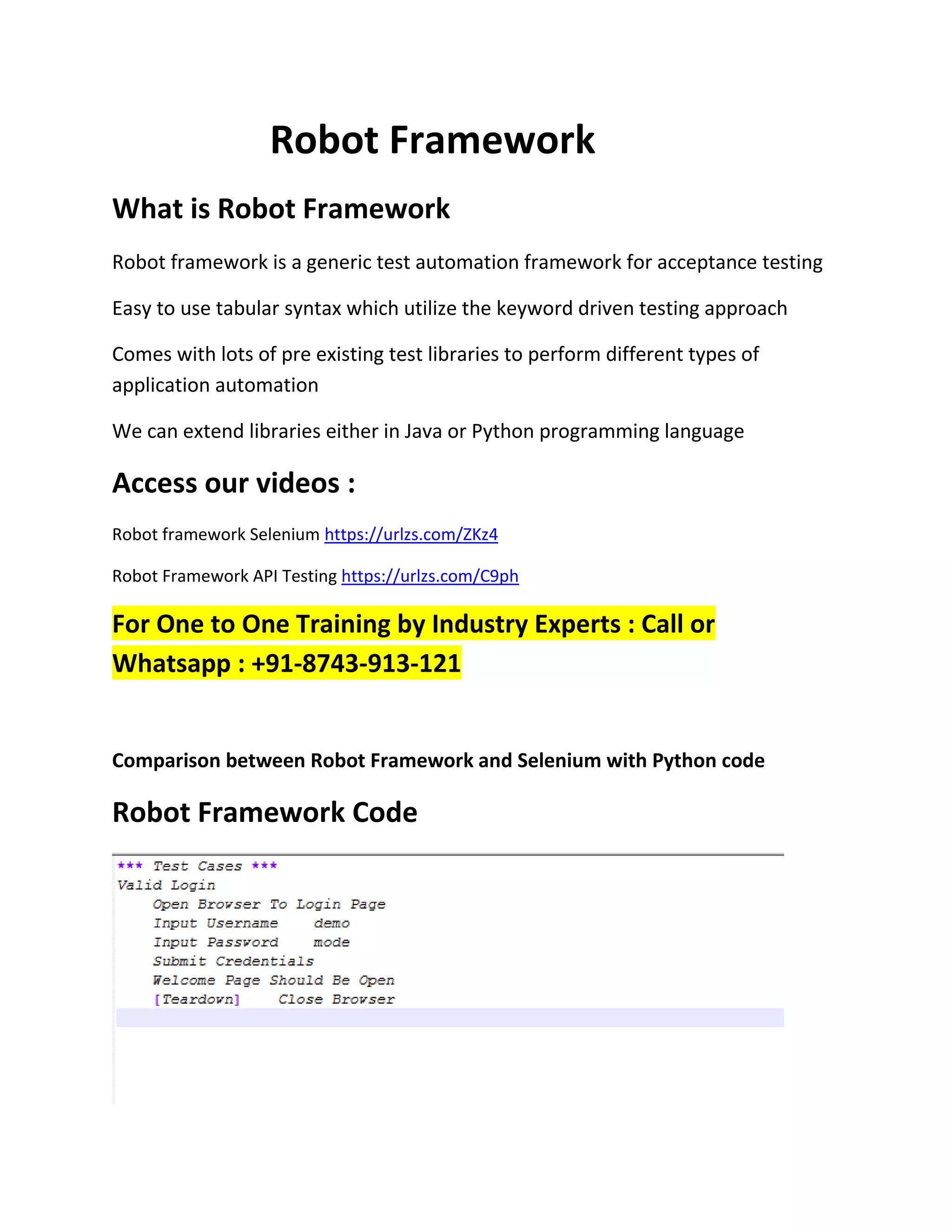
Comparison between Robot Framework and Selenium with Python code
Robot Framework Code
Code in Selenium
Advantage of Robot Framework
 Free
 Simple Tabular Syntax / Easy Syntax
 Fast Development with minimum coding efforts
 Default Reports with detailed information
 Detailed logs
 Generic test libraries / Lots of libraries/ Allow to extend libraries
 Webtesting, Swing, SWT, Windows GUIs, databases, SSH, Telnet etc
 Distributed Structure
Test Libraries
1. Lots of Libraries available with rich set of keywords
2. Standard and External Libraries
3. Allow to extend libraries using python programming
Installation of Robot Framework
Step 1: Install Python (Latest version of python 3.x)
Download from https://www.python.org/downloads/
Run installer
Sample Videos : https://goo.gl/dqecVH
All Courses & Content : https://goo.gl/2vKKhv
Students Feedback : https://goo.gl/xVrs8y
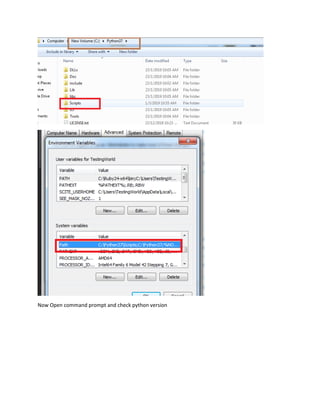
Step 2: Set Python path into environment variable
we need to set following 2 path
C:Python37
C:Python37Scripts
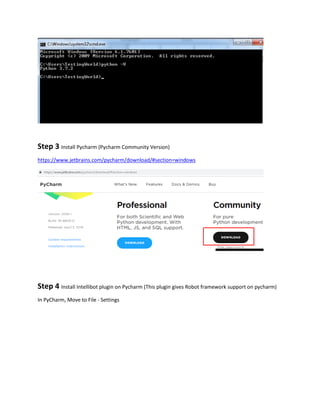
Now Open command prompt and check python version
Step 3 Install Pycharm (Pycharm Community Version)
https://www.jetbrains.com/pycharm/download/#section=windows
Step 4 Install Intellibot plugin on Pycharm (This plugin gives Robot framework support on pycharm)
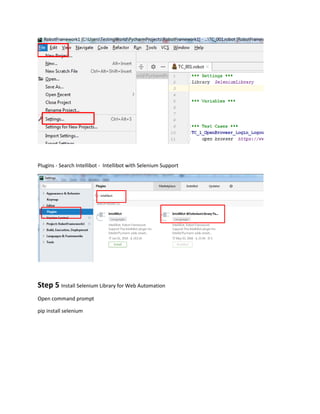
In PyCharm, Move to File - Settings
Plugins - Search Intellibot - Intellibot with Selenium Support
Step 5 Install Selenium Library for Web Automation
Open command prompt
pip install selenium
Robot framework

Robot framework

  • 1.
    Robot Framework What isRobot Framework Robot framework is a generic test automation framework for acceptance testing Easy to use tabular syntax which utilize the keyword driven testing approach Comes with lots of pre existing test libraries to perform different types of application automation We can extend libraries either in Java or Python programming language Access our videos : Robot framework Selenium https://urlzs.com/ZKz4 Robot Framework API Testing https://urlzs.com/C9ph For One to One Training by Industry Experts : Call or Whatsapp : +91-8743-913-121 Comparison between Robot Framework and Selenium with Python code Robot Framework Code
  • 2.
    Code in Selenium Advantageof Robot Framework  Free  Simple Tabular Syntax / Easy Syntax  Fast Development with minimum coding efforts  Default Reports with detailed information  Detailed logs  Generic test libraries / Lots of libraries/ Allow to extend libraries  Webtesting, Swing, SWT, Windows GUIs, databases, SSH, Telnet etc  Distributed Structure Test Libraries 1. Lots of Libraries available with rich set of keywords 2. Standard and External Libraries 3. Allow to extend libraries using python programming Installation of Robot Framework
  • 3.
    Step 1: InstallPython (Latest version of python 3.x) Download from https://www.python.org/downloads/ Run installer Sample Videos : https://goo.gl/dqecVH All Courses & Content : https://goo.gl/2vKKhv Students Feedback : https://goo.gl/xVrs8y Step 2: Set Python path into environment variable we need to set following 2 path C:Python37 C:Python37Scripts
  • 4.
    Now Open commandprompt and check python version
  • 5.
    Step 3 InstallPycharm (Pycharm Community Version) https://www.jetbrains.com/pycharm/download/#section=windows Step 4 Install Intellibot plugin on Pycharm (This plugin gives Robot framework support on pycharm) In PyCharm, Move to File - Settings
  • 6.
    Plugins - SearchIntellibot - Intellibot with Selenium Support Step 5 Install Selenium Library for Web Automation Open command prompt pip install selenium