TECHNICAL INTRODUCTION TO
RHEL 8
Ron Marshall
Senior Solutions Architect
February 2019
RHEL 8 - TECHNICAL INTRODUCTION2
AGENDA
★ What’s new - Overview
★ Where to get RHEL 8 beta ?
★ System management with Cockpit
★ What is new in package management ?
★ Container technologies : Podman, Buildah and Skopeo
★ Build your own RHEL images with Composer
★ Centralized user session recording with System recorder (tlog)
:: WHAT’S NEW ?
RHEL 8 - TECHNICAL INTRODUCTION4
WHAT’S NEW IN RHEL 8 ?
● Cockpit
○ PCP for persistence
○ Virt management
○ Session recorder (tlog)
○ Composer (RHEL 7.6 and + )
● YUM 4 , Application stream and
Flatpak
● Python 3.6 (**note on Ansible, 2.8+)
● Kernel 4.18 (RHEL 7 : Kernel 3.10)
○ 5-level page table (up to 4 PB
ram)
○ New tcp stack
■ Tcp bbr congestion
control
● Nvdimm storage support
● Containers : Podman, Buildah and
Skopeo
● Composer
● System purpose
● Wayland
● Stratis
● NFS 4.2
● Leapp
● And more ... (we are still in beta)
https://access.redhat.com/documentation/en-us/red_hat_enterprise_linux/8-beta/html/8.0_beta_release_note
:: WHERE TO GET RHEL 8
BETA ?
RHEL 8 - TECHNICAL INTRODUCTION6
WHERE TO GET RHEL 8 BETA ?
● Customer portal
https://access.redhat.com/products/red-hat-enterprise-linux/beta
○ ISO and KVM images
■ X86_64
■ Ppc64le
■ aarch64 (raspberry pi 3+)
■ S390x
● Developer program: https://developers.redhat.com/rhel8/getrhel8/
○ VirtualBox image https://developers.redhat.com/rhel8/install-rhel8-vbox/
○ Gnome Boxes (v3.30.2+)
:: SYSTEM MANAGEMENT WITH
COCKPIT
RHEL 8 - TECHNICAL INTRODUCTION8
COCKPIT
● IDM - idm domain admin can manage Cockpit
● Integration with PCP to activate metric persistence !
● Manage remote server via dashboard (7.6 +)
● New Subscription manager gui
● Tlog (session recorder)
● Composer - web interface
● Virt manager replacement (8.1+)
● NBDE (8.1+)
Cockpit is an interactive server admin interface (https://cockpit-project.org/)
:: WHAT IS NEW IN PACKAGE
MANAGEMENT ?
RHEL 8 - TECHNICAL INTRODUCTION10
APPLICATION STREAM (Modularity)
RHEL 8 - TECHNICAL INTRODUCTION11
MODULAR PACKAGE BUILDSTRADITIONAL PACKAGE BUILDS
BUILDING SOFTWARE WITH
MODULARITY
BUILDING AGAINST MULTIPLE
VERSIONS
RHEL 8 - TECHNICAL INTRODUCTION
● RHEL 8 content is distributed through the two main repositories: BaseOS and
Application Stream (AppStream).
○ BaseOS
The BaseOS repository provides the
core set of the underlying OS content
in the form of traditional RPM
packages. Same lifecycle as RHEL 7
○ Application Stream
The Application Stream repository
provides content with varying life cycles
as both modules and traditional
packages.
// DEMO
# yum module list
# yum module list postgresql
# yum module info postgresql
# yum module info
postgresql:9.6
# yum module info
postgresql:9.6 -v
# yum -y module install
postgresql:9.6
# yum module list --enabled
# /usr/bin/postgresql-setup
--initdb
# systemctl start postgresql
# psql --version
# yum -y module install
postgresql:10
12
APPLICATION STREAM
Provides modularity to package management
RHEL 8 - TECHNICAL INTRODUCTION
SCLs use a diferent method of packaging allowing for multiple versions of the
same piece of software to be installed on one system, by putting them into
separate namespaced paths. Modularity on the other hand uses standard RPM
packaging — so things are where you expect them to be — but you can only
install one version at a time.
SCLs have proven to be hard to maintain and hard to use (Special macros in spec
files, package name mangling, running 'nscl enable'n in order to make them
visible). And the ability to install multiple versions in parallel has turned out not
to be a common use case. The real benefit of SCLs was the ability to choose a
specific version of software — and that’s exactly what Modularity ofers.
APPLICATION STREAM VS SCL
RHEL 8 - TECHNICAL INTRODUCTION14
FLATPAK
Flatpak is a next-generation technology for building and distributing desktop
applications on Linux
//DEMO
# yum install flatpak
# flatpak remote-add --if-not-exists flathub https://flathub.org/repo/flathub.flatpakrepo
# flatpak install flathub com.spotify.Client
# flatpak list
# flatpak run com.spotify.Client
:: BUILD YOUR OWN RHEL
IMAGES WITH COMPOSER
RHEL 8 - TECHNICAL INTRODUCTION16
COMPOSER
● Composer is a tool that enables users to create customized system images of Red
Hat Enterprise Linux.
○ Amazon, Azure, .img, .iso, Openstack, qcow2, tar, and VMware
● Composer functionality can be accessed through a graphical user interface in
Cockpit, or with a command line interface in the composer-cli tool
https://weldr.io/
Ansible Playbook to setup composer
https://github.com/michaellessard/ansible-rhel8/blob/master/compose
r.yaml
:: CONTAINER TECHNOLOGIES
RHEL 8 - TECHNICAL INTRODUCTION
RHEL 8 - TECHNICAL INTRODUCTION19
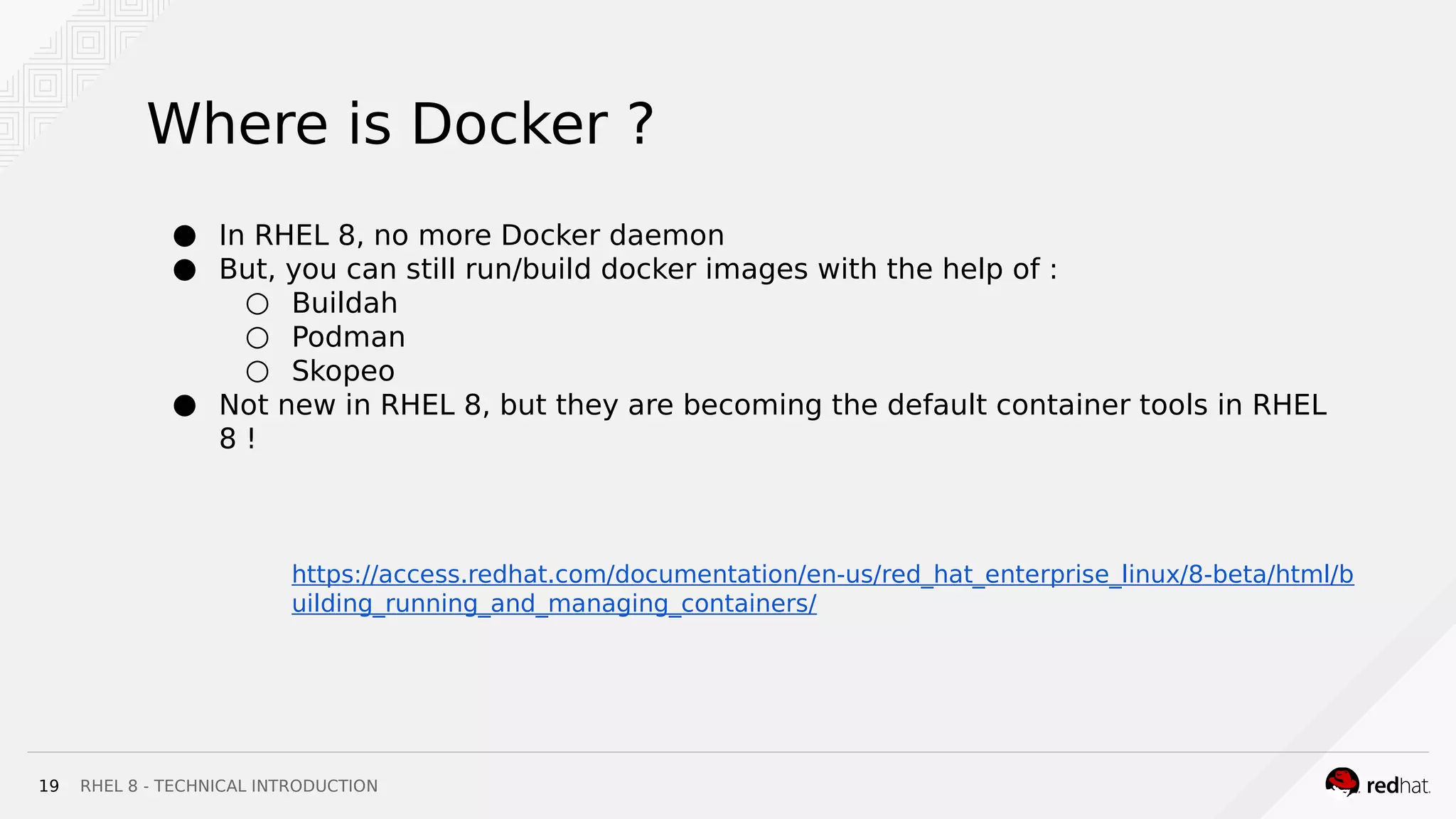
Where is Docker ?
● In RHEL 8, no more Docker daemon
● But, you can still run/build docker images with the help of :
○ Buildah
○ Podman
○ Skopeo
● Not new in RHEL 8, but they are becoming the default container tools in RHEL
8 !
https://access.redhat.com/documentation/en-us/red_hat_enterprise_linux/8-beta/html/b
uilding_running_and_managing_containers/
RHEL 8 - TECHNICAL INTRODUCTION20
● The buildah utility replaced docker build as the preferred, maintained, and
supported container images build tool in Red Hat Enterprise Linux 8
● Images can be built in either the OCI image format or the traditional upstream
docker image format
● No daemon !
//DEMO
# container=$(buildah from fedora)
# echo $container
# buildah run $container bash
# exit
# buildah run $container -- yum -y install screenfetch
# buildah run $container screenfetch
https://github.com/containers/buildah
RHEL 8 - TECHNICAL INTRODUCTION21
● Replaces docker push as the preferred, maintained and supported utility for
moving container images between registries, and container engines
● Can inspect a repository on a container registry without needlessly pulling the
image.
● Can sign and verify container images
● Can delete container images from a remote container registry
● No daemon ! No root user required
SKOPEO
//DEMO
$ skopeo inspect docker://docker.io/fedora
$ mkdir fedora-29
$ skopeo copy docker://fedora:29 dir:fedora-29
$ tree fedora-29
fedora-24
├── 7c91a140e7a1025c3bc3aace4c80c0d9933ac4ee24b8630a6b0b5d8b9ce6b9d4.tar
├── f9873d530588316311ac1d3d15e95487b947f5d8b560e72bdd6eb73a7831b2c4.tar
└── manifest.json
0 directories, 3 files
https://github.com/containers/skopeo
RHEL 8 - TECHNICAL INTRODUCTION22
● The podman container engine replaced docker as the preferred, maintained,
and supported container runtime of choice for Red Hat Enterprise Linux 8
● Podman provides a docker compatible command line experience enabling users
to find, run, build, and share containers
● Podman uses Buildah and Skopeo as libraries for the build and push
● No daemon !
//DEMO
# podman run -t -p 8000:80 nginx //than open a second
terminal
# podman ps
# podman inspect -l | grep IPAddress":
# curl http://<IP_address> // or with firefox
# podman logs --latest
# podman top <container_id>
# podman stop --latest
# podman ps -a
# podman rm --latest
https://podman.io/
:: SYSTEM RECORDER - TLOG
RHEL 8 - TECHNICAL INTRODUCTION24
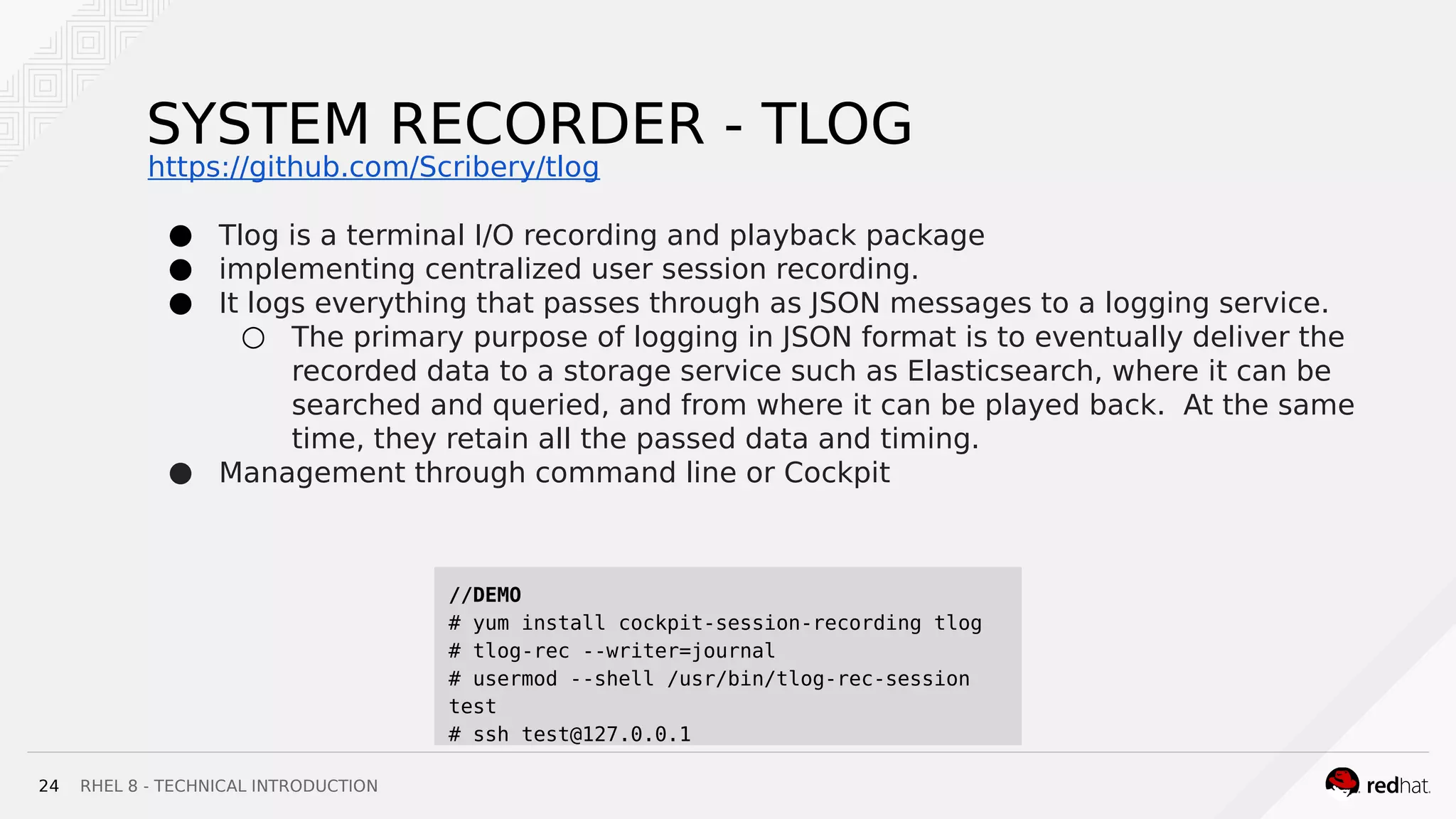
SYSTEM RECORDER - TLOG
● Tlog is a terminal I/O recording and playback package
● implementing centralized user session recording.
● It logs everything that passes through as JSON messages to a logging service.
○ The primary purpose of logging in JSON format is to eventually deliver the
recorded data to a storage service such as Elasticsearch, where it can be
searched and queried, and from where it can be played back. At the same
time, they retain all the passed data and timing.
● Management through command line or Cockpit
//DEMO
# yum install cockpit-session-recording tlog
# tlog-rec --writer=journal
# usermod --shell /usr/bin/tlog-rec-session
test
# ssh test@127.0.0.1
https://github.com/Scribery/tlog
THANK YOU !
plus.google.com/+RedHat
linkedin.com/company/red-hat
youtube.com/user/RedHatVide
os
facebook.com/redhatinc
twitter.com/RedHatNews
:: EXTRA
RHEL 8 - TECHNICAL INTRODUCTION
During beta testing, kernel 4.18.0-1.el8.x86_64 in RHEL 8 supported close to
558.59 Kcps, a 13% improvement over RHEL 7.6, which is able to support 496.09
Kcps.
Not enable by default, to activate it :
TCP BBR CONGESTION CONTROL
Developed by Google, used on GCP
//DEMO
# sysctl net.ipv4.tcp_available_congestion_control
# vim /etc/sysctl.conf
net.core.default_qdisc=fq
net.ipv4.tcp_congestion_control=bbr
# sysctl -p
# sysctl net.ipv4.tcp_available_congestion_control
# sysctl net.ipv4.tcp_congestion_control
RHEL 8 - TECHNICAL INTRODUCTION
Stratis is a Linux local storage management tool that aims to enable easy use of
advanced storage features such as thin provisioning, snapshots, and pool-based
management and monitoring.
STRATIS
https://stratis-storage.github.io
//DEMO
# yum install stratis-cli stratisd
# systemctl start stratisd
# startis pool create mypool /dev/sdb
# stratis fs create mypool myfs1
# mkdir /mnt/strat1
# mount /stratis/mypool/myfs1 /mnt/strat1
# mount | grep mnt // XFS default filesystem

Rhel8 Beta - Halifax RHUG

  • 1.
    TECHNICAL INTRODUCTION TO RHEL8 Ron Marshall Senior Solutions Architect February 2019
  • 2.
    RHEL 8 -TECHNICAL INTRODUCTION2 AGENDA ★ What’s new - Overview ★ Where to get RHEL 8 beta ? ★ System management with Cockpit ★ What is new in package management ? ★ Container technologies : Podman, Buildah and Skopeo ★ Build your own RHEL images with Composer ★ Centralized user session recording with System recorder (tlog)
  • 3.
  • 4.
    RHEL 8 -TECHNICAL INTRODUCTION4 WHAT’S NEW IN RHEL 8 ? ● Cockpit ○ PCP for persistence ○ Virt management ○ Session recorder (tlog) ○ Composer (RHEL 7.6 and + ) ● YUM 4 , Application stream and Flatpak ● Python 3.6 (**note on Ansible, 2.8+) ● Kernel 4.18 (RHEL 7 : Kernel 3.10) ○ 5-level page table (up to 4 PB ram) ○ New tcp stack ■ Tcp bbr congestion control ● Nvdimm storage support ● Containers : Podman, Buildah and Skopeo ● Composer ● System purpose ● Wayland ● Stratis ● NFS 4.2 ● Leapp ● And more ... (we are still in beta) https://access.redhat.com/documentation/en-us/red_hat_enterprise_linux/8-beta/html/8.0_beta_release_note
  • 5.
    :: WHERE TOGET RHEL 8 BETA ?
  • 6.
    RHEL 8 -TECHNICAL INTRODUCTION6 WHERE TO GET RHEL 8 BETA ? ● Customer portal https://access.redhat.com/products/red-hat-enterprise-linux/beta ○ ISO and KVM images ■ X86_64 ■ Ppc64le ■ aarch64 (raspberry pi 3+) ■ S390x ● Developer program: https://developers.redhat.com/rhel8/getrhel8/ ○ VirtualBox image https://developers.redhat.com/rhel8/install-rhel8-vbox/ ○ Gnome Boxes (v3.30.2+)
  • 7.
  • 8.
    RHEL 8 -TECHNICAL INTRODUCTION8 COCKPIT ● IDM - idm domain admin can manage Cockpit ● Integration with PCP to activate metric persistence ! ● Manage remote server via dashboard (7.6 +) ● New Subscription manager gui ● Tlog (session recorder) ● Composer - web interface ● Virt manager replacement (8.1+) ● NBDE (8.1+) Cockpit is an interactive server admin interface (https://cockpit-project.org/)
  • 9.
    :: WHAT ISNEW IN PACKAGE MANAGEMENT ?
  • 10.
    RHEL 8 -TECHNICAL INTRODUCTION10 APPLICATION STREAM (Modularity)
  • 11.
    RHEL 8 -TECHNICAL INTRODUCTION11 MODULAR PACKAGE BUILDSTRADITIONAL PACKAGE BUILDS BUILDING SOFTWARE WITH MODULARITY BUILDING AGAINST MULTIPLE VERSIONS
  • 12.
    RHEL 8 -TECHNICAL INTRODUCTION ● RHEL 8 content is distributed through the two main repositories: BaseOS and Application Stream (AppStream). ○ BaseOS The BaseOS repository provides the core set of the underlying OS content in the form of traditional RPM packages. Same lifecycle as RHEL 7 ○ Application Stream The Application Stream repository provides content with varying life cycles as both modules and traditional packages. // DEMO # yum module list # yum module list postgresql # yum module info postgresql # yum module info postgresql:9.6 # yum module info postgresql:9.6 -v # yum -y module install postgresql:9.6 # yum module list --enabled # /usr/bin/postgresql-setup --initdb # systemctl start postgresql # psql --version # yum -y module install postgresql:10 12 APPLICATION STREAM Provides modularity to package management
  • 13.
    RHEL 8 -TECHNICAL INTRODUCTION SCLs use a diferent method of packaging allowing for multiple versions of the same piece of software to be installed on one system, by putting them into separate namespaced paths. Modularity on the other hand uses standard RPM packaging — so things are where you expect them to be — but you can only install one version at a time. SCLs have proven to be hard to maintain and hard to use (Special macros in spec files, package name mangling, running 'nscl enable'n in order to make them visible). And the ability to install multiple versions in parallel has turned out not to be a common use case. The real benefit of SCLs was the ability to choose a specific version of software — and that’s exactly what Modularity ofers. APPLICATION STREAM VS SCL
  • 14.
    RHEL 8 -TECHNICAL INTRODUCTION14 FLATPAK Flatpak is a next-generation technology for building and distributing desktop applications on Linux //DEMO # yum install flatpak # flatpak remote-add --if-not-exists flathub https://flathub.org/repo/flathub.flatpakrepo # flatpak install flathub com.spotify.Client # flatpak list # flatpak run com.spotify.Client
  • 15.
    :: BUILD YOUROWN RHEL IMAGES WITH COMPOSER
  • 16.
    RHEL 8 -TECHNICAL INTRODUCTION16 COMPOSER ● Composer is a tool that enables users to create customized system images of Red Hat Enterprise Linux. ○ Amazon, Azure, .img, .iso, Openstack, qcow2, tar, and VMware ● Composer functionality can be accessed through a graphical user interface in Cockpit, or with a command line interface in the composer-cli tool https://weldr.io/ Ansible Playbook to setup composer https://github.com/michaellessard/ansible-rhel8/blob/master/compose r.yaml
  • 17.
  • 18.
    RHEL 8 -TECHNICAL INTRODUCTION
  • 19.
    RHEL 8 -TECHNICAL INTRODUCTION19 Where is Docker ? ● In RHEL 8, no more Docker daemon ● But, you can still run/build docker images with the help of : ○ Buildah ○ Podman ○ Skopeo ● Not new in RHEL 8, but they are becoming the default container tools in RHEL 8 ! https://access.redhat.com/documentation/en-us/red_hat_enterprise_linux/8-beta/html/b uilding_running_and_managing_containers/
  • 20.
    RHEL 8 -TECHNICAL INTRODUCTION20 ● The buildah utility replaced docker build as the preferred, maintained, and supported container images build tool in Red Hat Enterprise Linux 8 ● Images can be built in either the OCI image format or the traditional upstream docker image format ● No daemon ! //DEMO # container=$(buildah from fedora) # echo $container # buildah run $container bash # exit # buildah run $container -- yum -y install screenfetch # buildah run $container screenfetch https://github.com/containers/buildah
  • 21.
    RHEL 8 -TECHNICAL INTRODUCTION21 ● Replaces docker push as the preferred, maintained and supported utility for moving container images between registries, and container engines ● Can inspect a repository on a container registry without needlessly pulling the image. ● Can sign and verify container images ● Can delete container images from a remote container registry ● No daemon ! No root user required SKOPEO //DEMO $ skopeo inspect docker://docker.io/fedora $ mkdir fedora-29 $ skopeo copy docker://fedora:29 dir:fedora-29 $ tree fedora-29 fedora-24 ├── 7c91a140e7a1025c3bc3aace4c80c0d9933ac4ee24b8630a6b0b5d8b9ce6b9d4.tar ├── f9873d530588316311ac1d3d15e95487b947f5d8b560e72bdd6eb73a7831b2c4.tar └── manifest.json 0 directories, 3 files https://github.com/containers/skopeo
  • 22.
    RHEL 8 -TECHNICAL INTRODUCTION22 ● The podman container engine replaced docker as the preferred, maintained, and supported container runtime of choice for Red Hat Enterprise Linux 8 ● Podman provides a docker compatible command line experience enabling users to find, run, build, and share containers ● Podman uses Buildah and Skopeo as libraries for the build and push ● No daemon ! //DEMO # podman run -t -p 8000:80 nginx //than open a second terminal # podman ps # podman inspect -l | grep IPAddress": # curl http://<IP_address> // or with firefox # podman logs --latest # podman top <container_id> # podman stop --latest # podman ps -a # podman rm --latest https://podman.io/
  • 23.
  • 24.
    RHEL 8 -TECHNICAL INTRODUCTION24 SYSTEM RECORDER - TLOG ● Tlog is a terminal I/O recording and playback package ● implementing centralized user session recording. ● It logs everything that passes through as JSON messages to a logging service. ○ The primary purpose of logging in JSON format is to eventually deliver the recorded data to a storage service such as Elasticsearch, where it can be searched and queried, and from where it can be played back. At the same time, they retain all the passed data and timing. ● Management through command line or Cockpit //DEMO # yum install cockpit-session-recording tlog # tlog-rec --writer=journal # usermod --shell /usr/bin/tlog-rec-session test # ssh test@127.0.0.1 https://github.com/Scribery/tlog
  • 25.
  • 26.
  • 27.
    RHEL 8 -TECHNICAL INTRODUCTION During beta testing, kernel 4.18.0-1.el8.x86_64 in RHEL 8 supported close to 558.59 Kcps, a 13% improvement over RHEL 7.6, which is able to support 496.09 Kcps. Not enable by default, to activate it : TCP BBR CONGESTION CONTROL Developed by Google, used on GCP //DEMO # sysctl net.ipv4.tcp_available_congestion_control # vim /etc/sysctl.conf net.core.default_qdisc=fq net.ipv4.tcp_congestion_control=bbr # sysctl -p # sysctl net.ipv4.tcp_available_congestion_control # sysctl net.ipv4.tcp_congestion_control
  • 28.
    RHEL 8 -TECHNICAL INTRODUCTION Stratis is a Linux local storage management tool that aims to enable easy use of advanced storage features such as thin provisioning, snapshots, and pool-based management and monitoring. STRATIS https://stratis-storage.github.io //DEMO # yum install stratis-cli stratisd # systemctl start stratisd # startis pool create mypool /dev/sdb # stratis fs create mypool myfs1 # mkdir /mnt/strat1 # mount /stratis/mypool/myfs1 /mnt/strat1 # mount | grep mnt // XFS default filesystem