Revision-controlled collaborative
terminology authoring
IHTSDO Showcase
2014.10.30 - Amsterdam
Mark Czotter
Balazs Banfai, Ph.D.
Our approach
• Real-time collaborative authoring support
– Not an afterthought, the repository IS the store
• Workflow support
– Externalized therefore replaceable
• Cover the entire domain of healthcare terminology development
– All terminologies and all terminology components
• Including local terminologies, value domains and mapping sets
– Information models and terminology bindings
• Modular and extensible
– Capabilities are readily available for extensions
• Multiple deployment modes
– Stand-alone, thick client-server, thin client-server via REST
Collaborative authoring
• Multiple authors can work simultaneously on their
tasks in their dedicated and isolated ‘sandboxes’
• Completed work can be promoted to main repository
• Sandboxes can be synchronized to reflect relevant
changes in the main repository
• Potential conflicts are handled
• Authors receive notification about relevant changes
immediately
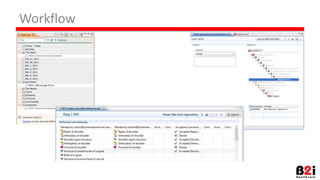
Workflow support
• External, managed by an issue tracking system
– Loosely integrated with ‘hooks’
– Bugzilla, JIRA, etc.
• Terminology authoring is only a part of the
overall enterprise workflow
Revision control features
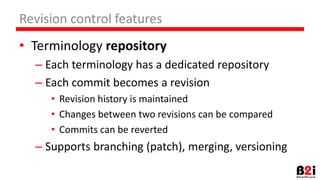
• Terminology repository
– Each terminology has a dedicated repository
– Each commit becomes a revision
• Revision history is maintained
• Changes between two revisions can be compared
• Commits can be reverted
– Supports branching (patch), merging, versioning
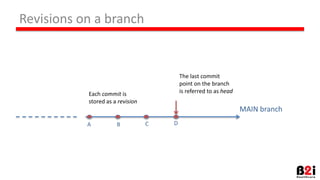
Revisions on a branch
MAIN branch
Each commit is
stored as a revision
The last commit
point on the branch
is referred to as head
A CB D
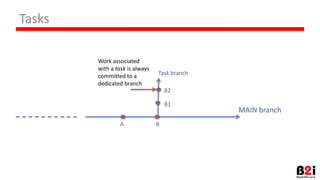
Tasks
MAIN branch
Work associated
with a task is always
committed to a
dedicated branch
Task branch
A B
B2
B1
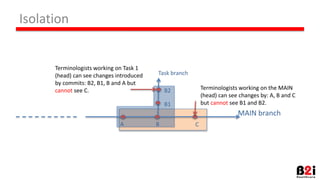
Isolation
MAIN branch
A C
Task branch
Terminologists working on the MAIN
(head) can see changes by: A, B and C
but cannot see B1 and B2.
B
B2
B1
Terminologists working on Task 1
(head) can see changes introduced
by commits: B2, B1, B and A but
cannot see C.
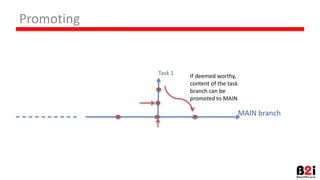
Promoting
MAIN branch
If deemed worthy,
content of the task
branch can be
promoted to MAIN
Task 1
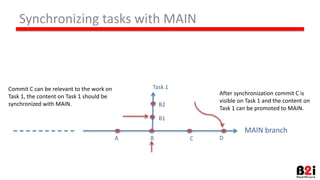
Synchronizing tasks with MAIN
MAIN branch
A C
Task 1Commit C can be relevant to the work on
Task 1, the content on Task 1 should be
synchronized with MAIN.
B
B2
B1
After synchronization commit C is
visible on Task 1 and the content on
Task 1 can be promoted to MAIN.
D
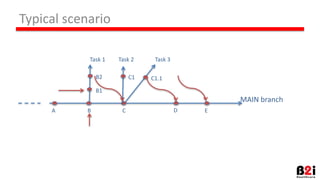
Typical scenario
MAIN branch
A C
Task 1
B
B2
B1
Task 2
C1
E
Task 3
D
C1.1
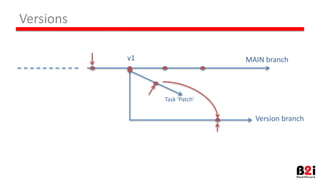
Versions
MAIN branch
Task ‘Patch’
Version branch
v1
Task
Management
Content
authoring
Task created for
1A&1R scenario
Review
Authoring completed
Task is set to Resolved
Admin
Author
Reviewer
Reviewer accepted changes
Task is set to Verified
Reviewer rejected changes
Task is set to Reopened
Single author and single reviewer
Content
promotion
Content is promoted to
MAIN repository
Task is set to Closed
Content
promotion
Task
Management
Content
authoring
Tasks are created for
2A&2R DIA scenario
Final
Review
Admin
Author
Reviewer
Final review completed
Task is set to Verified
Dual author and dual reviewers
Dual independent authoring
Content is promoted
to MAIN repository
Task is set to Closed
Content
authoring
Adjudicator
Review Review
Reviews completed
Final review completed
Tasks are set to Reopened
Authoring
completed
Tasks are set to
Resolved
Changes
rejected
Task is set to
Reopened
Changes
rejected
Task is set to
Reopened
Demo
• Create Task (Single author, single reviewer authoring)
• Create new child Concept under Tetralogy of Fallot
– Change to MAIN to show that concept is not there
– Change to Task to show that concept is there
• Review Concept
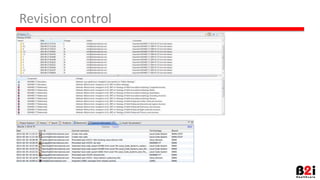
• Show history view
• Show commit info
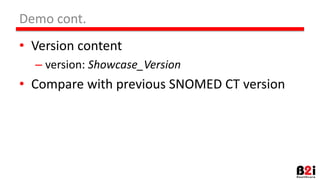
Demo cont.
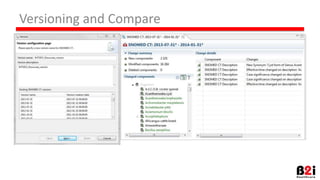
• Version content
– version: Showcase_Version
• Compare with previous SNOMED CT version
Questions?
Revision control
Workflow
Versioning and Compare
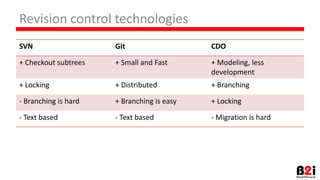
Revision control technologies
SVN Git CDO
+ Checkout subtrees + Small and Fast + Modeling, less
development
+ Locking + Distributed + Branching
- Branching is hard + Branching is easy + Locking
- Text based - Text based - Migration is hard
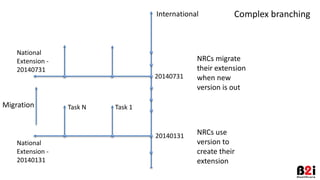
Task N Task 1
National
Extension -
20140131
Complex branchingInternational
20140131
20140731
National
Extension -
20140731
Migration
NRCs use
version to
create their
extension
NRCs migrate
their extension
when new
version is out

Revision-controlled collaborative terminology authoring

  • 1.
    Revision-controlled collaborative terminology authoring IHTSDOShowcase 2014.10.30 - Amsterdam Mark Czotter Balazs Banfai, Ph.D.
  • 2.
    Our approach • Real-timecollaborative authoring support – Not an afterthought, the repository IS the store • Workflow support – Externalized therefore replaceable • Cover the entire domain of healthcare terminology development – All terminologies and all terminology components • Including local terminologies, value domains and mapping sets – Information models and terminology bindings • Modular and extensible – Capabilities are readily available for extensions • Multiple deployment modes – Stand-alone, thick client-server, thin client-server via REST
  • 3.
    Collaborative authoring • Multipleauthors can work simultaneously on their tasks in their dedicated and isolated ‘sandboxes’ • Completed work can be promoted to main repository • Sandboxes can be synchronized to reflect relevant changes in the main repository • Potential conflicts are handled • Authors receive notification about relevant changes immediately
  • 4.
    Workflow support • External,managed by an issue tracking system – Loosely integrated with ‘hooks’ – Bugzilla, JIRA, etc. • Terminology authoring is only a part of the overall enterprise workflow
  • 5.
    Revision control features •Terminology repository – Each terminology has a dedicated repository – Each commit becomes a revision • Revision history is maintained • Changes between two revisions can be compared • Commits can be reverted – Supports branching (patch), merging, versioning
  • 6.
    Revisions on abranch MAIN branch Each commit is stored as a revision The last commit point on the branch is referred to as head A CB D
  • 7.
    Tasks MAIN branch Work associated witha task is always committed to a dedicated branch Task branch A B B2 B1
  • 8.
    Isolation MAIN branch A C Taskbranch Terminologists working on the MAIN (head) can see changes by: A, B and C but cannot see B1 and B2. B B2 B1 Terminologists working on Task 1 (head) can see changes introduced by commits: B2, B1, B and A but cannot see C.
  • 9.
    Promoting MAIN branch If deemedworthy, content of the task branch can be promoted to MAIN Task 1
  • 10.
    Synchronizing tasks withMAIN MAIN branch A C Task 1Commit C can be relevant to the work on Task 1, the content on Task 1 should be synchronized with MAIN. B B2 B1 After synchronization commit C is visible on Task 1 and the content on Task 1 can be promoted to MAIN. D
  • 11.
    Typical scenario MAIN branch AC Task 1 B B2 B1 Task 2 C1 E Task 3 D C1.1
  • 12.
  • 13.
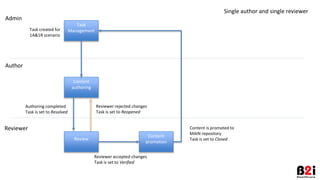
    Task Management Content authoring Task created for 1A&1Rscenario Review Authoring completed Task is set to Resolved Admin Author Reviewer Reviewer accepted changes Task is set to Verified Reviewer rejected changes Task is set to Reopened Single author and single reviewer Content promotion Content is promoted to MAIN repository Task is set to Closed
  • 14.
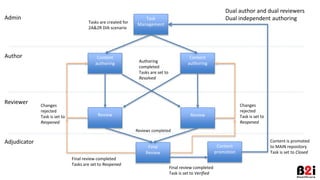
    Content promotion Task Management Content authoring Tasks are createdfor 2A&2R DIA scenario Final Review Admin Author Reviewer Final review completed Task is set to Verified Dual author and dual reviewers Dual independent authoring Content is promoted to MAIN repository Task is set to Closed Content authoring Adjudicator Review Review Reviews completed Final review completed Tasks are set to Reopened Authoring completed Tasks are set to Resolved Changes rejected Task is set to Reopened Changes rejected Task is set to Reopened
  • 15.
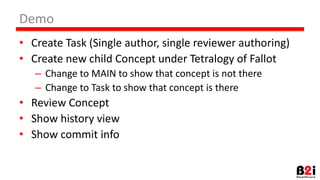
    Demo • Create Task(Single author, single reviewer authoring) • Create new child Concept under Tetralogy of Fallot – Change to MAIN to show that concept is not there – Change to Task to show that concept is there • Review Concept • Show history view • Show commit info
  • 16.
    Demo cont. • Versioncontent – version: Showcase_Version • Compare with previous SNOMED CT version
  • 17.
  • 18.
  • 19.
  • 20.
  • 21.
    Revision control technologies SVNGit CDO + Checkout subtrees + Small and Fast + Modeling, less development + Locking + Distributed + Branching - Branching is hard + Branching is easy + Locking - Text based - Text based - Migration is hard
  • 22.
    Task N Task1 National Extension - 20140131 Complex branchingInternational 20140131 20140731 National Extension - 20140731 Migration NRCs use version to create their extension NRCs migrate their extension when new version is out