A 
simple 
web-­‐based 
interface 
for 
advanced 
SNOMED 
CT 
queries 
Orsolya 
Bali, 
Brandon 
Ulrich 
– 
B2i 
Healthcare 
IHTSDO 
Showcase 
2014.10.30 
-­‐ 
Amsterdam
Why 
search 
or 
query 
SNOMED 
CT 
content? 
Common 
use 
cases 
include: 
• Terminology 
authoring 
• Reference 
set 
authoring 
– 
intensional 
sets 
• Mappings 
• Terminology 
binding 
• EHR 
queries 
• ValidaOon/QA 
1
Challenges 
• Over 
300,000 
concepts 
• Lexical 
search 
may 
be 
insufficient 
– Different 
meanings 
could 
sOll 
carry 
the 
same 
descripOon 
• SemanOc 
search 
requires 
comprehensive 
knowledge 
of 
the 
concept 
model 
• Various 
component 
properOes, 
extendable 
by 
RF2 
• Average 
users 
have 
high-­‐level 
or 
only 
vague 
understanding 
of 
SNOMED 
CT 
2
A 
search 
interface 
must 
be 
• … 
powerful 
enough 
to 
cater 
for 
all 
the 
relevant 
a[ributes 
(including 
lexical, 
semanOc 
and 
metadata 
searches). 
• …yet 
simple 
and 
user 
friendly. 
3
Snow 
Owl 
Meaningful 
Query 
(MQ) 
• Online 
browser 
for 
SNOMED 
CT 
and 
extensions 
– Advanced 
search 
– Filtered 
hierarchy 
• EHR 
datastore 
• SemanOc 
query 
engine 
to 
extract 
the 
semanOcs 
captured 
in 
EHRs 
• Terminology 
server 
integraOon 
4
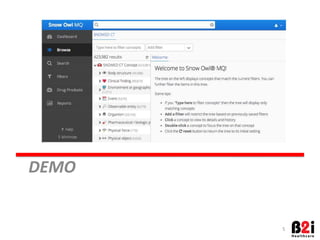
DEMO 
5
Introduce 
filters 
• Concept, 
DescripOon, 
Property, 
Refset 
and 
Mapping 
filters 
• Some 
relevant 
filters: 
property-­‐value, 
module, 
descripOon 
term, 
reference 
set, 
mapping 
6
Features 
to 
check 
out 
• Create 
a 
simple 
filter 
• Open 
a 
few 
more 
complex 
filters 
• Browse 
view 
• Filtered 
browse 
view 
7
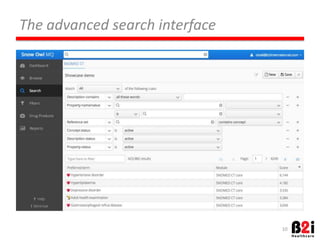
The 
advanced 
search 
interface 
8
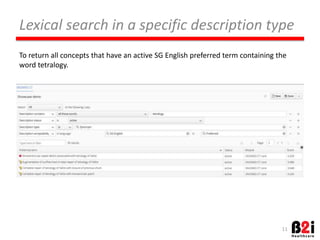
Lexical 
search 
in 
a 
specific 
descripMon 
type 
To 
return 
all 
concepts 
that 
have 
an 
acOve 
SG 
English 
preferred 
term 
containing 
the 
word 
tetralogy. 
9
Search 
by 
aNribute 
(relaMonship) 
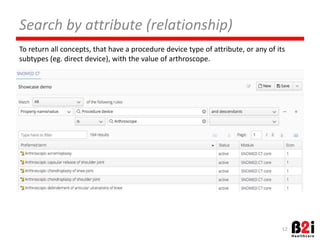
To 
return 
all 
concepts, 
that 
have 
a 
procedure 
device 
type 
of 
a[ribute, 
or 
any 
of 
its 
subtypes 
(eg. 
direct 
device), 
with 
the 
value 
of 
arthroscope. 
10
Search 
by 
aNribute 
(concrete 
domain) 
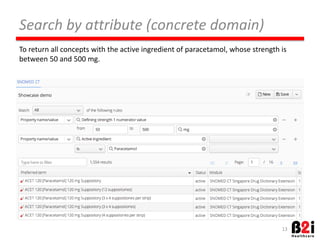
To 
return 
all 
concepts 
with 
the 
acOve 
ingredient 
of 
paracetamol, 
whose 
strength 
is 
between 
50 
and 
500 
mg. 
11
Complex 
query 
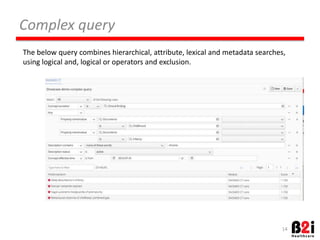
The 
below 
query 
combines 
hierarchical, 
a[ribute, 
lexical 
and 
metadata 
searches, 
using 
logical 
and, 
logical 
or 
operators 
and 
exclusion. 
12
Search 
in 
reference 
set 
13 
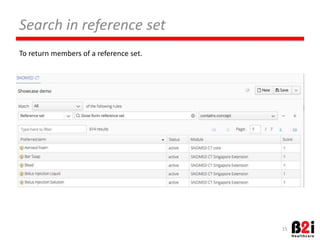
To 
return 
members 
of 
a 
reference 
set.
Search 
by 
mapping 
To 
search 
concepts 
by 
their 
maps. 
The 
below 
example 
returns 
all 
concepts, 
that 
are 
mapped 
to 
the 
specified 
ATC 
code. 
14
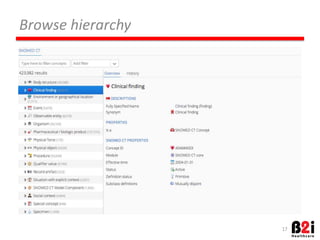
Browse 
hierarchy 
15
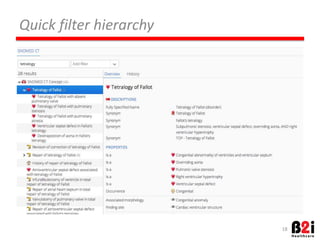
Quick 
filter 
hierarchy 
16
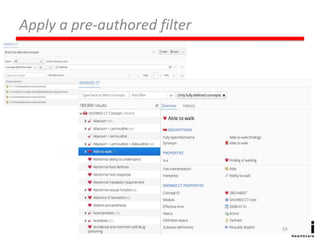
Apply 
a 
pre-­‐authored 
filter 
17
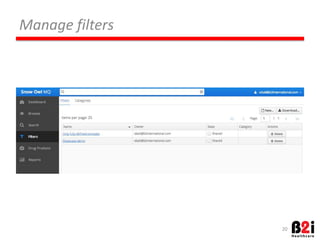
Manage 
filters 
18
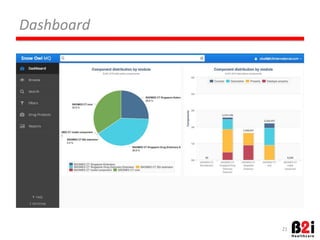
Dashboard 
19
QUESTIONS? 
h[p://www.b2internaOonal.com 
obali@b2internaOonal.com 
20
THANK 
YOU! 
21

A simple web-based interface for advanced SNOMED CT queries

  • 1.
    A simple web-­‐based interface for advanced SNOMED CT queries Orsolya Bali, Brandon Ulrich – B2i Healthcare IHTSDO Showcase 2014.10.30 -­‐ Amsterdam
  • 2.
    Why search or query SNOMED CT content? Common use cases include: • Terminology authoring • Reference set authoring – intensional sets • Mappings • Terminology binding • EHR queries • ValidaOon/QA 1
  • 3.
    Challenges • Over 300,000 concepts • Lexical search may be insufficient – Different meanings could sOll carry the same descripOon • SemanOc search requires comprehensive knowledge of the concept model • Various component properOes, extendable by RF2 • Average users have high-­‐level or only vague understanding of SNOMED CT 2
  • 4.
    A search interface must be • … powerful enough to cater for all the relevant a[ributes (including lexical, semanOc and metadata searches). • …yet simple and user friendly. 3
  • 5.
    Snow Owl Meaningful Query (MQ) • Online browser for SNOMED CT and extensions – Advanced search – Filtered hierarchy • EHR datastore • SemanOc query engine to extract the semanOcs captured in EHRs • Terminology server integraOon 4
  • 6.
  • 7.
    Introduce filters •Concept, DescripOon, Property, Refset and Mapping filters • Some relevant filters: property-­‐value, module, descripOon term, reference set, mapping 6
  • 8.
    Features to check out • Create a simple filter • Open a few more complex filters • Browse view • Filtered browse view 7
  • 9.
    The advanced search interface 8
  • 10.
    Lexical search in a specific descripMon type To return all concepts that have an acOve SG English preferred term containing the word tetralogy. 9
  • 11.
    Search by aNribute (relaMonship) To return all concepts, that have a procedure device type of a[ribute, or any of its subtypes (eg. direct device), with the value of arthroscope. 10
  • 12.
    Search by aNribute (concrete domain) To return all concepts with the acOve ingredient of paracetamol, whose strength is between 50 and 500 mg. 11
  • 13.
    Complex query The below query combines hierarchical, a[ribute, lexical and metadata searches, using logical and, logical or operators and exclusion. 12
  • 14.
    Search in reference set 13 To return members of a reference set.
  • 15.
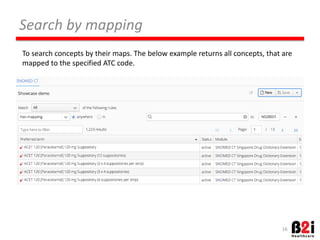
    Search by mapping To search concepts by their maps. The below example returns all concepts, that are mapped to the specified ATC code. 14
  • 16.
  • 17.
  • 18.
  • 19.
  • 20.
  • 21.
  • 22.