REST is not enough
Juan Gomez
@_juandg
Using Push Notifications to better support your
mobile clients
What this talk is about
• Brief introduction to push notifications
• Why you need to embrace them
• High level details on how to implement them in
Python
2
What I’m not going to cover
• Implementation on the smartphone side.
• Lots of code.
• Specially production ready code.
• Detailed topics.
3
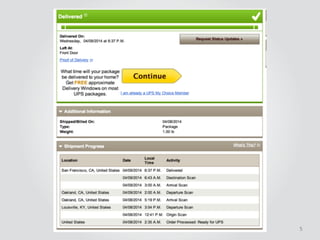
How many hours of your life have
you spent looking at this webpage?
4
5
6
!
!
!
There has to be
a better way…
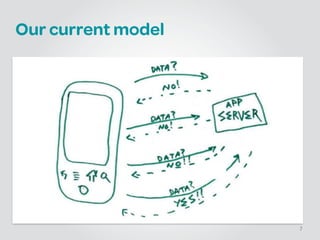
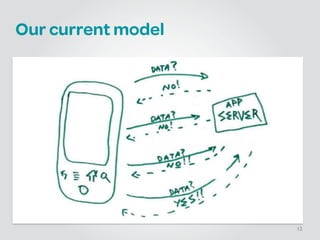
Our current model
7
8
Smartphone use around the world
isn’t growing
9
It’s exploding
10
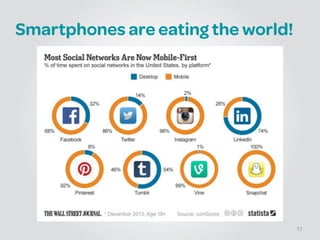
Smartphones are eating the world!
11
Our current model
12
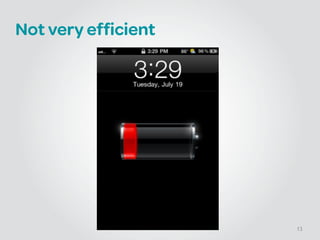
Not very efficient
13
Servers are smart
14
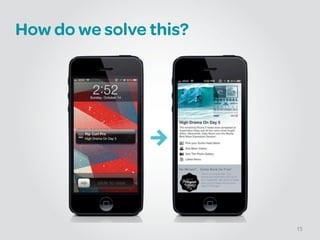
How do we solve this?
15
What’s a Push Notification?
!
• Display a short text message
• Play a brief sound
• iOS: Set a number in a badge on the app’s icon
• Android: Display a banner on the notification bar
16
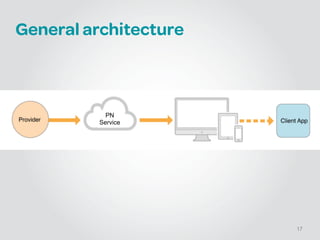
General architecture
17
PN
Service
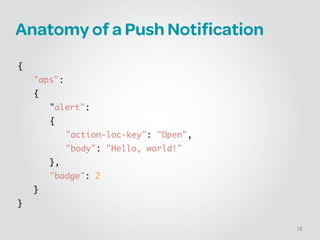
Anatomy of a Push Notification
!
{	
	 "aps":	
	 {	
	 	 "alert":	
	 	 {	
	 	 	 "action-loc-key": "Open",	
	 	 	 "body": "Hello, world!"	
	 	 },	
	 	 "badge": 2	
	 }	
}
18
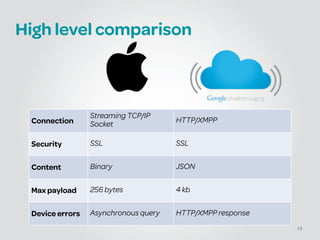
High level comparison
19
Connection
Streaming TCP/IP
Socket
HTTP/XMPP
Security SSL SSL
Content Binary JSON
Max payload 256 bytes 4 kb
Device errors Asynchronous query HTTP/XMPP response
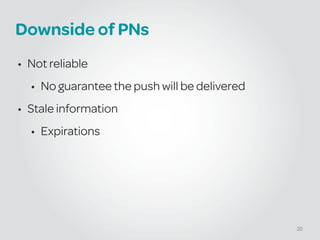
Downside of PNs
• Not reliable
• No guarantee the push will be delivered
• Stale information
• Expirations
20
APPLE PUSH NOTIFICATION
(APN)
21
What you need to get started
• iOS app
• Provisioning profile
• Certificate
• Device tokens
• Payload (a.k.a your messages)
22
Obtaining the certificate
Similar to any other SSL cert
• Generate CSR
• Upload it to Apple
• Link it to your App Id
• Enable Push Notifications
• Generate certificate
23
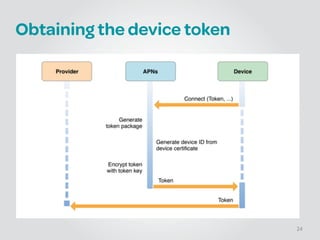
Obtaining the device token
24
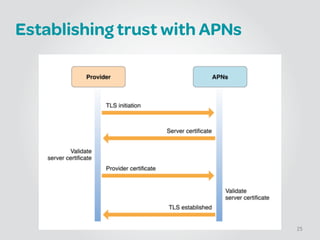
Establishing trust with APNs
25
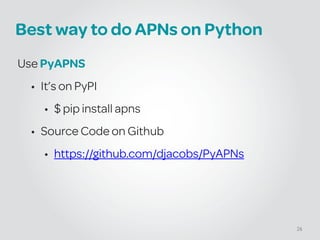
Best way to do APNs on Python
Use PyAPNS
• It’s on PyPI
• $ pip install apns
• Source Code on Github
• https://github.com/djacobs/PyAPNs
26
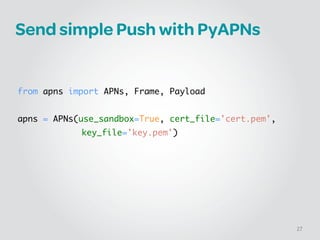
Send simple Push with PyAPNs
!
!
!
from apns import APNs, Frame, Payload	
!
apns = APNs(use_sandbox=True, cert_file='cert.pem', 	
key_file='key.pem')
27
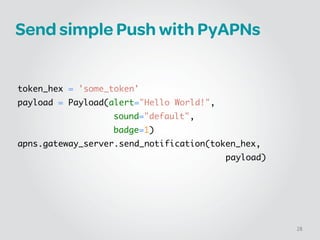
Send simple Push with PyAPNs
!
!
!
token_hex = 'some_token'	
payload = Payload(alert="Hello World!", 	
	 	 sound="default", 	
	 	 badge=1)	
apns.gateway_server.send_notification(token_hex, 	 	 	
	 	 	 	 	 	 	 	 	 	 	 	 	 payload)
28
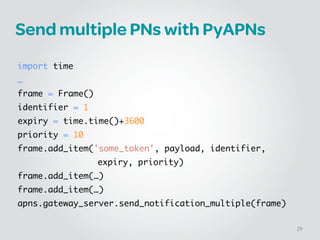
Send multiple PNs with PyAPNs
!
import time	
…	
frame = Frame()!
identifier = 1!
expiry = time.time()+3600!
priority = 10!
frame.add_item('some_token', payload, identifier, 	
	 	 	 	 	 expiry, priority)	
frame.add_item(…)	
frame.add_item(…)	
apns.gateway_server.send_notification_multiple(frame)
29
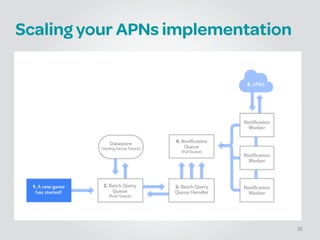
Scaling your APNs implementation
30
GOOGLE CLOUD MESSAGING
(GCM)
31
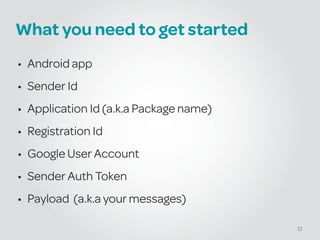
What you need to get started
• Android app
• Sender Id
• Application Id (a.k.a Package name)
• Registration Id
• Google User Account
• Sender Auth Token
• Payload (a.k.a your messages)
32
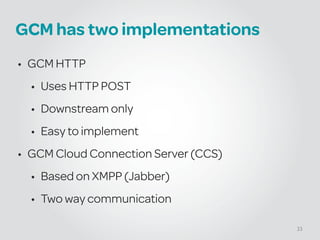
GCM has two implementations
• GCM HTTP
• Uses HTTP POST
• Downstream only
• Easy to implement
• GCM Cloud Connection Server (CCS)
• Based on XMPP (Jabber)
• Two way communication
33
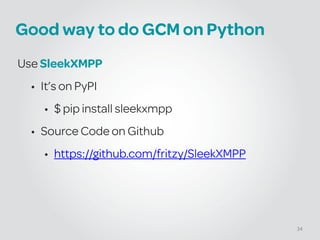
Good way to do GCM on Python
Use SleekXMPP
• It’s on PyPI
• $ pip install sleekxmpp
• Source Code on Github
• https://github.com/fritzy/SleekXMPP
34
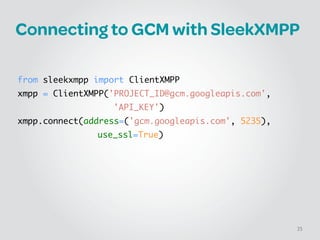
Connecting to GCM with SleekXMPP
!
!
from sleekxmpp import ClientXMPP	
xmpp = ClientXMPP('PROJECT_ID@gcm.googleapis.com', 	
	 	 	 	 	 	 'API_KEY')	
xmpp.connect(address=('gcm.googleapis.com', 5235), 	
	 	 	 	 	 use_ssl=True)
35
3RD PARTY ALTERNATIVES
36
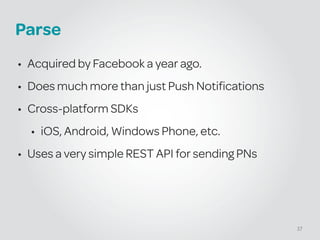
Parse
• Acquired by Facebook a year ago.
• Does much more than just Push Notifications
• Cross-platform SDKs
• iOS, Android, Windows Phone, etc.
• Uses a very simple REST API for sending PNs
37
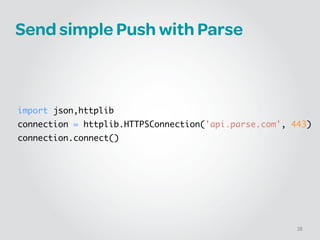
Send simple Push with Parse
!
!
!
!
!
import json,httplib	
connection = httplib.HTTPSConnection('api.parse.com', 443)	
connection.connect()
38
Send simple Push with Parse
!
connection.request('POST', '/1/push', json.dumps({	
       "channels": [ “Giants", “Mets" ],	
       "data": {	
         "alert": "The Giants won against the Mets 2-3."	
       }	
     }), {	
       "X-Parse-Application-Id": "${APPLICATION_ID}",	
       "X-Parse-REST-API-Key": "${REST_API_KEY}",	
       "Content-Type": "application/json"	
     })	
result = json.loads(connection.getresponse().read())
39
Downsides of Parse
• No Official Python SDK
• 3rd party “recommended” SDK on Github
• Issues with their Mobile SDK
• Specifically on Android
• They’re working through them
40
Urban Airship
• Push is still their main product
• Moving into mobile marketing and payments.
• Based out of Portland, OR
• Simple REST API
• Cross-platform SDKs
• iOS, Android, Blackberry, etc.
• Official Python SDK
41
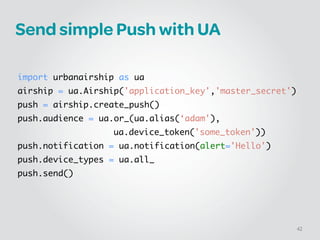
Send simple Push with UA
!
!
import urbanairship as ua	
airship = ua.Airship('application_key','master_secret')	
push = airship.create_push()	
push.audience = ua.or_(ua.alias(‘adam'),	
	 	 ua.device_token('some_token'))	
push.notification = ua.notification(alert='Hello')	
push.device_types = ua.all_	
push.send()
42
SUMMARY
43
Summary
• Mobile is eating the world.
• Push Notification will make your service smarter.
• Using Python for Push Notifications is easy.
44
Thank You!
Twitter: @_juandg
Email: jgomez@eventbrite.com
Lanyrd: lanyrd.com/profile/juandg/

REST is not enough: Using Push Notifications to better support your mobile clients

  • 1.
    REST is notenough Juan Gomez @_juandg Using Push Notifications to better support your mobile clients
  • 2.
    What this talkis about • Brief introduction to push notifications • Why you need to embrace them • High level details on how to implement them in Python 2
  • 3.
    What I’m notgoing to cover • Implementation on the smartphone side. • Lots of code. • Specially production ready code. • Detailed topics. 3
  • 4.
    How many hoursof your life have you spent looking at this webpage? 4
  • 5.
  • 6.
    6 ! ! ! There has tobe a better way…
  • 7.
  • 8.
  • 9.
    Smartphone use aroundthe world isn’t growing 9
  • 10.
  • 11.
  • 12.
  • 13.
  • 14.
  • 15.
    How do wesolve this? 15
  • 16.
    What’s a PushNotification? ! • Display a short text message • Play a brief sound • iOS: Set a number in a badge on the app’s icon • Android: Display a banner on the notification bar 16
  • 17.
  • 18.
    Anatomy of aPush Notification ! { "aps": { "alert": { "action-loc-key": "Open", "body": "Hello, world!" }, "badge": 2 } } 18
  • 19.
    High level comparison 19 Connection StreamingTCP/IP Socket HTTP/XMPP Security SSL SSL Content Binary JSON Max payload 256 bytes 4 kb Device errors Asynchronous query HTTP/XMPP response
  • 20.
    Downside of PNs •Not reliable • No guarantee the push will be delivered • Stale information • Expirations 20
  • 21.
  • 22.
    What you needto get started • iOS app • Provisioning profile • Certificate • Device tokens • Payload (a.k.a your messages) 22
  • 23.
    Obtaining the certificate Similarto any other SSL cert • Generate CSR • Upload it to Apple • Link it to your App Id • Enable Push Notifications • Generate certificate 23
  • 24.
  • 25.
  • 26.
    Best way todo APNs on Python Use PyAPNS • It’s on PyPI • $ pip install apns • Source Code on Github • https://github.com/djacobs/PyAPNs 26
  • 27.
    Send simple Pushwith PyAPNs ! ! ! from apns import APNs, Frame, Payload ! apns = APNs(use_sandbox=True, cert_file='cert.pem', key_file='key.pem') 27
  • 28.
    Send simple Pushwith PyAPNs ! ! ! token_hex = 'some_token' payload = Payload(alert="Hello World!", sound="default", badge=1) apns.gateway_server.send_notification(token_hex, payload) 28
  • 29.
    Send multiple PNswith PyAPNs ! import time … frame = Frame()! identifier = 1! expiry = time.time()+3600! priority = 10! frame.add_item('some_token', payload, identifier, expiry, priority) frame.add_item(…) frame.add_item(…) apns.gateway_server.send_notification_multiple(frame) 29
  • 30.
    Scaling your APNsimplementation 30
  • 31.
  • 32.
    What you needto get started • Android app • Sender Id • Application Id (a.k.a Package name) • Registration Id • Google User Account • Sender Auth Token • Payload (a.k.a your messages) 32
  • 33.
    GCM has twoimplementations • GCM HTTP • Uses HTTP POST • Downstream only • Easy to implement • GCM Cloud Connection Server (CCS) • Based on XMPP (Jabber) • Two way communication 33
  • 34.
    Good way todo GCM on Python Use SleekXMPP • It’s on PyPI • $ pip install sleekxmpp • Source Code on Github • https://github.com/fritzy/SleekXMPP 34
  • 35.
    Connecting to GCMwith SleekXMPP ! ! from sleekxmpp import ClientXMPP xmpp = ClientXMPP('PROJECT_ID@gcm.googleapis.com', 'API_KEY') xmpp.connect(address=('gcm.googleapis.com', 5235), use_ssl=True) 35
  • 36.
  • 37.
    Parse • Acquired byFacebook a year ago. • Does much more than just Push Notifications • Cross-platform SDKs • iOS, Android, Windows Phone, etc. • Uses a very simple REST API for sending PNs 37
  • 38.
    Send simple Pushwith Parse ! ! ! ! ! import json,httplib connection = httplib.HTTPSConnection('api.parse.com', 443) connection.connect() 38
  • 39.
    Send simple Pushwith Parse ! connection.request('POST', '/1/push', json.dumps({        "channels": [ “Giants", “Mets" ],        "data": {          "alert": "The Giants won against the Mets 2-3."        }      }), {        "X-Parse-Application-Id": "${APPLICATION_ID}",        "X-Parse-REST-API-Key": "${REST_API_KEY}",        "Content-Type": "application/json"      }) result = json.loads(connection.getresponse().read()) 39
  • 40.
    Downsides of Parse •No Official Python SDK • 3rd party “recommended” SDK on Github • Issues with their Mobile SDK • Specifically on Android • They’re working through them 40
  • 41.
    Urban Airship • Pushis still their main product • Moving into mobile marketing and payments. • Based out of Portland, OR • Simple REST API • Cross-platform SDKs • iOS, Android, Blackberry, etc. • Official Python SDK 41
  • 42.
    Send simple Pushwith UA ! ! import urbanairship as ua airship = ua.Airship('application_key','master_secret') push = airship.create_push() push.audience = ua.or_(ua.alias(‘adam'), ua.device_token('some_token')) push.notification = ua.notification(alert='Hello') push.device_types = ua.all_ push.send() 42
  • 43.
  • 44.
    Summary • Mobile iseating the world. • Push Notification will make your service smarter. • Using Python for Push Notifications is easy. 44
  • 45.
    Thank You! Twitter: @_juandg Email:jgomez@eventbrite.com Lanyrd: lanyrd.com/profile/juandg/