Responsible [digital] 
Home Ownership @thewebprincess
c Maintenance 
Insurance c 
c Security c Pest Control c Efficiency
Insurance
Back me Up 
How will your back up get created? 
Where will it be stored? 
How will you restore from that backup?
How to Back Up 
Let your host take care of it 
Learn how to do it manually 
(for those of us who are technical) 
! 
Install (and use) a WordPress backup plugin 
Pay someone to do it for you.
Backup Plugin Options 
1. VaultPress - $5-$15 monthly 
2. Backup Buddy - $80USD (annually if you want to 
be able to update it) 
3. WP Backup to Dropbox - Free with paid 
extensions
Where will the backup live? 
Hint: NOT on your server - send it offsite
How will you restore it? 
Hint: Practice restoring it
Schedule 
regular backups 
credit:photosteve101 https://www.flickr.com/photos/42931449@N07/6812481635/"
Maintenance
Stay up to Date 
WordPress core 
Allow auto updates 
Update your Plugins 
Update your Themes (a word of caution re child 
themes)
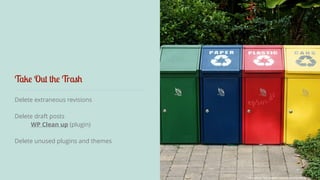
Take Out the Trash 
Delete extraneous revisions 
! 
Delete draft posts 
WP Clean up (plugin) 
Delete unused plugins and themes 
credit: epSos.de - https://www.flickr.com/photos/epsos/5575089139/
Declutter 
Optimise your Database 
WP Cleanup (plugin)
Keep on top of Broken Links 
Google Webmaster Tools - Web based 
! 
Broken Link Checker (plugin) 
! 
Screaming Frog - Desktop Tool
Security
Stay up to Date 
WordPress core 
Allow auto updates 
Update your Plugins and Themes 
Delete unused themes and plugins
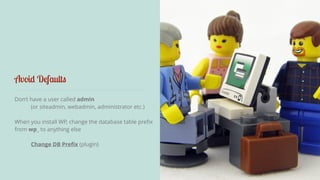
Avoid Defaults 
Don’t have a user called admin 
(or siteadmin, webadmin, administrator etc.) 
When you install WP, change the database table prefix 
from wp_ to anything else 
Change DB Prefix (plugin)
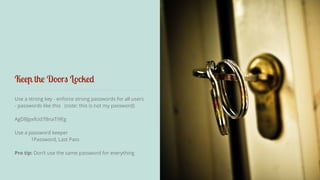
Keep the Doors Locked 
Use a strong key - enforce strong passwords for all users 
- passwords like this (note: this is not my password) 
AgDBJpxfcid7BnaTi9Eg 
! 
Use a password keeper 
1Password, Last Pass 
Pro tip: Don’t use the same password for everything
Use a Security Screen - (plugin) 
1. WordFence - Free (has a Pro option) 
! 
2. iThemes Security - Free (has a Pro option) 
3. Sucuri Malware scanner - Free to scan, (but 
cleanup and real time scanning - annual subscription)
Get an SSL Certificate for your Site 
Transfer of data is secure and encrypted 
! 
Particularly useful on login pages and contact 
forms where customer data, sales information 
and passwords are being transferred 
! 
Google is starting to give sites with an SSL 
certificate a better ranking
Pest Control
Spam, Spam, Spam 
1. Akismet - Spam Plugin 
Free for personal sites - $5 p/m if you make any money i.e. 
advertising/affiliate 
! 
2. WP SpamShield - Free 
! 
3. Disqus - alternate comment system and plugin 
! 
4. Registration Honeypot - for those with open 
registration on their sites
Efficiency
The Need… for Speed 
1. Bounce rate 
2. Search ranking 
3. Conversion 
4. Page views 
5. Reader satisfaction 
6. Revenue 
http://www.copyblogger.com/website-speed-matters/
How to Test your Site Speed 
1. http://webpagetest.org 
2. http://tools.pingdom.com/ 
3. https://developers.google.com/speed/pagespeed/insights/ 
4. http://gtmetrix.com/
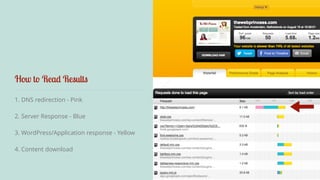
How to Read Results 
1. DNS redirection - Pink 
2. Server Response - Blue 
3. WordPress/Application response - Yellow 
4. Content download
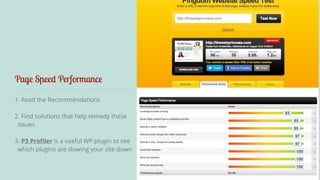
Page Speed Performance 
1. Read the Recommendations 
2. Find solutions that help remedy these 
issues 
3. P3 Profiler is a useful WP plugin to see 
which plugins are slowing your site down
How to Improve Results - in WP 
1. WordFence - has a caching engine built in to 
store static pages of your site. 
2. Other caching plugins include WP Super 
Cache, Hyper Cache, W3 Total Cache 
3. Page Speed - will help sort out a couple of the 
top recommendations from tests like Enable 
Compression and Leverage Browser Caching
How to Improve Results - on the Server 
1. Add a Content Delivery Network (CDN) to 
serve your static content. 
2. Consider a service like Cloud Flare - a lot of 
hosts offer free Cloud Flare integration with 
your site.
c Maintenance 
Insurance c 
c Security c Pest Control c Efficiency 
http://thewebprincess.com/pbevent14
thewebprincess.com/pbevent14 
Coupon Code 
PBEVENT1490 
Dee Teal 
http://thewebprincess.com/pbevent14 
@thewebprincess 
facebook.com/thewebprincess 
$90.00 off a WordPress Site Inspection 
to get you started. 
valid until Sept 5 - only 12 available
Questions? 
Dee Teal 
http://thewebprincess.com/pbevent14 
@thewebprincess 
facebook.com/thewebprincess
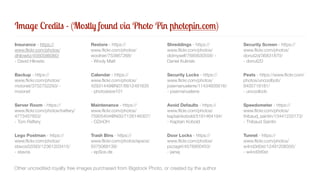
Image Credits - (Mostly found via Photo Pin photopin.com) 
Insurance - https:// 
www.flickr.com/photos/ 
dhilowitz/4560586060/ 
- David Hilowitz 
Backup - https:// 
www.flickr.com/photos/ 
moionet/3752752293/ - 
moionet 
Server Room - https:// 
www.flickr.com/photos/traftery/ 
4773457853/ 
- Tom Raftery 
Lego Postman - https:// 
www.flickr.com/photos/ 
stavos52093/12361203415/ 
- stavos 
Restore - https:// 
www.flickr.com/photos/ 
woolner/753867268/ 
- Wooly Matt 
Calendar - https:// 
www.flickr.com/photos/ 
42931449@N07/6812481635 
- photosteve101 
Maintenance - https:// 
www.flickr.com/photos/ 
75905404@N00/7126146307/ 
- OZinOH 
Trash Bins - https:// 
www.flickr.com/photos/epsos/ 
5575089139/ 
- epSos.de 
Shreddings - https:// 
www.flickr.com/photos/ 
didmyself/7685630558/ - 
Daniel Kulinski 
Security Locks - https:// 
www.flickr.com/photos/ 
josemanuelerre/11434605616/ 
- josemanuelerre 
Avoid Defaults - https:// 
www.flickr.com/photos/ 
kaptainkobold/5181464194/ 
- Kaptain Kobold 
Door Locks - https:// 
www.flickr.com/photos/ 
pizzagirl/4578900453/ 
- jainaj 
Security Screen - https:// 
www.flickr.com/photos/ 
donut2d/36831870/ 
- donut2D 
Pests - https://www.flickr.com/ 
photos/uncoolbob/ 
8405718181/ 
- uncoolbob 
Speedometer - https:// 
www.flickr.com/photos/ 
thibaud_saintin/13441220173/ 
- Thibaud Saintin 
Tunnel - https:// 
www.flickr.com/photos/ 
w4nd3rl0st/12491208355/ 
- w4nd3rl0st 
Other uncredited royalty free images purchased from Bigstock Photo, or created by the author
Dee Teal 
http://thewebprincess.com/pbevent14 
@thewebprincess 
facebook.com/thewebprincess

Responsible [digital] Home Ownership

  • 1.
    Responsible [digital] HomeOwnership @thewebprincess
  • 2.
    c Maintenance Insurancec c Security c Pest Control c Efficiency
  • 3.
  • 4.
    Back me Up How will your back up get created? Where will it be stored? How will you restore from that backup?
  • 5.
    How to BackUp Let your host take care of it Learn how to do it manually (for those of us who are technical) ! Install (and use) a WordPress backup plugin Pay someone to do it for you.
  • 6.
    Backup Plugin Options 1. VaultPress - $5-$15 monthly 2. Backup Buddy - $80USD (annually if you want to be able to update it) 3. WP Backup to Dropbox - Free with paid extensions
  • 7.
    Where will thebackup live? Hint: NOT on your server - send it offsite
  • 8.
    How will yourestore it? Hint: Practice restoring it
  • 9.
    Schedule regular backups credit:photosteve101 https://www.flickr.com/photos/42931449@N07/6812481635/"
  • 10.
  • 11.
    Stay up toDate WordPress core Allow auto updates Update your Plugins Update your Themes (a word of caution re child themes)
  • 12.
    Take Out theTrash Delete extraneous revisions ! Delete draft posts WP Clean up (plugin) Delete unused plugins and themes credit: epSos.de - https://www.flickr.com/photos/epsos/5575089139/
  • 13.
    Declutter Optimise yourDatabase WP Cleanup (plugin)
  • 14.
    Keep on topof Broken Links Google Webmaster Tools - Web based ! Broken Link Checker (plugin) ! Screaming Frog - Desktop Tool
  • 15.
  • 17.
    Stay up toDate WordPress core Allow auto updates Update your Plugins and Themes Delete unused themes and plugins
  • 18.
    Avoid Defaults Don’thave a user called admin (or siteadmin, webadmin, administrator etc.) When you install WP, change the database table prefix from wp_ to anything else Change DB Prefix (plugin)
  • 19.
    Keep the DoorsLocked Use a strong key - enforce strong passwords for all users - passwords like this (note: this is not my password) AgDBJpxfcid7BnaTi9Eg ! Use a password keeper 1Password, Last Pass Pro tip: Don’t use the same password for everything
  • 20.
    Use a SecurityScreen - (plugin) 1. WordFence - Free (has a Pro option) ! 2. iThemes Security - Free (has a Pro option) 3. Sucuri Malware scanner - Free to scan, (but cleanup and real time scanning - annual subscription)
  • 21.
    Get an SSLCertificate for your Site Transfer of data is secure and encrypted ! Particularly useful on login pages and contact forms where customer data, sales information and passwords are being transferred ! Google is starting to give sites with an SSL certificate a better ranking
  • 22.
  • 23.
    Spam, Spam, Spam 1. Akismet - Spam Plugin Free for personal sites - $5 p/m if you make any money i.e. advertising/affiliate ! 2. WP SpamShield - Free ! 3. Disqus - alternate comment system and plugin ! 4. Registration Honeypot - for those with open registration on their sites
  • 24.
  • 25.
    The Need… forSpeed 1. Bounce rate 2. Search ranking 3. Conversion 4. Page views 5. Reader satisfaction 6. Revenue http://www.copyblogger.com/website-speed-matters/
  • 26.
    How to Testyour Site Speed 1. http://webpagetest.org 2. http://tools.pingdom.com/ 3. https://developers.google.com/speed/pagespeed/insights/ 4. http://gtmetrix.com/
  • 27.
    How to ReadResults 1. DNS redirection - Pink 2. Server Response - Blue 3. WordPress/Application response - Yellow 4. Content download
  • 28.
    Page Speed Performance 1. Read the Recommendations 2. Find solutions that help remedy these issues 3. P3 Profiler is a useful WP plugin to see which plugins are slowing your site down
  • 29.
    How to ImproveResults - in WP 1. WordFence - has a caching engine built in to store static pages of your site. 2. Other caching plugins include WP Super Cache, Hyper Cache, W3 Total Cache 3. Page Speed - will help sort out a couple of the top recommendations from tests like Enable Compression and Leverage Browser Caching
  • 30.
    How to ImproveResults - on the Server 1. Add a Content Delivery Network (CDN) to serve your static content. 2. Consider a service like Cloud Flare - a lot of hosts offer free Cloud Flare integration with your site.
  • 31.
    c Maintenance Insurancec c Security c Pest Control c Efficiency http://thewebprincess.com/pbevent14
  • 32.
    thewebprincess.com/pbevent14 Coupon Code PBEVENT1490 Dee Teal http://thewebprincess.com/pbevent14 @thewebprincess facebook.com/thewebprincess $90.00 off a WordPress Site Inspection to get you started. valid until Sept 5 - only 12 available
  • 33.
    Questions? Dee Teal http://thewebprincess.com/pbevent14 @thewebprincess facebook.com/thewebprincess
  • 34.
    Image Credits -(Mostly found via Photo Pin photopin.com) Insurance - https:// www.flickr.com/photos/ dhilowitz/4560586060/ - David Hilowitz Backup - https:// www.flickr.com/photos/ moionet/3752752293/ - moionet Server Room - https:// www.flickr.com/photos/traftery/ 4773457853/ - Tom Raftery Lego Postman - https:// www.flickr.com/photos/ stavos52093/12361203415/ - stavos Restore - https:// www.flickr.com/photos/ woolner/753867268/ - Wooly Matt Calendar - https:// www.flickr.com/photos/ 42931449@N07/6812481635 - photosteve101 Maintenance - https:// www.flickr.com/photos/ 75905404@N00/7126146307/ - OZinOH Trash Bins - https:// www.flickr.com/photos/epsos/ 5575089139/ - epSos.de Shreddings - https:// www.flickr.com/photos/ didmyself/7685630558/ - Daniel Kulinski Security Locks - https:// www.flickr.com/photos/ josemanuelerre/11434605616/ - josemanuelerre Avoid Defaults - https:// www.flickr.com/photos/ kaptainkobold/5181464194/ - Kaptain Kobold Door Locks - https:// www.flickr.com/photos/ pizzagirl/4578900453/ - jainaj Security Screen - https:// www.flickr.com/photos/ donut2d/36831870/ - donut2D Pests - https://www.flickr.com/ photos/uncoolbob/ 8405718181/ - uncoolbob Speedometer - https:// www.flickr.com/photos/ thibaud_saintin/13441220173/ - Thibaud Saintin Tunnel - https:// www.flickr.com/photos/ w4nd3rl0st/12491208355/ - w4nd3rl0st Other uncredited royalty free images purchased from Bigstock Photo, or created by the author
  • 35.
    Dee Teal http://thewebprincess.com/pbevent14 @thewebprincess facebook.com/thewebprincess