RES HyperDrive
Overview

                        David Hitchen
                 Dhitchen@ResSoftware.com

                                            1
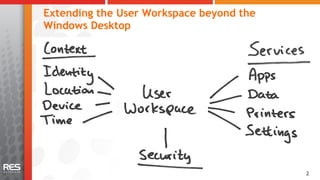
Extending the User Workspace beyond the
Windows Desktop


                                          22
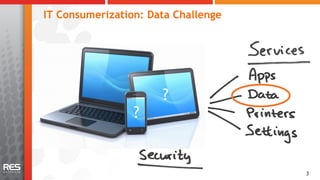
IT Consumerization: Data Challenge


                      ?
                 ?


                                     33
The easiest, most secure and on premises way to
share files on the go for enterprise users


                                                  44
RES HyperDrive Benefits
•  Easy for users
   –  Seamless follow-me-data across any device
   –  Ad-hoc file sharing
   –  Endorsed by corporate IT
•  Easy for IT
   –  Secure, on premises and client independent
   –  Easy to set up
•  Innovative approach
   –  End-to-end solution
   –  Flexible subscription model
   –  Independent from virtualization and cloud providers


                                                            55
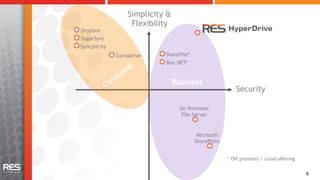
Simplicity &
                   Flexibility
Dropbox
SugarSync
Syncplicity
              Zumodrive     ShareFile*
                            Box.NET*


                                 Business
                                                         Security

                                   On Premises
                                   File Server


                                          Microsoft
                                         SharePoint


                                                      * Off premises / cloud offering


                                                                                        6
Introduction to RES HyperDrive
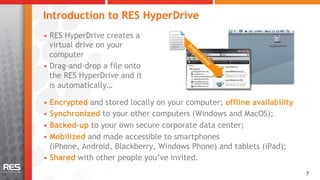
•  RES HyperDrive creates a
   virtual drive on your
   computer
•  Drag-and-drop a file onto
   the RES HyperDrive and it
   is automatically…

•  Encrypted and stored locally on your computer; offline availability
•  Synchronized to your other computers (Windows and MacOS);
•  Backed-up to your own secure corporate data center;
•  Mobilized and made accessible to smartphones
   (iPhone, Android, Blackberry, Windows Phone) and tablets (iPad);
•  Shared with other people you’ve invited.
                                                                         7
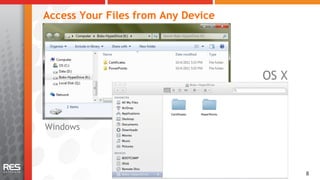
Access Your Files from Any Device


                                    OS X


Windows


                                           8
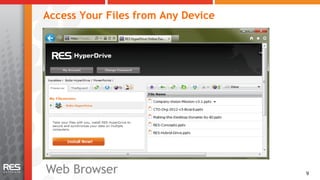
Access Your Files from Any Device


Web Browser                         9
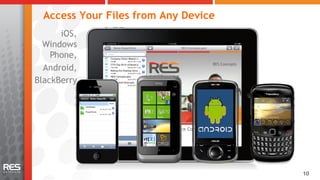
Access Your Files from Any Device
      iOS,
  Windows
    Phone,
  Android,
BlackBerry


                                      10
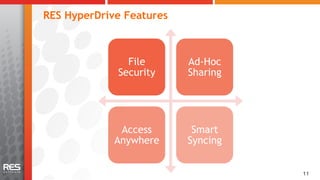
RES HyperDrive Features


               File       Ad-Hoc
             Security     Sharing


              Access       Smart
             Anywhere     Syncing


                                    11
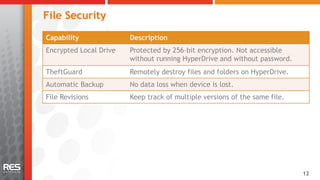
File Security
Capability              Description
Encrypted Local Drive   Protected by 256-bit encryption. Not accessible
                        without running HyperDrive and without password.
TheftGuard              Remotely destroy files and folders on HyperDrive.
Automatic Backup        No data loss when device is lost.
File Revisions          Keep track of multiple versions of the same file.


                                                                            12
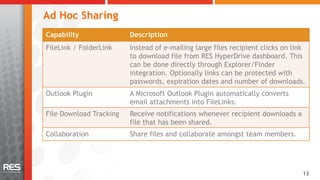
Ad Hoc Sharing
Capability               Description
FileLink / FolderLink    Instead of e-mailing large files recipient clicks on link
                         to download file from RES HyperDrive dashboard. This
                         can be done directly through Explorer/Finder
                         integration. Optionally links can be protected with
                         passwords, expiration dates and number of downloads.
Outlook Plugin           A Microsoft Outlook Plugin automatically converts
                         email attachments into FileLinks.
File Download Tracking   Receive notifications whenever recipient downloads a
                         file that has been shared.
Collaboration            Share files and collaborate amongst team members.


                                                                                 13
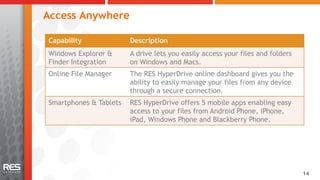
Access Anywhere

Capability              Description
Windows Explorer &      A drive lets you easily access your files and folders
Finder Integration      on Windows and Macs.
Online File Manager     The RES HyperDrive online dashboard gives you the
                        ability to easily manage your files from any device
                        through a secure connection.
Smartphones & Tablets   RES HyperDrive offers 5 mobile apps enabling easy
                        access to your files from Android Phone, iPhone,
                        iPad, Windows Phone and Blackberry Phone.


                                                                                14
Smart Synching
Capability            Description
Automatic Sync        Simply drag and drop or save files directly on your
                      HyperDrive and your files are automatically
                      synchronized.
Smart Sync            Only the changed portions of files are synchronized
                      increasing performance and bandwidth.
Smart Filters         Some files are too sensitive to be shared or are too
                      large to be synchronized. Set up filters to exclude
                      these files from sharing or syncing.
Smart Notifications   Keep track of when other contributors add, delete or
                      modify files on your shared HyperDrive.


                                                                             15
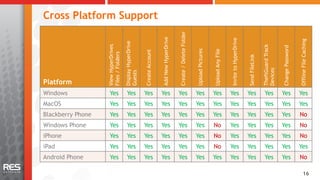
Cross Platform Support


                                                                                                 Create / Delete Folder
                                                                            Add New HyperDrive


                                                                                                                                                              Invite to HyperDrive


                                                                                                                                                                                                                                          Offline File Caching
                                      Display HyperDrive
                   View HyperDrives


                                                                                                                                                                                                     TheftGuard Track


                                                                                                                                                                                                                        Change Password
                                                                                                                          Upload Pictures


                                                                                                                                            Upload Any File
                                                           Create Account
                   Files / Folders


                                                                                                                                                                                     Send FileLink


                                                                                                                                                                                                     Devices
                                      Guests
Platform
Windows              Yes                Yes                Yes              Yes                  Yes                      Yes               Yes               Yes                    Yes               Yes              Yes               Yes
MacOS                Yes                Yes                Yes              Yes                  Yes                      Yes               Yes               Yes                    Yes               Yes              Yes               Yes
Blackberry Phone     Yes                Yes                Yes              Yes                  Yes                      Yes               Yes               Yes                    Yes               Yes              Yes               No
Windows Phone        Yes                Yes                Yes              Yes                  Yes                      Yes               No                Yes                    Yes               Yes              Yes               No
iPhone               Yes                Yes                Yes              Yes                  Yes                      Yes               No                Yes                    Yes               Yes              Yes               No
iPad                 Yes                Yes                Yes              Yes                  Yes                      Yes               No                Yes                    Yes               Yes              Yes               Yes
Android Phone        Yes                Yes                Yes              Yes                  Yes                      Yes               Yes               Yes                    Yes               Yes              Yes               No

                                                                                                                                                                                                                                                 16
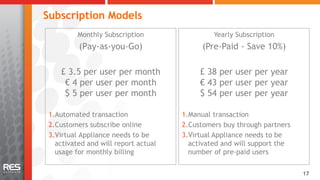
Subscription Models
          Monthly Subscription                 Yearly Subscription
          (Pay-as-you-Go)                   (Pre-Paid - Save 10%)

    £ 3.5 per user per month               £ 38 per user per year
     € 4 per user per month                € 43 per user per year
     $ 5 per user per month                $ 54 per user per year

 1. Automated transaction             1. Manual transaction
 2. Customers subscribe online        2. Customers buy through partners
 3. Virtual Appliance needs to be     3. Virtual Appliance needs to be
   activated and will report actual     activated and will support the
   usage for monthly billing            number of pre-paid users

                                                                          17
Availability
Q2 2012
•  Available

Q3 2012
•  Full integration with RES Workspace Manager (Early Q3)


                                                            18
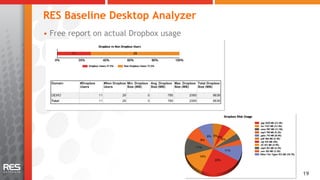
RES Baseline Desktop Analyzer
•  Free report on actual Dropbox usage


                                         19
RES Automation Manager
•  Free RES Automation Manager agent
   embedded on Virtual Appliance
•  Provisioning tasks:
   –  Create RES HyperDrive accounts
   –  Query RES HyperDrives
   –  Configure RES HyperDrive Virtual Appliance
   –  …


                                                   20
Demo

       21
Questions?


The easiest, most secure and on premises way to
share files on the go for enterprise users


                                                  22

Res hyper drive overview 201203 - widescreen

  • 1.
    RES HyperDrive Overview David Hitchen Dhitchen@ResSoftware.com 1
  • 2.
    Extending the UserWorkspace beyond the Windows Desktop 22
  • 3.
    IT Consumerization: DataChallenge ? ? 33
  • 4.
    The easiest, mostsecure and on premises way to share files on the go for enterprise users 44
  • 5.
    RES HyperDrive Benefits • Easy for users –  Seamless follow-me-data across any device –  Ad-hoc file sharing –  Endorsed by corporate IT •  Easy for IT –  Secure, on premises and client independent –  Easy to set up •  Innovative approach –  End-to-end solution –  Flexible subscription model –  Independent from virtualization and cloud providers 55
  • 6.
    Simplicity & Flexibility Dropbox SugarSync Syncplicity Zumodrive ShareFile* Box.NET* Business Security On Premises File Server Microsoft SharePoint * Off premises / cloud offering 6
  • 7.
    Introduction to RESHyperDrive •  RES HyperDrive creates a virtual drive on your computer •  Drag-and-drop a file onto the RES HyperDrive and it is automatically… •  Encrypted and stored locally on your computer; offline availability •  Synchronized to your other computers (Windows and MacOS); •  Backed-up to your own secure corporate data center; •  Mobilized and made accessible to smartphones (iPhone, Android, Blackberry, Windows Phone) and tablets (iPad); •  Shared with other people you’ve invited. 7
  • 8.
    Access Your Filesfrom Any Device OS X Windows 8
  • 9.
    Access Your Filesfrom Any Device Web Browser 9
  • 10.
    Access Your Filesfrom Any Device iOS, Windows Phone, Android, BlackBerry 10
  • 11.
    RES HyperDrive Features File Ad-Hoc Security Sharing Access Smart Anywhere Syncing 11
  • 12.
    File Security Capability Description Encrypted Local Drive Protected by 256-bit encryption. Not accessible without running HyperDrive and without password. TheftGuard Remotely destroy files and folders on HyperDrive. Automatic Backup No data loss when device is lost. File Revisions Keep track of multiple versions of the same file. 12
  • 13.
    Ad Hoc Sharing Capability Description FileLink / FolderLink Instead of e-mailing large files recipient clicks on link to download file from RES HyperDrive dashboard. This can be done directly through Explorer/Finder integration. Optionally links can be protected with passwords, expiration dates and number of downloads. Outlook Plugin A Microsoft Outlook Plugin automatically converts email attachments into FileLinks. File Download Tracking Receive notifications whenever recipient downloads a file that has been shared. Collaboration Share files and collaborate amongst team members. 13
  • 14.
    Access Anywhere Capability Description Windows Explorer & A drive lets you easily access your files and folders Finder Integration on Windows and Macs. Online File Manager The RES HyperDrive online dashboard gives you the ability to easily manage your files from any device through a secure connection. Smartphones & Tablets RES HyperDrive offers 5 mobile apps enabling easy access to your files from Android Phone, iPhone, iPad, Windows Phone and Blackberry Phone. 14
  • 15.
    Smart Synching Capability Description Automatic Sync Simply drag and drop or save files directly on your HyperDrive and your files are automatically synchronized. Smart Sync Only the changed portions of files are synchronized increasing performance and bandwidth. Smart Filters Some files are too sensitive to be shared or are too large to be synchronized. Set up filters to exclude these files from sharing or syncing. Smart Notifications Keep track of when other contributors add, delete or modify files on your shared HyperDrive. 15
  • 16.
    Cross Platform Support Create / Delete Folder Add New HyperDrive Invite to HyperDrive Offline File Caching Display HyperDrive View HyperDrives TheftGuard Track Change Password Upload Pictures Upload Any File Create Account Files / Folders Send FileLink Devices Guests Platform Windows Yes Yes Yes Yes Yes Yes Yes Yes Yes Yes Yes Yes MacOS Yes Yes Yes Yes Yes Yes Yes Yes Yes Yes Yes Yes Blackberry Phone Yes Yes Yes Yes Yes Yes Yes Yes Yes Yes Yes No Windows Phone Yes Yes Yes Yes Yes Yes No Yes Yes Yes Yes No iPhone Yes Yes Yes Yes Yes Yes No Yes Yes Yes Yes No iPad Yes Yes Yes Yes Yes Yes No Yes Yes Yes Yes Yes Android Phone Yes Yes Yes Yes Yes Yes Yes Yes Yes Yes Yes No 16
  • 17.
    Subscription Models Monthly Subscription Yearly Subscription (Pay-as-you-Go) (Pre-Paid - Save 10%) £ 3.5 per user per month £ 38 per user per year € 4 per user per month € 43 per user per year $ 5 per user per month $ 54 per user per year 1. Automated transaction 1. Manual transaction 2. Customers subscribe online 2. Customers buy through partners 3. Virtual Appliance needs to be 3. Virtual Appliance needs to be activated and will report actual activated and will support the usage for monthly billing number of pre-paid users 17
  • 18.
    Availability Q2 2012 •  Available Q32012 •  Full integration with RES Workspace Manager (Early Q3) 18
  • 19.
    RES Baseline DesktopAnalyzer •  Free report on actual Dropbox usage 19
  • 20.
    RES Automation Manager • Free RES Automation Manager agent embedded on Virtual Appliance •  Provisioning tasks: –  Create RES HyperDrive accounts –  Query RES HyperDrives –  Configure RES HyperDrive Virtual Appliance –  … 20
  • 21.
  • 22.
    Questions? The easiest, mostsecure and on premises way to share files on the go for enterprise users 22