Representing Patterns in UML Andy Bulka www.atug.com/andypatterns Technical Director Austhink Software www.austhink.com
The competitors IBM Rational has “pattern instances” on your UML diagram and you can re-apply a pattern and it enforces it.   ObjectIf has some pretty cool design pattern support and uses roles and colors to indicate patterns. EA (Enterprise Architect has design pattern support, though the merge feature is a bit buggy at the moment). StarUML is free, and has a configurable patterns system. ModelMaker, classic pattern “enforcer”, with code regions etc.  Now a bit old, has only a limited number of patterns – to be improved in the next few months.
IBM Rational - pattern instance itself is a first class modeling element The pattern instance itself is a first class modeling element, and appears in the model and can be placed in a diagram and has relationships to other model elements that bind its parameters to actual model elements.  Having pattern instances in a model help designers understand which patterns have been applied (since many might have been).
Applying Patterns to the workspace Most have a clear, standard way of applying patterns i.e. you specify if you want to create a  new  class or  merge  a role with an existing class.  UML diagram previews in the pattern wizards, too.  And most tools also have a way of representing the pattern on the diagram e.g. collaboration lines or class stereotypes or association lines with role labels.  Rational has  drag drop  wiring – nice.
Pattern is comprised of Classes (one or more) Attributes Methods Code fragments within methods (aspects?) Meta information tying all the above together
Ways of Representing the Grouping of classes Shading areas behind classes, grouping them. (vlissedes) Shaded areas can overlap to indicate classes performing different roles within different patterns i.e.  a class can be part of more than one pattern Sticky notes near classes Role labels on properties (ObjectIf)
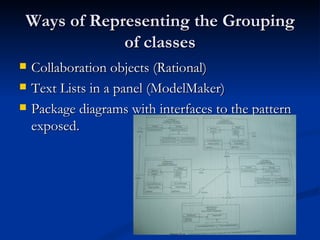
Ways of Representing the Grouping of classes Collaboration objects (Rational) Text Lists in a panel (ModelMaker) Package diagrams with interfaces to the pattern exposed.
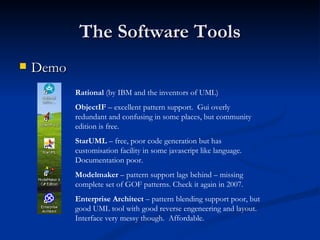
The Software Tools Demo Rational  (by IBM and the inventors of UML) ObjectIF  – excellent pattern support.  Gui overly redundant and confusing in some places, but community edition is free. StarUML  – free, poor code generation but has customisation facility in some javascript like language. Documentation poor. Modelmaker  – pattern support lags behind – missing complete set of GOF patterns. Check it again in 2007. Enterprise Architect  – pattern blending support poor, but good UML tool with good reverse engeneering and layout. Interface very messy though.  Affordable.
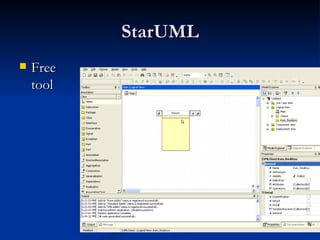
StarUML Free tool
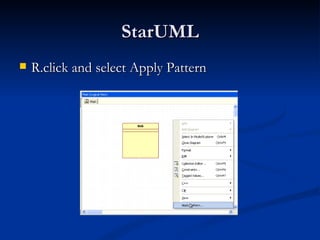
StarUML R.click and select Apply Pattern
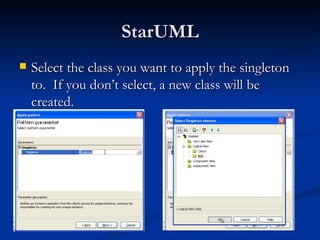
StarUML Select the class you want to apply the singleton to.  If you don’t select, a new class will be created.
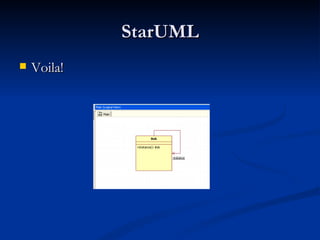
StarUML Voila!
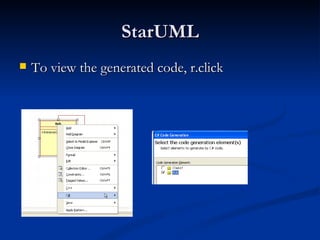
StarUML To view the generated code, r.click
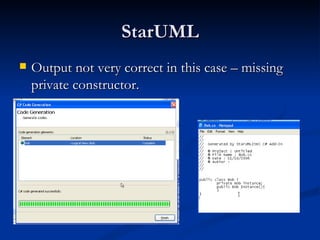
StarUML Output not very correct in this case – missing private constructor.
Other demos I demo’d all the 5 tools on the night, and there is a video of me doing them all.  At the moment the only video released is on my website is the Rational UML tool portion of the demo – see  www.andypatterns.com
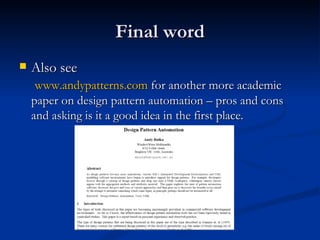
Final word Also see   www.andypatterns.com  for another more academic paper on design pattern automation – pros and cons and asking is it a good idea in the first place.

Representing Design Patterns In Uml Andy Bulka Oct2006

  • 1.
    Representing Patterns inUML Andy Bulka www.atug.com/andypatterns Technical Director Austhink Software www.austhink.com
  • 2.
    The competitors IBMRational has “pattern instances” on your UML diagram and you can re-apply a pattern and it enforces it.  ObjectIf has some pretty cool design pattern support and uses roles and colors to indicate patterns. EA (Enterprise Architect has design pattern support, though the merge feature is a bit buggy at the moment). StarUML is free, and has a configurable patterns system. ModelMaker, classic pattern “enforcer”, with code regions etc. Now a bit old, has only a limited number of patterns – to be improved in the next few months.
  • 3.
    IBM Rational -pattern instance itself is a first class modeling element The pattern instance itself is a first class modeling element, and appears in the model and can be placed in a diagram and has relationships to other model elements that bind its parameters to actual model elements. Having pattern instances in a model help designers understand which patterns have been applied (since many might have been).
  • 4.
    Applying Patterns tothe workspace Most have a clear, standard way of applying patterns i.e. you specify if you want to create a new class or merge a role with an existing class.  UML diagram previews in the pattern wizards, too.  And most tools also have a way of representing the pattern on the diagram e.g. collaboration lines or class stereotypes or association lines with role labels. Rational has drag drop wiring – nice.
  • 5.
    Pattern is comprisedof Classes (one or more) Attributes Methods Code fragments within methods (aspects?) Meta information tying all the above together
  • 6.
    Ways of Representingthe Grouping of classes Shading areas behind classes, grouping them. (vlissedes) Shaded areas can overlap to indicate classes performing different roles within different patterns i.e. a class can be part of more than one pattern Sticky notes near classes Role labels on properties (ObjectIf)
  • 7.
    Ways of Representingthe Grouping of classes Collaboration objects (Rational) Text Lists in a panel (ModelMaker) Package diagrams with interfaces to the pattern exposed.
  • 8.
    The Software ToolsDemo Rational (by IBM and the inventors of UML) ObjectIF – excellent pattern support. Gui overly redundant and confusing in some places, but community edition is free. StarUML – free, poor code generation but has customisation facility in some javascript like language. Documentation poor. Modelmaker – pattern support lags behind – missing complete set of GOF patterns. Check it again in 2007. Enterprise Architect – pattern blending support poor, but good UML tool with good reverse engeneering and layout. Interface very messy though. Affordable.
  • 9.
  • 10.
    StarUML R.click andselect Apply Pattern
  • 11.
    StarUML Select theclass you want to apply the singleton to. If you don’t select, a new class will be created.
  • 12.
  • 13.
    StarUML To viewthe generated code, r.click
  • 14.
    StarUML Output notvery correct in this case – missing private constructor.
  • 15.
    Other demos Idemo’d all the 5 tools on the night, and there is a video of me doing them all. At the moment the only video released is on my website is the Rational UML tool portion of the demo – see www.andypatterns.com
  • 16.
    Final word Alsosee www.andypatterns.com for another more academic paper on design pattern automation – pros and cons and asking is it a good idea in the first place.