

Home Working and the
University of Bath 

Green Impact Talk Series

15th March 2012


Marieke Guy
Research Officer, UKOLN                       UKOLN is supported by:


                           This work is licensed under a Attribution-
                           NonCommercial-ShareAlike 2.0 licence
                           This excludes images
      www.ukoln.ac.uk                                                   www.bath.ac.uk
Introduction to UKOLN
• UKOLN is a research organisation that aims to inform
  practice and influence policy in the areas of:
   – digital libraries, information systems, bibliographic
     management, and web technologies.
• Located here at the University of Bath
• Funded by JISC to advise UK HE and FE communities
• Many areas of work including:
   – Digital preservation: DCC, research360
   – Metadata, registry work
   – Repositories:
   – Dissemination: Ariadne, International Journal of Digital
     Curation
   – eScience: eCrystals….etc.

 www.ukoln.ac.uk
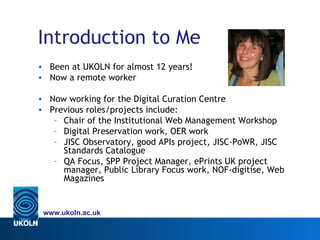
Introduction to Me
• Been at UKOLN for almost 12 years!
• Now a remote worker

• Now working for the Digital Curation Centre
• Previous roles/projects include:
   – Chair of the Institutional Web Management Workshop
   – Digital Preservation work, OER work
   – JISC Observatory, good APIs project, JISC-PoWR, JISC
     Standards Catalogue
   – QA Focus, SPP Project Manager, ePrints UK project
     manager, Public Library Focus work, NOF-digitise, Web
     Magazines


 www.ukoln.ac.uk
Workshop Resources
• All resources (and more) linked with Delicious tag:
  http://delicious.com/mariekeguy/remoteworking
• All ppts etc will be available from:
   – my blog http://remoteworker.wordpress.com/
   – slideshare http://www.slideshare.net/MariekeGuy
• Feel free to email me (m.guy@ukoln.ac.uk) or follow me on
  Twitter (mariekeguy)


 www.ukoln.ac.uk
Straw Poll: Where Do You Work?
• In the office
• From home (occasionally or full-time) – a ‘remote worker’
• Beyond the office
   – At different offices
   – At a client site
   – As a true nomad or ‘road warrior’
• In a virtual team


 www.ukoln.ac.uk
Work is becoming something you do, not a place you go to


                            http://www.flickr.com/photos/latteart/2547757031/
Changes to the Way we Work
• Technological
   – Broadband
   – Virtual Private Networks (VPN)
   – Mobile technology
• Cultural
   – Right to request flexible working extended (April 2009)
     - 4.5m parents eligible
   – Effects of recession (cutting overheads), pandemics,
     environment, weather, etc…
   – Work-life balance, flexibility
   – Output driven not physicality driven, productivity key,
     loyalty & reduced absenteeism

 www.ukoln.ac.uk
Challenges
• Cultural
   – Blurred boundaries - where does works stop and home
     begin?
   – Reduced interaction time with colleagues and managers
   – Connection with the (virtual) team
   – Morale, perceptions, ownership
   – Formalising current situations
• Technological
   – Bandwidth issues, managing VPN
   – Being supported from a distance, tracking, remote
     assistance
   – Security, cloud computing


 www.ukoln.ac.uk
www.ukoln.ac.uk

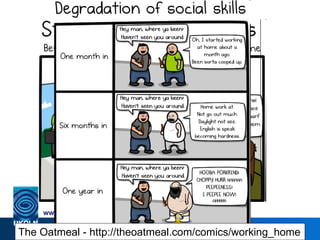
The Oatmeal - http://theoatmeal.com/comics/working_home
APPLYING


http://www.flickr.com/photos/jjpacres/3293117576/
Applying to Work from Home
•    You need to take the initiative!
•    Discuss your idea with your line manager
•    Can your work could be carried out in this way?
•    Consider options –
      – 1 or 2 days at home, 3 or 4 days in office
      – Formalising what already happens
• Consider reasons –
      –   Moving house
      –   Work/life balance - children
      –   Health/disability
      –   Space issues
• Apply to personnel
• Have your contract formally changed (has implications for
  expenses, travel etc.)
    www.ukoln.ac.uk
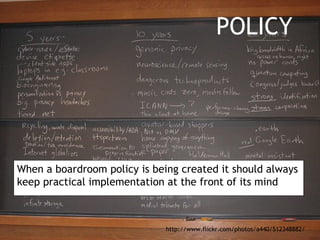
POLICY


When a boardroom policy is being created it should always
keep practical implementation at the front of its mind


                              http://www.flickr.com/photos/a440/512348882/
Policies
• UOB currently working on flexible working policies
• You may need to take the initiative if no policies in your
  department
• They really should be set up in advance & clear and
  transparent
• But also flexible
• Cover:
   – Eligibility, availability, contact procedures, workspace
     requirements, equipment and usage, expenses,
     training, ownership, etc.
• Have questions for consideration…
• Observe the development of effective patterns of usage
  rather than dictate
 www.ukoln.ac.uk
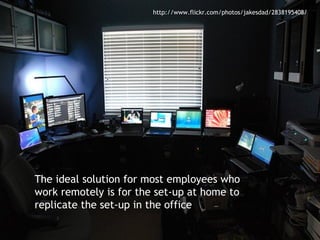
http://www.flickr.com/photos/jakesdad/2838195408/


The ideal solution for most employees who
work remotely is for the set-up at home to
replicate the set-up in the office
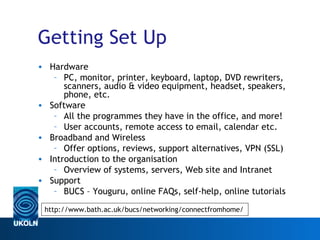
Getting Set Up
• Hardware
   – PC, monitor, printer, keyboard, laptop, DVD rewriters,
      scanners, audio & video equipment, headset, speakers,
      phone, etc.
• Software
   – All the programmes they have in the office, and more!
   – User accounts, remote access to email, calendar etc.
• Broadband and Wireless
   – Offer options, reviews, support alternatives, VPN (SSL)
• Introduction to the organisation
   – Overview of systems, servers, Web site and Intranet
• Support
   – BUCS – Youguru, online FAQs, self-help, online tutorials

 http://www.bath.ac.uk/bucs/networking/connectfromhome/
 www.ukoln.ac.uk
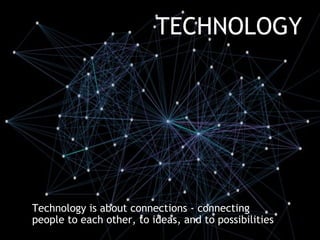
TECHNOLOGY


Technology is about connections - connecting
people to each other, to ideas, and to possibilities
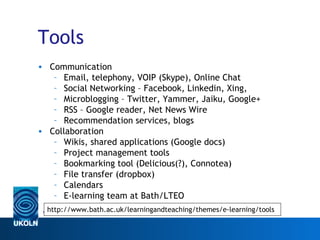
Tools
• Communication
   – Email, telephony, VOIP (Skype), Online Chat
   – Social Networking – Facebook, Linkedin, Xing,
   – Microblogging – Twitter, Yammer, Jaiku, Google+
   – RSS – Google reader, Net News Wire
   – Recommendation services, blogs
• Collaboration
   – Wikis, shared applications (Google docs)
   – Project management tools
   – Bookmarking tool (Delicious(?), Connotea)
   – File transfer (dropbox)
   – Calendars
   – E-learning team at Bath/LTEO
  http://www.bath.ac.uk/learningandteaching/themes/e-learning/tools
 www.ukoln.ac.uk
Virtual Meetings/Conferences
• Virtual Meetings
   – Video conferencing suite at Bath
   – Skype
   – Webinars – Panopto, trialling Adobe Connect &
      Blackboard Collaborate
• Virtual Conferences
   – Attending
   – Amplifying - video streaming, assigning a tag, Creative
      Commons
   – Sharing available resources: ppts, photos, video,
      podcasts


 www.ukoln.ac.uk
Mobile Devices
• Mobile is “everyware”

• Smartphones, PDAs, Blackberries, laptops
• Data is available on mobile devices, apps
• Mobile broadband – dongles, 3G
• Security issues – both data (encryption?) and actual devices
  (locks)
• Geolocation, augmented reality – the future is mobile!
• Issues with who owns what…


    www.ukoln.ac.uk
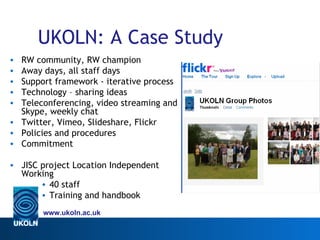
UKOLN: A Case Study
• RW community, RW champion
• Away days, all staff days
• Support framework - iterative process
• Technology – sharing ideas
• Teleconferencing, video streaming and
  Skype, weekly chat
• Twitter, Vimeo, Slideshare, Flickr
• Policies and procedures
• Commitment

• JISC project Location Independent
  Working
       • 40 staff
       • Training and handbook
       www.ukoln.ac.uk
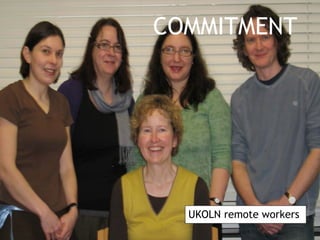
COMMITMENT


  UKOLN remote workers
Case Study BT
•    70,000 + home & nomadic workers empowered
•    6,000 part time workers
•    Over £220m in property costs saved in 10 years
•    Absenteeism reduced 3.1% (UK ave. 8.5%)
•    e-learning saves 40% training costs
•    Home-workers 7% happier, enhanced skills, less stress
•    1,800 tonnes less CO2. 1.2m litres less fuel used.
•    Transport cost savings £9.7m pa

• From http://www.slideshare.net/jackies/presentation-
  remote-workforce-v2


    www.ukoln.ac.uk
Conclusions
• Flexible working practices are on the up
• Cloud computing is on the up
• Virtual teams are on the up
• Technology is important - there is a need to support a
  portfolios of Tools
• Communication and community are more important!
   – Inclusion and support
   – Shared goals
   – Constructive feedback
   – Policies and procedures
• Blurred boundaries doesn’t have to mean lack of clarity
• New areas of interest: online learning, event amplification,
  openness, virtual teams

    www.ukoln.ac.uk
Questions?


www.ukoln.ac.uk
Discussion
•    What would you need in place to help you work from home?
•    What are your concerns about remote working?
•    How could the UOB and/or BUCs help?
•    What home working tips can you share?


    www.ukoln.ac.uk

Home Working and the University of Bath

  • 1.
    Home Working andthe University of Bath  Green Impact Talk Series 15th March 2012 Marieke Guy Research Officer, UKOLN UKOLN is supported by: This work is licensed under a Attribution- NonCommercial-ShareAlike 2.0 licence This excludes images www.ukoln.ac.uk www.bath.ac.uk
  • 2.
    Introduction to UKOLN •UKOLN is a research organisation that aims to inform practice and influence policy in the areas of: – digital libraries, information systems, bibliographic management, and web technologies. • Located here at the University of Bath • Funded by JISC to advise UK HE and FE communities • Many areas of work including: – Digital preservation: DCC, research360 – Metadata, registry work – Repositories: – Dissemination: Ariadne, International Journal of Digital Curation – eScience: eCrystals….etc. www.ukoln.ac.uk
  • 3.
    Introduction to Me •Been at UKOLN for almost 12 years! • Now a remote worker • Now working for the Digital Curation Centre • Previous roles/projects include: – Chair of the Institutional Web Management Workshop – Digital Preservation work, OER work – JISC Observatory, good APIs project, JISC-PoWR, JISC Standards Catalogue – QA Focus, SPP Project Manager, ePrints UK project manager, Public Library Focus work, NOF-digitise, Web Magazines www.ukoln.ac.uk
  • 4.
    Workshop Resources • Allresources (and more) linked with Delicious tag: http://delicious.com/mariekeguy/remoteworking • All ppts etc will be available from: – my blog http://remoteworker.wordpress.com/ – slideshare http://www.slideshare.net/MariekeGuy • Feel free to email me (m.guy@ukoln.ac.uk) or follow me on Twitter (mariekeguy) www.ukoln.ac.uk
  • 5.
    Straw Poll: WhereDo You Work? • In the office • From home (occasionally or full-time) – a ‘remote worker’ • Beyond the office – At different offices – At a client site – As a true nomad or ‘road warrior’ • In a virtual team www.ukoln.ac.uk
  • 6.
    Work is becomingsomething you do, not a place you go to http://www.flickr.com/photos/latteart/2547757031/
  • 7.
    Changes to theWay we Work • Technological – Broadband – Virtual Private Networks (VPN) – Mobile technology • Cultural – Right to request flexible working extended (April 2009) - 4.5m parents eligible – Effects of recession (cutting overheads), pandemics, environment, weather, etc… – Work-life balance, flexibility – Output driven not physicality driven, productivity key, loyalty & reduced absenteeism www.ukoln.ac.uk
  • 8.
    Challenges • Cultural – Blurred boundaries - where does works stop and home begin? – Reduced interaction time with colleagues and managers – Connection with the (virtual) team – Morale, perceptions, ownership – Formalising current situations • Technological – Bandwidth issues, managing VPN – Being supported from a distance, tracking, remote assistance – Security, cloud computing www.ukoln.ac.uk
  • 9.
    www.ukoln.ac.uk The Oatmeal -http://theoatmeal.com/comics/working_home
  • 10.
  • 11.
    Applying to Workfrom Home • You need to take the initiative! • Discuss your idea with your line manager • Can your work could be carried out in this way? • Consider options – – 1 or 2 days at home, 3 or 4 days in office – Formalising what already happens • Consider reasons – – Moving house – Work/life balance - children – Health/disability – Space issues • Apply to personnel • Have your contract formally changed (has implications for expenses, travel etc.) www.ukoln.ac.uk
  • 12.
    POLICY When a boardroompolicy is being created it should always keep practical implementation at the front of its mind http://www.flickr.com/photos/a440/512348882/
  • 13.
    Policies • UOB currentlyworking on flexible working policies • You may need to take the initiative if no policies in your department • They really should be set up in advance & clear and transparent • But also flexible • Cover: – Eligibility, availability, contact procedures, workspace requirements, equipment and usage, expenses, training, ownership, etc. • Have questions for consideration… • Observe the development of effective patterns of usage rather than dictate www.ukoln.ac.uk
  • 14.
    http://www.flickr.com/photos/jakesdad/2838195408/ The ideal solutionfor most employees who work remotely is for the set-up at home to replicate the set-up in the office
  • 15.
    Getting Set Up •Hardware – PC, monitor, printer, keyboard, laptop, DVD rewriters, scanners, audio & video equipment, headset, speakers, phone, etc. • Software – All the programmes they have in the office, and more! – User accounts, remote access to email, calendar etc. • Broadband and Wireless – Offer options, reviews, support alternatives, VPN (SSL) • Introduction to the organisation – Overview of systems, servers, Web site and Intranet • Support – BUCS – Youguru, online FAQs, self-help, online tutorials http://www.bath.ac.uk/bucs/networking/connectfromhome/ www.ukoln.ac.uk
  • 16.
    TECHNOLOGY Technology is aboutconnections - connecting people to each other, to ideas, and to possibilities
  • 17.
    Tools • Communication – Email, telephony, VOIP (Skype), Online Chat – Social Networking – Facebook, Linkedin, Xing, – Microblogging – Twitter, Yammer, Jaiku, Google+ – RSS – Google reader, Net News Wire – Recommendation services, blogs • Collaboration – Wikis, shared applications (Google docs) – Project management tools – Bookmarking tool (Delicious(?), Connotea) – File transfer (dropbox) – Calendars – E-learning team at Bath/LTEO http://www.bath.ac.uk/learningandteaching/themes/e-learning/tools www.ukoln.ac.uk
  • 18.
    Virtual Meetings/Conferences • VirtualMeetings – Video conferencing suite at Bath – Skype – Webinars – Panopto, trialling Adobe Connect & Blackboard Collaborate • Virtual Conferences – Attending – Amplifying - video streaming, assigning a tag, Creative Commons – Sharing available resources: ppts, photos, video, podcasts www.ukoln.ac.uk
  • 19.
    Mobile Devices • Mobileis “everyware” • Smartphones, PDAs, Blackberries, laptops • Data is available on mobile devices, apps • Mobile broadband – dongles, 3G • Security issues – both data (encryption?) and actual devices (locks) • Geolocation, augmented reality – the future is mobile! • Issues with who owns what… www.ukoln.ac.uk
  • 20.
    UKOLN: A CaseStudy • RW community, RW champion • Away days, all staff days • Support framework - iterative process • Technology – sharing ideas • Teleconferencing, video streaming and Skype, weekly chat • Twitter, Vimeo, Slideshare, Flickr • Policies and procedures • Commitment • JISC project Location Independent Working • 40 staff • Training and handbook www.ukoln.ac.uk
  • 21.
    COMMITMENT UKOLNremote workers
  • 22.
    Case Study BT • 70,000 + home & nomadic workers empowered • 6,000 part time workers • Over £220m in property costs saved in 10 years • Absenteeism reduced 3.1% (UK ave. 8.5%) • e-learning saves 40% training costs • Home-workers 7% happier, enhanced skills, less stress • 1,800 tonnes less CO2. 1.2m litres less fuel used. • Transport cost savings £9.7m pa • From http://www.slideshare.net/jackies/presentation- remote-workforce-v2 www.ukoln.ac.uk
  • 23.
    Conclusions • Flexible workingpractices are on the up • Cloud computing is on the up • Virtual teams are on the up • Technology is important - there is a need to support a portfolios of Tools • Communication and community are more important! – Inclusion and support – Shared goals – Constructive feedback – Policies and procedures • Blurred boundaries doesn’t have to mean lack of clarity • New areas of interest: online learning, event amplification, openness, virtual teams www.ukoln.ac.uk
  • 24.
  • 25.
    Discussion • What would you need in place to help you work from home? • What are your concerns about remote working? • How could the UOB and/or BUCs help? • What home working tips can you share? www.ukoln.ac.uk