3 minute
  presentation


                 RemoteExec® presentation
Enterprise-wide remote
installations, updates
and executions for
Windows® networks
What you should know first
      about RemoteExec
RemoteExec reviewed
      on TechRepublic


 RemoteExec is a great utility application
 for administrators or helpdesk staff who
 manage systems in multiple locations.
RemoteExec is used by hundreds of
 demanding organizations worldwide
Users’ quotes
       about RemoteExec                          Summing up, it’s a
                                                 simple and very
                                                 effective tool.
                                                          Vijay Ray

It cuts the deployment time in half and
streamlines the installation process.
Works perfect for batch installations,
patches or commands within your           I really recommend it to
network. It's a must for any system       anyone who needs to
administrator!                            manage a good number
                     Constantin Serban    of remote systems and
                                          wants to automate those
                                          tasks.
                                               Ravikanth Chaganti
RemoteExec
   features
MSI packages
   deployment


                RemoteExec quickly and
                easily deploys applications
                packaged in .msi format to
                hundreds or (tens of)
                thousands of Windows
                systems.
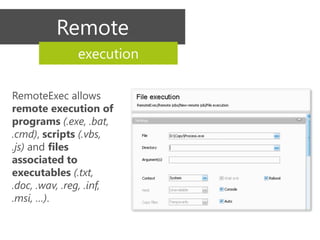
Remote
              execution

RemoteExec allows
remote execution of
programs (.exe, .bat,
.cmd), scripts (.vbs,
.js) and files
associated to
executables (.txt,
.doc, .wav, .reg, .inf,
.msi, …).
Service Packs, patches & updates
           deployment
With RemoteExec, you can deploy Service Packs, updates,
patches and hotfixes to all required Windows systems in
minutes.
Registry
           modification


RemoteExec allows remote
modification of the registry
on all Windows systems
throughout the network, or
on a specific subset of
computers.
File
          operations


RemoteExec allows
copying, updating or
deleting files and folders
on selected Windows
systems throughout the
network.
Password & local account
     management


                  RemoteExec allows
                  remotely changing the
                  Local Administrator
                  Password and disabling
                  all other local accounts
                  in order to reinforce
                  security.
Interaction
  with remote systems


RemoteExec enables you to
remotely power off, reboot
or shutdown systems, wake
up computers and lock or
close user sessions.
Integrated
                   scheduler


                                                RemoteExec comes with
                                                an integrated scheduler
                                                allowing action
                                                execution at a specific
                                                time and/or frequency.
You will be able to plan deployment to
workstations outside of working hours, or to
automatically rerun previously failed actions
due to system unavailability (unconnected
laptops, etc.).
Automated
               reporting


After an execution, RemoteExec
automatically generates a list of
systems on which the execution
failed.

That list can be directly reinserted
to rerun the execution and
                                       It also logs execution history
complete the task.                     and results into an Access or
                                       SQL Server database and
                                       generates graphical, printable
                                       reports.
User
 alerts


          RemoteExec can send
          instant alerts to users by
          displaying pop-ups and/or
          running sound files,
          enabling administrators to
          warn of any upcoming
          downtime or maintenance
          event.
RemoteExec
   Plus
RemoteExec
       Plus

                           Agentless,
                         non-intrusive
                           and secure

  RemoteExec is an agentless,
  encrypted solution that only requires
  ICMP (ping) and Microsoft File and
  Printer Sharing (SMB TCP 445).
RemoteExec
                    Plus
                   Automation                                    Impersonation
         via command line mode                                        accounts


RemoteExec can be used via the               RemoteExec allows using
command line and can also be                 impersonation accounts in order to
invoked by a script or any automation        perform remote executions requiring
tool.                                        different administrator accounts.


                                        Different execution
                                                   contexts

                      RemoteExec can silently perform
                      remote executions, or can launch
                      interactive executions displaying
                      information to the user and requiring
                      his interaction.
RemoteExec
                     Plus
                         Conditional                                            Favorite
                            Actions                                              Folders

RemoteExec allows conditional                       Remote Action configurations and lists
updating. Example: execute a                        of Target Computers can be saved in
deployment on Windows Vista SP2                     Favorite Folders in order to use them
workstations only, without having to                again quickly.
select them manually.


                                            Multi Action Mode


                      RemoteExec can execute complex,
                      multiple step actions. Example:
                      System wake up > Deployment of one or more
                      patches > File and folder replication > Registry
                      modification > System power off.
Download a free
       fully-functional
           trial now

www.RemoteExec.com

RemoteExec Presentation

  • 1.
    3 minute presentation RemoteExec® presentation Enterprise-wide remote installations, updates and executions for Windows® networks
  • 2.
    What you shouldknow first about RemoteExec
  • 3.
    RemoteExec reviewed on TechRepublic RemoteExec is a great utility application for administrators or helpdesk staff who manage systems in multiple locations.
  • 4.
    RemoteExec is usedby hundreds of demanding organizations worldwide
  • 5.
    Users’ quotes about RemoteExec Summing up, it’s a simple and very effective tool. Vijay Ray It cuts the deployment time in half and streamlines the installation process. Works perfect for batch installations, patches or commands within your I really recommend it to network. It's a must for any system anyone who needs to administrator! manage a good number Constantin Serban of remote systems and wants to automate those tasks. Ravikanth Chaganti
  • 6.
    RemoteExec features
  • 7.
    MSI packages deployment RemoteExec quickly and easily deploys applications packaged in .msi format to hundreds or (tens of) thousands of Windows systems.
  • 8.
    Remote execution RemoteExec allows remote execution of programs (.exe, .bat, .cmd), scripts (.vbs, .js) and files associated to executables (.txt, .doc, .wav, .reg, .inf, .msi, …).
  • 9.
    Service Packs, patches& updates deployment With RemoteExec, you can deploy Service Packs, updates, patches and hotfixes to all required Windows systems in minutes.
  • 10.
    Registry modification RemoteExec allows remote modification of the registry on all Windows systems throughout the network, or on a specific subset of computers.
  • 11.
    File operations RemoteExec allows copying, updating or deleting files and folders on selected Windows systems throughout the network.
  • 12.
    Password & localaccount management RemoteExec allows remotely changing the Local Administrator Password and disabling all other local accounts in order to reinforce security.
  • 13.
    Interaction withremote systems RemoteExec enables you to remotely power off, reboot or shutdown systems, wake up computers and lock or close user sessions.
  • 14.
    Integrated scheduler RemoteExec comes with an integrated scheduler allowing action execution at a specific time and/or frequency. You will be able to plan deployment to workstations outside of working hours, or to automatically rerun previously failed actions due to system unavailability (unconnected laptops, etc.).
  • 15.
    Automated reporting After an execution, RemoteExec automatically generates a list of systems on which the execution failed. That list can be directly reinserted to rerun the execution and It also logs execution history complete the task. and results into an Access or SQL Server database and generates graphical, printable reports.
  • 16.
    User alerts RemoteExec can send instant alerts to users by displaying pop-ups and/or running sound files, enabling administrators to warn of any upcoming downtime or maintenance event.
  • 17.
  • 18.
    RemoteExec Plus Agentless, non-intrusive and secure RemoteExec is an agentless, encrypted solution that only requires ICMP (ping) and Microsoft File and Printer Sharing (SMB TCP 445).
  • 19.
    RemoteExec Plus Automation Impersonation via command line mode accounts RemoteExec can be used via the RemoteExec allows using command line and can also be impersonation accounts in order to invoked by a script or any automation perform remote executions requiring tool. different administrator accounts. Different execution contexts RemoteExec can silently perform remote executions, or can launch interactive executions displaying information to the user and requiring his interaction.
  • 20.
    RemoteExec Plus Conditional Favorite Actions Folders RemoteExec allows conditional Remote Action configurations and lists updating. Example: execute a of Target Computers can be saved in deployment on Windows Vista SP2 Favorite Folders in order to use them workstations only, without having to again quickly. select them manually. Multi Action Mode RemoteExec can execute complex, multiple step actions. Example: System wake up > Deployment of one or more patches > File and folder replication > Registry modification > System power off.
  • 21.
    Download a free fully-functional trial now www.RemoteExec.com