INTERNATIONAL JOURNAL OF COMPUTER ENGINEERING & 
International Journal of Computer Engineering and Technology (IJCET), ISSN 0976-6367(Print), 
ISSN 0976 - 6375(Online), Volume 5, Issue 9, September (2014), pp. 98-104 © IAEME 
TECHNOLOGY (IJCET) 
ISSN 0976 – 6367(Print) 
ISSN 0976 – 6375(Online) 
Volume 5, Issue 9, September (2014), pp. 98-104 
© IAEME: www.iaeme.com/IJCET.asp 
Journal Impact Factor (2014): 8.5328 (Calculated by GISI) 
www.jifactor.com 
98 
 
IJCET 
© I A E M E 
JAVA REMOTE CONTROL FOR LABORATORY MONITORING 
Akshay Shinde1, Akash Malbari2, Manali Killedar3 
1, 2(Technical Analyst, Nomura Services India Pvt. Ltd.,) 
3(Department of Information Technology, Ramrao Adik Institute of Technology) 
 
ABSTRACT 
The proposed system of ‘Java Remote Control for Laboratory Monitoring’ is an optimized 
and automated software model that is used as a remote control for PC's connected as a Local Area 
Network. This software is used to control varied resources and processes running on the remote 
computer. The test implications of this technology suggest that a technology supporting remote 
control for computers connected over Local Area Network can add value for all its end users 
primarily serving the computer laboratory assistants and teachers. 
Keywords: Java Remote Control, RMI, Skeleton. 
1. INTRODUCTION 
We have seen many places where we have local area network and lots of people using them 
as per their own need. In such scenarios we need to closely monitor the computers. Many a times we 
need to lock the resources such as computer drivers, folder or files from these computers to restrict 
the users from making use of them. Sometimes we need to stop the users from using the internet or 
from the changing the settings or accessing the registry editor so as to secure the system from any 
crash due to the misuse of it. These are the common tasks that we need to do in our day to day life 
but for this we do not have any utility software, with this system we can serve us to achieve all these 
needs. 
2. EXISTING SYSTEM 
Studies show that the lab assistants had to follow the method of locking the machine 
manually as well as individually, so as to prevent the users from accessing the authorized 
information. Go on the individual machine and lock the resources as there was no particular remote
International Journal of Computer Engineering and Technology (IJCET), ISSN 0976-6367(Print), 
ISSN 0976 - 6375(Online), Volume 5, Issue 9, September (2014), pp. 98-104 © IAEME 
server. Also concepts like windows group management system called as RDP (remote desktop 
connection), Teamviewer were used. 
99 
2.1. Working 
 
Systems designed previously using this concept like RDP(remote desktop connection) that 
gives the ability to remotely connect to a computer/PC in network. After successful connection we 
can control the PC as if it’s our PC and we are controlling it with our keyboard and Mouse. 
Another example is software called Teamviewer.Teamviewer needs to have the software 
running on both the controlling machine and the machine being controlled, making it less convenient 
to operate and inefficient. 
2.2. Drawbacks of Existing System 
1. RDP needs the client and server systems to be connected in order to control the resources and 
to lock/unlock them. This approach is inefficient in terms of power consumption as it requires 
more processing power to be spent on both client and server machines. 
2. The major disadvantage of the using Teamviewer is that this approach needs the software to 
be running on both the machines all the time. 
Thus this application aims to design such a system that even a layman will be able to access 
and control the resources on remote pc and be more efficient in resource consumption at the same 
time. 
3. PROPOSED SYSTEM 
This paper implements a Java Runtime Environment (JRE) which features two virtual 
machines one called client and the other server. The client version is tuned for quick loading, it 
makes use of interpretations. The server version loads more slowly, putting more efforts into 
producing highly optimized Just-In-Time (JIT) compilations that yields higher performance. 
3.1. Working 
Java is used a programming language since it's a simple programming language, Object 
oriented throughout - no coding outside of the class definitions including the main(), An extensive 
class library available in the core language packages, A program runs inside the virtual machine 
sandbox, security manager- determines what resources a class can access such as reading and writing 
to a local disk, Lightweight processes, called threads can easily be spun off to perform 
multiprocessing, Java program can be moved from one computer system to another, anywhere, 
anytime. Once connected in LAN one can make such a provision in Java that the user screen that is 
designed using java swings could appear on the server machine or appear from where it is getting 
connected to so that the server could get to know which resources are accessed by the user. The 
entire structure of the project is based on RMI (remote method invocation) architecture. 
3.1.1. Architecture using Java 
RMI applications often comprise two separate programs, a server and a client. A typical 
server program creates some remote objects, makes references to these objects accessible, and waits 
for clients to invoke methods on these objects. A typical client program obtains a remote reference to 
one or more remote objects on a server and then invokes methods on them. RMI provides the
International Journal of Computer Engineering and Technology (IJCET), ISSN 0976-6367(Print), 
ISSN 0976 - 6375(Online), Volume 5, Issue 9, September (2014), pp. 98-104 © IAEME 
mechanism by which the server and the client communicate and pass information back and forth. 
Such an application is sometimes referred to as a distributed object application. 
Distributed object applications need to do the following: 
100 
 
1. Locate remote objects. Applications can use various mechanisms to obtain references to 
remote objects. For example, an application can register its remote objects with RMI's simple 
naming facility, the RMI registry. Alternatively, an application can pass and return remote 
object references as part of other remote invocations. 
2. Communicate with remote objects. Details of communication between remote objects are 
handled by RMI. To the programmer, remote communication looks similar to regular Java 
method invocations. 
As the application is divided into different modules where all the modules are basically RMI 
functions or methods which provides various functionalities as locking and unlocking the USB, 
managing the files on remote pc etc as discussed in the basic aim of the project. For this purpose 
studying the sample and basic programs on RMI was necessary. Various small programs like the 
‘Hello World’ programs were studies just to understand how RMI works. Mapping of modules were 
done to the RMI code and how RMI is going to be implemented was studied. 
• Defining the remote interfaces. A remote interface specifies the methods that can be invoked 
remotely by a client. Clients program to remote interfaces, not to the implementation classes 
of those interfaces. The design of such interfaces includes the determination of the types of 
objects that will be used as the parameters and return values for these methods. If any of these 
interfaces or classes does not yet exist, you need to define them as well. 
• Implementing the remote objects. Remote objects must implement one or more remote 
interfaces. The remote object class may include implementations of other interfaces and 
methods that are available only locally. If any local classes are to be used for parameters or 
return values of any of these methods, they must be implemented as well. 
• Implementing the clients. Clients that use remote objects can be implemented at any time 
after the remote interfaces are defined, including after the remote objects have been deployed. 
Compiling of RMI programs required a research as the client server architecture is a naïve 
architecture and required logins on the same machine. The sample programs were compiled and 
tested (Not the actual methods) in order to check the working of client and server. The concept of 
how the client actually looks up the registry to check the validity of modules. This falls under the 
domain of Skeleton How the modules are mapped to the registry so that all methods stay in it without 
the use of any database and the client then looks up the registry. The major focus has been the back 
end as the RMI coding is complicated and requires a lot of learning and understanding. The UI is to 
be designed using Java swings in Netbeans which is nothing but creating the front end to basically 
ease the functionality of our Client server architecture. 
3.1.2. Functional Overview 
The functional working of the system is depicted in the Fig.3.1.2.1. given below :
International Journal of Computer Engineering and Technology (IJCET), ISSN 0976-6367(Print), 
ISSN 0976 - 6375(Online), Volume 5, Issue 9, September (2014), pp. 98-104 © IAEME 
Admin Authentication 
client machine 
101 
 
Fig. 3.1.2.1. Flow diagram 
3.2. System Requirements 
• Software Requirement (Development): 
Language: JDK2 Version 1.4 
IDE: Eclipse/JCreator 
GUI: SWING 
OS: Windows 
• Software Requirement (Users): 
Environment: JRE 1.4 
As JRE features two virtual machines, one called Client and the other Server. The Client 
version is tuned for quick loading. It makes use of interpretation. The Server version loads more 
slowly, putting more effort into producing highly optimized JIT compilations that yield higher 
performance. Both VMs compile only often-run methods, using a configurable invocation-count-threshold 
to decide which methods to compile (M.A Hamilton 1996, C. Schmid 1999). 
• Hardware Requirement (For Development and users): 
CPU (Pentium III onwards) Recommended P4 Platform PCs. 
VDU (Monitor) 
Standard Keyboard and Mouse 
RAM 128 MB Minimum Recommended 512 MB 
File 
Registration / 
Login 
Receive configuration 
Successful client process 
Kill/Lock.etc. 
Store 
IP address 
Client machine 
details/ 
IP address 
Client 
Perform operation
International Journal of Computer Engineering and Technology (IJCET), ISSN 0976-6367(Print), 
ISSN 0976 - 6375(Online), Volume 5, Issue 9, September (2014), pp. 98-104 © IAEME 
3.3. Advantages 
This system is preferable to the existing systems because of clear advantages stated below: 
102 
 
• Using the proposed system you do not have to connect to the machine but still can control its 
resources to lock or unlock them. This way it saves the processing power of both the server 
and the client computers, thus speeding up the processes. 
• Major distinguishing point between this system and the existing ones is that, this software 
need not be running on both the systems. Only the computer that will be controlling the 
remote computer needs to have this running unlike Teamviewer where both the 
counterparties need to have the software running, Thus this application aims to design such a 
system that even a layman will be able to access and control the resources on remote pc. 
4. EXPERIMENTAL RESULTS 
The automated software system that is used as a remote control for PC's was used to conduct 
a trial in a particular college at the university of Mumbai where the lab assistant was assigned a 
central location and the students were given systems distributed across the computer laboratory. The 
application was installed on the lab assistant’s system and all the systems belonging to the students 
were connected in LAN with the lab assistants PC. The application had the IP addressed of all the 
systems registered with it. Everyone were asked to carry out their day to day work on the system. In 
some time one of the systems in the LAN was found to be in hung state due to some heavy processes 
running on it. The Lab assistant connected to that system using the application and managed to kill 
the heavy process which was causing the blocking. 
In case II there was an ad-hoc task of installing a particular application across all the systems 
of the laboratory. The only requirement here was to have the setup file of that application on the 
Computer of the lab assistant and he could setup the application on all the systems of the laboratory 
using the remote control application. 
In the last test performed as it was the exam time in the college there was a task for the lab 
assistant to lock all the input drives and block all the networks on each and every system of the 
laboratory but using the remote control application he could block all the driver processes on the 
remote systems located in the laboratory and hence furnish his task. 
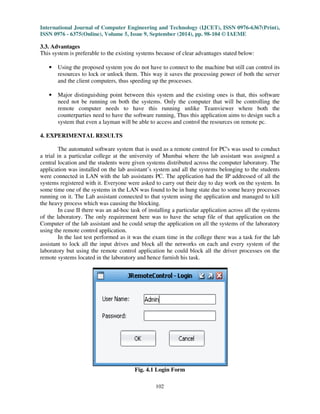
Fig. 4.1 Login Form
International Journal of Computer Engineering and Technology (IJCET), ISSN 0976-6367(Print), 
ISSN 0976 - 6375(Online), Volume 5, Issue 9, September (2014), pp. 98-104 © IAEME 
103 
 
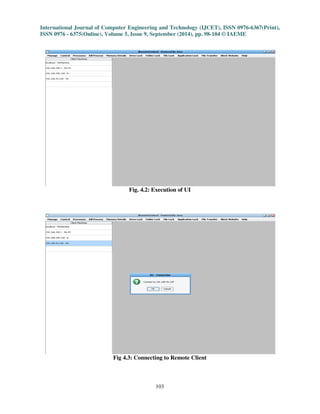
Fig. 4.2: Execution of UI 
Fig 4.3: Connecting to Remote Client
International Journal of Computer Engineering and Technology (IJCET), ISSN 0976-6367(Print), 
ISSN 0976 - 6375(Online), Volume 5, Issue 9, September (2014), pp. 98-104 © IAEME 
104 
 
Fig. 4.4: Sample Operation (Killing Process from Remote Client) 
5. CONCLUSION 
This system is user friendly and provides great efficiency in parallel with manpower. This 
will provide direct or indirect benefits to the organization. It is of immense help to grab the modem 
pace of automation and this software will provide easy mean for it. The software can be used on 
internet system. Drives/Folders/Files and Applications can be locked over internet systems.To 
conclude with the application build is extremely easy to operate where the lab assistant need not have 
any technical knowledge to run it. The simple GUI and architecture assists the lab assistant to carry 
out his day to day task in a timely and efficient manner. 
6. REFERENCES 
[1] Kim Topley, “core swing”, 5th ed., McGraw-Hill, New York, 2004. 
[2] M.A Hamilton, “Java and the shift to net-centric computing,” IEEE computer, vol. 29, no. 8, 
pp. 31-39, 1996. 
[3] C. Schmid “A remote laboratory using virtual reality on the web”, simulation, vol. 73, no. 1, 
pp. 13-21, 1999. 
[4] www.javaworld.com 
[5] www.sun.com/books/java_series.html 
[6] www.java.sun.com/javase/technologies/core/basic/rmi/index.jsp 
[7] www.java.sun.com/j2se/1.5.0/docs/guide/jni/ 
[8] www.ibm.com/developerworks/edu/j-dw-javajni-i.html 
[9] www.disordered.org/Java-At-One.html

Java remote control for laboratory monitoring

  • 1.
    INTERNATIONAL JOURNAL OFCOMPUTER ENGINEERING & International Journal of Computer Engineering and Technology (IJCET), ISSN 0976-6367(Print), ISSN 0976 - 6375(Online), Volume 5, Issue 9, September (2014), pp. 98-104 © IAEME TECHNOLOGY (IJCET) ISSN 0976 – 6367(Print) ISSN 0976 – 6375(Online) Volume 5, Issue 9, September (2014), pp. 98-104 © IAEME: www.iaeme.com/IJCET.asp Journal Impact Factor (2014): 8.5328 (Calculated by GISI) www.jifactor.com 98 IJCET © I A E M E JAVA REMOTE CONTROL FOR LABORATORY MONITORING Akshay Shinde1, Akash Malbari2, Manali Killedar3 1, 2(Technical Analyst, Nomura Services India Pvt. Ltd.,) 3(Department of Information Technology, Ramrao Adik Institute of Technology) ABSTRACT The proposed system of ‘Java Remote Control for Laboratory Monitoring’ is an optimized and automated software model that is used as a remote control for PC's connected as a Local Area Network. This software is used to control varied resources and processes running on the remote computer. The test implications of this technology suggest that a technology supporting remote control for computers connected over Local Area Network can add value for all its end users primarily serving the computer laboratory assistants and teachers. Keywords: Java Remote Control, RMI, Skeleton. 1. INTRODUCTION We have seen many places where we have local area network and lots of people using them as per their own need. In such scenarios we need to closely monitor the computers. Many a times we need to lock the resources such as computer drivers, folder or files from these computers to restrict the users from making use of them. Sometimes we need to stop the users from using the internet or from the changing the settings or accessing the registry editor so as to secure the system from any crash due to the misuse of it. These are the common tasks that we need to do in our day to day life but for this we do not have any utility software, with this system we can serve us to achieve all these needs. 2. EXISTING SYSTEM Studies show that the lab assistants had to follow the method of locking the machine manually as well as individually, so as to prevent the users from accessing the authorized information. Go on the individual machine and lock the resources as there was no particular remote
  • 2.
    International Journal ofComputer Engineering and Technology (IJCET), ISSN 0976-6367(Print), ISSN 0976 - 6375(Online), Volume 5, Issue 9, September (2014), pp. 98-104 © IAEME server. Also concepts like windows group management system called as RDP (remote desktop connection), Teamviewer were used. 99 2.1. Working Systems designed previously using this concept like RDP(remote desktop connection) that gives the ability to remotely connect to a computer/PC in network. After successful connection we can control the PC as if it’s our PC and we are controlling it with our keyboard and Mouse. Another example is software called Teamviewer.Teamviewer needs to have the software running on both the controlling machine and the machine being controlled, making it less convenient to operate and inefficient. 2.2. Drawbacks of Existing System 1. RDP needs the client and server systems to be connected in order to control the resources and to lock/unlock them. This approach is inefficient in terms of power consumption as it requires more processing power to be spent on both client and server machines. 2. The major disadvantage of the using Teamviewer is that this approach needs the software to be running on both the machines all the time. Thus this application aims to design such a system that even a layman will be able to access and control the resources on remote pc and be more efficient in resource consumption at the same time. 3. PROPOSED SYSTEM This paper implements a Java Runtime Environment (JRE) which features two virtual machines one called client and the other server. The client version is tuned for quick loading, it makes use of interpretations. The server version loads more slowly, putting more efforts into producing highly optimized Just-In-Time (JIT) compilations that yields higher performance. 3.1. Working Java is used a programming language since it's a simple programming language, Object oriented throughout - no coding outside of the class definitions including the main(), An extensive class library available in the core language packages, A program runs inside the virtual machine sandbox, security manager- determines what resources a class can access such as reading and writing to a local disk, Lightweight processes, called threads can easily be spun off to perform multiprocessing, Java program can be moved from one computer system to another, anywhere, anytime. Once connected in LAN one can make such a provision in Java that the user screen that is designed using java swings could appear on the server machine or appear from where it is getting connected to so that the server could get to know which resources are accessed by the user. The entire structure of the project is based on RMI (remote method invocation) architecture. 3.1.1. Architecture using Java RMI applications often comprise two separate programs, a server and a client. A typical server program creates some remote objects, makes references to these objects accessible, and waits for clients to invoke methods on these objects. A typical client program obtains a remote reference to one or more remote objects on a server and then invokes methods on them. RMI provides the
  • 3.
    International Journal ofComputer Engineering and Technology (IJCET), ISSN 0976-6367(Print), ISSN 0976 - 6375(Online), Volume 5, Issue 9, September (2014), pp. 98-104 © IAEME mechanism by which the server and the client communicate and pass information back and forth. Such an application is sometimes referred to as a distributed object application. Distributed object applications need to do the following: 100 1. Locate remote objects. Applications can use various mechanisms to obtain references to remote objects. For example, an application can register its remote objects with RMI's simple naming facility, the RMI registry. Alternatively, an application can pass and return remote object references as part of other remote invocations. 2. Communicate with remote objects. Details of communication between remote objects are handled by RMI. To the programmer, remote communication looks similar to regular Java method invocations. As the application is divided into different modules where all the modules are basically RMI functions or methods which provides various functionalities as locking and unlocking the USB, managing the files on remote pc etc as discussed in the basic aim of the project. For this purpose studying the sample and basic programs on RMI was necessary. Various small programs like the ‘Hello World’ programs were studies just to understand how RMI works. Mapping of modules were done to the RMI code and how RMI is going to be implemented was studied. • Defining the remote interfaces. A remote interface specifies the methods that can be invoked remotely by a client. Clients program to remote interfaces, not to the implementation classes of those interfaces. The design of such interfaces includes the determination of the types of objects that will be used as the parameters and return values for these methods. If any of these interfaces or classes does not yet exist, you need to define them as well. • Implementing the remote objects. Remote objects must implement one or more remote interfaces. The remote object class may include implementations of other interfaces and methods that are available only locally. If any local classes are to be used for parameters or return values of any of these methods, they must be implemented as well. • Implementing the clients. Clients that use remote objects can be implemented at any time after the remote interfaces are defined, including after the remote objects have been deployed. Compiling of RMI programs required a research as the client server architecture is a naïve architecture and required logins on the same machine. The sample programs were compiled and tested (Not the actual methods) in order to check the working of client and server. The concept of how the client actually looks up the registry to check the validity of modules. This falls under the domain of Skeleton How the modules are mapped to the registry so that all methods stay in it without the use of any database and the client then looks up the registry. The major focus has been the back end as the RMI coding is complicated and requires a lot of learning and understanding. The UI is to be designed using Java swings in Netbeans which is nothing but creating the front end to basically ease the functionality of our Client server architecture. 3.1.2. Functional Overview The functional working of the system is depicted in the Fig.3.1.2.1. given below :
  • 4.
    International Journal ofComputer Engineering and Technology (IJCET), ISSN 0976-6367(Print), ISSN 0976 - 6375(Online), Volume 5, Issue 9, September (2014), pp. 98-104 © IAEME Admin Authentication client machine 101 Fig. 3.1.2.1. Flow diagram 3.2. System Requirements • Software Requirement (Development): Language: JDK2 Version 1.4 IDE: Eclipse/JCreator GUI: SWING OS: Windows • Software Requirement (Users): Environment: JRE 1.4 As JRE features two virtual machines, one called Client and the other Server. The Client version is tuned for quick loading. It makes use of interpretation. The Server version loads more slowly, putting more effort into producing highly optimized JIT compilations that yield higher performance. Both VMs compile only often-run methods, using a configurable invocation-count-threshold to decide which methods to compile (M.A Hamilton 1996, C. Schmid 1999). • Hardware Requirement (For Development and users): CPU (Pentium III onwards) Recommended P4 Platform PCs. VDU (Monitor) Standard Keyboard and Mouse RAM 128 MB Minimum Recommended 512 MB File Registration / Login Receive configuration Successful client process Kill/Lock.etc. Store IP address Client machine details/ IP address Client Perform operation
  • 5.
    International Journal ofComputer Engineering and Technology (IJCET), ISSN 0976-6367(Print), ISSN 0976 - 6375(Online), Volume 5, Issue 9, September (2014), pp. 98-104 © IAEME 3.3. Advantages This system is preferable to the existing systems because of clear advantages stated below: 102 • Using the proposed system you do not have to connect to the machine but still can control its resources to lock or unlock them. This way it saves the processing power of both the server and the client computers, thus speeding up the processes. • Major distinguishing point between this system and the existing ones is that, this software need not be running on both the systems. Only the computer that will be controlling the remote computer needs to have this running unlike Teamviewer where both the counterparties need to have the software running, Thus this application aims to design such a system that even a layman will be able to access and control the resources on remote pc. 4. EXPERIMENTAL RESULTS The automated software system that is used as a remote control for PC's was used to conduct a trial in a particular college at the university of Mumbai where the lab assistant was assigned a central location and the students were given systems distributed across the computer laboratory. The application was installed on the lab assistant’s system and all the systems belonging to the students were connected in LAN with the lab assistants PC. The application had the IP addressed of all the systems registered with it. Everyone were asked to carry out their day to day work on the system. In some time one of the systems in the LAN was found to be in hung state due to some heavy processes running on it. The Lab assistant connected to that system using the application and managed to kill the heavy process which was causing the blocking. In case II there was an ad-hoc task of installing a particular application across all the systems of the laboratory. The only requirement here was to have the setup file of that application on the Computer of the lab assistant and he could setup the application on all the systems of the laboratory using the remote control application. In the last test performed as it was the exam time in the college there was a task for the lab assistant to lock all the input drives and block all the networks on each and every system of the laboratory but using the remote control application he could block all the driver processes on the remote systems located in the laboratory and hence furnish his task. Fig. 4.1 Login Form
  • 6.
    International Journal ofComputer Engineering and Technology (IJCET), ISSN 0976-6367(Print), ISSN 0976 - 6375(Online), Volume 5, Issue 9, September (2014), pp. 98-104 © IAEME 103 Fig. 4.2: Execution of UI Fig 4.3: Connecting to Remote Client
  • 7.
    International Journal ofComputer Engineering and Technology (IJCET), ISSN 0976-6367(Print), ISSN 0976 - 6375(Online), Volume 5, Issue 9, September (2014), pp. 98-104 © IAEME 104 Fig. 4.4: Sample Operation (Killing Process from Remote Client) 5. CONCLUSION This system is user friendly and provides great efficiency in parallel with manpower. This will provide direct or indirect benefits to the organization. It is of immense help to grab the modem pace of automation and this software will provide easy mean for it. The software can be used on internet system. Drives/Folders/Files and Applications can be locked over internet systems.To conclude with the application build is extremely easy to operate where the lab assistant need not have any technical knowledge to run it. The simple GUI and architecture assists the lab assistant to carry out his day to day task in a timely and efficient manner. 6. REFERENCES [1] Kim Topley, “core swing”, 5th ed., McGraw-Hill, New York, 2004. [2] M.A Hamilton, “Java and the shift to net-centric computing,” IEEE computer, vol. 29, no. 8, pp. 31-39, 1996. [3] C. Schmid “A remote laboratory using virtual reality on the web”, simulation, vol. 73, no. 1, pp. 13-21, 1999. [4] www.javaworld.com [5] www.sun.com/books/java_series.html [6] www.java.sun.com/javase/technologies/core/basic/rmi/index.jsp [7] www.java.sun.com/j2se/1.5.0/docs/guide/jni/ [8] www.ibm.com/developerworks/edu/j-dw-javajni-i.html [9] www.disordered.org/Java-At-One.html