Remind 101
LOGIN INSTRUCTIONS
-Remind 101 is a great teacher-student
communication tools that allows you to set
up groups and text these groups
information about class. Here is how to
join!
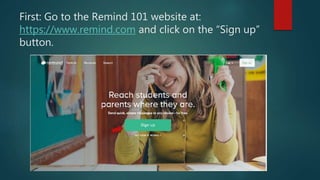
First: Go to the Remind 101 website at:
https://www.remind.com and click on the “Sign up”
button.
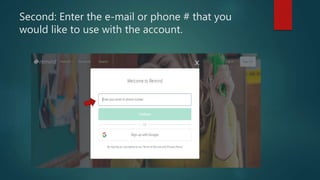
Second: Enter the e-mail or phone # that you
would like to use with the account.
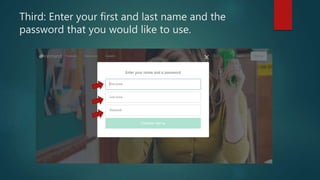
Third: Enter your first and last name and the
password that you would like to use.
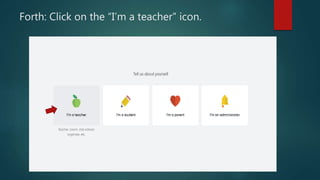
Forth: Click on the “I’m a teacher” icon.
Fifth: When logged in to Remind push the Function
key and print screen key. Then paste that image
into an email it to me at: hewear@valdosta.edu
This will verify your completetion of the course
Lastly: Enjoy Remind 101 and
remember to follow the basic
guidelines learned in this course
about digital communication.

Remind 101 login instructions

  • 1.
  • 2.
    -Remind 101 isa great teacher-student communication tools that allows you to set up groups and text these groups information about class. Here is how to join!
  • 3.
    First: Go tothe Remind 101 website at: https://www.remind.com and click on the “Sign up” button.
  • 4.
    Second: Enter thee-mail or phone # that you would like to use with the account.
  • 5.
    Third: Enter yourfirst and last name and the password that you would like to use.
  • 6.
    Forth: Click onthe “I’m a teacher” icon.
  • 7.
    Fifth: When loggedin to Remind push the Function key and print screen key. Then paste that image into an email it to me at: hewear@valdosta.edu This will verify your completetion of the course
  • 8.
    Lastly: Enjoy Remind101 and remember to follow the basic guidelines learned in this course about digital communication.