Liquid Sequence
Multiple (line)Order Entry configuration
How to configure this building block
Authors
Nikola Kasev;Nanno van der Laan
Multiple Line Order Entry Configure the building block
_____________________________________________________________________________________
_____________________________________________________________________________________
releasedescriptionharmonymatrixorderentry-140411071902-phpapp01-reupload.docx
Project documentation page: 2
Version Management
# Date Author Description
1.0 2 dec 2013 Nikola Documenting release
1.1 15 dec Nanno Adding detailed descriptions
Related documents
Title # Date Author Description
Harmony user’s guide 3.3 - Multiple Harminy main document
Multiple Line Order Entry Configure the building block
_____________________________________________________________________________________
_____________________________________________________________________________________
releasedescriptionharmonymatrixorderentry-140411071902-phpapp01-reupload.docx
Project documentation page: 3
Table of Contents
Version Management ...............................................................................................................................2
Related documents...................................................................................................................................2
Introduction ..................................................................................................................................................4
Reference file setup..................................................................................................................................4
Rules..........................................................................................................................................................5
Creating OrderMatrix custom item...........................................................................................................6
Using the OrderMatrix custom item.........................................................................................................7
Testing the configuration..........................................................................................................................8
Multiple Line Order Entry Configure the building block
_____________________________________________________________________________________
_____________________________________________________________________________________
releasedescriptionharmonymatrixorderentry-140411071902-phpapp01-reupload.docx
Project documentation page: 4
Introduction
This document describes how to implement the Building Block Multiple Order Entry (MOE)
Reference file setup
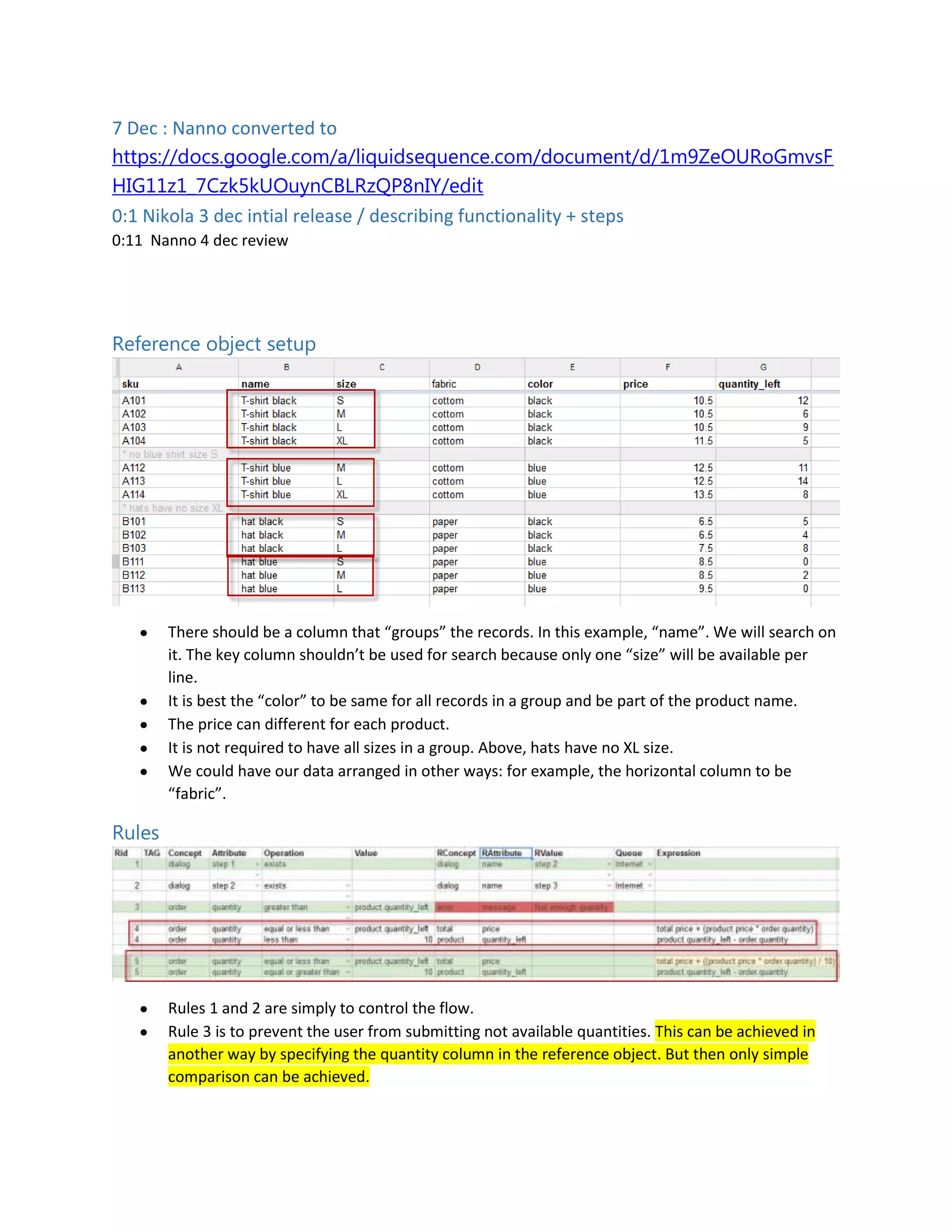
Use / create a catalog / product file
There should be a column that “groups” the records. In this example, “name”. We will search on
it. The key column shouldn’t be used for search because only one “size” will be available per
line.
It is best the “color” to be same for all records in a group and be part of the product name.
The price can different for each product.
It is not required to have all sizes in a group. Above, hats have no XL size.
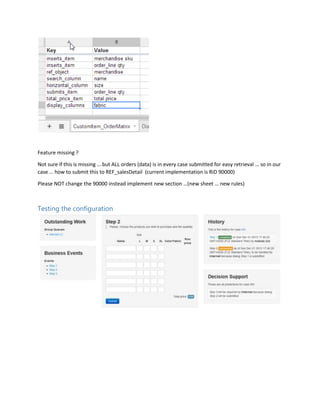
We could have our data arranged in other ways: for example, the horizontal column to be
“fabric”.
Multiple Line Order Entry Configure the building block
_____________________________________________________________________________________
_____________________________________________________________________________________
releasedescriptionharmonymatrixorderentry-140411071902-phpapp01-reupload.docx
Project documentation page: 5
Rules
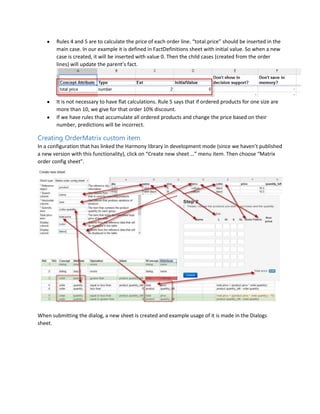
Rules 1 and 2 are simply to control the flow.
Rule 3 is to prevent the user from submitting not available quantities. This can be achieved in
another way by specifying the quantity column in the reference object. But then only simple
comparison can be achieved.
Rules 4 and 5 are to calculate the price of each order line. “total.price” should be inserted in the
main case. In our example it is defined in FactDefinitions sheet with initial value. So when a new
case is created, it will be inserted with value 0. Then the child cases (created from the order
lines) will update the parent’s fact.
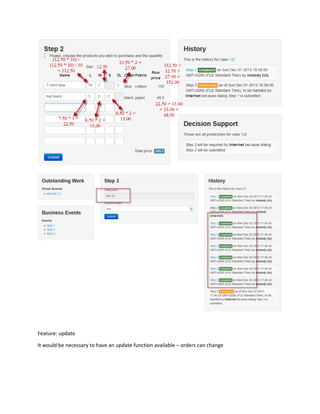
It is not necessary to have flat calculations. Rule 5 says that if ordered products for one size are
more than 10, we give for that order 10% discount.
If we have rules that accumulate all ordered products and change the price based on their
number, predictions will be incorrect.
Multiple Line Order Entry Configure the building block
_____________________________________________________________________________________
_____________________________________________________________________________________
releasedescriptionharmonymatrixorderentry-140411071902-phpapp01-reupload.docx
Project documentation page: 6
Creating OrderMatrix custom item
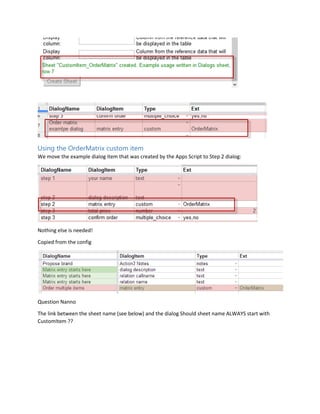
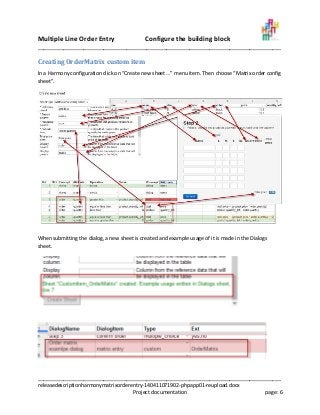
In a Harmony configuration click on “Create new sheet …” menu item. Then choose “Matrix order config
sheet”.
When submitting the dialog, a new sheet is created and example usage of it is made in the Dialogs
sheet.
Multiple Line Order Entry Configure the building block
_____________________________________________________________________________________
_____________________________________________________________________________________
releasedescriptionharmonymatrixorderentry-140411071902-phpapp01-reupload.docx
Project documentation page: 7
Using the OrderMatrix custom item
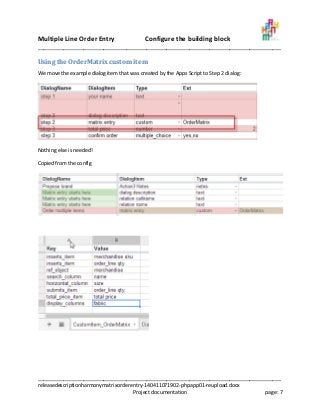
We move the example dialog item that was created by the Apps Script to Step 2 dialog:
Nothing else is needed!
Copied from the config
Multiple Line Order Entry Configure the building block
_____________________________________________________________________________________
_____________________________________________________________________________________
releasedescriptionharmonymatrixorderentry-140411071902-phpapp01-reupload.docx
Project documentation page: 8
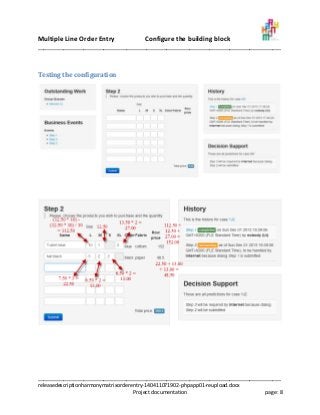
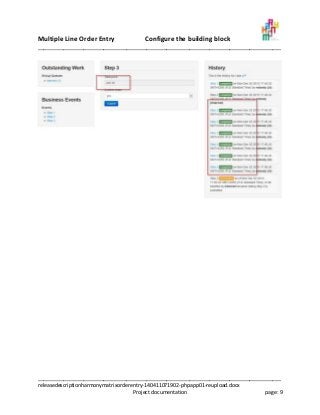
Testing the configuration
Multiple Line Order Entry Configure the building block
_____________________________________________________________________________________
_____________________________________________________________________________________
releasedescriptionharmonymatrixorderentry-140411071902-phpapp01-reupload.docx
Project documentation page: 9

Release description harmony matrix order entry

  • 1.
    Liquid Sequence Multiple (line)OrderEntry configuration How to configure this building block Authors Nikola Kasev;Nanno van der Laan
  • 2.
    Multiple Line OrderEntry Configure the building block _____________________________________________________________________________________ _____________________________________________________________________________________ releasedescriptionharmonymatrixorderentry-140411071902-phpapp01-reupload.docx Project documentation page: 2 Version Management # Date Author Description 1.0 2 dec 2013 Nikola Documenting release 1.1 15 dec Nanno Adding detailed descriptions Related documents Title # Date Author Description Harmony user’s guide 3.3 - Multiple Harminy main document
  • 3.
    Multiple Line OrderEntry Configure the building block _____________________________________________________________________________________ _____________________________________________________________________________________ releasedescriptionharmonymatrixorderentry-140411071902-phpapp01-reupload.docx Project documentation page: 3 Table of Contents Version Management ...............................................................................................................................2 Related documents...................................................................................................................................2 Introduction ..................................................................................................................................................4 Reference file setup..................................................................................................................................4 Rules..........................................................................................................................................................5 Creating OrderMatrix custom item...........................................................................................................6 Using the OrderMatrix custom item.........................................................................................................7 Testing the configuration..........................................................................................................................8
  • 4.
    Multiple Line OrderEntry Configure the building block _____________________________________________________________________________________ _____________________________________________________________________________________ releasedescriptionharmonymatrixorderentry-140411071902-phpapp01-reupload.docx Project documentation page: 4 Introduction This document describes how to implement the Building Block Multiple Order Entry (MOE) Reference file setup Use / create a catalog / product file There should be a column that “groups” the records. In this example, “name”. We will search on it. The key column shouldn’t be used for search because only one “size” will be available per line. It is best the “color” to be same for all records in a group and be part of the product name. The price can different for each product. It is not required to have all sizes in a group. Above, hats have no XL size. We could have our data arranged in other ways: for example, the horizontal column to be “fabric”.
  • 5.
    Multiple Line OrderEntry Configure the building block _____________________________________________________________________________________ _____________________________________________________________________________________ releasedescriptionharmonymatrixorderentry-140411071902-phpapp01-reupload.docx Project documentation page: 5 Rules Rules 1 and 2 are simply to control the flow. Rule 3 is to prevent the user from submitting not available quantities. This can be achieved in another way by specifying the quantity column in the reference object. But then only simple comparison can be achieved. Rules 4 and 5 are to calculate the price of each order line. “total.price” should be inserted in the main case. In our example it is defined in FactDefinitions sheet with initial value. So when a new case is created, it will be inserted with value 0. Then the child cases (created from the order lines) will update the parent’s fact. It is not necessary to have flat calculations. Rule 5 says that if ordered products for one size are more than 10, we give for that order 10% discount. If we have rules that accumulate all ordered products and change the price based on their number, predictions will be incorrect.
  • 6.
    Multiple Line OrderEntry Configure the building block _____________________________________________________________________________________ _____________________________________________________________________________________ releasedescriptionharmonymatrixorderentry-140411071902-phpapp01-reupload.docx Project documentation page: 6 Creating OrderMatrix custom item In a Harmony configuration click on “Create new sheet …” menu item. Then choose “Matrix order config sheet”. When submitting the dialog, a new sheet is created and example usage of it is made in the Dialogs sheet.
  • 7.
    Multiple Line OrderEntry Configure the building block _____________________________________________________________________________________ _____________________________________________________________________________________ releasedescriptionharmonymatrixorderentry-140411071902-phpapp01-reupload.docx Project documentation page: 7 Using the OrderMatrix custom item We move the example dialog item that was created by the Apps Script to Step 2 dialog: Nothing else is needed! Copied from the config
  • 8.
    Multiple Line OrderEntry Configure the building block _____________________________________________________________________________________ _____________________________________________________________________________________ releasedescriptionharmonymatrixorderentry-140411071902-phpapp01-reupload.docx Project documentation page: 8 Testing the configuration
  • 9.
    Multiple Line OrderEntry Configure the building block _____________________________________________________________________________________ _____________________________________________________________________________________ releasedescriptionharmonymatrixorderentry-140411071902-phpapp01-reupload.docx Project documentation page: 9