Thinking in React
React is, the premier way to build big, fast Web apps
with JavaScript.
One of the many great parts of React is how it makes
you think about apps as you build them.
Start With A Mock
Imagine that we already have a JSON API.Our JSON API returns some
data that looks like this:
[
{category: "Sporting Goods", price: "$49.99", stocked: true, name: "Football"},
{category: "Sporting Goods", price: "$9.99", stocked: true, name: "Baseball"},
{category: "Sporting Goods", price: "$29.99", stocked: false, name: "Basketball"},
{category: "Electronics", price: "$99.99", stocked: true, name: "iPod Touch"},
{category: "Electronics", price: "$399.99", stocked: false, name: "iPhone 5"},
{category: "Electronics", price: "$199.99", stocked: true, name: "Nexus 7"}
];
Step 1: Break The UI Into A Component Hierarchy
The first thing you'll want to do is to draw boxes around every component (and
subcomponent) in the mock and give them all names.
But how do you know what should be its own component? Just use the same techniques
for deciding if you should create a new function or object. One such technique is the
single responsibility principle, that is, a component should ideally only do one thing. If it
ends up growing, it should be decomposed into smaller subcomponents.
Since you're often displaying a JSON data model to a user, you'll find that if your model
was built correctly, your UI (and therefore your component structure) will map nicely.
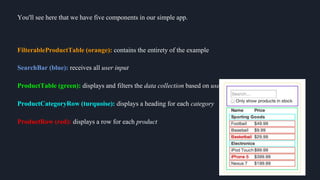
You'll see here that we have five components in our simple app.
FilterableProductTable (orange): contains the entirety of the example
SearchBar (blue): receives all user input
ProductTable (green): displays and filters the data collection based on user input
ProductCategoryRow (turquoise): displays a heading for each category
ProductRow (red): displays a row for each product
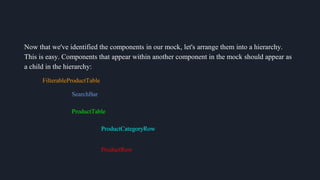
Now that we've identified the components in our mock, let's arrange them into a hierarchy.
This is easy. Components that appear within another component in the mock should appear as
a child in the hierarchy:
FilterableProductTable
SearchBar
ProductTable
ProductCategoryRow
ProductRow
Step 2: Build A Static Version in React
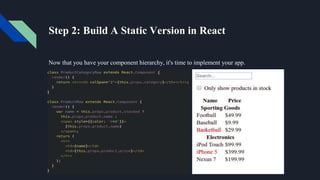
Now that you have your component hierarchy, it's time to implement your app.
To build a static version of your app that renders your data model, you'll want to build
components that reuse other components and pass data using props.
props are a way of passing data from parent to child. If you're familiar with the concept of
state, don't use state at all to build this static version. State is reserved only for interactivity,
that is, data that changes over time.
At the end of this step, you'll have a library of reusable components that render your data
model. The components will only have render() methods since this is a static version of your
app.
React's one-way data flow (also called one-way binding) keeps everything modular and fast.
Step 3: Identify The Minimal (but complete) Representation Of UI State
To build your app correctly, you first need to think of the minimal set of mutable
state that your app needs. The key here is DRY: Don't Repeat Yourself.
Think of all of the pieces of data in our example application. We have:
The original list of products
The search text the user has entered
The value of the checkbox
The filtered list of products
Let's go through each one and figure out which one is state. Simply ask three questions about
each piece of data:
1. Is it passed in from a parent via props? If so, it probably isn't state.
2. Does it remain unchanged over time? If so, it probably isn't state.
3. Can you compute it based on any other state or props in your component? If so, it
isn't state.
So finally, our state is:
The search text the user has entered
The value of the checkbox
Step 4: Identify Where Your State Should Live
OK, so we've identified what the minimal set of app state is. Next, we need to identify which
component mutates, or owns, this state.
For each piece of state in your application:
Identify every component that renders something based on that state.
Either the common owner or another component higher up in the hierarchy should own the
state.
If you can't find a component where it makes sense to own the state, create a new component
simply for holding the state and add it somewhere in the hierarchy above the common
owner component.
Let's run through this strategy for our application:
ProductTable needs to filter the product list based on state and SearchBar
needs to display the search text and checked state.
The common owner component is FilterableProductTable.
It conceptually makes sense for the filter text and checked value to live in
FilterableProductTable
Step 5: Add Inverse Data Flow
So far, we've built an app that renders correctly as a function of props and state flowing down
the hierarchy. Now it's time to support data flowing
Let's think about what we want to happen. We want to make sure that whenever the user
changes the form, we update the state to reflect the user input. Since components should only
update their own state, FilterableProductTable will pass callbacks to SearchBar that will fire
whenever the state should be updated. We can use the onChange event on the inputs to be
notified of it. The callbacks passed by FilterableProductTable will call setState(), and the app
will be updated.
Though this sounds complex, it's really just a few lines of code. And it's really explicit how
your data is flowing throughout the app.
Hopefully, this gives you an idea of how to think about building components and
applications with React.
As you start to build large libraries of components, you'll appreciate this explicitness
and modularity, and with code reuse, your lines of code will start to shrink. :)
THANK YOU
BY:
AASHIMA
SHIKHER
DINESH

Thinking in react

  • 1.
  • 2.
    React is, thepremier way to build big, fast Web apps with JavaScript. One of the many great parts of React is how it makes you think about apps as you build them.
  • 3.
    Start With AMock Imagine that we already have a JSON API.Our JSON API returns some data that looks like this: [ {category: "Sporting Goods", price: "$49.99", stocked: true, name: "Football"}, {category: "Sporting Goods", price: "$9.99", stocked: true, name: "Baseball"}, {category: "Sporting Goods", price: "$29.99", stocked: false, name: "Basketball"}, {category: "Electronics", price: "$99.99", stocked: true, name: "iPod Touch"}, {category: "Electronics", price: "$399.99", stocked: false, name: "iPhone 5"}, {category: "Electronics", price: "$199.99", stocked: true, name: "Nexus 7"} ];
  • 4.
    Step 1: BreakThe UI Into A Component Hierarchy The first thing you'll want to do is to draw boxes around every component (and subcomponent) in the mock and give them all names. But how do you know what should be its own component? Just use the same techniques for deciding if you should create a new function or object. One such technique is the single responsibility principle, that is, a component should ideally only do one thing. If it ends up growing, it should be decomposed into smaller subcomponents. Since you're often displaying a JSON data model to a user, you'll find that if your model was built correctly, your UI (and therefore your component structure) will map nicely.
  • 5.
    You'll see herethat we have five components in our simple app. FilterableProductTable (orange): contains the entirety of the example SearchBar (blue): receives all user input ProductTable (green): displays and filters the data collection based on user input ProductCategoryRow (turquoise): displays a heading for each category ProductRow (red): displays a row for each product
  • 6.
    Now that we'veidentified the components in our mock, let's arrange them into a hierarchy. This is easy. Components that appear within another component in the mock should appear as a child in the hierarchy: FilterableProductTable SearchBar ProductTable ProductCategoryRow ProductRow
  • 7.
    Step 2: BuildA Static Version in React Now that you have your component hierarchy, it's time to implement your app.
  • 8.
    To build astatic version of your app that renders your data model, you'll want to build components that reuse other components and pass data using props. props are a way of passing data from parent to child. If you're familiar with the concept of state, don't use state at all to build this static version. State is reserved only for interactivity, that is, data that changes over time. At the end of this step, you'll have a library of reusable components that render your data model. The components will only have render() methods since this is a static version of your app. React's one-way data flow (also called one-way binding) keeps everything modular and fast.
  • 9.
    Step 3: IdentifyThe Minimal (but complete) Representation Of UI State To build your app correctly, you first need to think of the minimal set of mutable state that your app needs. The key here is DRY: Don't Repeat Yourself. Think of all of the pieces of data in our example application. We have: The original list of products The search text the user has entered The value of the checkbox The filtered list of products
  • 10.
    Let's go througheach one and figure out which one is state. Simply ask three questions about each piece of data: 1. Is it passed in from a parent via props? If so, it probably isn't state. 2. Does it remain unchanged over time? If so, it probably isn't state. 3. Can you compute it based on any other state or props in your component? If so, it isn't state. So finally, our state is: The search text the user has entered The value of the checkbox
  • 11.
    Step 4: IdentifyWhere Your State Should Live OK, so we've identified what the minimal set of app state is. Next, we need to identify which component mutates, or owns, this state. For each piece of state in your application: Identify every component that renders something based on that state. Either the common owner or another component higher up in the hierarchy should own the state. If you can't find a component where it makes sense to own the state, create a new component simply for holding the state and add it somewhere in the hierarchy above the common owner component.
  • 12.
    Let's run throughthis strategy for our application: ProductTable needs to filter the product list based on state and SearchBar needs to display the search text and checked state. The common owner component is FilterableProductTable. It conceptually makes sense for the filter text and checked value to live in FilterableProductTable
  • 13.
    Step 5: AddInverse Data Flow So far, we've built an app that renders correctly as a function of props and state flowing down the hierarchy. Now it's time to support data flowing Let's think about what we want to happen. We want to make sure that whenever the user changes the form, we update the state to reflect the user input. Since components should only update their own state, FilterableProductTable will pass callbacks to SearchBar that will fire whenever the state should be updated. We can use the onChange event on the inputs to be notified of it. The callbacks passed by FilterableProductTable will call setState(), and the app will be updated. Though this sounds complex, it's really just a few lines of code. And it's really explicit how your data is flowing throughout the app.
  • 14.
    Hopefully, this givesyou an idea of how to think about building components and applications with React. As you start to build large libraries of components, you'll appreciate this explicitness and modularity, and with code reuse, your lines of code will start to shrink. :)
  • 15.

Editor's Notes

  • #5 The single responsibility principle is a computer programming principle that states that every module or class should have responsibility over a single part of the functionality provided by the software, and that responsibility should be entirely encapsulated by the class.