Record Revenue @ Daily Rate
[A Deep Dive into Daily Revenue Recognition
Options in Oracle Receivables]
Presenter:
Anil Madhireddy
VeriSign Inc

Key Contributors:
Rajendra Sathe
Gautam Ramakrishna
VeriSign Inc
About Us
• VeriSign Inc (NASDAQ: VRSN) is the trusted provider of Internet
  infrastructure services for the networked world. VeriSign brings Trust
  to the Internet with domain name and authentication services allowing
  companies and consumers all over the world engaged in trusted
   communications and commerce


• Anil Madhireddy is Manager – Business Systems Analysis & solution
  architect for the Daily Revenue solution @ VeriSign.
• Rajendra Sathe is the Lead Business Analyst on the Daily Revenue
  project @ VeriSign & a key contributor
• Gautam Ramakrishna is a Senior Developer @ VeriSign & the
  technical architect who helped design APIs for the Deferred Revenue
  solution & also co-authored the whitepaper on this topic.
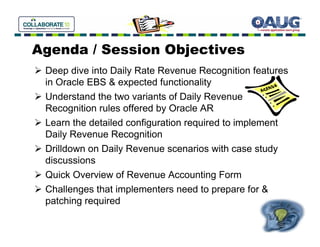
Agenda / Session Objectives
 Deep dive into Daily Rate Revenue Recognition features
 in Oracle EBS & expected functionality
 Understand the two variants of Daily Revenue
 Recognition rules offered by Oracle AR
 Learn the detailed configuration required to implement
 Daily Revenue Recognition
 Drilldown on Daily Revenue scenarios with case study
 discussions
 Quick Overview of Revenue Accounting Form
 Challenges that implementers need to prepare for &
 patching required
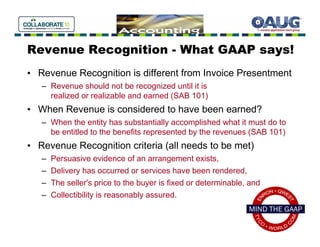
Revenue Recognition - What GAAP says!
• Revenue Recognition is different from Invoice Presentment
   – Revenue should not be recognized until it is
     realized or realizable and earned (SAB 101)
• When Revenue is considered to have been earned?
   – When the entity has substantially accomplished what it must do to
     be entitled to the benefits represented by the revenues (SAB 101)
• Revenue Recognition criteria (all needs to be met)
   –   Persuasive evidence of an arrangement exists,
   –   Delivery has occurred or services have been rendered,
   –   The seller's price to the buyer is fixed or determinable, and
   –   Collectibility is reasonably assured.
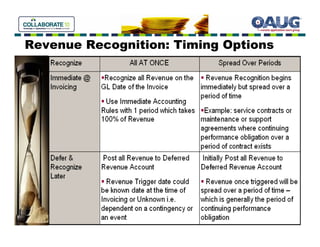
Revenue Recognition: Timing Options
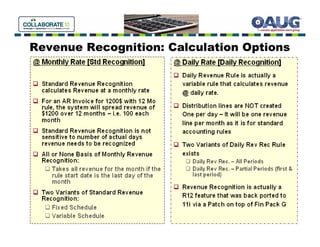
Revenue Recognition: Calculation Options
Daily Revenue – Flavors
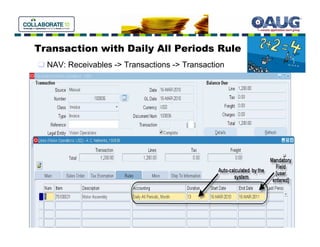
• Daily Revenue Rate, All Periods
      • Delivers the most precise revenue recognition schedule
        possible
      • Revenue for all months calculated at Daily Rate
      • Revenue Amount = [# of days in the period / Total # of days] *
        Total Revenue Amount
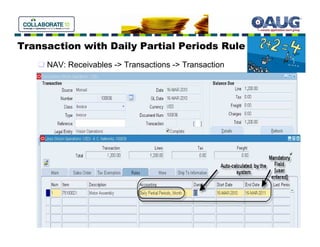
• Daily Revenue Rate, Partial Periods
      • Delivers the most precise revenue recognition schedule for the
        partial periods – first and last period
      • Revenue for partial periods calculated at Daily Rate
      • First & Last Period:
          – Revenue Amount = [# of days in the period / Total # of
            days] * Total Revenue Amount
      • Remaining Period:
          – Remaining Revenue evenly spread on remaining periods
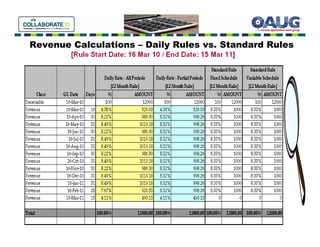
Revenue Calculations – Daily Rules vs. Standard Rules
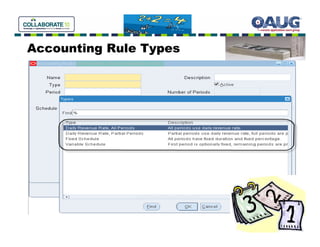
Accounting Rule Types
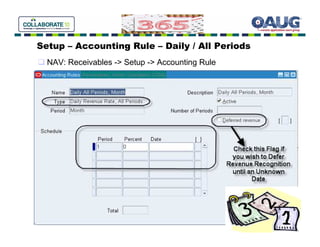
Setup – Accounting Rule – Daily / All Periods
  NAV: Receivables -> Setup -> Accounting Rule
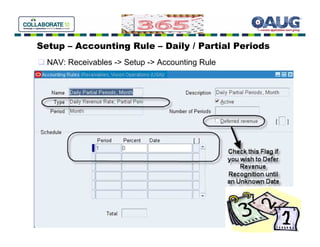
Setup – Accounting Rule – Daily / Partial Periods
  NAV: Receivables -> Setup -> Accounting Rule
Transaction with Daily All Periods Rule
  NAV: Receivables -> Transactions -> Transaction
Transaction with Daily Partial Periods Rule
     NAV: Receivables -> Transactions -> Transaction
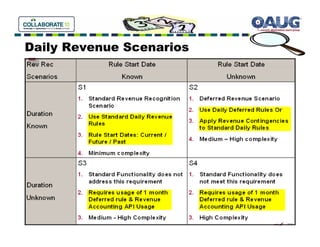
Daily Revenue Scenarios
S1 – Rule Start Date & Duration Known
•   Daily [Non-Deferred] Revenue Recognition Rules
    apply
          Daily All Periods or Daily Partial Periods
•   Start Date Scenarios
    a) Rule Start Date in the Past
          Revenue Recognition begin in current period - AR will catch
          up revenue for the past periods in the current period
          (assuming the prior periods are closed)
    b) Rule Start Date in the current period
          Revenue Recognition begins in the current period (standard
          scenario)
    c) Rule Start Date in the future period
          Revenue Recognition happens on the given future date
S2 – Rule Start Unknown & Duration Known
•   Use Deferred Revenue Recognition Rules
          Daily All Periods / Daily Partial Periods
          Check Deferred Revenue checkbox
•   Alternatively, Use Revenue Contingencies
      •   Time Based (Refund Policy)
      •   Event Based (Customer Acceptance, Cash Payment)
•   Use Revenue Accounting Form
          Manually Trigger revenue using Revenue Accounting Form
          Use original GL Date on Invoice or Provide new GL date at
          the time of triggering revenue
•   Revenue Accounting API
          Automated way of triggering revenue [Details in Appendix B
          of White Paper]
Revenue Accounting Form
[Find Transactions]
NAV: Receivables -> Control -> Accounting -> Revenue Accounting
Revenue Accounting Form
[Manage Revenue]
Revenue Accounting Form
[Schedule Revenue]
Revenue Accounting Form
[Enter Amount / GL Date]
Revenue Accounting Form
[Review & Save]
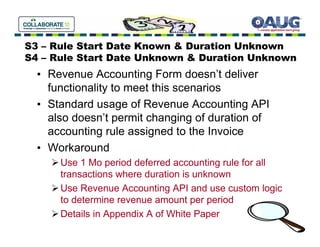
S3 – Rule Start Date Known & Duration Unknown
S4 – Rule Start Date Unknown & Duration Unknown
  • Revenue Accounting Form doesn’t deliver
    functionality to meet this scenarios
  • Standard usage of Revenue Accounting API
    also doesn’t permit changing of duration of
    accounting rule assigned to the Invoice
  • Workaround
      Use 1 Mo period deferred accounting rule for all
      transactions where duration is unknown
      Use Revenue Accounting API and use custom logic
      to determine revenue amount per period
      Details in Appendix A of White Paper
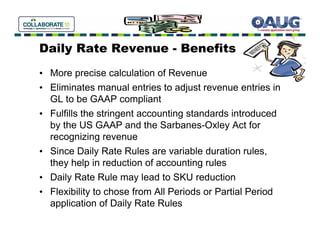
Daily Rate Revenue - Benefits
• More precise calculation of Revenue
• Eliminates manual entries to adjust revenue entries in
  GL to be GAAP compliant
• Fulfills the stringent accounting standards introduced
  by the US GAAP and the Sarbanes-Oxley Act for
  recognizing revenue
• Since Daily Rate Rules are variable duration rules,
  they help in reduction of accounting rules
• Daily Rate Rule may lead to SKU reduction
• Flexibility to chose from All Periods or Partial Period
  application of Daily Rate Rules
References:
• Record Revenue @ Daily Rate [Whitepaper]
   – Appendix A & B provide case studies & technical details on
     Revenue Accounting API
• Complying with SOP 97-2: Utilizing Daily Revenue
  Recognition in Oracle EBS 11.5.10 and Beyond
   – By Mike Ivers
• Revenue Management Enhancement: Daily Revenue
  [Metalink Note: ID 401000.1]
• For COGS Deferrals: EBS Cost Management Data
  Flow in Sub Ledger Accounting & Deferring COGS
   – By Dharmalingam Kandampalayam (Dharma)
Q&A


     •
Please remember to complete the Survey Form!
• Contact:
  Anil Madhireddy
  http://www.linkedin.com/pub/anil-madhireddy/4/21a/15b

Record Revenue @ Daily Rate[Presentation]

  • 1.
    Record Revenue @Daily Rate [A Deep Dive into Daily Revenue Recognition Options in Oracle Receivables] Presenter: Anil Madhireddy VeriSign Inc Key Contributors: Rajendra Sathe Gautam Ramakrishna VeriSign Inc
  • 2.
    About Us • VeriSignInc (NASDAQ: VRSN) is the trusted provider of Internet infrastructure services for the networked world. VeriSign brings Trust to the Internet with domain name and authentication services allowing companies and consumers all over the world engaged in trusted communications and commerce • Anil Madhireddy is Manager – Business Systems Analysis & solution architect for the Daily Revenue solution @ VeriSign. • Rajendra Sathe is the Lead Business Analyst on the Daily Revenue project @ VeriSign & a key contributor • Gautam Ramakrishna is a Senior Developer @ VeriSign & the technical architect who helped design APIs for the Deferred Revenue solution & also co-authored the whitepaper on this topic.
  • 3.
    Agenda / SessionObjectives Deep dive into Daily Rate Revenue Recognition features in Oracle EBS & expected functionality Understand the two variants of Daily Revenue Recognition rules offered by Oracle AR Learn the detailed configuration required to implement Daily Revenue Recognition Drilldown on Daily Revenue scenarios with case study discussions Quick Overview of Revenue Accounting Form Challenges that implementers need to prepare for & patching required
  • 4.
    Revenue Recognition -What GAAP says! • Revenue Recognition is different from Invoice Presentment – Revenue should not be recognized until it is realized or realizable and earned (SAB 101) • When Revenue is considered to have been earned? – When the entity has substantially accomplished what it must do to be entitled to the benefits represented by the revenues (SAB 101) • Revenue Recognition criteria (all needs to be met) – Persuasive evidence of an arrangement exists, – Delivery has occurred or services have been rendered, – The seller's price to the buyer is fixed or determinable, and – Collectibility is reasonably assured.
  • 5.
  • 6.
  • 7.
    Daily Revenue –Flavors • Daily Revenue Rate, All Periods • Delivers the most precise revenue recognition schedule possible • Revenue for all months calculated at Daily Rate • Revenue Amount = [# of days in the period / Total # of days] * Total Revenue Amount • Daily Revenue Rate, Partial Periods • Delivers the most precise revenue recognition schedule for the partial periods – first and last period • Revenue for partial periods calculated at Daily Rate • First & Last Period: – Revenue Amount = [# of days in the period / Total # of days] * Total Revenue Amount • Remaining Period: – Remaining Revenue evenly spread on remaining periods
  • 8.
    Revenue Calculations –Daily Rules vs. Standard Rules
  • 9.
  • 10.
    Setup – AccountingRule – Daily / All Periods NAV: Receivables -> Setup -> Accounting Rule
  • 11.
    Setup – AccountingRule – Daily / Partial Periods NAV: Receivables -> Setup -> Accounting Rule
  • 12.
    Transaction with DailyAll Periods Rule NAV: Receivables -> Transactions -> Transaction
  • 13.
    Transaction with DailyPartial Periods Rule NAV: Receivables -> Transactions -> Transaction
  • 14.
  • 15.
    S1 – RuleStart Date & Duration Known • Daily [Non-Deferred] Revenue Recognition Rules apply Daily All Periods or Daily Partial Periods • Start Date Scenarios a) Rule Start Date in the Past Revenue Recognition begin in current period - AR will catch up revenue for the past periods in the current period (assuming the prior periods are closed) b) Rule Start Date in the current period Revenue Recognition begins in the current period (standard scenario) c) Rule Start Date in the future period Revenue Recognition happens on the given future date
  • 16.
    S2 – RuleStart Unknown & Duration Known • Use Deferred Revenue Recognition Rules Daily All Periods / Daily Partial Periods Check Deferred Revenue checkbox • Alternatively, Use Revenue Contingencies • Time Based (Refund Policy) • Event Based (Customer Acceptance, Cash Payment) • Use Revenue Accounting Form Manually Trigger revenue using Revenue Accounting Form Use original GL Date on Invoice or Provide new GL date at the time of triggering revenue • Revenue Accounting API Automated way of triggering revenue [Details in Appendix B of White Paper]
  • 17.
    Revenue Accounting Form [FindTransactions] NAV: Receivables -> Control -> Accounting -> Revenue Accounting
  • 18.
  • 19.
  • 20.
  • 21.
  • 22.
    S3 – RuleStart Date Known & Duration Unknown S4 – Rule Start Date Unknown & Duration Unknown • Revenue Accounting Form doesn’t deliver functionality to meet this scenarios • Standard usage of Revenue Accounting API also doesn’t permit changing of duration of accounting rule assigned to the Invoice • Workaround Use 1 Mo period deferred accounting rule for all transactions where duration is unknown Use Revenue Accounting API and use custom logic to determine revenue amount per period Details in Appendix A of White Paper
  • 23.
    Daily Rate Revenue- Benefits • More precise calculation of Revenue • Eliminates manual entries to adjust revenue entries in GL to be GAAP compliant • Fulfills the stringent accounting standards introduced by the US GAAP and the Sarbanes-Oxley Act for recognizing revenue • Since Daily Rate Rules are variable duration rules, they help in reduction of accounting rules • Daily Rate Rule may lead to SKU reduction • Flexibility to chose from All Periods or Partial Period application of Daily Rate Rules
  • 25.
    References: • Record Revenue@ Daily Rate [Whitepaper] – Appendix A & B provide case studies & technical details on Revenue Accounting API • Complying with SOP 97-2: Utilizing Daily Revenue Recognition in Oracle EBS 11.5.10 and Beyond – By Mike Ivers • Revenue Management Enhancement: Daily Revenue [Metalink Note: ID 401000.1] • For COGS Deferrals: EBS Cost Management Data Flow in Sub Ledger Accounting & Deferring COGS – By Dharmalingam Kandampalayam (Dharma)
  • 26.
    Q&A • Please remember to complete the Survey Form! • Contact: Anil Madhireddy http://www.linkedin.com/pub/anil-madhireddy/4/21a/15b