Real World Haskell:
     Lecture 1

   Bryan O’Sullivan


     2009-10-07
Welcome!


  A few things to mull over:
      Our pace will be fairly rapid.
      Stop me and ask questions—early and often.
      I assume no prior Haskell or functional programming exposure.
What’s software, doc?


   What does a program do?
       It consumes old data.
       It computes over the old data.
       It produces new data.
A familiar program


   Consider the Unix sort command:
       Consumes (possibly unsorted) lines of text.
       Sorts the lines.
       Produces sorted lines of text.
Have you ever run sort?


   If so, you’re already a functional programmer.
What’s functional programming?


   Definition
   Functional programming is a style of programming that emphasizes
   functions and function application.
What’s a function?


   Definition
   A function inspects its input, and produces an output.

   Definition
   Function application involves supplying a function with one or
   more arguments (inputs).
Why is the sort command functional?


   Discuss.
So what?


  I can already write code that inspects inputs and produces outputs
  in C, Python, or whatever.

  So what’s different about functional programming (FP)?
      We only inspect inputs; we don’t change them.
      In fact, we generally don’t change any data.
What’s interesting about functional programming?


   I’ll tell you what got me hooked:
       It requires a substantially different way of thinking about
       programming.
       In exchange for the challenge, it offers great expressiveness
       and conciseness.
       It is beautiful.
Why Haskell?


   Why choose Haskell over Erlang, Clojure, F#, OCaml, . . . ?
       It is the most radical of the practical functional languages.
       It will force you to learn many new things at once,
       and to unlearn things that perhaps you thought you knew.
Getting started with Haskell


   We’ll be using the Haskell Platform:
       http://hackage.haskell.org/platform/

   What is this Platform, anyway?
       A modern, optimising compiler (ghc)
       An interactive interpreter (ghci)
       Useful standard libraries
       An awesome package manager (cabal)
Starting with interaction


   The interactive interpreter for the Haskell Platform is named ghci
   (for “GHC interactive”). When you run it, you’ll see something like
   this:

   GHCi, version 6.10.3: http://www.haskell.org/ghc/
     :? for help
   Loading package ghc-prim ... linking ... done.
   Loading package integer ... linking ... done.
   Loading package base ... linking ... done.
   Prelude>

   That “Prelude>” is the prompt.
Really simple stuff


   What happens when you enter these expressions at the ghci
   prompt?
       2+2
       putStrLn ”hi mom!”
       ”foo” ++ ”bar”
       :quit
Handy things to know


      You should be able to use your arrow keys to edit your ghci
      input.
      Up and down arrows should go through your input history.
      Tab should complete names: try typing put<TAB>.
Haskell source files


       The standard Haskell source file extension is “.hs”.
       By convention, files use InterCapsNaming.
       Save the following in a file named Hello.hs:
       main = putStrLn ” h e l l o , w o r l d ! ”
Run your program immediately


      We can run our new program straight away, via the runghc
      batch interpreter:
      $ runghc Hello.hs
      hello, world!
Compilation


      We can also compile our new program to a native executable:
      $ ghc --make Hello
      [1 of 1] Compiling Main        ( Hello.hs, Hello.o )
      Linking Hello ...
      (GHC’s “--make” option is super-useful!)
      We can run our new program in the usual way:
      $ ./Hello
      hello, world!
Operators and things


   Haskell’s rules for writing expressions with operators should look
   familiar.
   b ˆ2 − 4∗ a ∗ c

       The ˆ operator is (integral) exponentiation.
       Expressions group as you might expect, i.e. (bˆ2) − (4∗a∗c).
   Confused about operator precedence? Parens are your friend!
What about functions?


   To apply a function to some arguments, we simply write it next to
   its arguments.
        length ” hello ”
   Function application binds tighter than operations, so if you write
   this:
        sqrt 2 − 3
   What you’ll get is this:
        (sqrt 2) − 3
   If you mean something else, tell the compiler!
        sqrt (2 − 3)
A more complex expression


   Look familiar?
       (−b + sqrt (bˆ2 ∗ 4∗a∗c)) / (2∗a)
   (It’s part of the solution to a quadratic equation.)
Expressions are all very well


   But we need a bit more to do anything useful.
       We have to be able to give things names.
   To define something, we supply a name, an equals sign, and an
   expression.
   e = 2.718281828459045
A more useful definition


   When we supply more than one name before the equals sign, the
   remainder are the arguments to a function.
   oneRoot a b c = (−b + ( b ˆ2 + 4∗ a ∗ c ) ) / ( 2 ∗ a )
   We’ve now defined a function named oneRoot, with three
   arguments.
       Try saving this definition into a source file, then load it into
       ghci and use it.
       What’s the result of this expression in ghci?
       oneRoot 2 3 4
Your turn!


   I’m going to open up an Emacs window.
       Tell me how to write a function that computes the mean of
       three numbers.
Speaking of Emacs


   What are the best tools for working with Haskell source code?
       Emacs
       vim
   Google for “emacs haskell mode” or “vim haskell mode” for details.
   Do you prefer IDEs?
       At least for now, you’ve come to the wrong language. Back to
       Visual Studio with you!
       Less flippant answer: there are no mature Haskell IDEs yet.
Of source files and editors


   Haskellers hate tab characters! (For the same reason Python
   programmers do: they’re unportable.)

   A decent Haskell mode for a good editor will give you some useful
   features:
       Syntax highlighting.
       Intelligent indentation.
       Compilation and jump-to-error support.
       No tabs!
       Maybe interaction with ghci.
A very tiny, marginally useful program


   wordCount x s = show ( l e n g t h ( words x s ) ) ++ ”n”

   main = i n t e r a c t wordCount

   What’s going on here?
       The words function breaks up a text string into a list of words.
       The length function. . . well, you can guess.
       The show function takes something (in this case, a number)
       and represents it as a string.
       The ++ operator means “append.”
Oh, and then there’s interact


   The interact function is your gateway to Unix shell pipeline bliss.
   It:
       reads from standard input;
       feeds it to your function as a string;
       consumes the string that your function produces; and
       prints it to standard output.
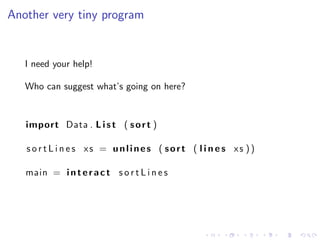
Another very tiny program


   I need your help!

   Who can suggest what’s going on here?


   import Data . L i s t ( s o r t )

   s o r t L i n e s xs = unlines ( sort ( l i n e s xs ))

   main = i n t e r a c t s o r t L i n e s
Figuring stuff out


   When you’re in exploratory mode (i.e. most of the time, at least
   for me), ghci is your friend.
   Wonder what lines does? Simply try it, and find out!

   Prelude> lines "foonbarnquuxn"
   ["foo","bar","quux"]

   What else did we find out here?
Lists


   The syntactic sugar for a list of items is square brackets
   surrounding items, which are separated by commas:
   [4 ,8 ,15 ,16 ,23 ,42]
   [ True , F a l s e ]
   [ ” L i n d e n ” , ” Lab ” ]

   Let’s try some experiments with lists.
        Can we write this? [7, True]
        What about this?           [[1,2],[3,4]]
More experimentation


      What does the unlines function do?
      What about sort?
Another small program


   Let’s develop something! Another Unix-like command!

   We’ll write a program that prefixes each line of input with a line
   number.

   Okay. . . so now what?
When in doubt


  If I don’t know how to solve a problem, I like to start by seeing if
  there are bits of it I know how to solve.

  What do we already know about?
      Defining new functions!
      And, of course, using existing functions!
      We have a small library of built-in functions and operators,
      e.g. show, unlines, and ++.
The small problem


   Given one number and one line of text, how should we render
   them?
The small problem


   Given one number and one line of text, how should we render
   them?

   oneNumber n s = show n ++ ” : ” ++ s
The small problem


   Given one number and one line of text, how should we render
   them?

   oneNumber n s = show n ++ ” : ” ++ s

   Let’s try this function in ghci:

   Prelude> oneNumber 3 "blargh"
   "3: blargh"
Powering up


   That’s a good start. But now what?

   We need to produce a whole series of lines with numbers.
Powering up


   That’s a good start. But now what?

   We need to produce a whole series of lines with numbers.

   lineNumbers n xs =
        i f x s == [ ]
        then     []
        else     oneNumber n ( head x s )
               : l i n e N u m b e r s ( n+1) ( t a i l x s )
Powering up


   That’s a good start. But now what?

   We need to produce a whole series of lines with numbers.

   lineNumbers n xs =
        i f x s == [ ]
        then     []
        else     oneNumber n ( head x s )
               : l i n e N u m b e r s ( n+1) ( t a i l x s )

   Hey! See that little lonely “:”? It’s a list constructor (like cons in
   Lisp or Scheme).
The quantum leap


  Wow, we just did something interesting:
      We wrote a recursive function.
  Not bad for the first lecture!
The quantum leap


  Wow, we just did something interesting:
      We wrote a recursive function.
  Not bad for the first lecture!

  We still lack a little glue to create a complete program.
The quantum leap


  Wow, we just did something interesting:
        We wrote a recursive function.
  Not bad for the first lecture!

  We still lack a little glue to create a complete program.

   b u n c h i e x s = unwords ( l i n e N u m b e r s 1 ( l i n e s x s ) )

   main = i n t e r a c t b u n c h i e
Accompanying materials


   Where should you be going to learn more?
       http://book.realworldhaskell.org/
       http://learnyouahaskell.com/
       http://haskell.org/
       http://slideshare.net/bos31337
       #haskell on irc.freenode.net (I’m bos)
Accompanying materials


   Where should you be going to learn more?
       http://book.realworldhaskell.org/
       http://learnyouahaskell.com/
       http://haskell.org/
       http://slideshare.net/bos31337
       #haskell on irc.freenode.net (I’m bos)

   Source code for these slides and examples:
       darcs get http://darcs.serpentine.com/rwh-course
Recap


  What have we covered today?
        What functional programming is. A tiny bit about Haskell.
        The Haskell Platform, and why it matters.
        Writing expressions, and defining functions.
        Simple interactive Unix-like commands.
Recap


  What have we covered today?
        What functional programming is. A tiny bit about Haskell.
        The Haskell Platform, and why it matters.
        Writing expressions, and defining functions.
        Simple interactive Unix-like commands.


  There will be homework. Assignments will go out later today to
  the haskell mailing list.
Recap


  What have we covered today?
        What functional programming is. A tiny bit about Haskell.
        The Haskell Platform, and why it matters.
        Writing expressions, and defining functions.
        Simple interactive Unix-like commands.


  There will be homework. Assignments will go out later today to
  the haskell mailing list.

  Thanks! Questions?

Real World Haskell: Lecture 1

  • 1.
    Real World Haskell: Lecture 1 Bryan O’Sullivan 2009-10-07
  • 2.
    Welcome! Afew things to mull over: Our pace will be fairly rapid. Stop me and ask questions—early and often. I assume no prior Haskell or functional programming exposure.
  • 3.
    What’s software, doc? What does a program do? It consumes old data. It computes over the old data. It produces new data.
  • 4.
    A familiar program Consider the Unix sort command: Consumes (possibly unsorted) lines of text. Sorts the lines. Produces sorted lines of text.
  • 5.
    Have you everrun sort? If so, you’re already a functional programmer.
  • 6.
    What’s functional programming? Definition Functional programming is a style of programming that emphasizes functions and function application.
  • 7.
    What’s a function? Definition A function inspects its input, and produces an output. Definition Function application involves supplying a function with one or more arguments (inputs).
  • 8.
    Why is thesort command functional? Discuss.
  • 9.
    So what? I can already write code that inspects inputs and produces outputs in C, Python, or whatever. So what’s different about functional programming (FP)? We only inspect inputs; we don’t change them. In fact, we generally don’t change any data.
  • 10.
    What’s interesting aboutfunctional programming? I’ll tell you what got me hooked: It requires a substantially different way of thinking about programming. In exchange for the challenge, it offers great expressiveness and conciseness. It is beautiful.
  • 11.
    Why Haskell? Why choose Haskell over Erlang, Clojure, F#, OCaml, . . . ? It is the most radical of the practical functional languages. It will force you to learn many new things at once, and to unlearn things that perhaps you thought you knew.
  • 12.
    Getting started withHaskell We’ll be using the Haskell Platform: http://hackage.haskell.org/platform/ What is this Platform, anyway? A modern, optimising compiler (ghc) An interactive interpreter (ghci) Useful standard libraries An awesome package manager (cabal)
  • 13.
    Starting with interaction The interactive interpreter for the Haskell Platform is named ghci (for “GHC interactive”). When you run it, you’ll see something like this: GHCi, version 6.10.3: http://www.haskell.org/ghc/ :? for help Loading package ghc-prim ... linking ... done. Loading package integer ... linking ... done. Loading package base ... linking ... done. Prelude> That “Prelude>” is the prompt.
  • 14.
    Really simple stuff What happens when you enter these expressions at the ghci prompt? 2+2 putStrLn ”hi mom!” ”foo” ++ ”bar” :quit
  • 15.
    Handy things toknow You should be able to use your arrow keys to edit your ghci input. Up and down arrows should go through your input history. Tab should complete names: try typing put<TAB>.
  • 16.
    Haskell source files The standard Haskell source file extension is “.hs”. By convention, files use InterCapsNaming. Save the following in a file named Hello.hs: main = putStrLn ” h e l l o , w o r l d ! ”
  • 17.
    Run your programimmediately We can run our new program straight away, via the runghc batch interpreter: $ runghc Hello.hs hello, world!
  • 18.
    Compilation We can also compile our new program to a native executable: $ ghc --make Hello [1 of 1] Compiling Main ( Hello.hs, Hello.o ) Linking Hello ... (GHC’s “--make” option is super-useful!) We can run our new program in the usual way: $ ./Hello hello, world!
  • 19.
    Operators and things Haskell’s rules for writing expressions with operators should look familiar. b ˆ2 − 4∗ a ∗ c The ˆ operator is (integral) exponentiation. Expressions group as you might expect, i.e. (bˆ2) − (4∗a∗c). Confused about operator precedence? Parens are your friend!
  • 20.
    What about functions? To apply a function to some arguments, we simply write it next to its arguments. length ” hello ” Function application binds tighter than operations, so if you write this: sqrt 2 − 3 What you’ll get is this: (sqrt 2) − 3 If you mean something else, tell the compiler! sqrt (2 − 3)
  • 21.
    A more complexexpression Look familiar? (−b + sqrt (bˆ2 ∗ 4∗a∗c)) / (2∗a) (It’s part of the solution to a quadratic equation.)
  • 22.
    Expressions are allvery well But we need a bit more to do anything useful. We have to be able to give things names. To define something, we supply a name, an equals sign, and an expression. e = 2.718281828459045
  • 23.
    A more usefuldefinition When we supply more than one name before the equals sign, the remainder are the arguments to a function. oneRoot a b c = (−b + ( b ˆ2 + 4∗ a ∗ c ) ) / ( 2 ∗ a ) We’ve now defined a function named oneRoot, with three arguments. Try saving this definition into a source file, then load it into ghci and use it. What’s the result of this expression in ghci? oneRoot 2 3 4
  • 24.
    Your turn! I’m going to open up an Emacs window. Tell me how to write a function that computes the mean of three numbers.
  • 25.
    Speaking of Emacs What are the best tools for working with Haskell source code? Emacs vim Google for “emacs haskell mode” or “vim haskell mode” for details. Do you prefer IDEs? At least for now, you’ve come to the wrong language. Back to Visual Studio with you! Less flippant answer: there are no mature Haskell IDEs yet.
  • 26.
    Of source filesand editors Haskellers hate tab characters! (For the same reason Python programmers do: they’re unportable.) A decent Haskell mode for a good editor will give you some useful features: Syntax highlighting. Intelligent indentation. Compilation and jump-to-error support. No tabs! Maybe interaction with ghci.
  • 27.
    A very tiny,marginally useful program wordCount x s = show ( l e n g t h ( words x s ) ) ++ ”n” main = i n t e r a c t wordCount What’s going on here? The words function breaks up a text string into a list of words. The length function. . . well, you can guess. The show function takes something (in this case, a number) and represents it as a string. The ++ operator means “append.”
  • 28.
    Oh, and thenthere’s interact The interact function is your gateway to Unix shell pipeline bliss. It: reads from standard input; feeds it to your function as a string; consumes the string that your function produces; and prints it to standard output.
  • 29.
    Another very tinyprogram I need your help! Who can suggest what’s going on here? import Data . L i s t ( s o r t ) s o r t L i n e s xs = unlines ( sort ( l i n e s xs )) main = i n t e r a c t s o r t L i n e s
  • 30.
    Figuring stuff out When you’re in exploratory mode (i.e. most of the time, at least for me), ghci is your friend. Wonder what lines does? Simply try it, and find out! Prelude> lines "foonbarnquuxn" ["foo","bar","quux"] What else did we find out here?
  • 31.
    Lists The syntactic sugar for a list of items is square brackets surrounding items, which are separated by commas: [4 ,8 ,15 ,16 ,23 ,42] [ True , F a l s e ] [ ” L i n d e n ” , ” Lab ” ] Let’s try some experiments with lists. Can we write this? [7, True] What about this? [[1,2],[3,4]]
  • 32.
    More experimentation What does the unlines function do? What about sort?
  • 33.
    Another small program Let’s develop something! Another Unix-like command! We’ll write a program that prefixes each line of input with a line number. Okay. . . so now what?
  • 34.
    When in doubt If I don’t know how to solve a problem, I like to start by seeing if there are bits of it I know how to solve. What do we already know about? Defining new functions! And, of course, using existing functions! We have a small library of built-in functions and operators, e.g. show, unlines, and ++.
  • 35.
    The small problem Given one number and one line of text, how should we render them?
  • 36.
    The small problem Given one number and one line of text, how should we render them? oneNumber n s = show n ++ ” : ” ++ s
  • 37.
    The small problem Given one number and one line of text, how should we render them? oneNumber n s = show n ++ ” : ” ++ s Let’s try this function in ghci: Prelude> oneNumber 3 "blargh" "3: blargh"
  • 38.
    Powering up That’s a good start. But now what? We need to produce a whole series of lines with numbers.
  • 39.
    Powering up That’s a good start. But now what? We need to produce a whole series of lines with numbers. lineNumbers n xs = i f x s == [ ] then [] else oneNumber n ( head x s ) : l i n e N u m b e r s ( n+1) ( t a i l x s )
  • 40.
    Powering up That’s a good start. But now what? We need to produce a whole series of lines with numbers. lineNumbers n xs = i f x s == [ ] then [] else oneNumber n ( head x s ) : l i n e N u m b e r s ( n+1) ( t a i l x s ) Hey! See that little lonely “:”? It’s a list constructor (like cons in Lisp or Scheme).
  • 41.
    The quantum leap Wow, we just did something interesting: We wrote a recursive function. Not bad for the first lecture!
  • 42.
    The quantum leap Wow, we just did something interesting: We wrote a recursive function. Not bad for the first lecture! We still lack a little glue to create a complete program.
  • 43.
    The quantum leap Wow, we just did something interesting: We wrote a recursive function. Not bad for the first lecture! We still lack a little glue to create a complete program. b u n c h i e x s = unwords ( l i n e N u m b e r s 1 ( l i n e s x s ) ) main = i n t e r a c t b u n c h i e
  • 44.
    Accompanying materials Where should you be going to learn more? http://book.realworldhaskell.org/ http://learnyouahaskell.com/ http://haskell.org/ http://slideshare.net/bos31337 #haskell on irc.freenode.net (I’m bos)
  • 45.
    Accompanying materials Where should you be going to learn more? http://book.realworldhaskell.org/ http://learnyouahaskell.com/ http://haskell.org/ http://slideshare.net/bos31337 #haskell on irc.freenode.net (I’m bos) Source code for these slides and examples: darcs get http://darcs.serpentine.com/rwh-course
  • 46.
    Recap Whathave we covered today? What functional programming is. A tiny bit about Haskell. The Haskell Platform, and why it matters. Writing expressions, and defining functions. Simple interactive Unix-like commands.
  • 47.
    Recap Whathave we covered today? What functional programming is. A tiny bit about Haskell. The Haskell Platform, and why it matters. Writing expressions, and defining functions. Simple interactive Unix-like commands. There will be homework. Assignments will go out later today to the haskell mailing list.
  • 48.
    Recap Whathave we covered today? What functional programming is. A tiny bit about Haskell. The Haskell Platform, and why it matters. Writing expressions, and defining functions. Simple interactive Unix-like commands. There will be homework. Assignments will go out later today to the haskell mailing list. Thanks! Questions?