Real Programmers Use
Programming Languages
(Not Shell Scripts)
Daniel Laeng - May 2014
daniel@laeng.org
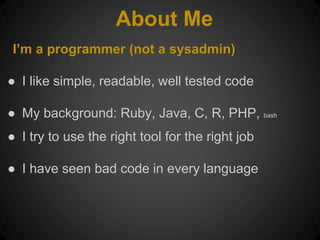
About Me
I’m a programmer (not a sysadmin)
ā— I like simple, readable, well tested code
ā— My background: Ruby, Java, C, R, PHP, bash
ā— I try to use the right tool for the right job
ā— I have seen bad code in every language
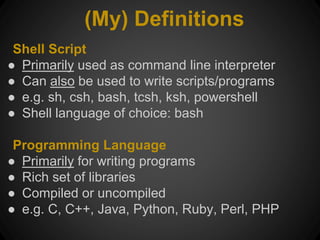
(My) Definitions
Shell Script
ā— Primarily used as command line interpreter
ā— Can also be used to write scripts/programs
ā— e.g. sh, csh, bash, tcsh, ksh, powershell
ā— Shell language of choice: bash
Programming Language
ā— Primarily for writing programs
ā— Rich set of libraries
ā— Compiled or uncompiled
ā— e.g. C, C++, Java, Python, Ruby, Perl, PHP
Why Shell Scripts are Good
ā— Quick to write
ā— Use commands you know (cp, mv, ps, etc)
ā— Complex tasks can be done in a short script
ā— Easy to try out on command prompt
ā— Power of unix pipes for free
Shell Programming Issues
What’s bad about programming in shell scripts
ā— Confusing syntax
ā— Untyped (everything is a string)
ā— Slow
ā— Not always portable
ā— No exception handling
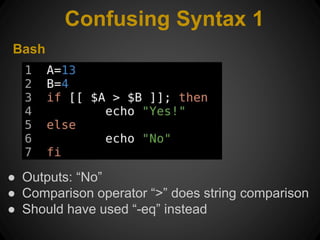
Confusing Syntax 1
Bash
ā— Outputs: ā€œNoā€
ā— Comparison operator ā€œ>ā€ does string comparison
ā— Should have used ā€œ-eqā€ instead
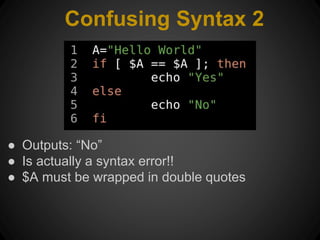
Confusing Syntax 2
ā— Outputs: ā€œNoā€
ā— Is actually a syntax error!!
ā— $A must be wrapped in double quotes
Confusing Syntax!
ā— Non standard comparison operators
ā— Variables need to be quoted... sometimes
ā— Variables need to be prepended with "$"...
sometimes
ā— Syntax errors can be caused by variable
contents
Untyped
ā— All variables behave like strings
ā— Some integer operations are allowed
ā— No built in floating point operators!!
ā— Can’t define your own types
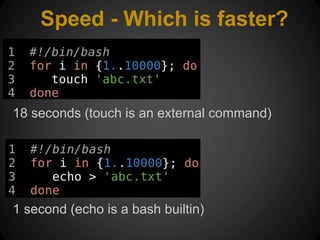
Speed - Which is faster?
18 seconds (touch is an external command)
1 second (echo is a bash builtin)
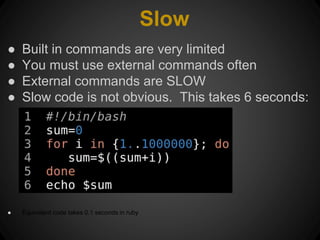
Slow
ā— Built in commands are very limited
ā— You must use external commands often
ā— External commands are SLOW
ā— Slow code is not obvious. This takes 6 seconds:
ā— Equivalent code takes 0.1 seconds in ruby
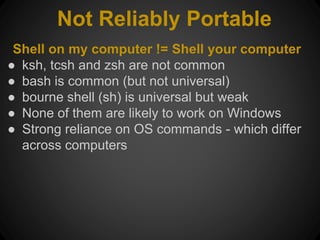
Not Reliably Portable
Shell on my computer != Shell your computer
ā— ksh, tcsh and zsh are not common
ā— bash is common (but not universal)
ā— bourne shell (sh) is universal but weak
ā— None of them are likely to work on Windows
ā— Strong reliance on OS commands - which differ
across computers
No Exception Handling
ā— There is no built in exception handling
ā— There are (complicated) ways to work around
this
ā— Errors are hard to debug
When To Use Shell Scripts
Shell (Scripts)
ā— Working on the command line
ā— Wrapper to start a program
ā— One off hack to automate tedious task
ā— Keep it SHORT! (under 50 lines)
Programming Languages
ā— Anything with complicated logic
ā— Anything that needs to be fast
ā— Anything that needs to be portable
ā— Anything that should be tested
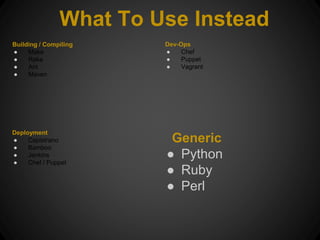
Generic
ā— Python
ā— Ruby
ā— Perl
What To Use Instead
Building / Compiling
ā— Make
ā— Rake
ā— Ant
ā— Maven
Deployment
ā— Capistrano
ā— Bamboo
ā— Jenkins
ā— Chef / Puppet
Dev-Ops
ā— Chef
ā— Puppet
ā— Vagrant
Conclusions
Understand your tools
ā— Shell scripts are very useful
ā— But - they are not a replacement for
programming languages
ā— Think about your choice - pick the right tool
ā— Happy scripting

Real programmers use programming languages (Not shell scripts)

  • 1.
    Real Programmers Use ProgrammingLanguages (Not Shell Scripts) Daniel Laeng - May 2014 daniel@laeng.org
  • 2.
    About Me I’m aprogrammer (not a sysadmin) ā— I like simple, readable, well tested code ā— My background: Ruby, Java, C, R, PHP, bash ā— I try to use the right tool for the right job ā— I have seen bad code in every language
  • 3.
    (My) Definitions Shell Script ā—Primarily used as command line interpreter ā— Can also be used to write scripts/programs ā— e.g. sh, csh, bash, tcsh, ksh, powershell ā— Shell language of choice: bash Programming Language ā— Primarily for writing programs ā— Rich set of libraries ā— Compiled or uncompiled ā— e.g. C, C++, Java, Python, Ruby, Perl, PHP
  • 4.
    Why Shell Scriptsare Good ā— Quick to write ā— Use commands you know (cp, mv, ps, etc) ā— Complex tasks can be done in a short script ā— Easy to try out on command prompt ā— Power of unix pipes for free
  • 5.
    Shell Programming Issues What’sbad about programming in shell scripts ā— Confusing syntax ā— Untyped (everything is a string) ā— Slow ā— Not always portable ā— No exception handling
  • 6.
    Confusing Syntax 1 Bash ā—Outputs: ā€œNoā€ ā— Comparison operator ā€œ>ā€ does string comparison ā— Should have used ā€œ-eqā€ instead
  • 7.
    Confusing Syntax 2 ā—Outputs: ā€œNoā€ ā— Is actually a syntax error!! ā— $A must be wrapped in double quotes
  • 8.
    Confusing Syntax! ā— Nonstandard comparison operators ā— Variables need to be quoted... sometimes ā— Variables need to be prepended with "$"... sometimes ā— Syntax errors can be caused by variable contents
  • 9.
    Untyped ā— All variablesbehave like strings ā— Some integer operations are allowed ā— No built in floating point operators!! ā— Can’t define your own types
  • 10.
    Speed - Whichis faster? 18 seconds (touch is an external command) 1 second (echo is a bash builtin)
  • 11.
    Slow ā— Built incommands are very limited ā— You must use external commands often ā— External commands are SLOW ā— Slow code is not obvious. This takes 6 seconds: ā— Equivalent code takes 0.1 seconds in ruby
  • 12.
    Not Reliably Portable Shellon my computer != Shell your computer ā— ksh, tcsh and zsh are not common ā— bash is common (but not universal) ā— bourne shell (sh) is universal but weak ā— None of them are likely to work on Windows ā— Strong reliance on OS commands - which differ across computers
  • 13.
    No Exception Handling ā—There is no built in exception handling ā— There are (complicated) ways to work around this ā— Errors are hard to debug
  • 14.
    When To UseShell Scripts Shell (Scripts) ā— Working on the command line ā— Wrapper to start a program ā— One off hack to automate tedious task ā— Keep it SHORT! (under 50 lines) Programming Languages ā— Anything with complicated logic ā— Anything that needs to be fast ā— Anything that needs to be portable ā— Anything that should be tested
  • 15.
    Generic ā— Python ā— Ruby ā—Perl What To Use Instead Building / Compiling ā— Make ā— Rake ā— Ant ā— Maven Deployment ā— Capistrano ā— Bamboo ā— Jenkins ā— Chef / Puppet Dev-Ops ā— Chef ā— Puppet ā— Vagrant
  • 16.
    Conclusions Understand your tools ā—Shell scripts are very useful ā— But - they are not a replacement for programming languages ā— Think about your choice - pick the right tool ā— Happy scripting