REACT NATIVE
HTTPS://FACEBOOK.GITHUB.IO/REACT-NATIVE/
NHAN CAO (FRI, SEP 15, 2017)
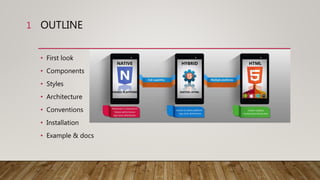
OUTLINE
• First look
• Components
• Styles
• Architecture
• Conventions
• Installation
• Example & docs
1
FIRST LOOK
LEARN ONCE, WRITE ANYWHERE: BUILD MOBILE APPS WITH REACT
What is it?
• Build native mobile apps using JavaScript and React
• A React Native app is a real mobile app
• Don't waste time recompiling
• Use native code when you need to
2
FIRST LOOK
LEARN ONCE, WRITE ANYWHERE: BUILD MOBILE APPS WITH REACT
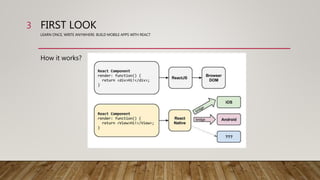
How it works?
3
FIRST LOOK
LEARN ONCE, WRITE ANYWHERE: BUILD MOBILE APPS WITH REACT
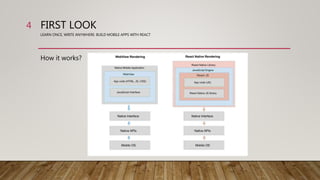
How it works?
4
FIRST LOOK
LEARN ONCE, WRITE ANYWHERE: BUILD MOBILE APPS WITH REACT
Pros of React Native
• React Native uses JavaScript – fast and popular programming language
• Native controls and native modules in React Native improve performance
• React Native contains all ReactJS features, aimed at improving UI
5
FIRST LOOK
LEARN ONCE, WRITE ANYWHERE: BUILD MOBILE APPS WITH REACT
Cons of React Native
• Documentation
• Expertise for native modules
• Third-party components
• Lagging SDK Updates
• Not support WP (currently)
6
COMPONENTS
LEARN ONCE, WRITE ANYWHERE: BUILD MOBILE APPS WITH REACT
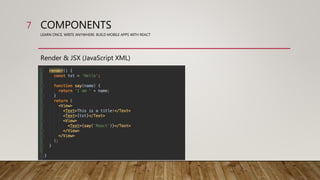
Render & JSX (JavaScript XML)
7
COMPONENTS
LEARN ONCE, WRITE ANYWHERE: BUILD MOBILE APPS WITH REACT
UI libraries
• From home page: https://facebook.github.io/react-native/docs/native-
components-ios.html
• From framework: https://nativebase.io/
8
COMPONENTS
LEARN ONCE, WRITE ANYWHERE: BUILD MOBILE APPS WITH REACT
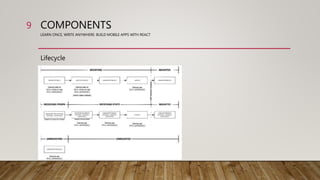
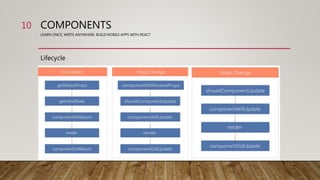
Lifecycle
9
COMPONENTS
LEARN ONCE, WRITE ANYWHERE: BUILD MOBILE APPS WITH REACT
Lifecycle
10
COMPONENTS
LEARN ONCE, WRITE ANYWHERE: BUILD MOBILE APPS WITH REACT
Props & States
• Props: properties are passed to a component and can hold any data
• State: internal to the component.
11
STYLES
LEARN ONCE, WRITE ANYWHERE: BUILD MOBILE APPS WITH REACT
12
STYLES
LEARN ONCE, WRITE ANYWHERE: BUILD MOBILE APPS WITH REACT
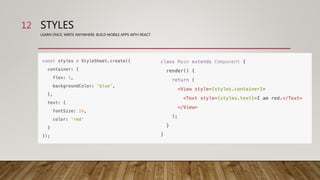
• Flexbox
• Absolute & Relative
• Size & Dimension
13
STYLES
LEARN ONCE, WRITE ANYWHERE: BUILD MOBILE APPS WITH REACT
Flexbox: https://css-tricks.com/snippets/css/a-guide-to-flexbox/
• - Container:
```
flexDirection:'row'|'column'
justifyContent:'flex-start'|'flex-end'|'center'|'space-between'|'space-around'
alignItems:'flex-start'|'flex-end'|'center'|'stretch'
flexWrap:'wrap'|'nowrap'
```
- Item:
```
flex
alignSelf:'auto'|'flex-start'|'flex-end'|'center'|'stretch'
```
14
STYLES
LEARN ONCE, WRITE ANYWHERE: BUILD MOBILE APPS WITH REACT
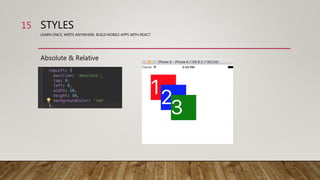
Absolute & Relative
15
STYLES
LEARN ONCE, WRITE ANYWHERE: BUILD MOBILE APPS WITH REACT
Size & Dimension
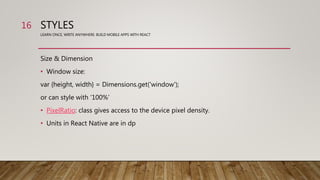
• Window size:
var {height, width} = Dimensions.get('window');
or can style with ‘100%’
• PixelRatio: class gives access to the device pixel density.
• Units in React Native are in dp
16
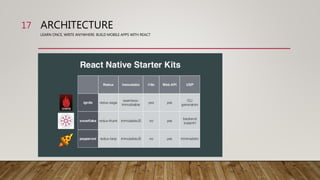
ARCHITECTURE
LEARN ONCE, WRITE ANYWHERE: BUILD MOBILE APPS WITH REACT
17
ARCHITECTURE
LEARN ONCE, WRITE ANYWHERE: BUILD MOBILE APPS WITH REACT
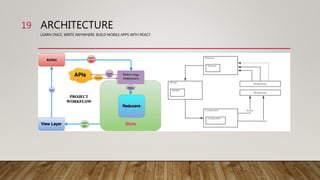
Tech stack:
• CLI: https://infinite.red/ignite
• Redux: http://redux.js.org/docs/basics/UsageWithReact.html
• Redux-saga: https://redux-saga.js.org/
• Rest api: https://github.com/skellock/apisauce
18
ARCHITECTURE
LEARN ONCE, WRITE ANYWHERE: BUILD MOBILE APPS WITH REACT
19
CONVENTIONS
LEARN ONCE, WRITE ANYWHERE: BUILD MOBILE APPS WITH REACT
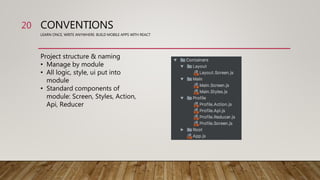
Project structure & naming
• Manage by module
• All logic, style, ui put into
module
• Standard components of
module: Screen, Styles, Action,
Api, Reducer
20
CONVENTIONS
LEARN ONCE, WRITE ANYWHERE: BUILD MOBILE APPS WITH REACT
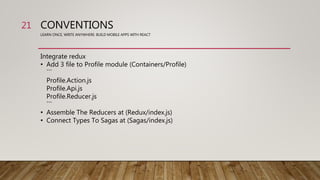
Integrate redux
• Add 3 file to Profile module (Containers/Profile)
```
Profile.Action.js
Profile.Api.js
Profile.Reducer.js
```
• Assemble The Reducers at (Redux/index.js)
• Connect Types To Sagas at (Sagas/index.js)
21
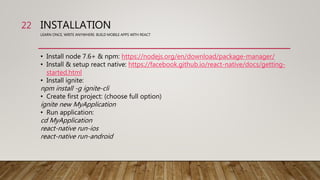
INSTALLATION
LEARN ONCE, WRITE ANYWHERE: BUILD MOBILE APPS WITH REACT
• Install node 7.6+ & npm: https://nodejs.org/en/download/package-manager/
• Install & setup react native: https://facebook.github.io/react-native/docs/getting-
started.html
• Install ignite:
npm install -g ignite-cli
• Create first project: (choose full option)
ignite new MyApplication
• Run application:
cd MyApplication
react-native run-ios
react-native run-android
22
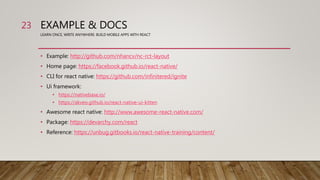
EXAMPLE & DOCS
LEARN ONCE, WRITE ANYWHERE: BUILD MOBILE APPS WITH REACT
• Example: http://github.com/nhancv/nc-rct-layout
• Home page: https://facebook.github.io/react-native/
• CLI for react native: https://github.com/infinitered/ignite
• Ui framework:
• https://nativebase.io/
• https://akveo.github.io/react-native-ui-kitten
• Awesome react native: http://www.awesome-react-native.com/
• Package: https://devarchy.com/react
• Reference: https://unbug.gitbooks.io/react-native-training/content/
23
END!24

React native starter

  • 1.
  • 2.
    OUTLINE • First look •Components • Styles • Architecture • Conventions • Installation • Example & docs 1
  • 3.
    FIRST LOOK LEARN ONCE,WRITE ANYWHERE: BUILD MOBILE APPS WITH REACT What is it? • Build native mobile apps using JavaScript and React • A React Native app is a real mobile app • Don't waste time recompiling • Use native code when you need to 2
  • 4.
    FIRST LOOK LEARN ONCE,WRITE ANYWHERE: BUILD MOBILE APPS WITH REACT How it works? 3
  • 5.
    FIRST LOOK LEARN ONCE,WRITE ANYWHERE: BUILD MOBILE APPS WITH REACT How it works? 4
  • 6.
    FIRST LOOK LEARN ONCE,WRITE ANYWHERE: BUILD MOBILE APPS WITH REACT Pros of React Native • React Native uses JavaScript – fast and popular programming language • Native controls and native modules in React Native improve performance • React Native contains all ReactJS features, aimed at improving UI 5
  • 7.
    FIRST LOOK LEARN ONCE,WRITE ANYWHERE: BUILD MOBILE APPS WITH REACT Cons of React Native • Documentation • Expertise for native modules • Third-party components • Lagging SDK Updates • Not support WP (currently) 6
  • 8.
    COMPONENTS LEARN ONCE, WRITEANYWHERE: BUILD MOBILE APPS WITH REACT Render & JSX (JavaScript XML) 7
  • 9.
    COMPONENTS LEARN ONCE, WRITEANYWHERE: BUILD MOBILE APPS WITH REACT UI libraries • From home page: https://facebook.github.io/react-native/docs/native- components-ios.html • From framework: https://nativebase.io/ 8
  • 10.
    COMPONENTS LEARN ONCE, WRITEANYWHERE: BUILD MOBILE APPS WITH REACT Lifecycle 9
  • 11.
    COMPONENTS LEARN ONCE, WRITEANYWHERE: BUILD MOBILE APPS WITH REACT Lifecycle 10
  • 12.
    COMPONENTS LEARN ONCE, WRITEANYWHERE: BUILD MOBILE APPS WITH REACT Props & States • Props: properties are passed to a component and can hold any data • State: internal to the component. 11
  • 13.
    STYLES LEARN ONCE, WRITEANYWHERE: BUILD MOBILE APPS WITH REACT 12
  • 14.
    STYLES LEARN ONCE, WRITEANYWHERE: BUILD MOBILE APPS WITH REACT • Flexbox • Absolute & Relative • Size & Dimension 13
  • 15.
    STYLES LEARN ONCE, WRITEANYWHERE: BUILD MOBILE APPS WITH REACT Flexbox: https://css-tricks.com/snippets/css/a-guide-to-flexbox/ • - Container: ``` flexDirection:'row'|'column' justifyContent:'flex-start'|'flex-end'|'center'|'space-between'|'space-around' alignItems:'flex-start'|'flex-end'|'center'|'stretch' flexWrap:'wrap'|'nowrap' ``` - Item: ``` flex alignSelf:'auto'|'flex-start'|'flex-end'|'center'|'stretch' ``` 14
  • 16.
    STYLES LEARN ONCE, WRITEANYWHERE: BUILD MOBILE APPS WITH REACT Absolute & Relative 15
  • 17.
    STYLES LEARN ONCE, WRITEANYWHERE: BUILD MOBILE APPS WITH REACT Size & Dimension • Window size: var {height, width} = Dimensions.get('window'); or can style with ‘100%’ • PixelRatio: class gives access to the device pixel density. • Units in React Native are in dp 16
  • 18.
    ARCHITECTURE LEARN ONCE, WRITEANYWHERE: BUILD MOBILE APPS WITH REACT 17
  • 19.
    ARCHITECTURE LEARN ONCE, WRITEANYWHERE: BUILD MOBILE APPS WITH REACT Tech stack: • CLI: https://infinite.red/ignite • Redux: http://redux.js.org/docs/basics/UsageWithReact.html • Redux-saga: https://redux-saga.js.org/ • Rest api: https://github.com/skellock/apisauce 18
  • 20.
    ARCHITECTURE LEARN ONCE, WRITEANYWHERE: BUILD MOBILE APPS WITH REACT 19
  • 21.
    CONVENTIONS LEARN ONCE, WRITEANYWHERE: BUILD MOBILE APPS WITH REACT Project structure & naming • Manage by module • All logic, style, ui put into module • Standard components of module: Screen, Styles, Action, Api, Reducer 20
  • 22.
    CONVENTIONS LEARN ONCE, WRITEANYWHERE: BUILD MOBILE APPS WITH REACT Integrate redux • Add 3 file to Profile module (Containers/Profile) ``` Profile.Action.js Profile.Api.js Profile.Reducer.js ``` • Assemble The Reducers at (Redux/index.js) • Connect Types To Sagas at (Sagas/index.js) 21
  • 23.
    INSTALLATION LEARN ONCE, WRITEANYWHERE: BUILD MOBILE APPS WITH REACT • Install node 7.6+ & npm: https://nodejs.org/en/download/package-manager/ • Install & setup react native: https://facebook.github.io/react-native/docs/getting- started.html • Install ignite: npm install -g ignite-cli • Create first project: (choose full option) ignite new MyApplication • Run application: cd MyApplication react-native run-ios react-native run-android 22
  • 24.
    EXAMPLE & DOCS LEARNONCE, WRITE ANYWHERE: BUILD MOBILE APPS WITH REACT • Example: http://github.com/nhancv/nc-rct-layout • Home page: https://facebook.github.io/react-native/ • CLI for react native: https://github.com/infinitered/ignite • Ui framework: • https://nativebase.io/ • https://akveo.github.io/react-native-ui-kitten • Awesome react native: http://www.awesome-react-native.com/ • Package: https://devarchy.com/react • Reference: https://unbug.gitbooks.io/react-native-training/content/ 23
  • 25.

Editor's Notes

  • #18 All dimensions in React Native are unitless, and represent density-independent pixels. Setting dimensions this way is common for components that should always render at exactly the same size, regardless of screen dimensions. https://facebook.github.io/react-native/docs/height-and-width.html