ASP.NET 2010, WebServices Full Example for BCA Students
1.
https://www.csharp.com/UploadFile/29d7e0/steps-to-create-a-simple-web-service-and-use-it-in-
Asp-Net/
STEP:1 CREATE YOUROWN Web Service using
1. File > New > Website… >> ASP.NET Empty Website (Visual C#) [TempWebService]
2. In Solution Explorer -> Right click on Project Name -> Add New Item
3. Give Name to this web service “CalcWebService” (CalcWebService.asmx)
4. Open code Window of the CalcWebService (CalcWebService.cs) and write a
[WebMethod] name Multi() (Code is given below)
5. Test the web service by F5 (Run).
2.
Create A
CalcWebService.asmx
(Keep defaultpage as it is)
<%@ WebService Language="C#" CodeBehind="~/App_Code/Calcwebservice.cs"
Class="Calcwebservice" %>
CalcWebService.cs
using System;
using System.Collections.Generic;
using System.Linq;
using System.Web;
using System.Web.Services;
/// <summary>
/// Summary description for Calcwebservice
/// </summary>
[WebService(Namespace = "http://tempuri.org/")]
[WebServiceBinding(ConformsTo = WsiProfiles.BasicProfile1_1)]
// To allow this Web Service to be called from script, using ASP.NET
AJAX, uncomment the following line.
// [System.Web.Script.Services.ScriptService]
public class Calcwebservice : System.Web.Services.WebService {
public Calcwebservice () {
//Uncomment the following line if using designed components
//InitializeComponent();
}
[WebMethod]
public string HelloWorld() {
return "Hello World";
}
[WebMethod]
public int multi(int a, int b)
{
return a * b;
}
}
3.
STEP:2 - DEPLOYthe WEB SERVICE in IIS server
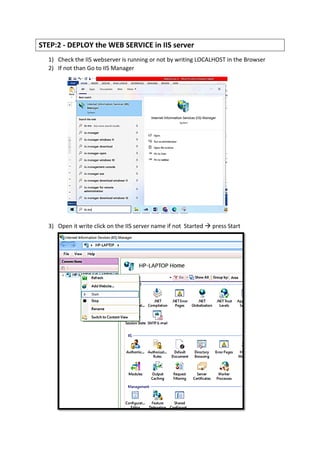
1) Check the IIS webserver is running or not by writing LOCALHOST in the Browser
2) If not than Go to IIS Manager
3) Open it write click on the IIS server name if not Started → press Start
4.
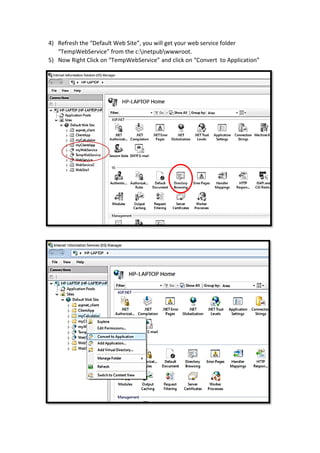
4) Refresh the“Default Web Site”, you will get your web service folder
“TempWebService” from the c:inetpubwwwroot.
5) Now Right Click on “TempWebService” and click on “Convert to Application”
5.
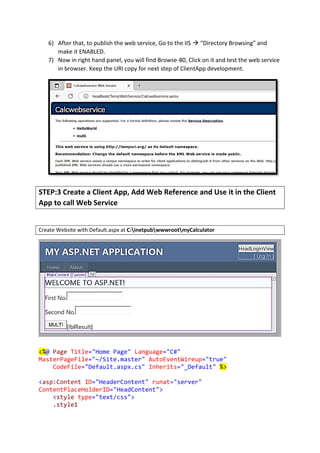
6) After that,to publish the web service, Go to the IIS → “Directory Browsing” and
make it ENABLED.
7) Now in right hand panel, you will find Browse-80, Click on it and test the web service
in browser. Keep the URI copy for next step of ClientApp development.
STEP:3 Create a Client App, Add Web Reference and Use it in the Client
App to call Web Service
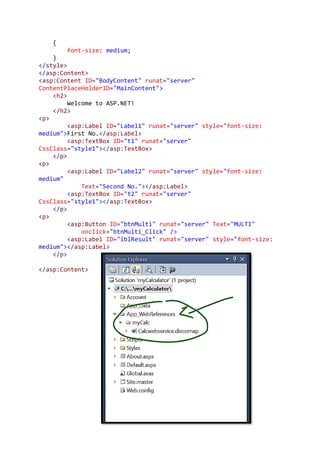
Create Website with Default.aspx at C:inetpubwwwrootmyCalculator
<%@ Page Title="Home Page" Language="C#"
MasterPageFile="~/Site.master" AutoEventWireup="true"
CodeFile="Default.aspx.cs" Inherits="_Default" %>
<asp:Content ID="HeaderContent" runat="server"
ContentPlaceHolderID="HeadContent">
<style type="text/css">
.style1
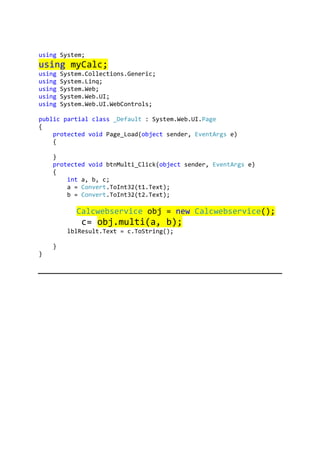
using System;
using myCalc;
usingSystem.Collections.Generic;
using System.Linq;
using System.Web;
using System.Web.UI;
using System.Web.UI.WebControls;
public partial class _Default : System.Web.UI.Page
{
protected void Page_Load(object sender, EventArgs e)
{
}
protected void btnMulti_Click(object sender, EventArgs e)
{
int a, b, c;
a = Convert.ToInt32(t1.Text);
b = Convert.ToInt32(t2.Text);
Calcwebservice obj = new Calcwebservice();
c= obj.multi(a, b);
lblResult.Text = c.ToString();
}
}
![https://www.csharp.com/UploadFile/29d7e0/steps-to-create-a-simple-web-service-and-use-it-in-
Asp-Net/
STEP:1 CREATE YOUR OWN Web Service using
1. File > New > Website… >> ASP.NET Empty Website (Visual C#) [TempWebService]
2. In Solution Explorer -> Right click on Project Name -> Add New Item
3. Give Name to this web service “CalcWebService” (CalcWebService.asmx)
4. Open code Window of the CalcWebService (CalcWebService.cs) and write a
[WebMethod] name Multi() (Code is given below)
5. Test the web service by F5 (Run).](https://image.slidesharecdn.com/webservicesfullexample-250427164036-221919c0/85/ASP-NET-2010-WebServices-Full-Example-for-BCA-Students-1-320.jpg)
![https://www.csharp.com/UploadFile/29d7e0/steps-to-create-a-simple-web-service-and-use-it-in-
Asp-Net/
STEP:1 CREATE YOUR OWN Web Service using
1. File > New > Website… >> ASP.NET Empty Website (Visual C#) [TempWebService]
2. In Solution Explorer -> Right click on Project Name -> Add New Item
3. Give Name to this web service “CalcWebService” (CalcWebService.asmx)
4. Open code Window of the CalcWebService (CalcWebService.cs) and write a
[WebMethod] name Multi() (Code is given below)
5. Test the web service by F5 (Run).](https://image.slidesharecdn.com/webservicesfullexample-250427164036-221919c0/75/ASP-NET-2010-WebServices-Full-Example-for-BCA-Students-1-2048.jpg)
![Create A
CalcWebService.asmx
(Keep default page as it is)
<%@ WebService Language="C#" CodeBehind="~/App_Code/Calcwebservice.cs"
Class="Calcwebservice" %>
CalcWebService.cs
using System;
using System.Collections.Generic;
using System.Linq;
using System.Web;
using System.Web.Services;
/// <summary>
/// Summary description for Calcwebservice
/// </summary>
[WebService(Namespace = "http://tempuri.org/")]
[WebServiceBinding(ConformsTo = WsiProfiles.BasicProfile1_1)]
// To allow this Web Service to be called from script, using ASP.NET
AJAX, uncomment the following line.
// [System.Web.Script.Services.ScriptService]
public class Calcwebservice : System.Web.Services.WebService {
public Calcwebservice () {
//Uncomment the following line if using designed components
//InitializeComponent();
}
[WebMethod]
public string HelloWorld() {
return "Hello World";
}
[WebMethod]
public int multi(int a, int b)
{
return a * b;
}
}](https://image.slidesharecdn.com/webservicesfullexample-250427164036-221919c0/85/ASP-NET-2010-WebServices-Full-Example-for-BCA-Students-2-320.jpg)


![Getting Started with Apache Spark: Big Data Made Simple [Free Meetup]](https://cdn.slidesharecdn.com/ss_thumbnails/apachesparkgettingstarted-260203175547-8361bcc3-thumbnail.jpg?width=640&height=640&fit=bounds)


