raspberry
pi
contents
 Introduction
 History
 What is a Raspberry Pi?
 Features
 Hardware
 Operating System
 Preparing SD Card
 Applications
 Advantages
 Disadvantages
 Future Developments
introduction
• Raspberry Pi is a credit card
sized computer.
• It can be plugged into your TV
and a Keyboard.
• Can be used for many of the
things as that an average
desktop does.
HISTORY
 The Raspberry Pi is the work of the
Raspberry Pi Foundation, a charitable
organisation.
UK registered charity (No. 1129409), May
2009
 It's supported by the University of
Cambridge Computer Laboratory and tech
firm Broad comm
WHATISARASPBERRYPI??
The Raspberry Pi is a fully featured
micro-computer squashed onto a circuit
board measuring approximately 9cm x
5.5cm.
Whyraspberrypi??
Very Low Cost ($25 – Rs 1550/- for Model A & $35 – Rs 2200/- for
Model B/B+).
Great tool for Learning Programming, Computers & Concepts of
Embedded Linux, etc.
Support for all Age Groups (School Children, College Undergraduates,
Professional Developers, Programmers).
Supports & runs Free and Open Source Linux OS .
Consumes less than 5W of Power.
Supports Full HD Video Output (1080p), Multiple USB Ports , etc
Fun to learn & explore. You are limited by your imagination.
features
• Ultra low-cost (Model A $25,
Model B $35)
• Ultra low-power ~1W
• Credit-card sized,fan less,
instant start-up
• Complete easy-to-program
compute
hardware
o 10/100 BaseT Ethernet socket
o HDMI socket
o USB 2.0 socket
o RCA video socket
o SD card socket
o Powered from microUSB socket
o 3.5mm audio out jack
o Header footprint for camera
connection
Operatingsystem
 Linux on a bootable SD
card
 Fedora
 Raspbian
 Debian
 ArchLinux ARM
Preparingasdcard
Format a SD card that is 4GB .
Download and extract the files from the NOOBS zip file.
Copy the extracted files onto the SD card that you just formatted so that
this file is at the root directory of the SD card.
When this process has finished, safely remove the SD card and insert it
into your Raspberry Pi and Power it up.
Raspberry Pi will boot, and a window will appear with a list of different
operating systems that you can install. We recommend that you use
Raspbian – tick the box next to Raspbian and click on Install.
Wait for it to finish. (15 – 20 mins)
programming
 By default, supporting Python as the
educational language.
 Any language which will compile for
ARMv6 can be used with the
Raspberry Pi.
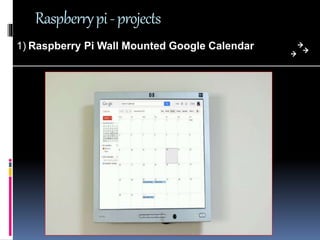
Raspberrypi-projects
1) Raspberry Pi Wall Mounted Google Calendar
Raspberrypi-projects
2)PiPad: Tablet Using Raspberry Pi
Raspberrypi-projects
3) Games on Raspberry Pi
advantages
 Small,Inexpensive
 Less power consumption
 As SD card is used here ,easily
portable
 Able to display images or play
videos at 1080p high definition
solution
 Python is the programming
language required which is easy.
disadvantages
 Does not have hard disk,so no
permanent storage of files
 RAM is not removable or
swappable
 Not compatible with other
operating systems like windows
 Complexity in multi-tasking
 Not suitable for big business
companies that have big servers.
Future
Developments
 Tablet version
 Interesting low-cost screen
technologies emerging
 Brambles! (Networks of
Raspberries)
conclusion
Raspberry Pi is an innovative product.The
sheer number of users and fan base support
the fact that the device can see a great future
ahead.The device can surely help anyone who
really wants to lean electronics and computers
any queries ????
Thank you !!!!!!!

Raspberry pi

  • 1.
  • 2.
    contents  Introduction  History What is a Raspberry Pi?  Features  Hardware  Operating System  Preparing SD Card  Applications  Advantages  Disadvantages  Future Developments
  • 3.
    introduction • Raspberry Piis a credit card sized computer. • It can be plugged into your TV and a Keyboard. • Can be used for many of the things as that an average desktop does.
  • 4.
    HISTORY  The RaspberryPi is the work of the Raspberry Pi Foundation, a charitable organisation. UK registered charity (No. 1129409), May 2009  It's supported by the University of Cambridge Computer Laboratory and tech firm Broad comm
  • 5.
    WHATISARASPBERRYPI?? The Raspberry Piis a fully featured micro-computer squashed onto a circuit board measuring approximately 9cm x 5.5cm.
  • 6.
    Whyraspberrypi?? Very Low Cost($25 – Rs 1550/- for Model A & $35 – Rs 2200/- for Model B/B+). Great tool for Learning Programming, Computers & Concepts of Embedded Linux, etc. Support for all Age Groups (School Children, College Undergraduates, Professional Developers, Programmers). Supports & runs Free and Open Source Linux OS . Consumes less than 5W of Power. Supports Full HD Video Output (1080p), Multiple USB Ports , etc Fun to learn & explore. You are limited by your imagination.
  • 7.
    features • Ultra low-cost(Model A $25, Model B $35) • Ultra low-power ~1W • Credit-card sized,fan less, instant start-up • Complete easy-to-program compute
  • 8.
    hardware o 10/100 BaseTEthernet socket o HDMI socket o USB 2.0 socket o RCA video socket o SD card socket o Powered from microUSB socket o 3.5mm audio out jack o Header footprint for camera connection
  • 10.
    Operatingsystem  Linux ona bootable SD card  Fedora  Raspbian  Debian  ArchLinux ARM
  • 13.
    Preparingasdcard Format a SDcard that is 4GB . Download and extract the files from the NOOBS zip file. Copy the extracted files onto the SD card that you just formatted so that this file is at the root directory of the SD card. When this process has finished, safely remove the SD card and insert it into your Raspberry Pi and Power it up. Raspberry Pi will boot, and a window will appear with a list of different operating systems that you can install. We recommend that you use Raspbian – tick the box next to Raspbian and click on Install. Wait for it to finish. (15 – 20 mins)
  • 14.
    programming  By default,supporting Python as the educational language.  Any language which will compile for ARMv6 can be used with the Raspberry Pi.
  • 17.
    Raspberrypi-projects 1) Raspberry PiWall Mounted Google Calendar
  • 18.
  • 19.
  • 20.
    advantages  Small,Inexpensive  Lesspower consumption  As SD card is used here ,easily portable  Able to display images or play videos at 1080p high definition solution  Python is the programming language required which is easy.
  • 21.
    disadvantages  Does nothave hard disk,so no permanent storage of files  RAM is not removable or swappable  Not compatible with other operating systems like windows  Complexity in multi-tasking  Not suitable for big business companies that have big servers.
  • 22.
    Future Developments  Tablet version Interesting low-cost screen technologies emerging  Brambles! (Networks of Raspberries)
  • 23.
    conclusion Raspberry Pi isan innovative product.The sheer number of users and fan base support the fact that the device can see a great future ahead.The device can surely help anyone who really wants to lean electronics and computers
  • 24.
  • 25.