RANSOMWARE PRESENTATION
Lisa Young
May 21, 2017
Agenda
• Introduction – Education & Work History
• What is Ransomware?
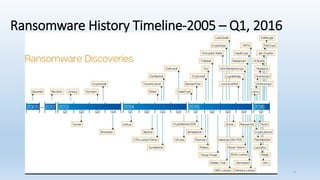
• Ransomware History Timeline
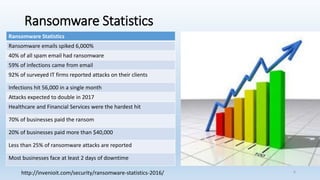
• Ransomware Statistics
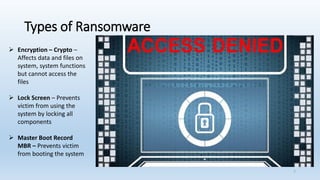
• Types of Ransomware
• Examples of Ransomware
• Cryptolocker and Cryptowall
• Wanncry
• Tips to Avoid Ransomware
• Questions & Answers
2
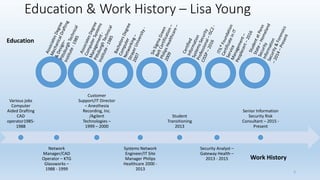
Education & Work History – Lisa Young
3
Various jobs
Computer
Aided Drafting
CAD
operator1985-
1988
Network
Manager/CAD
Operator – KTG
Glassworks –
1988 - 1999
Customer
Support/IT Director
– Anesthesia
Recording, Inc.
/Agilent
Technologies –
1999 – 2000
Systems Network
Engineer/IT Site
Manager Philips
Healthcare 2000 -
2013
Student
Transitioning
2013
Security Analyst –
Gateway Health –
2013 - 2015
Senior Information
Security Risk
Consultant – 2015 -
Present
Education
Work History
Ransomware Information
➢ What is ransomware? Malicious software (malware) that locks a device, such
as a computer, tablet or smartphone and then demands a ransom to unlock it
➢ Where did ransomware originate? The first documented case
‘Gpcoder’appeared in 2005 in the United States, but quickly spread around the
world
➢ How does it affect a computer? The software is normally contained within an
attachment to an email that masquerades as something innocent. Once
opened it encrypts the hard drive, making it impossible to access or retrieve
anything stored on there – such as photographs, documents or music
➢ How can you protect yourself? Anti-virus software can protect your machine,
although cybercriminals are constantly working on new ways to override such
protection
➢ How much are victims expected to pay? The ransom demanded varies.
Victims of a 2014 attack in the UK were charged £500 or about $652.00 in the
US. However, there’s no guarantee that paying will get your data back
http://www.telegraph.co.uk/news/2017/05/12/nhs-hit-major-cyber-attack-hackers-demanding-ransom/
4
Ransomware History Timeline-2005 – Q1, 2016
5
Ransomware Statistics
http://invenioit.com/security/ransomware-statistics-2016/ 6
Ransomware Statistics
Ransomware emails spiked 6,000%
40% of all spam email had ransomware
59% of infections came from email
92% of surveyed IT firms reported attacks on their clients
Infections hit 56,000 in a single month
Attacks expected to double in 2017
Healthcare and Financial Services were the hardest hit
70% of businesses paid the ransom
20% of businesses paid more than $40,000
Less than 25% of ransomware attacks are reported
Most businesses face at least 2 days of downtime
Types of Ransomware
➢ Encryption – Crypto –
Affects data and files on
system, system functions
but cannot access the
files
➢ Lock Screen – Prevents
victim from using the
system by locking all
components
➢ Master Boot Record
MBR – Prevents victim
from booting the system
7
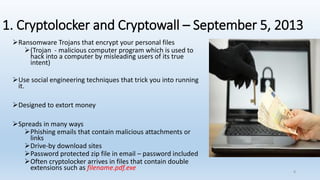
1. Cryptolocker and Cryptowall – September 5, 2013
➢Ransomware Trojans that encrypt your personal files
➢(Trojan - malicious computer program which is used to
hack into a computer by misleading users of its true
intent)
➢Use social engineering techniques that trick you into running
it.
➢Designed to extort money
➢Spreads in many ways
➢Phishing emails that contain malicious attachments or
links
➢Drive-by download sites
➢Password protected zip file in email – password included
➢Often cryptolocker arrives in files that contain double
extensions such as filename.pdf.exe 8
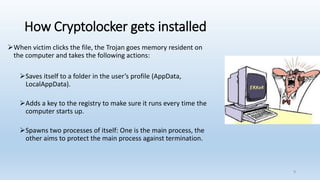
How Cryptolocker gets installed
➢When victim clicks the file, the Trojan goes memory resident on
the computer and takes the following actions:
➢Saves itself to a folder in the user’s profile (AppData,
LocalAppData).
➢Adds a key to the registry to make sure it runs every time the
computer starts up.
➢Spawns two processes of itself: One is the main process, the
other aims to protect the main process against termination.
9
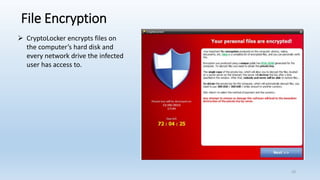
File Encryption
➢ CryptoLocker encrypts files on
the computer’s hard disk and
every network drive the infected
user has access to.
10
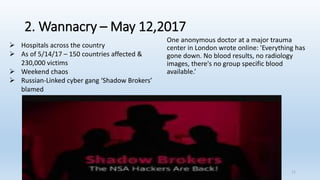
2. Wannacry – May 12,2017
One anonymous doctor at a major trauma
center in London wrote online: 'Everything has
gone down. No blood results, no radiology
images, there's no group specific blood
available.’
➢ Hospitals across the country
➢ As of 5/14/17 – 150 countries affected &
230,000 victims
➢ Weekend chaos
➢ Russian-Linked cyber gang ‘Shadow Brokers’
blamed
11
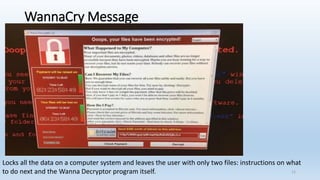
WannaCry Message
Locks all the data on a computer system and leaves the user with only two files: instructions on what
to do next and the Wanna Decryptor program itself. 12
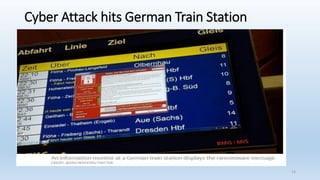
Cyber Attack hits German Train Station
13
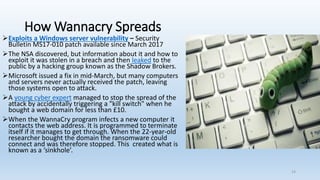
How Wannacry Spreads
➢Exploits a Windows server vulnerability – Security
Bulletin MS17-010 patch available since March 2017
➢The NSA discovered, but information about it and how to
exploit it was stolen in a breach and then leaked to the
public by a hacking group known as the Shadow Brokers.
➢Microsoft issued a fix in mid-March, but many computers
and servers never actually received the patch, leaving
those systems open to attack.
➢A young cyber expert managed to stop the spread of the
attack by accidentally triggering a "kill switch" when he
bought a web domain for less than £10.
➢When the WannaCry program infects a new computer it
contacts the web address. It is programmed to terminate
itself if it manages to get through. When the 22-year-old
researcher bought the domain the ransomware could
connect and was therefore stopped. This created what is
known as a ‘sinkhole’.
14
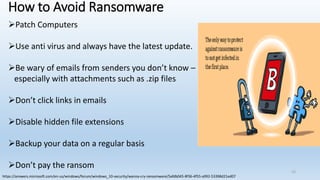
How to Avoid Ransomware
➢Patch Computers
➢Use anti virus and always have the latest update.
➢Be wary of emails from senders you don’t know –
especially with attachments such as .zip files
➢Don’t click links in emails
➢Disable hidden file extensions
➢Backup your data on a regular basis
➢Don’t pay the ransom
https://answers.microsoft.com/en-us/windows/forum/windows_10-security/wanna-cry-ransomware/5afdb045-8f36-4f55-a992-53398d21ed07
15
Questions
16
Appendix
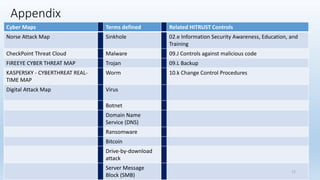
Cyber Maps Terms defined Related HITRUST Controls
Norse Attack Map Sinkhole 02.e Information Security Awareness, Education, and
Training
CheckPoint Threat Cloud Malware 09.J Controls against malicious code
FIREEYE CYBER THREAT MAP Trojan 09.L Backup
KASPERSKY - CYBERTHREAT REAL-
TIME MAP
Worm 10.k Change Control Procedures
Digital Attack Map Virus
Botnet
Domain Name
Service (DNS)
Ransomware
Bitcoin
Drive-by-download
attack
Server Message
Block (SMB)
17
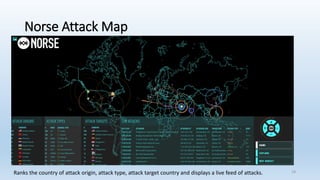
Norse Attack Map
• Http://map.norsecorp.com/#/
Ranks the country of attack origin, attack type, attack target country and displays a live feed of attacks. 18
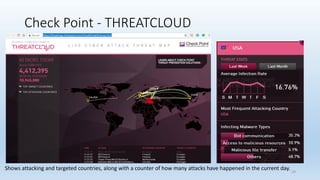
Check Point - THREATCLOUD
Shows attacking and targeted countries, along with a counter of how many attacks have happened in the current day. 19
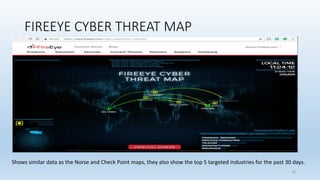
FIREEYE CYBER THREAT MAP
Shows similar data as the Norse and Check Point maps, they also show the top 5 targeted industries for the past 30 days.
20
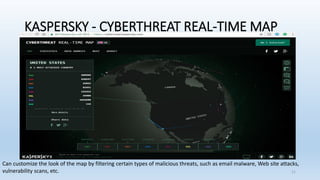
KASPERSKY - CYBERTHREAT REAL-TIME MAP
Can customize the look of the map by filtering certain types of malicious threats, such as email malware, Web site attacks,
vulnerability scans, etc. 21
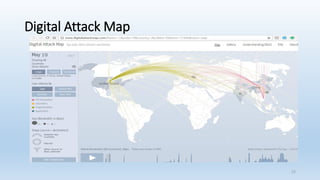
Digital Attack Map
22
Terms
• Sinkhole is basically a way of redirecting malicious Internet traffic so that it can be captured and analyzed
by security analysts. Sinkholes are most often used to seize control of botnets by interrupting the DNS names of the
botnet that is used by the malware.
• Malware – Malicious software program that is intended to damage or disable computers and computer systems.
• Trojan - Malicious computer program which is used to hack into a computer by misleading users of its true intent
• Worm - standalone malicious software that does not require a host program or human help to propagate.
• Virus - type of malicious software program ("malware") that, when executed, replicates itself by modifying
other computer programs and inserting its own code. Infected computer programs can include as well, data files, or the
"boot" sector of the hard drive.
• Botnet - a network of private computers infected with malicious software and controlled as a group without the owners'
knowledge, e.g., to send spam messages.
• Domain Name Servers (DNS) - The Internet's equivalent of a phone book. They maintain a directory of domain names and
translate them to Internet Protocol (IP) addresses.
• Ransomware - Malicious software (malware) that locks a device, such as a computer, tablet or smartphone and then
demands a ransom to unlock it
• Bitcoin - a type of digital currency in which encryption techniques are used to regulate the generation of units of currency
and verify the transfer of funds, operating independently of a central bank.
• Drive-by-download attack – means two things, each concerning the unintended download of computer software from
the Internet: Downloads which a person authorized but without understanding the consequences (e.g. downloads which
install an unknown or counterfeit executable program, ActiveX component, or Java applet) automatically.
• Server Message Block (SMB), one version of which was also known as Common Internet File
System (CIFS, /ˈsɪfs/),[1][2] operates as an application-layer network protocol[3] mainly used for providing shared
access to files, printers, and serial ports and miscellaneous communications between nodes on a network. It also provides
an authenticated inter-process communication mechanism.
• Note: Definitions from wikipedia 23
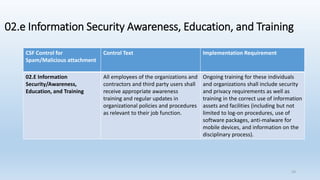
02.e Information Security Awareness, Education, and Training
CSF Control for
Spam/Malicious attachment
Control Text Implementation Requirement
02.E Information
Security/Awareness,
Education, and Training
All employees of the organizations and
contractors and third party users shall
receive appropriate awareness
training and regular updates in
organizational policies and procedures
as relevant to their job function.
Ongoing training for these individuals
and organizations shall include security
and privacy requirements as well as
training in the correct use of information
assets and facilities (including but not
limited to log-on procedures, use of
software packages, anti-malware for
mobile devices, and information on the
disciplinary process).
24
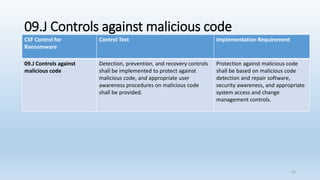
09.J Controls against malicious code
CSF Control for
Ransomware
Control Text Implementation Requirement
09.J Controls against
malicious code
Detection, prevention, and recovery controls
shall be implemented to protect against
malicious code, and appropriate user
awareness procedures on malicious code
shall be provided.
Protection against malicious code
shall be based on malicious code
detection and repair software,
security awareness, and appropriate
system access and change
management controls.
25
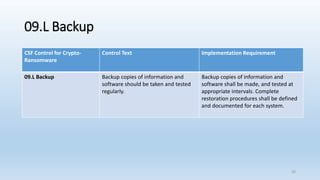
09.L Backup
CSF Control for Crypto-
Ransomware
Control Text Implementation Requirement
09.L Backup Backup copies of information and
software should be taken and tested
regularly.
Backup copies of information and
software shall be made, and tested at
appropriate intervals. Complete
restoration procedures shall be defined
and documented for each system.
26
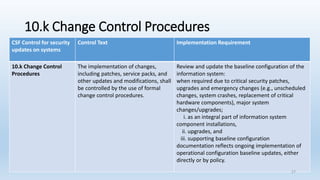
10.k Change Control Procedures
CSF Control for security
updates on systems
Control Text Implementation Requirement
10.k Change Control
Procedures
The implementation of changes,
including patches, service packs, and
other updates and modifications, shall
be controlled by the use of formal
change control procedures.
Review and update the baseline configuration of the
information system:
when required due to critical security patches,
upgrades and emergency changes (e.g., unscheduled
changes, system crashes, replacement of critical
hardware components), major system
changes/upgrades;
i. as an integral part of information system
component installations,
ii. upgrades, and
iii. supporting baseline configuration
documentation reflects ongoing implementation of
operational configuration baseline updates, either
directly or by policy.
27

Ransomware ly

  • 1.
  • 2.
    Agenda • Introduction –Education & Work History • What is Ransomware? • Ransomware History Timeline • Ransomware Statistics • Types of Ransomware • Examples of Ransomware • Cryptolocker and Cryptowall • Wanncry • Tips to Avoid Ransomware • Questions & Answers 2
  • 3.
    Education & WorkHistory – Lisa Young 3 Various jobs Computer Aided Drafting CAD operator1985- 1988 Network Manager/CAD Operator – KTG Glassworks – 1988 - 1999 Customer Support/IT Director – Anesthesia Recording, Inc. /Agilent Technologies – 1999 – 2000 Systems Network Engineer/IT Site Manager Philips Healthcare 2000 - 2013 Student Transitioning 2013 Security Analyst – Gateway Health – 2013 - 2015 Senior Information Security Risk Consultant – 2015 - Present Education Work History
  • 4.
    Ransomware Information ➢ Whatis ransomware? Malicious software (malware) that locks a device, such as a computer, tablet or smartphone and then demands a ransom to unlock it ➢ Where did ransomware originate? The first documented case ‘Gpcoder’appeared in 2005 in the United States, but quickly spread around the world ➢ How does it affect a computer? The software is normally contained within an attachment to an email that masquerades as something innocent. Once opened it encrypts the hard drive, making it impossible to access or retrieve anything stored on there – such as photographs, documents or music ➢ How can you protect yourself? Anti-virus software can protect your machine, although cybercriminals are constantly working on new ways to override such protection ➢ How much are victims expected to pay? The ransom demanded varies. Victims of a 2014 attack in the UK were charged £500 or about $652.00 in the US. However, there’s no guarantee that paying will get your data back http://www.telegraph.co.uk/news/2017/05/12/nhs-hit-major-cyber-attack-hackers-demanding-ransom/ 4
  • 5.
  • 6.
    Ransomware Statistics http://invenioit.com/security/ransomware-statistics-2016/ 6 RansomwareStatistics Ransomware emails spiked 6,000% 40% of all spam email had ransomware 59% of infections came from email 92% of surveyed IT firms reported attacks on their clients Infections hit 56,000 in a single month Attacks expected to double in 2017 Healthcare and Financial Services were the hardest hit 70% of businesses paid the ransom 20% of businesses paid more than $40,000 Less than 25% of ransomware attacks are reported Most businesses face at least 2 days of downtime
  • 7.
    Types of Ransomware ➢Encryption – Crypto – Affects data and files on system, system functions but cannot access the files ➢ Lock Screen – Prevents victim from using the system by locking all components ➢ Master Boot Record MBR – Prevents victim from booting the system 7
  • 8.
    1. Cryptolocker andCryptowall – September 5, 2013 ➢Ransomware Trojans that encrypt your personal files ➢(Trojan - malicious computer program which is used to hack into a computer by misleading users of its true intent) ➢Use social engineering techniques that trick you into running it. ➢Designed to extort money ➢Spreads in many ways ➢Phishing emails that contain malicious attachments or links ➢Drive-by download sites ➢Password protected zip file in email – password included ➢Often cryptolocker arrives in files that contain double extensions such as filename.pdf.exe 8
  • 9.
    How Cryptolocker getsinstalled ➢When victim clicks the file, the Trojan goes memory resident on the computer and takes the following actions: ➢Saves itself to a folder in the user’s profile (AppData, LocalAppData). ➢Adds a key to the registry to make sure it runs every time the computer starts up. ➢Spawns two processes of itself: One is the main process, the other aims to protect the main process against termination. 9
  • 10.
    File Encryption ➢ CryptoLockerencrypts files on the computer’s hard disk and every network drive the infected user has access to. 10
  • 11.
    2. Wannacry –May 12,2017 One anonymous doctor at a major trauma center in London wrote online: 'Everything has gone down. No blood results, no radiology images, there's no group specific blood available.’ ➢ Hospitals across the country ➢ As of 5/14/17 – 150 countries affected & 230,000 victims ➢ Weekend chaos ➢ Russian-Linked cyber gang ‘Shadow Brokers’ blamed 11
  • 12.
    WannaCry Message Locks allthe data on a computer system and leaves the user with only two files: instructions on what to do next and the Wanna Decryptor program itself. 12
  • 13.
    Cyber Attack hitsGerman Train Station 13
  • 14.
    How Wannacry Spreads ➢Exploitsa Windows server vulnerability – Security Bulletin MS17-010 patch available since March 2017 ➢The NSA discovered, but information about it and how to exploit it was stolen in a breach and then leaked to the public by a hacking group known as the Shadow Brokers. ➢Microsoft issued a fix in mid-March, but many computers and servers never actually received the patch, leaving those systems open to attack. ➢A young cyber expert managed to stop the spread of the attack by accidentally triggering a "kill switch" when he bought a web domain for less than £10. ➢When the WannaCry program infects a new computer it contacts the web address. It is programmed to terminate itself if it manages to get through. When the 22-year-old researcher bought the domain the ransomware could connect and was therefore stopped. This created what is known as a ‘sinkhole’. 14
  • 15.
    How to AvoidRansomware ➢Patch Computers ➢Use anti virus and always have the latest update. ➢Be wary of emails from senders you don’t know – especially with attachments such as .zip files ➢Don’t click links in emails ➢Disable hidden file extensions ➢Backup your data on a regular basis ➢Don’t pay the ransom https://answers.microsoft.com/en-us/windows/forum/windows_10-security/wanna-cry-ransomware/5afdb045-8f36-4f55-a992-53398d21ed07 15
  • 16.
  • 17.
    Appendix Cyber Maps Termsdefined Related HITRUST Controls Norse Attack Map Sinkhole 02.e Information Security Awareness, Education, and Training CheckPoint Threat Cloud Malware 09.J Controls against malicious code FIREEYE CYBER THREAT MAP Trojan 09.L Backup KASPERSKY - CYBERTHREAT REAL- TIME MAP Worm 10.k Change Control Procedures Digital Attack Map Virus Botnet Domain Name Service (DNS) Ransomware Bitcoin Drive-by-download attack Server Message Block (SMB) 17
  • 18.
    Norse Attack Map •Http://map.norsecorp.com/#/ Ranks the country of attack origin, attack type, attack target country and displays a live feed of attacks. 18
  • 19.
    Check Point -THREATCLOUD Shows attacking and targeted countries, along with a counter of how many attacks have happened in the current day. 19
  • 20.
    FIREEYE CYBER THREATMAP Shows similar data as the Norse and Check Point maps, they also show the top 5 targeted industries for the past 30 days. 20
  • 21.
    KASPERSKY - CYBERTHREATREAL-TIME MAP Can customize the look of the map by filtering certain types of malicious threats, such as email malware, Web site attacks, vulnerability scans, etc. 21
  • 22.
  • 23.
    Terms • Sinkhole isbasically a way of redirecting malicious Internet traffic so that it can be captured and analyzed by security analysts. Sinkholes are most often used to seize control of botnets by interrupting the DNS names of the botnet that is used by the malware. • Malware – Malicious software program that is intended to damage or disable computers and computer systems. • Trojan - Malicious computer program which is used to hack into a computer by misleading users of its true intent • Worm - standalone malicious software that does not require a host program or human help to propagate. • Virus - type of malicious software program ("malware") that, when executed, replicates itself by modifying other computer programs and inserting its own code. Infected computer programs can include as well, data files, or the "boot" sector of the hard drive. • Botnet - a network of private computers infected with malicious software and controlled as a group without the owners' knowledge, e.g., to send spam messages. • Domain Name Servers (DNS) - The Internet's equivalent of a phone book. They maintain a directory of domain names and translate them to Internet Protocol (IP) addresses. • Ransomware - Malicious software (malware) that locks a device, such as a computer, tablet or smartphone and then demands a ransom to unlock it • Bitcoin - a type of digital currency in which encryption techniques are used to regulate the generation of units of currency and verify the transfer of funds, operating independently of a central bank. • Drive-by-download attack – means two things, each concerning the unintended download of computer software from the Internet: Downloads which a person authorized but without understanding the consequences (e.g. downloads which install an unknown or counterfeit executable program, ActiveX component, or Java applet) automatically. • Server Message Block (SMB), one version of which was also known as Common Internet File System (CIFS, /ˈsɪfs/),[1][2] operates as an application-layer network protocol[3] mainly used for providing shared access to files, printers, and serial ports and miscellaneous communications between nodes on a network. It also provides an authenticated inter-process communication mechanism. • Note: Definitions from wikipedia 23
  • 24.
    02.e Information SecurityAwareness, Education, and Training CSF Control for Spam/Malicious attachment Control Text Implementation Requirement 02.E Information Security/Awareness, Education, and Training All employees of the organizations and contractors and third party users shall receive appropriate awareness training and regular updates in organizational policies and procedures as relevant to their job function. Ongoing training for these individuals and organizations shall include security and privacy requirements as well as training in the correct use of information assets and facilities (including but not limited to log-on procedures, use of software packages, anti-malware for mobile devices, and information on the disciplinary process). 24
  • 25.
    09.J Controls againstmalicious code CSF Control for Ransomware Control Text Implementation Requirement 09.J Controls against malicious code Detection, prevention, and recovery controls shall be implemented to protect against malicious code, and appropriate user awareness procedures on malicious code shall be provided. Protection against malicious code shall be based on malicious code detection and repair software, security awareness, and appropriate system access and change management controls. 25
  • 26.
    09.L Backup CSF Controlfor Crypto- Ransomware Control Text Implementation Requirement 09.L Backup Backup copies of information and software should be taken and tested regularly. Backup copies of information and software shall be made, and tested at appropriate intervals. Complete restoration procedures shall be defined and documented for each system. 26
  • 27.
    10.k Change ControlProcedures CSF Control for security updates on systems Control Text Implementation Requirement 10.k Change Control Procedures The implementation of changes, including patches, service packs, and other updates and modifications, shall be controlled by the use of formal change control procedures. Review and update the baseline configuration of the information system: when required due to critical security patches, upgrades and emergency changes (e.g., unscheduled changes, system crashes, replacement of critical hardware components), major system changes/upgrades; i. as an integral part of information system component installations, ii. upgrades, and iii. supporting baseline configuration documentation reflects ongoing implementation of operational configuration baseline updates, either directly or by policy. 27