MQ Series Cross Platform Dominant Messaging sw – 70% of market Messaging API same on all platforms Guaranteed one-time delivery Two-Phase Commit Wide EAI industry support
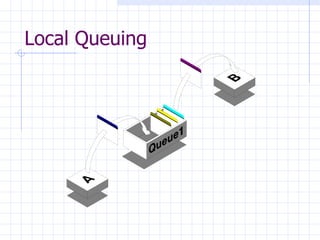
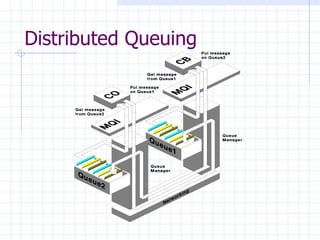
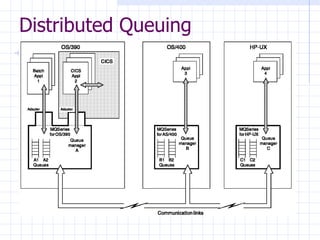
What is it? MQSeries is a middleware product from IBM that runs on multiple platforms and enables applications to send messages to  other applications.  Basically, the sending  application PUTs a message on a Queue, and the receiving application GETs the message from the Queue. The sending and receiving applications do not have to be on the same platform, and do not have to be executing at the same time. MQSeries takes care of all the storage, logging and communications details required to guarantee delivery of the message to the destination queue. In most cases, it will take care of translating the data when the source and destination use different character sets (EBCDIC on MVS vs. ASCII on NT or Unix). All the applications have to do is know the name of the Queue and agree on the meaning of the message.
MQ Series API (basic) Connect to a Queue Manager Open a queue Put or get messages Close a queue Commit or roll back Disconnect
Advanced features Triggering – automatically starting an application to process a message IMS & CICS Bridges – reusing legacy transactions without modification Confirmation of message arrival, delivery Grouping of messages Load balancing
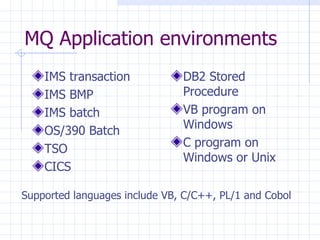
MQ Application environments IMS transaction IMS BMP IMS batch OS/390 Batch TSO CICS DB2 Stored Procedure VB program on Windows C program on Windows or Unix Supported languages include VB, C/C++, PL/1 and Cobol
Local Queuing
Distributed Queuing
Distributed Queuing
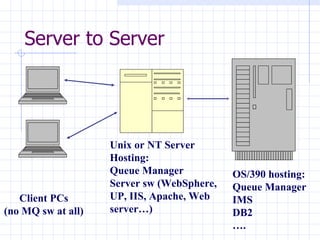
Server to Server Client PCs (no MQ sw at all) Unix or NT Server Hosting: Queue Manager Server sw (WebSphere, UP, IIS, Apache, Web server…) OS/390 hosting: Queue Manager IMS DB2 … .
Server to Server -  Server application gets it’s data using MQ. Clients do not use MQ API Guaranteed Delivery in effect Server license required
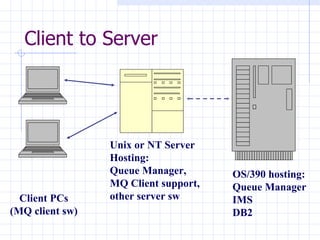
Client to Server Client PCs (MQ client sw) Unix or NT Server Hosting: Queue Manager, MQ Client support, other server sw OS/390 hosting: Queue Manager IMS DB2
Client to Server Client applications use MQ API (linked differently) MQ processing actually occurs on server within client support modules Client licenses free Guaranteed delivery not supported over client – server link
To what problems is MQ the solution? Fast, asynchronous inter-system notification.  Data propagation Transferring data from mainframe systems to PC/Unix systems Transferring data from PC/Unix systems to mainframe systems
Problem…Solution… An event in an IMS system requires action by a  midrange system. Modify the IMS program to PUT a message to  the midrange system. The midrange system can be  configured to start the application whenever a  message arrives.
Problem…Solution… An event in an midrange system requires action by a  mainframe system. Modify the midrange program to PUT a message to  the mainframe system. The mainframe system can  process the message : Immediately At set intervals On a schedule
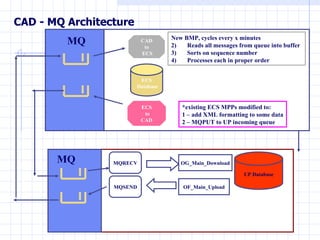
CAD - MQ Architecture MQSEND ECS Database CAD to ECS ECS to CAD  *existing ECS MPPs modified to: 1 – add XML formatting to some data 2 – MQPUT to UP incoming queue MQ MQ New BMP, cycles every x minutes  Reads all messages from queue into buffer  Sorts on sequence number Processes each in proper order UP Database OG_Main_Download OF_Main_Upload MQRECV
Problem…Solution… A PC user needs to request an overnight report that needs data from IMS, DB2 and other files. A VB program puts the report requirements on a queue  which is read by a batch job
Problem…Solution… Web server needs data from legacy IMS/CICS transaction. Web server puts a message to the MQ-IMS/CICS Bridge,  which runs the transaction and returns the results on a  queue (screen-scraping without the 3270).
Problem…Solution… VB app needs data from DB2, SQL Server and IMS VB client app puts messages on queues on NT and  mainframe systems, triggering programs which populate reply queues on an NT system, which the VB app will read to present to the user.  The VB client need not wait for the report to be completed. It could spawn a separate thread that would monitor the reply queues and notify the user when the report  was complete.

Mq presentation

  • 1.
    MQ Series CrossPlatform Dominant Messaging sw – 70% of market Messaging API same on all platforms Guaranteed one-time delivery Two-Phase Commit Wide EAI industry support
  • 2.
    What is it?MQSeries is a middleware product from IBM that runs on multiple platforms and enables applications to send messages to other applications. Basically, the sending application PUTs a message on a Queue, and the receiving application GETs the message from the Queue. The sending and receiving applications do not have to be on the same platform, and do not have to be executing at the same time. MQSeries takes care of all the storage, logging and communications details required to guarantee delivery of the message to the destination queue. In most cases, it will take care of translating the data when the source and destination use different character sets (EBCDIC on MVS vs. ASCII on NT or Unix). All the applications have to do is know the name of the Queue and agree on the meaning of the message.
  • 3.
    MQ Series API(basic) Connect to a Queue Manager Open a queue Put or get messages Close a queue Commit or roll back Disconnect
  • 4.
    Advanced features Triggering– automatically starting an application to process a message IMS & CICS Bridges – reusing legacy transactions without modification Confirmation of message arrival, delivery Grouping of messages Load balancing
  • 5.
    MQ Application environmentsIMS transaction IMS BMP IMS batch OS/390 Batch TSO CICS DB2 Stored Procedure VB program on Windows C program on Windows or Unix Supported languages include VB, C/C++, PL/1 and Cobol
  • 6.
  • 7.
  • 8.
  • 9.
    Server to ServerClient PCs (no MQ sw at all) Unix or NT Server Hosting: Queue Manager Server sw (WebSphere, UP, IIS, Apache, Web server…) OS/390 hosting: Queue Manager IMS DB2 … .
  • 10.
    Server to Server- Server application gets it’s data using MQ. Clients do not use MQ API Guaranteed Delivery in effect Server license required
  • 11.
    Client to ServerClient PCs (MQ client sw) Unix or NT Server Hosting: Queue Manager, MQ Client support, other server sw OS/390 hosting: Queue Manager IMS DB2
  • 12.
    Client to ServerClient applications use MQ API (linked differently) MQ processing actually occurs on server within client support modules Client licenses free Guaranteed delivery not supported over client – server link
  • 13.
    To what problemsis MQ the solution? Fast, asynchronous inter-system notification. Data propagation Transferring data from mainframe systems to PC/Unix systems Transferring data from PC/Unix systems to mainframe systems
  • 14.
    Problem…Solution… An eventin an IMS system requires action by a midrange system. Modify the IMS program to PUT a message to the midrange system. The midrange system can be configured to start the application whenever a message arrives.
  • 15.
    Problem…Solution… An eventin an midrange system requires action by a mainframe system. Modify the midrange program to PUT a message to the mainframe system. The mainframe system can process the message : Immediately At set intervals On a schedule
  • 16.
    CAD - MQArchitecture MQSEND ECS Database CAD to ECS ECS to CAD *existing ECS MPPs modified to: 1 – add XML formatting to some data 2 – MQPUT to UP incoming queue MQ MQ New BMP, cycles every x minutes Reads all messages from queue into buffer Sorts on sequence number Processes each in proper order UP Database OG_Main_Download OF_Main_Upload MQRECV
  • 17.
    Problem…Solution… A PCuser needs to request an overnight report that needs data from IMS, DB2 and other files. A VB program puts the report requirements on a queue which is read by a batch job
  • 18.
    Problem…Solution… Web serverneeds data from legacy IMS/CICS transaction. Web server puts a message to the MQ-IMS/CICS Bridge, which runs the transaction and returns the results on a queue (screen-scraping without the 3270).
  • 19.
    Problem…Solution… VB appneeds data from DB2, SQL Server and IMS VB client app puts messages on queues on NT and mainframe systems, triggering programs which populate reply queues on an NT system, which the VB app will read to present to the user. The VB client need not wait for the report to be completed. It could spawn a separate thread that would monitor the reply queues and notify the user when the report was complete.

Editor's Notes

  • #2 Bill Beinert November 2001 Introduction to MQ Series for people interested in middleware solutions Most Enterprise Application Integration products support MQ as the messaging agent
  • #10 I don’t think we write any client-server applications like this ourselves, but use vendor products like IIS, WebSphere or Utility Partners’ Mobile UP. The focus here is that the server uses MQ at the the ‘back end’ to assemble the data it needs to present to the users at the ‘front end’. The client PCs need no MQ software, just as they would need no ODBC driver if the server was using DB2 or SQL Server.
  • #12 Here MQ client software is installed on the client PC, along with configuration files that tell it where to find it’s MQ Server. The client program uses the same MQ calls as it would if it were running on a server, but it is linked with stubs that connect across the network to the MQ Server, where the MQ calls are actually executed on behalf of the client. MQ’s guarantees are not in full effect when applied to the connection between the client and the server, since this is supported only by basic network protocols, with no effective assured delivery. OS/390 can be an MQ server, though the license is pricey, and there are security issues that are more easily addressed when there is an intermediate server that is part of the same security domain as the end user.
  • #14 MQSeries can be used in many, many contexts. But remember: MQSeries is NOT: -          An application execution environment like CICS, IMS, DB2 Stored Procedure etc -          A replacement for the MDI Gateway or DB2 Connect or FTP
  • #15 This is just a sample…not necessarily the best solution to this problem…
  • #16 This is just a sample…not necessarily the best solution to this problem…
  • #17 This is a real solution to a real problem – our Wireless Gas Leak Dispatching System
  • #18 This is just a sample…not necessarily the best solution to this problem…
  • #19 This is just a sample…not necessarily the best solution to this problem…
  • #20 This is just a sample…not necessarily the best solution to this problem…