Questions 4-7
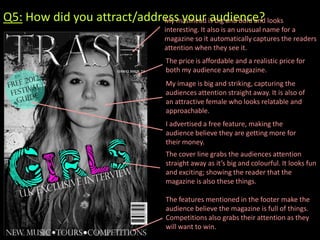
Q5: How did you attract/address your is big and bold and looks
                            My masthead audience?
                                   interesting. It also is an unusual name for a
                                   magazine so it automatically captures the readers
                                   attention when they see it.
                                   The price is affordable and a realistic price for
                                   both my audience and magazine.
                                   My image is big and striking, capturing the
                                   audiences attention straight away. It is also of
                                   an attractive female who looks relatable and
                                   approachable.
                                   I advertised a free feature, making the
                                   audience believe they are getting more for
                                   their money.
                                   The cover line grabs the audiences attention
                                   straight away as it’s big and colourful. It looks fun
                                   and exciting; showing the reader that the
                                   magazine is also these things.

                                   The features mentioned in the footer make the
                                   audience believe the magazine is full of things.
                                   Competitions also grabs their attention as they
                                   will want to win.
Q6: What have you learnt about technologies from the
process of constructing this product?
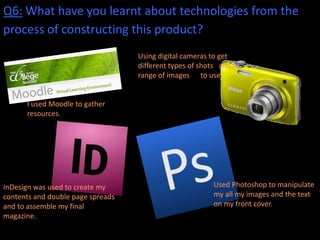
                                   Using digital cameras to get
                                   different types of shots and a
                                   range of images to use.


      I used Moodle to gather
      resources.


InDesign was used to create my                            Used Photoshop to manipulate
contents and double page spreads                          my all my images and the text
and to assemble my final                                  on my front cover.
magazine.
Using Photoshop


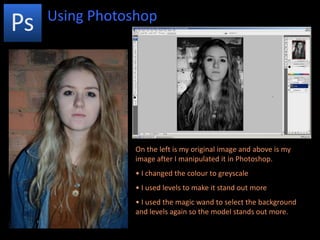
            On the left is my original image and above is my
            image after I manipulated it in Photoshop.
            • I changed the colour to greyscale
            • I used levels to make it stand out more
            • I used the magic wand to select the background
            and levels again so the model stands out more.
Using Indesign


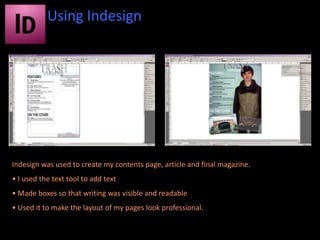
Indesign was used to create my contents page, article and final magazine.
• I used the text tool to add text
• Made boxes so that writing was visible and readable
• Used it to make the layout of my pages look professional.
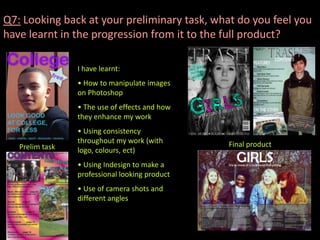
Q7: Looking back at your preliminary task, what do you feel you
have learnt in the progression from it to the full product?

                 I have learnt:
                 • How to manipulate images
                 on Photoshop
                 • The use of effects and how
                 they enhance my work
                 • Using consistency
                 throughout my work (with       Final product
   Prelim task   logo, colours, ect)
                 • Using Indesign to make a
                 professional looking product
                 • Use of camera shots and
                 different angles

Questions 4-7

  • 1.
  • 2.
    Q5: How didyou attract/address your is big and bold and looks My masthead audience? interesting. It also is an unusual name for a magazine so it automatically captures the readers attention when they see it. The price is affordable and a realistic price for both my audience and magazine. My image is big and striking, capturing the audiences attention straight away. It is also of an attractive female who looks relatable and approachable. I advertised a free feature, making the audience believe they are getting more for their money. The cover line grabs the audiences attention straight away as it’s big and colourful. It looks fun and exciting; showing the reader that the magazine is also these things. The features mentioned in the footer make the audience believe the magazine is full of things. Competitions also grabs their attention as they will want to win.
  • 3.
    Q6: What haveyou learnt about technologies from the process of constructing this product? Using digital cameras to get different types of shots and a range of images to use. I used Moodle to gather resources. InDesign was used to create my Used Photoshop to manipulate contents and double page spreads my all my images and the text and to assemble my final on my front cover. magazine.
  • 4.
    Using Photoshop On the left is my original image and above is my image after I manipulated it in Photoshop. • I changed the colour to greyscale • I used levels to make it stand out more • I used the magic wand to select the background and levels again so the model stands out more.
  • 5.
    Using Indesign Indesign wasused to create my contents page, article and final magazine. • I used the text tool to add text • Made boxes so that writing was visible and readable • Used it to make the layout of my pages look professional.
  • 6.
    Q7: Looking backat your preliminary task, what do you feel you have learnt in the progression from it to the full product? I have learnt: • How to manipulate images on Photoshop • The use of effects and how they enhance my work • Using consistency throughout my work (with Final product Prelim task logo, colours, ect) • Using Indesign to make a professional looking product • Use of camera shots and different angles