Question 4
Blogger
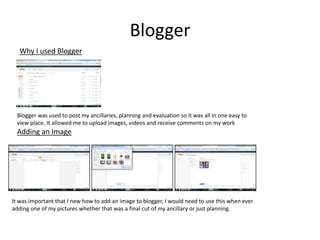
  Why I used Blogger


 Blogger was used to post my ancillaries, planning and evaluation so it was all in one easy to
 view place. It allowed me to upload images, videos and receive comments on my work
 Adding an Image


It was important that I new how to add an image to blogger, I would need to use this when ever
adding one of my pictures whether that was a final cut of my ancillary or just planning.
Twitter
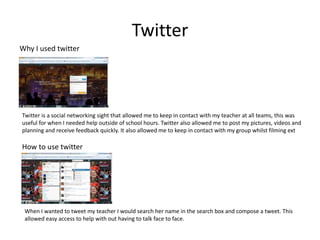
Why I used twitter


Twitter is a social networking sight that allowed me to keep in contact with my teacher at all teams, this was
useful for when I needed help outside of school hours. Twitter also allowed me to post my pictures, videos and
planning and receive feedback quickly. It also allowed me to keep in contact with my group whilst filming ext

How to use twitter


 When I wanted to tweet my teacher I would search her name in the search box and compose a tweet. This
 allowed easy access to help with out having to talk face to face.
YouTube
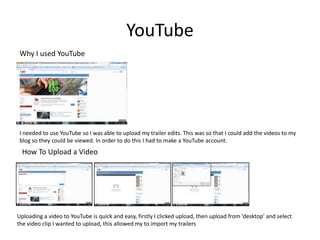
 Why I used YouTube


 I needed to use YouTube so I was able to upload my trailer edits. This was so that I could add the videos to my
 blog so they could be viewed. In order to do this I had to make a YouTube account.
  How To Upload a Video


Uploading a video to YouTube is quick and easy, firstly I clicked upload, then upload from ‘desktop’ and select
the video clip I wanted to upload, this allowed my to import my trailers
SlideShare
Why I used SlideShare


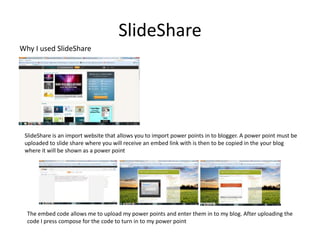
 SlideShare is an import website that allows you to import power points in to blogger. A power point must be
 uploaded to slide share where you will receive an embed link with is then to be copied in the your blog
 where it will be shown as a power point


  The embed code allows me to upload my power points and enter them in to my blog. After uploading the
  code I press compose for the code to turn in to my power point
Power Point
  Why I used Power Point


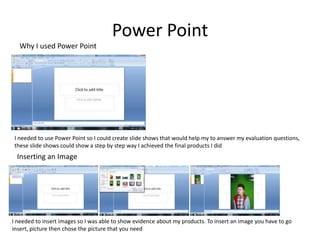
I needed to use Power Point so I could create slide shows that would help my to answer my evaluation questions,
these slide shows could show a step by step way I achieved the final products I did
 Inserting an Image


I needed to insert images so I was able to show evidence about my products. To insert an image you have to go
insert, picture then chose the picture that you need
Publisher
Why I used Publisher


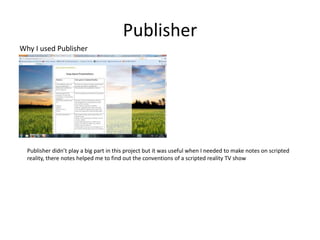
  Publisher didn’t play a big part in this project but it was useful when I needed to make notes on scripted
  reality, there notes helped me to find out the conventions of a scripted reality TV show
Photoshop
Why I used Photoshop


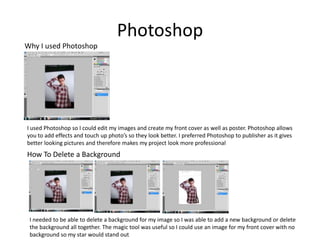
I used Photoshop so I could edit my images and create my front cover as well as poster. Photoshop allows
you to add effects and touch up photo’s so they look better. I preferred Photoshop to publisher as it gives
better looking pictures and therefore makes my project look more professional
How To Delete a Background


 I needed to be able to delete a background for my image so I was able to add a new background or delete
 the background all together. The magic tool was useful so I could use an image for my front cover with no
 background so my star would stand out
Photoshop
Font
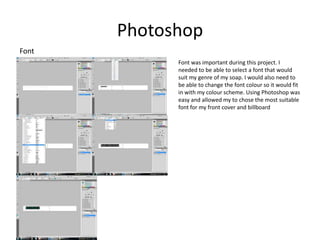
             Font was important during this project. I
             needed to be able to select a font that would
             suit my genre of my soap. I would also need to
             be able to change the font colour so it would fit
             in with my colour scheme. Using Photoshop was
             easy and allowed my to chose the most suitable
             font for my front cover and billboard
Photoshop
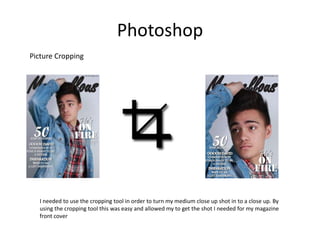
Picture Cropping


  I needed to use the cropping tool in order to turn my medium close up shot in to a close up. By
  using the cropping tool this was easy and allowed my to get the shot I needed for my magazine
  front cover

Question 4

  • 1.
  • 2.
    Blogger WhyI used Blogger Blogger was used to post my ancillaries, planning and evaluation so it was all in one easy to view place. It allowed me to upload images, videos and receive comments on my work Adding an Image It was important that I new how to add an image to blogger, I would need to use this when ever adding one of my pictures whether that was a final cut of my ancillary or just planning.
  • 3.
    Twitter Why I usedtwitter Twitter is a social networking sight that allowed me to keep in contact with my teacher at all teams, this was useful for when I needed help outside of school hours. Twitter also allowed me to post my pictures, videos and planning and receive feedback quickly. It also allowed me to keep in contact with my group whilst filming ext How to use twitter When I wanted to tweet my teacher I would search her name in the search box and compose a tweet. This allowed easy access to help with out having to talk face to face.
  • 4.
    YouTube Why Iused YouTube I needed to use YouTube so I was able to upload my trailer edits. This was so that I could add the videos to my blog so they could be viewed. In order to do this I had to make a YouTube account. How To Upload a Video Uploading a video to YouTube is quick and easy, firstly I clicked upload, then upload from ‘desktop’ and select the video clip I wanted to upload, this allowed my to import my trailers
  • 5.
    SlideShare Why I usedSlideShare SlideShare is an import website that allows you to import power points in to blogger. A power point must be uploaded to slide share where you will receive an embed link with is then to be copied in the your blog where it will be shown as a power point The embed code allows me to upload my power points and enter them in to my blog. After uploading the code I press compose for the code to turn in to my power point
  • 6.
    Power Point Why I used Power Point I needed to use Power Point so I could create slide shows that would help my to answer my evaluation questions, these slide shows could show a step by step way I achieved the final products I did Inserting an Image I needed to insert images so I was able to show evidence about my products. To insert an image you have to go insert, picture then chose the picture that you need
  • 7.
    Publisher Why I usedPublisher Publisher didn’t play a big part in this project but it was useful when I needed to make notes on scripted reality, there notes helped me to find out the conventions of a scripted reality TV show
  • 8.
    Photoshop Why I usedPhotoshop I used Photoshop so I could edit my images and create my front cover as well as poster. Photoshop allows you to add effects and touch up photo’s so they look better. I preferred Photoshop to publisher as it gives better looking pictures and therefore makes my project look more professional How To Delete a Background I needed to be able to delete a background for my image so I was able to add a new background or delete the background all together. The magic tool was useful so I could use an image for my front cover with no background so my star would stand out
  • 9.
    Photoshop Font Font was important during this project. I needed to be able to select a font that would suit my genre of my soap. I would also need to be able to change the font colour so it would fit in with my colour scheme. Using Photoshop was easy and allowed my to chose the most suitable font for my front cover and billboard
  • 10.
    Photoshop Picture Cropping I needed to use the cropping tool in order to turn my medium close up shot in to a close up. By using the cropping tool this was easy and allowed my to get the shot I needed for my magazine front cover