Quantum. Just Quantum
By Dmytro Mysak,
Software Developer
www.eliftech.com
Content
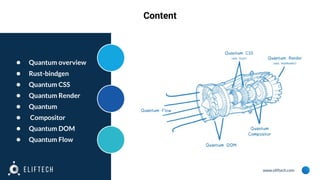
● Quantum overview
● Rust-bindgen
● Quantum CSS
● Quantum Render
● Quantum
● Compositor
● Quantum DOM
● Quantum Flow
www.eliftech.com
Quantum overview
A number of the Quantum components are written in Rust. If you’re not familiar with Rust,
it’s a systems programming language that runs blazing fast, while simplifying development of
parallel programs by guaranteeing thread and memory safety. In most cases, Rust code
won’t
even compile unless it is safe.
"Everything major we wanted to get in made it. ... It's almost certainly the biggest refactoring
ever done in software engineering, at least in public," Mayo said of the overhaul.
"Seventy-five percent of the code base had to be touched. Almost 5 million lines of code
were impacted."
Read more here and here
www.eliftech.com
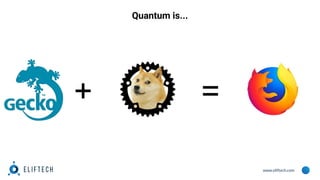
Quantum is...
+ =
www.eliftech.com
Rust-bindgen
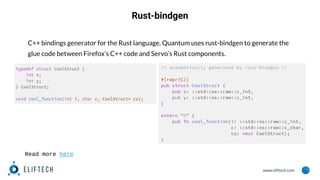
C++ bindings generator for the Rust language. Quantum uses rust-bindgen to generate the
glue code between Firefox’s C++ code and Servo’s Rust components.
Read more here
www.eliftech.com
Quantum CSS (aka Stylo)
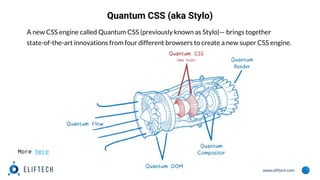
A new CSS engine called Quantum CSS (previously known as Stylo)— brings together
state-of-the-art innovations from four different browsers to create a new super CSS engine.
More here
www.eliftech.com
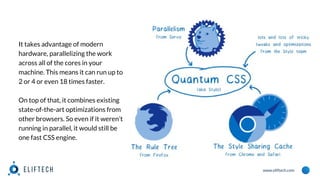
It takes advantage of modern
hardware, parallelizing the work
across all of the cores in your
machine. This means it can run up to
2 or 4 or even 18 times faster.
On top of that, it combines existing
state-of-the-art optimizations from
other browsers. So even if it weren’t
running in parallel, it would still be
one fast CSS engine.
www.eliftech.com
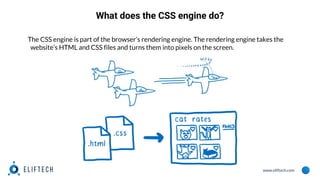
What does the CSS engine do?
The CSS engine is part of the browser’s rendering engine. The rendering engine takes the
website’s HTML and CSS files and turns them into pixels on the screen.
www.eliftech.com
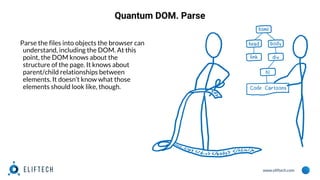
Quantum DOM. Parse
Parse the files into objects the browser can
understand, including the DOM. At this
point, the DOM knows about the
structure of the page. It knows about
parent/child relationships between
elements. It doesn’t know what those
elements should look like, though.
www.eliftech.com
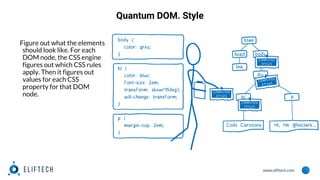
Quantum DOM. Style
Figure out what the elements
should look like. For each
DOM node, the CSS engine
figures out which CSS rules
apply. Then it figures out
values for each CSS
property for that DOM
node.
www.eliftech.com
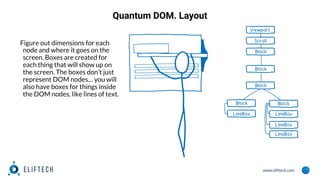
Quantum DOM. Layout
Figure out dimensions for each
node and where it goes on the
screen. Boxes are created for
each thing that will show up on
the screen. The boxes don’t just
represent DOM nodes… you will
also have boxes for things inside
the DOM nodes, like lines of text.
www.eliftech.com
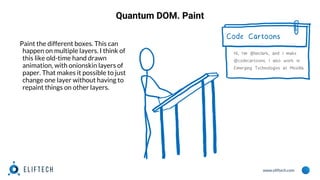
Quantum DOM. Paint
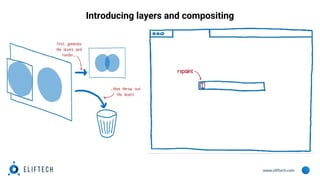
Paint the different boxes. This can
happen on multiple layers. I think of
this like old-time hand drawn
animation, with onionskin layers of
paper. That makes it possible to just
change one layer without having to
repaint things on other layers.
www.eliftech.com
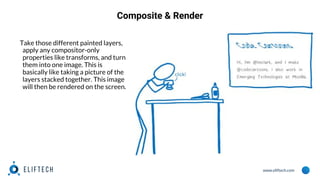
Composite & Render
Take those different painted layers,
apply any compositor-only
properties like transforms, and turn
them into one image. This is
basically like taking a picture of the
layers stacked together. This image
will then be rendered on the screen.
www.eliftech.com
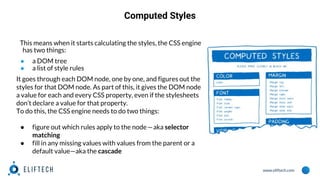
Computed Styles
This means when it starts calculating the styles, the CSS engine
has two things:
● a DOM tree
● a list of style rules
It goes through each DOM node, one by one, and figures out the
styles for that DOM node. As part of this, it gives the DOM node
a value for each and every CSS property, even if the stylesheets
don’t declare a value for that property.
To do this, the CSS engine needs to do two things:
● figure out which rules apply to the node — aka selector
matching
● fill in any missing values with values from the parent or a
default value—aka the cascade
www.eliftech.com
Quantum DOM. Selector Matching
For this step, we’ll add any rule that
matches the DOM node to a list.
Because multiple rules can match,
there may be multiple declarations
for the same property.
www.eliftech.com
Quantum DOM. Selector Matching
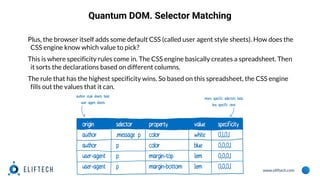
Plus, the browser itself adds some default CSS (called user agent style sheets). How does the
CSS engine know which value to pick?
This is where specificity rules come in. The CSS engine basically creates a spreadsheet. Then
it sorts the declarations based on different columns.
The rule that has the highest specificity wins. So based on this spreadsheet, the CSS engine
fills out the values that it can.
www.eliftech.com
The Cascade
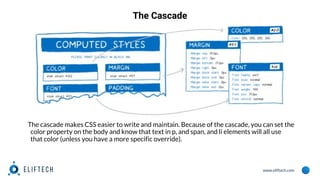
The cascade makes CSS easier to write and maintain. Because of the cascade, you can set the
color property on the body and know that text in p, and span, and li elements will all use
that color (unless you have a more specific override).
www.eliftech.com
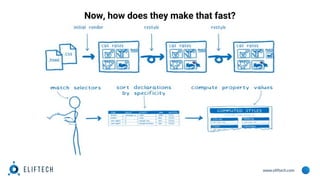
Now, how does they make that fast?
www.eliftech.com
1. Run it all in parallel
www.eliftech.com
1. Run it all in parallel
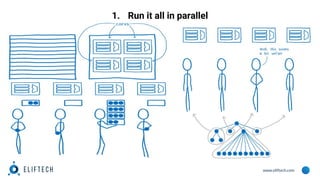
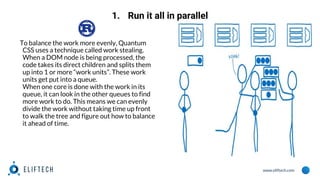
To balance the work more evenly, Quantum
CSS uses a technique called work stealing.
When a DOM node is being processed, the
code takes its direct children and splits them
up into 1 or more “work units”. These work
units get put into a queue.
When one core is done with the work in its
queue, it can look in the other queues to find
more work to do. This means we can evenly
divide the work without taking time up front
to walk the tree and figure out how to balance
it ahead of time.
www.eliftech.com
2. Speed up restyles with the Rule Tree
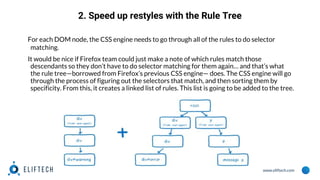
For each DOM node, the CSS engine needs to go through all of the rules to do selector
matching.
It would be nice if Firefox team could just make a note of which rules match those
descendants so they don’t have to do selector matching for them again… and that’s what
the rule tree—borrowed from Firefox’s previous CSS engine— does. The CSS engine will go
through the process of figuring out the selectors that match, and then sorting them by
specificity. From this, it creates a linked list of rules. This list is going to be added to the tree.
www.eliftech.com
2. Speed up restyles with the Rule Tree
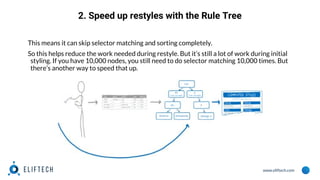
This means it can skip selector matching and sorting completely.
So this helps reduce the work needed during restyle. But it’s still a lot of work during initial
styling. If you have 10,000 nodes, you still need to do selector matching 10,000 times. But
there’s another way to speed that up.
www.eliftech.com
Speed up initial render (and the cascade) with the style
sharing cache
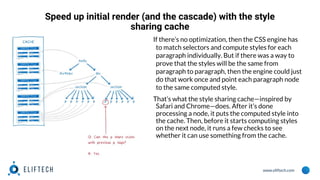
If there’s no optimization, then the CSS engine has
to match selectors and compute styles for each
paragraph individually. But if there was a way to
prove that the styles will be the same from
paragraph to paragraph, then the engine could just
do that work once and point each paragraph node
to the same computed style.
That’s what the style sharing cache—inspired by
Safari and Chrome—does. After it’s done
processing a node, it puts the computed style into
the cache. Then, before it starts computing styles
on the next node, it runs a few checks to see
whether it can use something from the cache.
www.eliftech.com
What about :first-child?
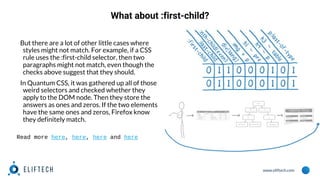
But there are a lot of other little cases where
styles might not match. For example, if a CSS
rule uses the :first-child selector, then two
paragraphs might not match, even though the
checks above suggest that they should.
In Quantum CSS, it was gathered up all of those
weird selectors and checked whether they
apply to the DOM node. Then they store the
answers as ones and zeros. If the two elements
have the same ones and zeros, Firefox know
they definitely match.
Read more here, here, here and here
www.eliftech.com
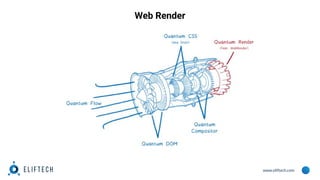
Web Render
www.eliftech.com
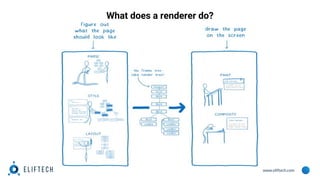
What does a renderer do?
www.eliftech.com
What does a renderer do?
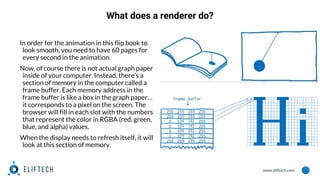
In order for the animation in this flip book to
look smooth, you need to have 60 pages for
every second in the animation.
Now, of course there is not actual graph paper
inside of your computer. Instead, there’s a
section of memory in the computer called a
frame buffer. Each memory address in the
frame buffer is like a box in the graph paper…
it corresponds to a pixel on the screen. The
browser will fill in each slot with the numbers
that represent the color in RGBA (red, green,
blue, and alpha) values.
When the display needs to refresh itself, it will
look at this section of memory.
www.eliftech.com
What does a renderer do?
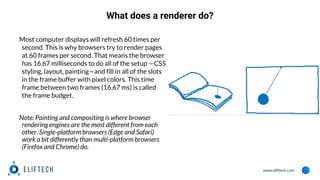
Most computer displays will refresh 60 times per
second. This is why browsers try to render pages
at 60 frames per second. That means the browser
has 16.67 milliseconds to do all of the setup —CSS
styling, layout, painting—and fill in all of the slots
in the frame buffer with pixel colors. This time
frame between two frames (16.67 ms) is called
the frame budget.
Note: Painting and compositing is where browser
rendering engines are the most different from each
other. Single-platform browsers (Edge and Safari)
work a bit differently than multi-platform browsers
(Firefox and Chrome) do.
www.eliftech.com
Introducing layers and compositing
www.eliftech.com
www.eliftech.com
Introducing layers and compositing
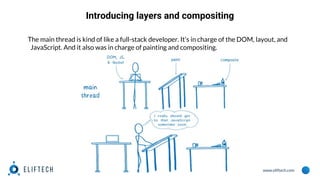
The main thread is kind of like a full-stack developer. It’s in charge of the DOM, layout, and
JavaScript. And it also was in charge of painting and compositing.
www.eliftech.com
Introducing layers and compositing
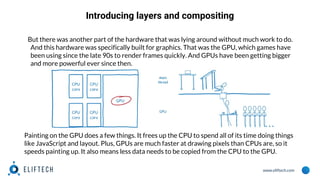
But there was another part of the hardware that was lying around without much work to do.
And this hardware was specifically built for graphics. That was the GPU, which games have
been using since the late 90s to render frames quickly. And GPUs have been getting bigger
and more powerful ever since then.
Painting on the GPU does a few things. It frees up the CPU to spend all of its time doing things
like JavaScript and layout. Plus, GPUs are much faster at drawing pixels than CPUs are, so it
speeds painting up. It also means less data needs to be copied from the CPU to the GPU.
www.eliftech.com
Introducing layers and compositing
But maintaining this division between paint and composite still has some costs, even when
they are both on the GPU. This division also limits the kinds of optimizations that you can
use to make the GPU do its work faster.
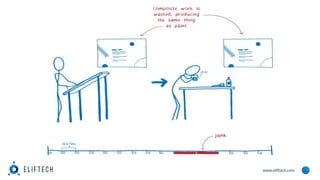
This is where WebRender comes in. It fundamentally changes the way we render, removing
the distinction between paint and composite. This gives a way to tailor the performance of
renderer to give you the best user experience on today’s web, and to best support the use
cases that you will see on tomorrow’s web.
This means we don’t just want to make frames render faster… we want to make them
render more consistently and without jank. And even when there are lots of pixels to draw,
like on 4k displays or WebVR headsets, we still want the experience to be just as smooth.
Read more here.
www.eliftech.com
www.eliftech.com
www.eliftech.com
Introducing layers and compositing
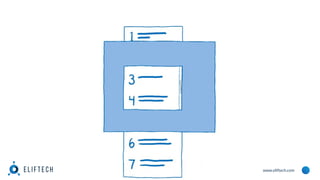
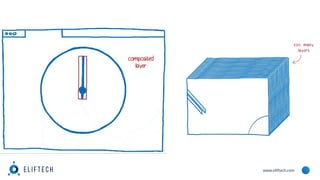
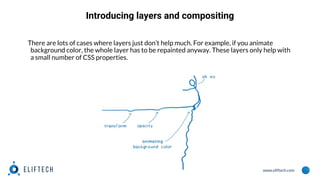
There are lots of cases where layers just don’t help much. For example, if you animate
background color, the whole layer has to be repainted anyway. These layers only help with
a small number of CSS properties.
www.eliftech.com
Using the GPU like a game engine
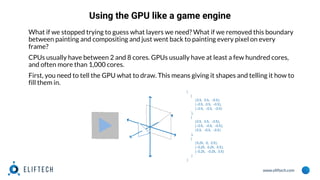
What if we stopped trying to guess what layers we need? What if we removed this boundary
between painting and compositing and just went back to painting every pixel on every
frame?
CPUs usually have between 2 and 8 cores. GPUs usually have at least a few hundred cores,
and often more than 1,000 cores.
First, you need to tell the GPU what to draw. This means giving it shapes and telling it how to
fill them in.
www.eliftech.com
Using the GPU like a game engine
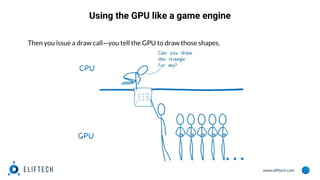
Then you issue a draw call—you tell the GPU to draw those shapes.
www.eliftech.com
Using the GPU like a game engine
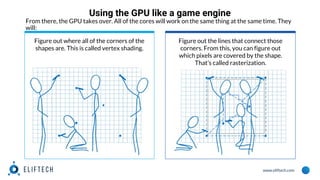
Figure out where all of the corners of the
shapes are. This is called vertex shading.
Figure out the lines that connect those
corners. From this, you can figure out
which pixels are covered by the shape.
That’s called rasterization.
From there, the GPU takes over. All of the cores will work on the same thing at the same time. They
will:
www.eliftech.com
Using the GPU like a game engine
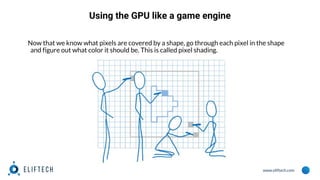
Now that we know what pixels are covered by a shape, go through each pixel in the shape
and figure out what color it should be. This is called pixel shading.
www.eliftech.com
How WebRender works with the GPU
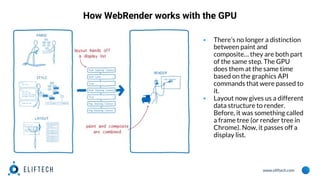
▪ There’s no longer a distinction
between paint and
composite… they are both part
of the same step. The GPU
does them at the same time
based on the graphics API
commands that were passed to
it.
▪ Layout now gives us a different
data structure to render.
Before, it was something called
a frame tree (or render tree in
Chrome). Now, it passes off a
display list.
www.eliftech.com
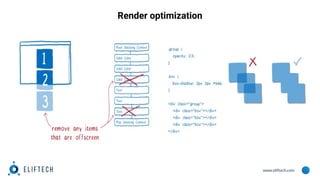
Render optimization
www.eliftech.com
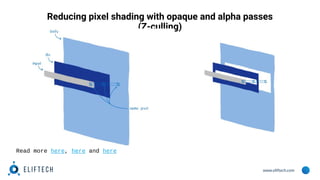
Reducing pixel shading with opaque and alpha passes
(Z-culling)
Read more here, here and here
www.eliftech.com
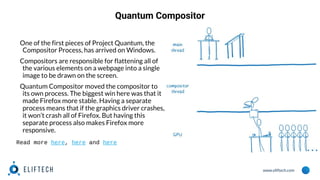
Quantum Compositor
One of the first pieces of Project Quantum, the
Compositor Process, has arrived on Windows.
Compositors are responsible for flattening all of
the various elements on a webpage into a single
image to be drawn on the screen.
Quantum Compositor moved the compositor to
its own process. The biggest win here was that it
made Firefox more stable. Having a separate
process means that if the graphics driver crashes,
it won’t crash all of Firefox. But having this
separate process also makes Firefox more
responsive.
Read more here, here and here
www.eliftech.com
Quantum DOM
Even when you split up the content windows between cores and have a separate main
thread for each one, there are still a lot of tasks that main thread needs to do. And some of
them are more important than others. For example, responding to a keypress is more
important than running garbage collection. Quantum DOM gives a way to prioritize these
tasks. This makes Firefox more responsive. Most of this work has landed, but Firefox team
still plan to take this further with something called pre-emptive scheduling.
Read more here.
www.eliftech.com
Problems
▪ Task prioritization in different categories
▪ Lack of task prioritization between tabs
www.eliftech.com
Problem 1: Task prioritization in different categories
Since multiprocess Firefox was first enabled in Firefox 48, web content tabs now run in
separate content processes in order to reduce overcrowding of OS resources in a given
process. However, after further research, it was found that the task queue of the main
thread in the content process was still crowded with tasks in multiple categories. The tasks
in the content process can come from a number of possible sources: through IPC
(interprocess communication) from the main process (e.g. for input events, network data,
and vsync), directly from web pages (e.g. from setTimeout, requestIdleCallback, or
postMessage), or internally in the content process (e.g. for garbage collection or telemetry
tasks). For better responsiveness, team has learned to prioritize tasks for user inputs and
vsync above tasks for requestIdleCallback and garbage collection.
www.eliftech.com
Problem 2: Lack of task prioritization between tabs
Inside Firefox, tasks running in foreground and background tabs are executed in
First-Come-First-Served order, in a single task queue. It is quite reasonable to prioritize the
foreground tasks over than the background ones, in order to increase the responsiveness of
the user experience for Firefox users.
www.eliftech.com
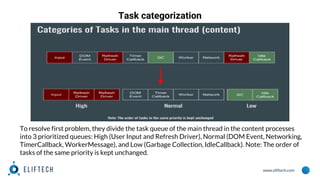
Task categorization
To resolve first problem, they divide the task queue of the main thread in the content processes
into 3 prioritized queues: High (User Input and Refresh Driver), Normal (DOM Event, Networking,
TimerCallback, WorkerMessage), and Low (Garbage Collection, IdleCallback). Note: The order of
tasks of the same priority is kept unchanged.
www.eliftech.com
Task grouping
Before describing the solution to second problem, let’s define a TabGroup as a set of open
tabs that are associated via window.opener and window.parent. In the HTML standard, this
is called a unit of related browsing contexts. Tasks are isolated and cannot affect each other
if they belong to different TabGroups. Task grouping ensures that tasks from the same
TabGroup are run in order while allowing us to interrupt tasks from background
TabGroups in order to run tasks from a foreground TabGroup.
In Firefox internals, each window/document contains a reference to the TabGroup object it
belongs to, which provides a set of useful dispatch APIs. These APIs make it easier for
Firefox developers to associate a task with a particular TabGroup.
Read more here.
www.eliftech.com
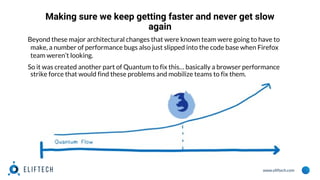
Making sure we keep getting faster and never get slow
again
Beyond these major architectural changes that were known team were going to have to
make, a number of performance bugs also just slipped into the code base when Firefox
team weren’t looking.
So it was created another part of Quantum to fix this… basically a browser performance
strike force that would find these problems and mobilize teams to fix them.
www.eliftech.com
Quantum Flow
The Quantum Flow team was this strike force. Rather than focusing on overall performance
of a particular subsystem, they zero-ed in on some very specific, important use cases — for
example, loading your social media feed — and worked across teams to figure out why it was
less responsive in Firefox than other browsers.
Quantum Flow brought lots of big performance wins. Along the way, team also developed
tools and processes to make it easier to find and track these types of issues.
www.eliftech.com
So what happens to Quantum Flow now?
Firefox Quantum team is taking this process that was so successful—identifying and
focusing on one key use case at a time — and turning it into a regular part of their workflow.
To do this,they are improving tools so they don’t need a strike force of experts to search for
the issues, but instead can empower more engineers across the organization to find them.
There’s one problem with this approach. When they optimize one use case, they could
deoptimize another. To prevent this, they are adding lots of new tracking, including
improvements to CI automation running performance tests, telemetry to track what users
experience, and regression management inside of bugs. With this, they expect Firefox
Quantum to keep getting better.
Read more here.
www.eliftech.com
Thank you for reading!
Find us at eliftech.com
Have a question? Contact us:
info@eliftech.

Quantum. Just Quantum

  • 1.
    Quantum. Just Quantum ByDmytro Mysak, Software Developer
  • 2.
    www.eliftech.com Content ● Quantum overview ●Rust-bindgen ● Quantum CSS ● Quantum Render ● Quantum ● Compositor ● Quantum DOM ● Quantum Flow
  • 3.
    www.eliftech.com Quantum overview A numberof the Quantum components are written in Rust. If you’re not familiar with Rust, it’s a systems programming language that runs blazing fast, while simplifying development of parallel programs by guaranteeing thread and memory safety. In most cases, Rust code won’t even compile unless it is safe. "Everything major we wanted to get in made it. ... It's almost certainly the biggest refactoring ever done in software engineering, at least in public," Mayo said of the overhaul. "Seventy-five percent of the code base had to be touched. Almost 5 million lines of code were impacted." Read more here and here
  • 4.
  • 5.
    www.eliftech.com Rust-bindgen C++ bindings generatorfor the Rust language. Quantum uses rust-bindgen to generate the glue code between Firefox’s C++ code and Servo’s Rust components. Read more here
  • 6.
    www.eliftech.com Quantum CSS (akaStylo) A new CSS engine called Quantum CSS (previously known as Stylo)— brings together state-of-the-art innovations from four different browsers to create a new super CSS engine. More here
  • 7.
    www.eliftech.com It takes advantageof modern hardware, parallelizing the work across all of the cores in your machine. This means it can run up to 2 or 4 or even 18 times faster. On top of that, it combines existing state-of-the-art optimizations from other browsers. So even if it weren’t running in parallel, it would still be one fast CSS engine.
  • 8.
    www.eliftech.com What does theCSS engine do? The CSS engine is part of the browser’s rendering engine. The rendering engine takes the website’s HTML and CSS files and turns them into pixels on the screen.
  • 9.
    www.eliftech.com Quantum DOM. Parse Parsethe files into objects the browser can understand, including the DOM. At this point, the DOM knows about the structure of the page. It knows about parent/child relationships between elements. It doesn’t know what those elements should look like, though.
  • 10.
    www.eliftech.com Quantum DOM. Style Figureout what the elements should look like. For each DOM node, the CSS engine figures out which CSS rules apply. Then it figures out values for each CSS property for that DOM node.
  • 11.
    www.eliftech.com Quantum DOM. Layout Figureout dimensions for each node and where it goes on the screen. Boxes are created for each thing that will show up on the screen. The boxes don’t just represent DOM nodes… you will also have boxes for things inside the DOM nodes, like lines of text.
  • 12.
    www.eliftech.com Quantum DOM. Paint Paintthe different boxes. This can happen on multiple layers. I think of this like old-time hand drawn animation, with onionskin layers of paper. That makes it possible to just change one layer without having to repaint things on other layers.
  • 13.
    www.eliftech.com Composite & Render Takethose different painted layers, apply any compositor-only properties like transforms, and turn them into one image. This is basically like taking a picture of the layers stacked together. This image will then be rendered on the screen.
  • 14.
    www.eliftech.com Computed Styles This meanswhen it starts calculating the styles, the CSS engine has two things: ● a DOM tree ● a list of style rules It goes through each DOM node, one by one, and figures out the styles for that DOM node. As part of this, it gives the DOM node a value for each and every CSS property, even if the stylesheets don’t declare a value for that property. To do this, the CSS engine needs to do two things: ● figure out which rules apply to the node — aka selector matching ● fill in any missing values with values from the parent or a default value—aka the cascade
  • 15.
    www.eliftech.com Quantum DOM. SelectorMatching For this step, we’ll add any rule that matches the DOM node to a list. Because multiple rules can match, there may be multiple declarations for the same property.
  • 16.
    www.eliftech.com Quantum DOM. SelectorMatching Plus, the browser itself adds some default CSS (called user agent style sheets). How does the CSS engine know which value to pick? This is where specificity rules come in. The CSS engine basically creates a spreadsheet. Then it sorts the declarations based on different columns. The rule that has the highest specificity wins. So based on this spreadsheet, the CSS engine fills out the values that it can.
  • 17.
    www.eliftech.com The Cascade The cascademakes CSS easier to write and maintain. Because of the cascade, you can set the color property on the body and know that text in p, and span, and li elements will all use that color (unless you have a more specific override).
  • 18.
    www.eliftech.com Now, how doesthey make that fast?
  • 19.
  • 20.
    www.eliftech.com 1. Run itall in parallel To balance the work more evenly, Quantum CSS uses a technique called work stealing. When a DOM node is being processed, the code takes its direct children and splits them up into 1 or more “work units”. These work units get put into a queue. When one core is done with the work in its queue, it can look in the other queues to find more work to do. This means we can evenly divide the work without taking time up front to walk the tree and figure out how to balance it ahead of time.
  • 21.
    www.eliftech.com 2. Speed uprestyles with the Rule Tree For each DOM node, the CSS engine needs to go through all of the rules to do selector matching. It would be nice if Firefox team could just make a note of which rules match those descendants so they don’t have to do selector matching for them again… and that’s what the rule tree—borrowed from Firefox’s previous CSS engine— does. The CSS engine will go through the process of figuring out the selectors that match, and then sorting them by specificity. From this, it creates a linked list of rules. This list is going to be added to the tree.
  • 22.
    www.eliftech.com 2. Speed uprestyles with the Rule Tree This means it can skip selector matching and sorting completely. So this helps reduce the work needed during restyle. But it’s still a lot of work during initial styling. If you have 10,000 nodes, you still need to do selector matching 10,000 times. But there’s another way to speed that up.
  • 23.
    www.eliftech.com Speed up initialrender (and the cascade) with the style sharing cache If there’s no optimization, then the CSS engine has to match selectors and compute styles for each paragraph individually. But if there was a way to prove that the styles will be the same from paragraph to paragraph, then the engine could just do that work once and point each paragraph node to the same computed style. That’s what the style sharing cache—inspired by Safari and Chrome—does. After it’s done processing a node, it puts the computed style into the cache. Then, before it starts computing styles on the next node, it runs a few checks to see whether it can use something from the cache.
  • 24.
    www.eliftech.com What about :first-child? Butthere are a lot of other little cases where styles might not match. For example, if a CSS rule uses the :first-child selector, then two paragraphs might not match, even though the checks above suggest that they should. In Quantum CSS, it was gathered up all of those weird selectors and checked whether they apply to the DOM node. Then they store the answers as ones and zeros. If the two elements have the same ones and zeros, Firefox know they definitely match. Read more here, here, here and here
  • 25.
  • 26.
  • 27.
    www.eliftech.com What does arenderer do? In order for the animation in this flip book to look smooth, you need to have 60 pages for every second in the animation. Now, of course there is not actual graph paper inside of your computer. Instead, there’s a section of memory in the computer called a frame buffer. Each memory address in the frame buffer is like a box in the graph paper… it corresponds to a pixel on the screen. The browser will fill in each slot with the numbers that represent the color in RGBA (red, green, blue, and alpha) values. When the display needs to refresh itself, it will look at this section of memory.
  • 28.
    www.eliftech.com What does arenderer do? Most computer displays will refresh 60 times per second. This is why browsers try to render pages at 60 frames per second. That means the browser has 16.67 milliseconds to do all of the setup —CSS styling, layout, painting—and fill in all of the slots in the frame buffer with pixel colors. This time frame between two frames (16.67 ms) is called the frame budget. Note: Painting and compositing is where browser rendering engines are the most different from each other. Single-platform browsers (Edge and Safari) work a bit differently than multi-platform browsers (Firefox and Chrome) do.
  • 29.
  • 30.
  • 31.
    www.eliftech.com Introducing layers andcompositing The main thread is kind of like a full-stack developer. It’s in charge of the DOM, layout, and JavaScript. And it also was in charge of painting and compositing.
  • 32.
    www.eliftech.com Introducing layers andcompositing But there was another part of the hardware that was lying around without much work to do. And this hardware was specifically built for graphics. That was the GPU, which games have been using since the late 90s to render frames quickly. And GPUs have been getting bigger and more powerful ever since then. Painting on the GPU does a few things. It frees up the CPU to spend all of its time doing things like JavaScript and layout. Plus, GPUs are much faster at drawing pixels than CPUs are, so it speeds painting up. It also means less data needs to be copied from the CPU to the GPU.
  • 33.
    www.eliftech.com Introducing layers andcompositing But maintaining this division between paint and composite still has some costs, even when they are both on the GPU. This division also limits the kinds of optimizations that you can use to make the GPU do its work faster. This is where WebRender comes in. It fundamentally changes the way we render, removing the distinction between paint and composite. This gives a way to tailor the performance of renderer to give you the best user experience on today’s web, and to best support the use cases that you will see on tomorrow’s web. This means we don’t just want to make frames render faster… we want to make them render more consistently and without jank. And even when there are lots of pixels to draw, like on 4k displays or WebVR headsets, we still want the experience to be just as smooth. Read more here.
  • 34.
  • 35.
  • 36.
    www.eliftech.com Introducing layers andcompositing There are lots of cases where layers just don’t help much. For example, if you animate background color, the whole layer has to be repainted anyway. These layers only help with a small number of CSS properties.
  • 37.
    www.eliftech.com Using the GPUlike a game engine What if we stopped trying to guess what layers we need? What if we removed this boundary between painting and compositing and just went back to painting every pixel on every frame? CPUs usually have between 2 and 8 cores. GPUs usually have at least a few hundred cores, and often more than 1,000 cores. First, you need to tell the GPU what to draw. This means giving it shapes and telling it how to fill them in.
  • 38.
    www.eliftech.com Using the GPUlike a game engine Then you issue a draw call—you tell the GPU to draw those shapes.
  • 39.
    www.eliftech.com Using the GPUlike a game engine Figure out where all of the corners of the shapes are. This is called vertex shading. Figure out the lines that connect those corners. From this, you can figure out which pixels are covered by the shape. That’s called rasterization. From there, the GPU takes over. All of the cores will work on the same thing at the same time. They will:
  • 40.
    www.eliftech.com Using the GPUlike a game engine Now that we know what pixels are covered by a shape, go through each pixel in the shape and figure out what color it should be. This is called pixel shading.
  • 41.
    www.eliftech.com How WebRender workswith the GPU ▪ There’s no longer a distinction between paint and composite… they are both part of the same step. The GPU does them at the same time based on the graphics API commands that were passed to it. ▪ Layout now gives us a different data structure to render. Before, it was something called a frame tree (or render tree in Chrome). Now, it passes off a display list.
  • 42.
  • 43.
    www.eliftech.com Reducing pixel shadingwith opaque and alpha passes (Z-culling) Read more here, here and here
  • 44.
    www.eliftech.com Quantum Compositor One ofthe first pieces of Project Quantum, the Compositor Process, has arrived on Windows. Compositors are responsible for flattening all of the various elements on a webpage into a single image to be drawn on the screen. Quantum Compositor moved the compositor to its own process. The biggest win here was that it made Firefox more stable. Having a separate process means that if the graphics driver crashes, it won’t crash all of Firefox. But having this separate process also makes Firefox more responsive. Read more here, here and here
  • 45.
    www.eliftech.com Quantum DOM Even whenyou split up the content windows between cores and have a separate main thread for each one, there are still a lot of tasks that main thread needs to do. And some of them are more important than others. For example, responding to a keypress is more important than running garbage collection. Quantum DOM gives a way to prioritize these tasks. This makes Firefox more responsive. Most of this work has landed, but Firefox team still plan to take this further with something called pre-emptive scheduling. Read more here.
  • 46.
    www.eliftech.com Problems ▪ Task prioritizationin different categories ▪ Lack of task prioritization between tabs
  • 47.
    www.eliftech.com Problem 1: Taskprioritization in different categories Since multiprocess Firefox was first enabled in Firefox 48, web content tabs now run in separate content processes in order to reduce overcrowding of OS resources in a given process. However, after further research, it was found that the task queue of the main thread in the content process was still crowded with tasks in multiple categories. The tasks in the content process can come from a number of possible sources: through IPC (interprocess communication) from the main process (e.g. for input events, network data, and vsync), directly from web pages (e.g. from setTimeout, requestIdleCallback, or postMessage), or internally in the content process (e.g. for garbage collection or telemetry tasks). For better responsiveness, team has learned to prioritize tasks for user inputs and vsync above tasks for requestIdleCallback and garbage collection.
  • 48.
    www.eliftech.com Problem 2: Lackof task prioritization between tabs Inside Firefox, tasks running in foreground and background tabs are executed in First-Come-First-Served order, in a single task queue. It is quite reasonable to prioritize the foreground tasks over than the background ones, in order to increase the responsiveness of the user experience for Firefox users.
  • 49.
    www.eliftech.com Task categorization To resolvefirst problem, they divide the task queue of the main thread in the content processes into 3 prioritized queues: High (User Input and Refresh Driver), Normal (DOM Event, Networking, TimerCallback, WorkerMessage), and Low (Garbage Collection, IdleCallback). Note: The order of tasks of the same priority is kept unchanged.
  • 50.
    www.eliftech.com Task grouping Before describingthe solution to second problem, let’s define a TabGroup as a set of open tabs that are associated via window.opener and window.parent. In the HTML standard, this is called a unit of related browsing contexts. Tasks are isolated and cannot affect each other if they belong to different TabGroups. Task grouping ensures that tasks from the same TabGroup are run in order while allowing us to interrupt tasks from background TabGroups in order to run tasks from a foreground TabGroup. In Firefox internals, each window/document contains a reference to the TabGroup object it belongs to, which provides a set of useful dispatch APIs. These APIs make it easier for Firefox developers to associate a task with a particular TabGroup. Read more here.
  • 51.
    www.eliftech.com Making sure wekeep getting faster and never get slow again Beyond these major architectural changes that were known team were going to have to make, a number of performance bugs also just slipped into the code base when Firefox team weren’t looking. So it was created another part of Quantum to fix this… basically a browser performance strike force that would find these problems and mobilize teams to fix them.
  • 52.
    www.eliftech.com Quantum Flow The QuantumFlow team was this strike force. Rather than focusing on overall performance of a particular subsystem, they zero-ed in on some very specific, important use cases — for example, loading your social media feed — and worked across teams to figure out why it was less responsive in Firefox than other browsers. Quantum Flow brought lots of big performance wins. Along the way, team also developed tools and processes to make it easier to find and track these types of issues.
  • 53.
    www.eliftech.com So what happensto Quantum Flow now? Firefox Quantum team is taking this process that was so successful—identifying and focusing on one key use case at a time — and turning it into a regular part of their workflow. To do this,they are improving tools so they don’t need a strike force of experts to search for the issues, but instead can empower more engineers across the organization to find them. There’s one problem with this approach. When they optimize one use case, they could deoptimize another. To prevent this, they are adding lots of new tracking, including improvements to CI automation running performance tests, telemetry to track what users experience, and regression management inside of bugs. With this, they expect Firefox Quantum to keep getting better. Read more here.
  • 54.
    www.eliftech.com Thank you forreading! Find us at eliftech.com Have a question? Contact us: info@eliftech.