QUANG NGUYEN
Senior QA at KMS
quangxuan@gmail.com
Best Practices in Performance Test
STC 2014
AGENDA
OBJECTIVES
IDENTIFYING PERFORMANCE
REQUIREMENTS
DOING PERFORMANCE TEST TASKS
Q&A
OBJECTIVES
Sharing an approach
Doing performance testing
tasks efficiently
4
4
PERFORMANCE REQUIREMENTS
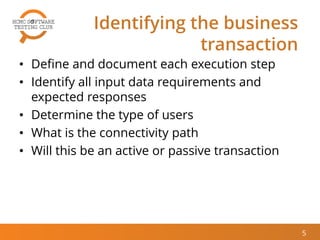
Identifying the business
transaction
5
• Define and document each execution step
• Identify all input data requirements and
expected responses
• Determine the type of users
• What is the connectivity path
• Will this be an active or passive transaction
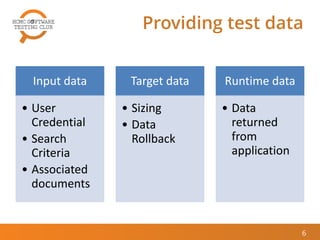
Providing test data
6
Input data
• User
Credential
• Search
Criteria
• Associated
documents
Target data
• Sizing
• Data
Rollback
Runtime data
• Data
returned
from
application
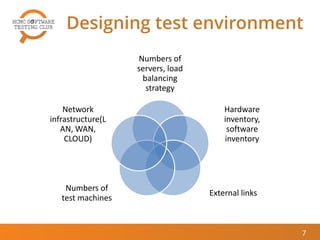
Designing test environment
Numbers of
servers, load
balancing
strategy
Hardware
inventory,
software
inventory
External links
Numbers of
test machines
Network
infrastructure(L
AN, WAN,
CLOUD)
7
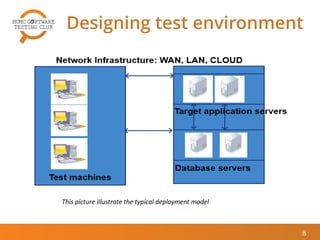
Designing test environment
8
This picture illustrate the typical deployment model
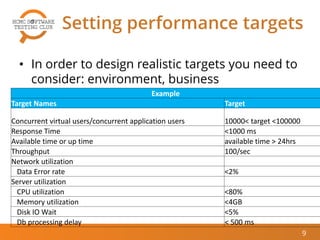
Setting performance targets
9
• In order to design realistic targets you need to
consider: environment, business
requirements, technical…Example
Target Names Target
Concurrent virtual users/concurrent application users 10000< target <100000
Response Time <1000 ms
Available time or up time available time > 24hrs
Throughput 100/sec
Network utilization
Data Error rate <2%
Server utilization
CPU utilization <80%
Memory utilization <4GB
Disk IO Wait <5%
Db processing delay < 500 ms
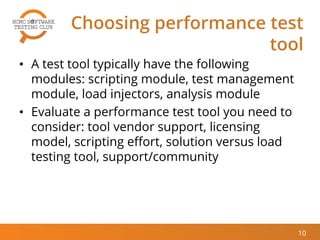
Choosing performance test
tool
• A test tool typically have the following
modules: scripting module, test management
module, load injectors, analysis module
• Evaluate a performance test tool you need to
consider: tool vendor support, licensing
model, scripting effort, solution versus load
testing tool, support/community
10
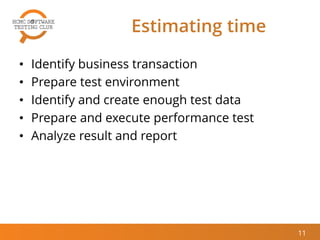
Estimating time
11
• Identify business transaction
• Prepare test environment
• Identify and create enough test data
• Prepare and execute performance test
• Analyze result and report
12
12
PERFORMANCE TEST TASKS
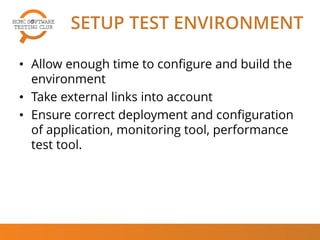
SETUP TEST ENVIRONMENT
• Allow enough time to configure and build the
environment
• Take external links into account
• Ensure correct deployment and configuration
of application, monitoring tool, performance
test tool.
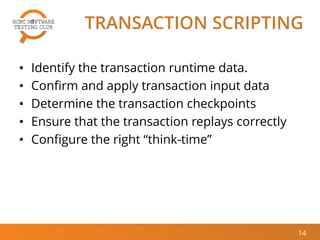
TRANSACTION SCRIPTING
• Identify the transaction runtime data.
• Confirm and apply transaction input data
• Determine the transaction checkpoints
• Ensure that the transaction replays correctly
• Configure the right “think-time”
14
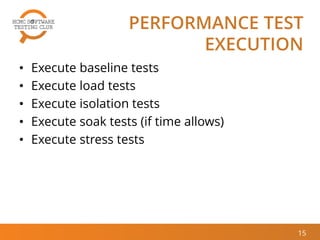
PERFORMANCE TEST
EXECUTION
• Execute baseline tests
• Execute load tests
• Execute isolation tests
• Execute soak tests (if time allows)
• Execute stress tests
15
ANALYZE RESULT
REPORT,RETEST
• Capture and back up all data created
• Compare test results to performance targets
• Root cause analysis
• Document the results of the project.
• Use the final results as baseline data for End
User Experience (EUE) monitoring.
16
Conclusions
• Performing performance test is not only a
challenge but also an interesting task. I hope
this presentation could help you apply this to
your real work.
17
References
• The art of application performance testing –
Ian Molyneaux
• Performance Testing Guidance for Web
Applications - J.D. Meier, Carlos Farre,Prashant
Bansode, Scott Barber, Dennis Rea
18
19
19
Q&A
© 2014 HCMC Software Testing Club
THANK YOU

[Quang Nguyen] Performance Test in Best Practices

  • 1.
    QUANG NGUYEN Senior QAat KMS quangxuan@gmail.com Best Practices in Performance Test STC 2014
  • 2.
  • 3.
    OBJECTIVES Sharing an approach Doingperformance testing tasks efficiently
  • 4.
  • 5.
    Identifying the business transaction 5 •Define and document each execution step • Identify all input data requirements and expected responses • Determine the type of users • What is the connectivity path • Will this be an active or passive transaction
  • 6.
    Providing test data 6 Inputdata • User Credential • Search Criteria • Associated documents Target data • Sizing • Data Rollback Runtime data • Data returned from application
  • 7.
    Designing test environment Numbersof servers, load balancing strategy Hardware inventory, software inventory External links Numbers of test machines Network infrastructure(L AN, WAN, CLOUD) 7
  • 8.
    Designing test environment 8 Thispicture illustrate the typical deployment model
  • 9.
    Setting performance targets 9 •In order to design realistic targets you need to consider: environment, business requirements, technical…Example Target Names Target Concurrent virtual users/concurrent application users 10000< target <100000 Response Time <1000 ms Available time or up time available time > 24hrs Throughput 100/sec Network utilization Data Error rate <2% Server utilization CPU utilization <80% Memory utilization <4GB Disk IO Wait <5% Db processing delay < 500 ms
  • 10.
    Choosing performance test tool •A test tool typically have the following modules: scripting module, test management module, load injectors, analysis module • Evaluate a performance test tool you need to consider: tool vendor support, licensing model, scripting effort, solution versus load testing tool, support/community 10
  • 11.
    Estimating time 11 • Identifybusiness transaction • Prepare test environment • Identify and create enough test data • Prepare and execute performance test • Analyze result and report
  • 12.
  • 13.
    SETUP TEST ENVIRONMENT •Allow enough time to configure and build the environment • Take external links into account • Ensure correct deployment and configuration of application, monitoring tool, performance test tool.
  • 14.
    TRANSACTION SCRIPTING • Identifythe transaction runtime data. • Confirm and apply transaction input data • Determine the transaction checkpoints • Ensure that the transaction replays correctly • Configure the right “think-time” 14
  • 15.
    PERFORMANCE TEST EXECUTION • Executebaseline tests • Execute load tests • Execute isolation tests • Execute soak tests (if time allows) • Execute stress tests 15
  • 16.
    ANALYZE RESULT REPORT,RETEST • Captureand back up all data created • Compare test results to performance targets • Root cause analysis • Document the results of the project. • Use the final results as baseline data for End User Experience (EUE) monitoring. 16
  • 17.
    Conclusions • Performing performancetest is not only a challenge but also an interesting task. I hope this presentation could help you apply this to your real work. 17
  • 18.
    References • The artof application performance testing – Ian Molyneaux • Performance Testing Guidance for Web Applications - J.D. Meier, Carlos Farre,Prashant Bansode, Scott Barber, Dennis Rea 18
  • 19.
  • 20.
    © 2014 HCMCSoftware Testing Club THANK YOU