Quad Tree Composite Tiling
/ SVGMap
Effective vector raster mixed tiling
Satoru Takagi
Purpose of tiling
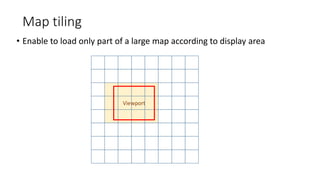
Map tiling
• Enable to load only part of a large map according to display area
Viewport
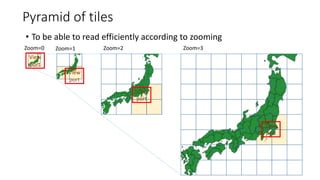
Pyramid of tiles
• To be able to read efficiently according to zooming
View
port
View
port
View
port
Zoom=0 Zoom=1 Zoom=2 Zoom=3
View
port
Quad Tree Composite Tiling
Exploring the issues of vector tiling and its countermeasure
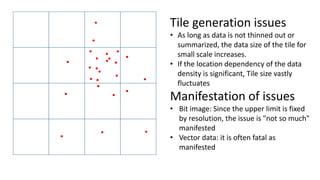
Tile generation issues
• As long as data is not thinned out or
summarized, the data size of the tile for
small scale increases.
• If the location dependency of the data
density is significant, Tile size vastly
fluctuates
Manifestation of issues
• Bit image: Since the upper limit is fixed
by resolution, the issue is "not so much"
manifested
• Vector data: it is often fatal as
manifested
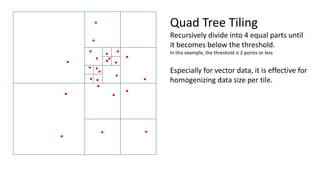
Quad Tree Tiling
Recursively divide into 4 equal parts until
it becomes below the threshold.
In this example, the threshold is 2 points or less
Especially for vector data, it is effective for
homogenizing data size per tile.
Quad Tree Tiling
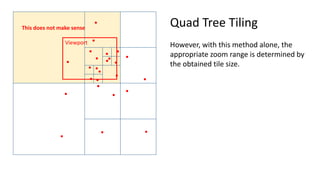
However, with this method alone, the
appropriate zoom range is determined by
the obtained tile size.
Viewport
This does not make sense
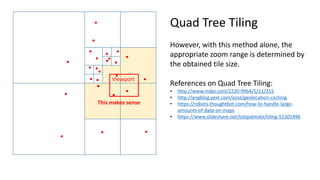
Viewport
This makes sense
Quad Tree Tiling
However, with this method alone, the
appropriate zoom range is determined by
the obtained tile size.
References on Quad Tree Tiling:
• http://www.mdpi.com/2220-9964/5/11/215
• http://engblog.yext.com/post/geolocation-caching
• https://robots.thoughtbot.com/how-to-handle-large-
amounts-of-data-on-maps
• https://www.slideshare.net/totipalmate/tiling-51301496
Pyramid of Quad Tree Tiling [Quad Tree Composite Tiling]
Zoom=0 Zoom=1 Zoom=2 Zoom=3
Vector tile generation: Always use this vector tile at zoom levels higher than this zoom level
Raster tile generation: Use this tile at this zoom level only
Note: thinned out or summarized vector tiles are also acceptable
No tile generation: Use Vector Tiles at a lower zoom levels than it
Zoom=0 Zoom=1 Zoom=2 Zoom=3
Viewport
For this part, the
generated vector tile
at the lower zoom
level is used
Vector tile generation: Always use this vector tile at zoom levels higher than this zoom level
Raster tile generation: Use this tile at this zoom level only
Note: thinned out or summarized vector tiles are also acceptable
No tile generation: Use Vector Tiles at a lower zoom levels than it
Pyramid of Quad Tree Tiling [Quad Tree Composite Tiling]
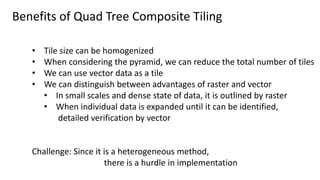
Benefits of Quad Tree Composite Tiling
• Tile size can be homogenized
• When considering the pyramid, we can reduce the total number of tiles
• We can use vector data as a tile
• We can distinguish between advantages of raster and vector
• In small scales and dense state of data, it is outlined by raster
• When individual data is expanded until it can be identified,
detailed verification by vector
Challenge: Since it is a heterogeneous method,
there is a hurdle in implementation
Application to SVGMap
Existing web mapping framework
• Industry standard such as TMS, or dedicated tiling method is
incorporated
• All of these schemes have existing uniform tiling pyramid structures
• In addition, the core architecture of the framework depends heavily
on this scheme
⇒ Introduction of Quad Tree Composite Tiling is
close to building a new framework
SVGMap / SVG:
• There is no built-in tiling method
But there are functional features to build it
What is SVGMap?
• JIS: X.7197 (One of a Japan Industrial Standard (de jure standard) for Web Mapping)
https://webdesk.jsa.or.jp/books/W11M0090/index/?bunsyo_id=JIS%20X%207197:2012
• Extended specification based on SVG
SVG: Scalable Vector Graphics: http://w3.org/svg
• Standardization work in W3C
https://www.w3.org/Submission/2011/04/
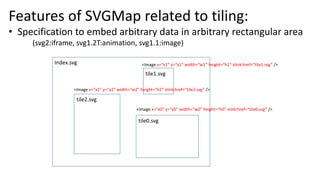
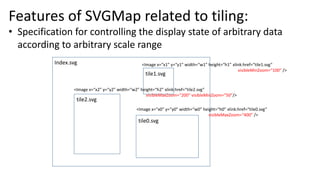
Features of SVGMap related to tiling:
• Specification to embed arbitrary data in arbitrary rectangular area
(svg2:iframe, svg1.2T:animation, svg1.1:image)
Index.svg
<Image x=“x0” y=“y0” width=“w0” height=“h0” xlink:href=“tile0.svg” />
<Image x=“x1” y=“y1” width=“w1” height=“h1” xlink:href=“tile1.svg” />
<Image x=“x2” y=“y2” width=“w2” height=“h2” xlink:href=“tile2.svg” />
tile1.svg
tile0.svg
tile2.svg
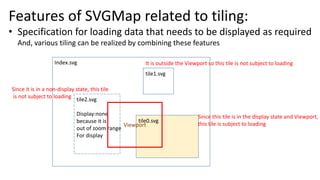
Features of SVGMap related to tiling:
• Specification for controlling the display state of arbitrary data
according to arbitrary scale range
Index.svg
<Image x=“x0” y=“y0” width=“w0” height=“h0” xlink:href=“tile0.svg”
visibleMaxZoom=“400” />
<Image x=“x1” y=“y1” width=“w1” height=“h1” xlink:href=“tile1.svg”
visibleMinZoom=“100” />
<Image x=“x2” y=“y2” width=“w2” height=“h2” xlink:href=“tile2.svg”
visibleMaxZoom=“200” visibleMinZoom=“50”/>
tile1.svg
tile0.svg
tile2.svg
Features of SVGMap related to tiling:
• Specification for loading data that needs to be displayed as required
And, various tiling can be realized by combining these features
Index.svg
tile1.svg
tile0.svg
tile2.svg
Display:none
because it is
out of zoom range
For display
Viewport
It is outside the Viewport so this tile is not subject to loading
Since it is in a non-display state, this tile
is not subject to loading
Since this tile is in the display state and Viewport,
this tile is subject to loading
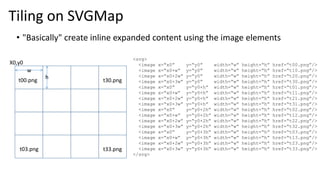
• "Basically" create inline expanded content using the image elements
X0,y0
w
h
<svg>
<image x=“x0” y=“y0” width=“w” height=“h” href=“t00.png”/>
<image x=“x0+w” y=“y0” width=“w” height=“h” href=“t10.png”/>
<image x=“x0+2w” y=“y0” width=“w” height=“h” href=“t20.png”/>
<image x=“x0+3w” y=“y0” width=“w” height=“h” href=“t30.png”/>
<image x=“x0” y=“y0+h” width=“w” height=“h” href=“t01.png”/>
<image x=“x0+w” y=“y0+h” width=“w” height=“h” href=“t11.png”/>
<image x=“x0+2w” y=“y0+h” width=“w” height=“h” href=“t21.png”/>
<image x=“x0+3w” y=“y0+h” width=“w” height=“h” href=“t31.png”/>
<image x=“x0” y=“y0+2h” width=“w” height=“h” href=“t02.png”/>
<image x=“x0+w” y=“y0+2h” width=“w” height=“h” href=“t12.png”/>
<image x=“x0+2w” y=“y0+2h” width=“w” height=“h” href=“t22.png”/>
<image x=“x0+3w” y=“y0+2h” width=“w” height=“h” href=“t32.png”/>
<image x=“x0” y=“y0+3h” width=“w” height=“h” href=“t03.png”/>
<image x=“x0+w” y=“y0+3h” width=“w” height=“h” href=“t13.png”/>
<image x=“x0+2w” y=“y0+3h” width=“w” height=“h” href=“t23.png”/>
<image x=“x0+3w” y=“y0+3h” width=“w” height=“h” href=“t33.png”/>
</svg>
t00.png
t33.png
t30.png
t03.png
Tiling on SVGMap
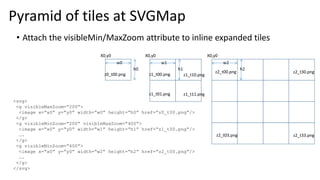
<svg>
<g visibleMaxZoom=“200”>
<image x=“x0” y=“y0” width=“w0” height=“h0” href=“z0_t00.png”/>
</g>
<g visibleMinZoom=“200” visibleMaxZoom=“400”>
<image x=“x0” y=“y0” width=“w1” height=“h1” href=“z1_t00.png”/>
….
</g>
<g visibleMinZoom=“400”>
<image x=“x0” y=“y0” width=“w2” height=“h2” href=“z2_t00.png”/>
….
</g>
</svg>
X0,y0
w0
h0
z0_t00.png
X0,y0
w2
h2
z2_t00.png
z2_t33.png
z2_t30.png
z2_t03.png
X0,y0
w1
h1
z1_t00.png
z1_t11.png
z1_t10.png
z1_t01.png
• Attach the visibleMin/MaxZoom attribute to inline expanded tiles
Pyramid of tiles at SVGMap
SVGMap / SVG:
Therefore, without changing the architecture,
Quad Tree Composite Tiling can be easily installed
However,
Do all the tiling have to do "inline expansion"?
No, SVG has a <script> element.
The existing uniform tiling pyramid can be easily implemented
by creating a sequence DOM generation function. (About 100 steps)
Example:
view-source:http://www.svgmap.org/devinfo/devkddi/tutorials/tutorial5/dynamicOSM_r10.svg
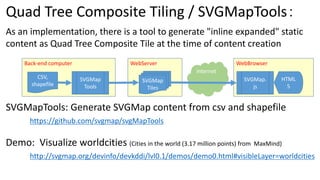
Quad Tree Composite Tiling / SVGMapTools:
As an implementation, there is a tool to generate "inline expanded" static
content as Quad Tree Composite Tile at the time of content creation
SVGMapTools: Generate SVGMap content from csv and shapefile
https://github.com/svgmap/svgMapTools
Demo: Visualize worldcities (Cities in the world (3.17 million points) from MaxMind)
http://svgmap.org/devinfo/devkddi/lvl0.1/demos/demo0.html#visibleLayer=worldcities
Back-end computer WebBrowserWebServer
CSV,
shapefile
SVGMap
Tools
SVGMap
Tiles
SVGMap.
js
HTML
5
Internet

Quad Tree Composite Tiling for Web Mapping (in English)

  • 1.
    Quad Tree CompositeTiling / SVGMap Effective vector raster mixed tiling Satoru Takagi
  • 2.
  • 3.
    Map tiling • Enableto load only part of a large map according to display area Viewport
  • 4.
    Pyramid of tiles •To be able to read efficiently according to zooming View port View port View port Zoom=0 Zoom=1 Zoom=2 Zoom=3 View port
  • 5.
    Quad Tree CompositeTiling Exploring the issues of vector tiling and its countermeasure
  • 6.
    Tile generation issues •As long as data is not thinned out or summarized, the data size of the tile for small scale increases. • If the location dependency of the data density is significant, Tile size vastly fluctuates Manifestation of issues • Bit image: Since the upper limit is fixed by resolution, the issue is "not so much" manifested • Vector data: it is often fatal as manifested
  • 7.
    Quad Tree Tiling Recursivelydivide into 4 equal parts until it becomes below the threshold. In this example, the threshold is 2 points or less Especially for vector data, it is effective for homogenizing data size per tile.
  • 8.
    Quad Tree Tiling However,with this method alone, the appropriate zoom range is determined by the obtained tile size. Viewport This does not make sense
  • 9.
    Viewport This makes sense QuadTree Tiling However, with this method alone, the appropriate zoom range is determined by the obtained tile size. References on Quad Tree Tiling: • http://www.mdpi.com/2220-9964/5/11/215 • http://engblog.yext.com/post/geolocation-caching • https://robots.thoughtbot.com/how-to-handle-large- amounts-of-data-on-maps • https://www.slideshare.net/totipalmate/tiling-51301496
  • 10.
    Pyramid of QuadTree Tiling [Quad Tree Composite Tiling] Zoom=0 Zoom=1 Zoom=2 Zoom=3 Vector tile generation: Always use this vector tile at zoom levels higher than this zoom level Raster tile generation: Use this tile at this zoom level only Note: thinned out or summarized vector tiles are also acceptable No tile generation: Use Vector Tiles at a lower zoom levels than it
  • 11.
    Zoom=0 Zoom=1 Zoom=2Zoom=3 Viewport For this part, the generated vector tile at the lower zoom level is used Vector tile generation: Always use this vector tile at zoom levels higher than this zoom level Raster tile generation: Use this tile at this zoom level only Note: thinned out or summarized vector tiles are also acceptable No tile generation: Use Vector Tiles at a lower zoom levels than it Pyramid of Quad Tree Tiling [Quad Tree Composite Tiling]
  • 12.
    Benefits of QuadTree Composite Tiling • Tile size can be homogenized • When considering the pyramid, we can reduce the total number of tiles • We can use vector data as a tile • We can distinguish between advantages of raster and vector • In small scales and dense state of data, it is outlined by raster • When individual data is expanded until it can be identified, detailed verification by vector Challenge: Since it is a heterogeneous method, there is a hurdle in implementation
  • 13.
  • 14.
    Existing web mappingframework • Industry standard such as TMS, or dedicated tiling method is incorporated • All of these schemes have existing uniform tiling pyramid structures • In addition, the core architecture of the framework depends heavily on this scheme ⇒ Introduction of Quad Tree Composite Tiling is close to building a new framework
  • 15.
    SVGMap / SVG: •There is no built-in tiling method But there are functional features to build it What is SVGMap? • JIS: X.7197 (One of a Japan Industrial Standard (de jure standard) for Web Mapping) https://webdesk.jsa.or.jp/books/W11M0090/index/?bunsyo_id=JIS%20X%207197:2012 • Extended specification based on SVG SVG: Scalable Vector Graphics: http://w3.org/svg • Standardization work in W3C https://www.w3.org/Submission/2011/04/
  • 16.
    Features of SVGMaprelated to tiling: • Specification to embed arbitrary data in arbitrary rectangular area (svg2:iframe, svg1.2T:animation, svg1.1:image) Index.svg <Image x=“x0” y=“y0” width=“w0” height=“h0” xlink:href=“tile0.svg” /> <Image x=“x1” y=“y1” width=“w1” height=“h1” xlink:href=“tile1.svg” /> <Image x=“x2” y=“y2” width=“w2” height=“h2” xlink:href=“tile2.svg” /> tile1.svg tile0.svg tile2.svg
  • 17.
    Features of SVGMaprelated to tiling: • Specification for controlling the display state of arbitrary data according to arbitrary scale range Index.svg <Image x=“x0” y=“y0” width=“w0” height=“h0” xlink:href=“tile0.svg” visibleMaxZoom=“400” /> <Image x=“x1” y=“y1” width=“w1” height=“h1” xlink:href=“tile1.svg” visibleMinZoom=“100” /> <Image x=“x2” y=“y2” width=“w2” height=“h2” xlink:href=“tile2.svg” visibleMaxZoom=“200” visibleMinZoom=“50”/> tile1.svg tile0.svg tile2.svg
  • 18.
    Features of SVGMaprelated to tiling: • Specification for loading data that needs to be displayed as required And, various tiling can be realized by combining these features Index.svg tile1.svg tile0.svg tile2.svg Display:none because it is out of zoom range For display Viewport It is outside the Viewport so this tile is not subject to loading Since it is in a non-display state, this tile is not subject to loading Since this tile is in the display state and Viewport, this tile is subject to loading
  • 19.
    • "Basically" createinline expanded content using the image elements X0,y0 w h <svg> <image x=“x0” y=“y0” width=“w” height=“h” href=“t00.png”/> <image x=“x0+w” y=“y0” width=“w” height=“h” href=“t10.png”/> <image x=“x0+2w” y=“y0” width=“w” height=“h” href=“t20.png”/> <image x=“x0+3w” y=“y0” width=“w” height=“h” href=“t30.png”/> <image x=“x0” y=“y0+h” width=“w” height=“h” href=“t01.png”/> <image x=“x0+w” y=“y0+h” width=“w” height=“h” href=“t11.png”/> <image x=“x0+2w” y=“y0+h” width=“w” height=“h” href=“t21.png”/> <image x=“x0+3w” y=“y0+h” width=“w” height=“h” href=“t31.png”/> <image x=“x0” y=“y0+2h” width=“w” height=“h” href=“t02.png”/> <image x=“x0+w” y=“y0+2h” width=“w” height=“h” href=“t12.png”/> <image x=“x0+2w” y=“y0+2h” width=“w” height=“h” href=“t22.png”/> <image x=“x0+3w” y=“y0+2h” width=“w” height=“h” href=“t32.png”/> <image x=“x0” y=“y0+3h” width=“w” height=“h” href=“t03.png”/> <image x=“x0+w” y=“y0+3h” width=“w” height=“h” href=“t13.png”/> <image x=“x0+2w” y=“y0+3h” width=“w” height=“h” href=“t23.png”/> <image x=“x0+3w” y=“y0+3h” width=“w” height=“h” href=“t33.png”/> </svg> t00.png t33.png t30.png t03.png Tiling on SVGMap
  • 20.
    <svg> <g visibleMaxZoom=“200”> <image x=“x0”y=“y0” width=“w0” height=“h0” href=“z0_t00.png”/> </g> <g visibleMinZoom=“200” visibleMaxZoom=“400”> <image x=“x0” y=“y0” width=“w1” height=“h1” href=“z1_t00.png”/> …. </g> <g visibleMinZoom=“400”> <image x=“x0” y=“y0” width=“w2” height=“h2” href=“z2_t00.png”/> …. </g> </svg> X0,y0 w0 h0 z0_t00.png X0,y0 w2 h2 z2_t00.png z2_t33.png z2_t30.png z2_t03.png X0,y0 w1 h1 z1_t00.png z1_t11.png z1_t10.png z1_t01.png • Attach the visibleMin/MaxZoom attribute to inline expanded tiles Pyramid of tiles at SVGMap
  • 21.
    SVGMap / SVG: Therefore,without changing the architecture, Quad Tree Composite Tiling can be easily installed However, Do all the tiling have to do "inline expansion"? No, SVG has a <script> element. The existing uniform tiling pyramid can be easily implemented by creating a sequence DOM generation function. (About 100 steps) Example: view-source:http://www.svgmap.org/devinfo/devkddi/tutorials/tutorial5/dynamicOSM_r10.svg
  • 22.
    Quad Tree CompositeTiling / SVGMapTools: As an implementation, there is a tool to generate "inline expanded" static content as Quad Tree Composite Tile at the time of content creation SVGMapTools: Generate SVGMap content from csv and shapefile https://github.com/svgmap/svgMapTools Demo: Visualize worldcities (Cities in the world (3.17 million points) from MaxMind) http://svgmap.org/devinfo/devkddi/lvl0.1/demos/demo0.html#visibleLayer=worldcities Back-end computer WebBrowserWebServer CSV, shapefile SVGMap Tools SVGMap Tiles SVGMap. js HTML 5 Internet