Tiling on SVG
Satoru Takagi
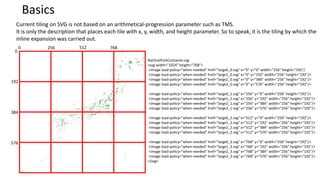
Current tiling on SVG is not based on an arithmetical-progression parameter such as TMS.
It is only the description that places each tile with x, y, width, and height parameter. So to speak, it is the tiling by which the
inline expansion was carried out.
0 256 512 768
0
192
384
576
NatiloalParkContainer.svg
<svg width="1024" height="768">
<image load-policy="when-needed" href="large0_0.svg" x="0" y="0" width="256" height="192"/
<image load-policy="when-needed" href="large1_0.svg" x="0" y="192" width="256" height="192"/>
<image load-policy="when-needed" href="large2_0.svg" x="0" y="384" width="256" height="192"/>
<image load-policy="when-needed" href="large3_0.svg" x="0" y="576" width="256" height="192"/>
<image load-policy="when-needed" href="large0_1.svg" x="256" y="0" width="256" height="192"/>
<image load-policy="when-needed" href="large1_1.svg" x="256" y="192" width="256" height="192"/>
<image load-policy="when-needed" href="large2_1.svg" x="256" y="384" width="256" height="192"/>
<image load-policy="when-needed" href="large3_1.svg" x="256" y="576" width="256" height="192"/>
<image load-policy="when-needed" href="large0_2.svg" x="512" y="0" width="256" height="192"/>
<image load-policy="when-needed" href="large1_2.svg" x="512" y="192" width="256" height="192"/>
<image load-policy="when-needed" href="large2_2.svg" x="512" y="384" width="256" height="192"/>
<image load-policy="when-needed" href="large3_2.svg" x="512" y="576" width="256" height="192"/>
<image load-policy="when-needed" href="large0_3.svg" x="768" y="0" width="256" height="192"/>
<image load-policy="when-needed" href="large1_3.svg" x="768" y="192" width="256" height="192"/>
<image load-policy="when-needed" href="large2_3.svg" x="768" y="384" width="256" height="192"/>
<image load-policy="when-needed" href="large3_3.svg" x="768" y="576" width="256" height="192"/>
</svg>
Basics
NatiloalParkContainer.svg
<svg width="1024" height="768">
<script>
function onload(){
var root = document.documentElement;
var svgsvg = document.get
for ( var x = 0 ; x <= 768 ; x += 256 ){
for ( var y = 0 ; y <= 576 ; y += 192 ){
var cl = document.createElement("image");
cl.setAttribute("x" , x);
cl.setAttribute("y" , y);
cl.setAttribute("width" , 256);
cl.setAttribute("height" , 192);
cl.setAttribute("xlink:href" , “image” + y + “_” + x + “.svg”);
root.appendChild(cl);
}
}
}
</script>
</svg>
Arithmetical-progression tiling by JavaScript
Since SVG accepts javascript, a thing TMS is also possible by javascrpt.
0
192
384
576
NatiloalParkContainer.svg
<svg width="1024" height="768">
<image load-policy="when-needed" href="large0_0.png" x="0" y="0" width="256" height="192"/
<image load-policy="when-needed" href="large1_0.png" x="0" y="192" width="256" height="192"/>
<image load-policy="when-needed" href="large2_0.png" x="0" y="384" width="256" height="192"/>
<image load-policy="when-needed" href="large3_0.png" x="0" y="576" width="256" height="192"/>
<image load-policy="when-needed" href="large0_1.png" x="256" y="0" width="256" height="192"/>
<image load-policy="when-needed" href="large1_1.png" x="256" y="192" width="256" height="192"/>
<image load-policy="when-needed" href="large2_1.png" x="256" y="384" width="256" height="192"/>
<image load-policy="when-needed" href="large3_1.png" x="256" y="576" width="256" height="192"/>
<image load-policy="when-needed" href="large0_2.png" x="512" y="0" width="256" height="192"/>
<image load-policy="when-needed" href="large1_2.png" x="512" y="192" width="256" height="192"/>
<image load-policy="when-needed" href="large2_2.png" x="512" y="384" width="256" height="192"/>
<image load-policy="when-needed" href="large3_2.png" x="512" y="576" width="256" height="192"/>
<image load-policy="when-needed" href="large0_3.png" x="768" y="0" width="256" height="192"/>
<image load-policy="when-needed" href="large1_3.png" x="768" y="192" width="256" height="192"/>
<image load-policy="when-needed" href="large2_3.png" x="768" y="384" width="256" height="192"/>
<image load-policy="when-needed" href="large3_3.png" x="768" y="576" width="256" height="192"/>
</svg>
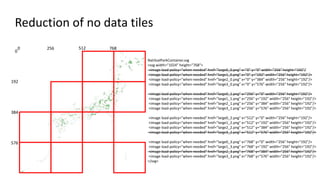
0 256 512 768
Reduction of no data tiles
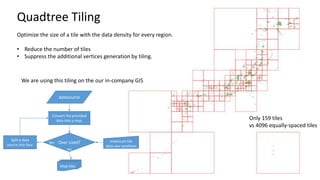
Quadtree Tiling
Optimize the size of a tile with the data density for every region.
• Reduce the number of tiles
• Suppress the additional vertices generation by tiling.
Only 159 tiles
vs 4096 equally-spaced tiles
Over sized?
datasource
Map tiles
maximum tile
data size condition
Convert the provided
data into a map.
Split a data
source into four.
Yes
No
We are using this tiling on the our in-company GIS

Tiling

  • 1.
  • 2.
    Current tiling onSVG is not based on an arithmetical-progression parameter such as TMS. It is only the description that places each tile with x, y, width, and height parameter. So to speak, it is the tiling by which the inline expansion was carried out. 0 256 512 768 0 192 384 576 NatiloalParkContainer.svg <svg width="1024" height="768"> <image load-policy="when-needed" href="large0_0.svg" x="0" y="0" width="256" height="192"/ <image load-policy="when-needed" href="large1_0.svg" x="0" y="192" width="256" height="192"/> <image load-policy="when-needed" href="large2_0.svg" x="0" y="384" width="256" height="192"/> <image load-policy="when-needed" href="large3_0.svg" x="0" y="576" width="256" height="192"/> <image load-policy="when-needed" href="large0_1.svg" x="256" y="0" width="256" height="192"/> <image load-policy="when-needed" href="large1_1.svg" x="256" y="192" width="256" height="192"/> <image load-policy="when-needed" href="large2_1.svg" x="256" y="384" width="256" height="192"/> <image load-policy="when-needed" href="large3_1.svg" x="256" y="576" width="256" height="192"/> <image load-policy="when-needed" href="large0_2.svg" x="512" y="0" width="256" height="192"/> <image load-policy="when-needed" href="large1_2.svg" x="512" y="192" width="256" height="192"/> <image load-policy="when-needed" href="large2_2.svg" x="512" y="384" width="256" height="192"/> <image load-policy="when-needed" href="large3_2.svg" x="512" y="576" width="256" height="192"/> <image load-policy="when-needed" href="large0_3.svg" x="768" y="0" width="256" height="192"/> <image load-policy="when-needed" href="large1_3.svg" x="768" y="192" width="256" height="192"/> <image load-policy="when-needed" href="large2_3.svg" x="768" y="384" width="256" height="192"/> <image load-policy="when-needed" href="large3_3.svg" x="768" y="576" width="256" height="192"/> </svg> Basics
  • 3.
    NatiloalParkContainer.svg <svg width="1024" height="768"> <script> functiononload(){ var root = document.documentElement; var svgsvg = document.get for ( var x = 0 ; x <= 768 ; x += 256 ){ for ( var y = 0 ; y <= 576 ; y += 192 ){ var cl = document.createElement("image"); cl.setAttribute("x" , x); cl.setAttribute("y" , y); cl.setAttribute("width" , 256); cl.setAttribute("height" , 192); cl.setAttribute("xlink:href" , “image” + y + “_” + x + “.svg”); root.appendChild(cl); } } } </script> </svg> Arithmetical-progression tiling by JavaScript Since SVG accepts javascript, a thing TMS is also possible by javascrpt.
  • 4.
    0 192 384 576 NatiloalParkContainer.svg <svg width="1024" height="768"> <imageload-policy="when-needed" href="large0_0.png" x="0" y="0" width="256" height="192"/ <image load-policy="when-needed" href="large1_0.png" x="0" y="192" width="256" height="192"/> <image load-policy="when-needed" href="large2_0.png" x="0" y="384" width="256" height="192"/> <image load-policy="when-needed" href="large3_0.png" x="0" y="576" width="256" height="192"/> <image load-policy="when-needed" href="large0_1.png" x="256" y="0" width="256" height="192"/> <image load-policy="when-needed" href="large1_1.png" x="256" y="192" width="256" height="192"/> <image load-policy="when-needed" href="large2_1.png" x="256" y="384" width="256" height="192"/> <image load-policy="when-needed" href="large3_1.png" x="256" y="576" width="256" height="192"/> <image load-policy="when-needed" href="large0_2.png" x="512" y="0" width="256" height="192"/> <image load-policy="when-needed" href="large1_2.png" x="512" y="192" width="256" height="192"/> <image load-policy="when-needed" href="large2_2.png" x="512" y="384" width="256" height="192"/> <image load-policy="when-needed" href="large3_2.png" x="512" y="576" width="256" height="192"/> <image load-policy="when-needed" href="large0_3.png" x="768" y="0" width="256" height="192"/> <image load-policy="when-needed" href="large1_3.png" x="768" y="192" width="256" height="192"/> <image load-policy="when-needed" href="large2_3.png" x="768" y="384" width="256" height="192"/> <image load-policy="when-needed" href="large3_3.png" x="768" y="576" width="256" height="192"/> </svg> 0 256 512 768 Reduction of no data tiles
  • 5.
    Quadtree Tiling Optimize thesize of a tile with the data density for every region. • Reduce the number of tiles • Suppress the additional vertices generation by tiling. Only 159 tiles vs 4096 equally-spaced tiles Over sized? datasource Map tiles maximum tile data size condition Convert the provided data into a map. Split a data source into four. Yes No We are using this tiling on the our in-company GIS