M agickTiler
A Java tool and embeddable library for converting images into
  formats suitable for publishing as zoomable Web images.


                                          http://code.google.com/p/magicktiler/
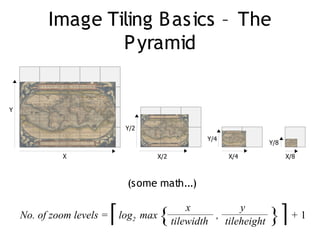
Image Tiling B asics – The
                  P yramid


Y

                              Y/2
                                                           Y/4
                                                                            Y/8

             X                               X/2                 X/4              X/8


                              (some math...)

    No. of zoom levels =   ⌈ log   2   max   {         x
                                                   tilewidth
                                                             ,
                                                                   y
                                                               tileheight   }⌉ + 1
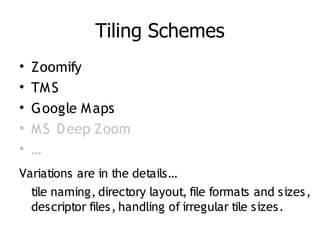
Tiling Schemes
•   Zoomify
•   TM S
•   Google M aps
•   M S D eep Zoom
•   …
Variations are in the details…
  tile naming, directory layout, file formats and sizes,
  descriptor files, handling of irregular tile sizes.
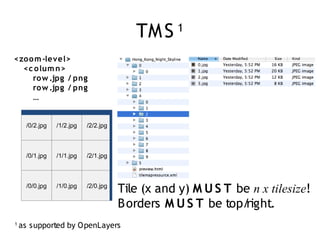
TM S     1

<zo o m -level>
  <c o lum n>
     ro w .jpg / png
     ro w .jpg / png
     …


      /0/2.jpg   /1/2.jpg   /2/2.jpg


      /0/1.jpg   /1/1.jpg   /2/1.jpg


      /0/0.jpg   /1/0.jpg   /2/0.jpg
                                       Tile (x and y) M U S T be n x tilesize!
                                       B orders M U S T be top/right.
1
    as supported by O penLayers
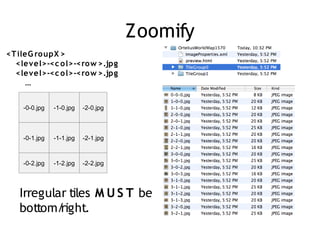
Zoomify
<T ileG ro upX >
  <level>-<c o l>-<ro w >.jpg
  <level>-<c o l>-<ro w >.jpg
      …


    -0-0.jpg   -1-0.jpg   -2-0.jpg


    -0-1.jpg   -1-1.jpg   -2-1.jpg


    -0-2.jpg   -1-2.jpg   -2-2.jpg


   Irregular tiles M U S T be
   bottom/ right.
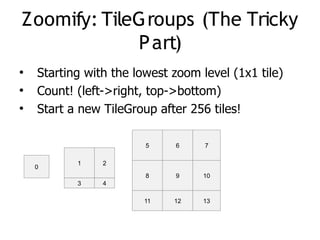
Zoomify: TileGroups (The Tricky
             P art)
●
    Starting with the lowest zoom level (1x1 tile)
●
    Count! (left->right, top->bottom)
●
    Start a new TileGroup after 256 tiles!

                        5    6     7

           1    2
    0
                        8    9     10
           3    4

                        11   12    13
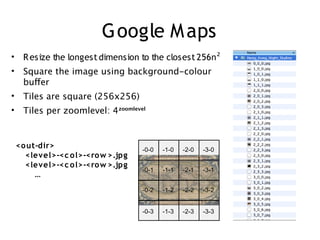
Google M aps
• R esize the longest dimension to the closest 256n²
• Square the image using background-colour
  bufer
• Tiles are square (256x256)
• Tiles per zoomlevel: 4zoomlevel


 <o ut-dir>                      -0-0   -1-0   -2-0   -3-0
   <level>-<c o l>-<ro w >.jpg
   <level>-<c o l>-<ro w >.jpg
                                 -0-1   -1-1   -2-1   -3-1
      …
                                 -0-2   -1-2   -2-2   -3-2


                                 -0-3   -1-3   -2-3   -3-3
P erformance O ptimizations
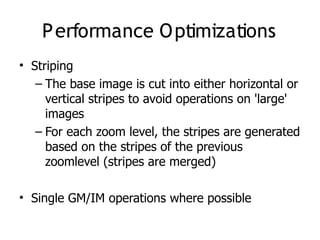
• Striping
   – The base image is cut into either horizontal or
     vertical stripes to avoid operations on 'large'
     images
   – For each zoom level, the stripes are generated
     based on the stripes of the previous
     zoomlevel (stripes are merged)

• Single GM/IM operations where possible
C LI
usage: java -jar magicktiler [-b <color>] [-f <format>] [-g] [-h] -i
       <input> [-l] [-o <output>] [-p] [-q <quality>] -s <scheme> [-v]


-b <color>     background color, default=white
-f <format>    tile format ('jpeg' or 'png'), default=jpeg
-g             displays the GUI (ignores all other parameters)
-h             displays this help text
-i <input>     mandatory input file or directory
-l             writes reporting information to a log file
-o <output>    output directory (for tilesets) or file (for PTIF), default=.
-p             generate an HTML preview file
-q <quality>   JPEG compression quality (0 - 100), default=75
-s <scheme>    mandatory tiling scheme ('tms', 'zoomify', 'gmap' or 'ptif')
-v             validate the input instead of generating a tileset


Example: java -jar magicktiler.jar -s tms -f jpeg -i image.tif -p
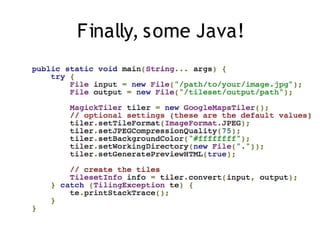
Finally, some Java!

MagickTiler at Toronto JUG

  • 1.
    M agickTiler A Javatool and embeddable library for converting images into formats suitable for publishing as zoomable Web images. http://code.google.com/p/magicktiler/
  • 2.
    Image Tiling Basics – The P yramid Y Y/2 Y/4 Y/8 X X/2 X/4 X/8 (some math...) No. of zoom levels = ⌈ log 2 max { x tilewidth , y tileheight }⌉ + 1
  • 3.
    Tiling Schemes • Zoomify • TM S • Google M aps • M S D eep Zoom • … Variations are in the details… tile naming, directory layout, file formats and sizes, descriptor files, handling of irregular tile sizes.
  • 4.
    TM S 1 <zo o m -level> <c o lum n> ro w .jpg / png ro w .jpg / png … /0/2.jpg /1/2.jpg /2/2.jpg /0/1.jpg /1/1.jpg /2/1.jpg /0/0.jpg /1/0.jpg /2/0.jpg Tile (x and y) M U S T be n x tilesize! B orders M U S T be top/right. 1 as supported by O penLayers
  • 5.
    Zoomify <T ileG roupX > <level>-<c o l>-<ro w >.jpg <level>-<c o l>-<ro w >.jpg … -0-0.jpg -1-0.jpg -2-0.jpg -0-1.jpg -1-1.jpg -2-1.jpg -0-2.jpg -1-2.jpg -2-2.jpg Irregular tiles M U S T be bottom/ right.
  • 6.
    Zoomify: TileGroups (TheTricky P art) ● Starting with the lowest zoom level (1x1 tile) ● Count! (left->right, top->bottom) ● Start a new TileGroup after 256 tiles! 5 6 7 1 2 0 8 9 10 3 4 11 12 13
  • 7.
    Google M aps •R esize the longest dimension to the closest 256n² • Square the image using background-colour bufer • Tiles are square (256x256) • Tiles per zoomlevel: 4zoomlevel <o ut-dir> -0-0 -1-0 -2-0 -3-0 <level>-<c o l>-<ro w >.jpg <level>-<c o l>-<ro w >.jpg -0-1 -1-1 -2-1 -3-1 … -0-2 -1-2 -2-2 -3-2 -0-3 -1-3 -2-3 -3-3
  • 8.
    P erformance Optimizations • Striping – The base image is cut into either horizontal or vertical stripes to avoid operations on 'large' images – For each zoom level, the stripes are generated based on the stripes of the previous zoomlevel (stripes are merged) • Single GM/IM operations where possible
  • 9.
    C LI usage: java-jar magicktiler [-b <color>] [-f <format>] [-g] [-h] -i <input> [-l] [-o <output>] [-p] [-q <quality>] -s <scheme> [-v] -b <color> background color, default=white -f <format> tile format ('jpeg' or 'png'), default=jpeg -g displays the GUI (ignores all other parameters) -h displays this help text -i <input> mandatory input file or directory -l writes reporting information to a log file -o <output> output directory (for tilesets) or file (for PTIF), default=. -p generate an HTML preview file -q <quality> JPEG compression quality (0 - 100), default=75 -s <scheme> mandatory tiling scheme ('tms', 'zoomify', 'gmap' or 'ptif') -v validate the input instead of generating a tileset Example: java -jar magicktiler.jar -s tms -f jpeg -i image.tif -p
  • 10.