Unified Functional Testing
AmaravathiTechSystems Page 1
UNIFIED FUNCTIONAL TESTING / QUICK TEST PROFESSIONAL
(UFT/QTP)
Unified Functional Testing
AmaravathiTechSystems Page 2
CONTENTS
1. History 4
2. Introduction 5
3. Features supported by UTF 7
4. Types of Tools 9-15
5. Advantages and Disadvantages of UFT 16-17
6. Selenium VS UFT 18
7. System Requirements 19
8. Steps to Download and Installation: 20-31
9. References 32
Unified Functional Testing
AmaravathiTechSystems Page 3
FIGUER DETAILS
FIGURE NO FIGURE NAME PAGE NO
Fig 3.1 Combination of QTP and ST 6
Fig 3.2 QTP Integration 7
Fig 3.3 Shared asset Repository 7
Fig 4.1 Test Management 10
Fig 4.2 Configuration Management 14
TABLE DETAILS
TABLE NO TABLE NAME PAGE NO
Table 1 Types o tools 9
Table 2 Selenium VS UFT 18
Table 3 System Requirements 19
Unified Functional Testing
AmaravathiTechSystems Page 4
1. HISTORY
 In the year 2001 Mercury Interactive (Software company) developed and released QTP “Quick Test
Professional” version 5.5 .
 QTP is a software application used for Automation Testing process to test the software applications,
more useful for “Functional” and “Regression” testing. This was testing with the GUI testing.
 Later on QTP was developed by Hewlett Packard (HP) in 2006. In 2012, HP renewed QTP with the
new name UFT “Unified; during renewal HP’s UFT version was 11.50.
 The name “Unified” reveals that UTF is an advanced and combined “GUI and API (service)” testing
tool, strongly test the functionalities of the front-end and back-end of the software application. HP said
that the new released of UFT 12.01 provides better documentation support as compare to UFT 12.0.
Unified Functional Testing
AmaravathiTechSystems Page 5
2. INTRODUCTION
QTP stands for Quick Test Professional, a product of Hewlett Packard (HP). This tool helps testers to
perform an automated functional testing seamlessly, without monitoring, once script development is
complete.
HP QTP uses Visual Basic Scripting (VBScript) for automating the applications. The Scripting
Engine need not be installed exclusively, as it is available as a part of the Windows OS. The Current version
of VBScript is 5.8, which is available as a part of Win 7. VBScript is NOT an object-oriented language but
an object-based language.
HP UFT is an automated functional Testing tool that helps testers to execute automated tests in order
to identify any errors, defects or gaps in contrary to the expected results of the application under test..
Unified Functional Testing
AmaravathiTechSystems Page 6
3. FEATURES SUPPORTED BY UTF
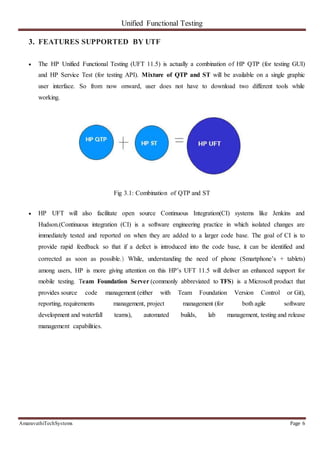
 The HP Unified Functional Testing (UFT 11.5) is actually a combination of HP QTP (for testing GUI)
and HP Service Test (for testing API). Mixture of QTP and ST will be available on a single graphic
user interface. So from now onward, user does not have to download two different tools while
working.
Fig 3.1: Combination of QTP and ST
 HP UFT will also facilitate open source Continuous Integration(CI) systems like Jenkins and
Hudson.(Continuous integration (CI) is a software engineering practice in which isolated changes are
immediately tested and reported on when they are added to a larger code base. The goal of CI is to
provide rapid feedback so that if a defect is introduced into the code base, it can be identified and
corrected as soon as possible.) While, understanding the need of phone (Smartphone’s + tablets)
among users, HP is more giving attention on this HP’s UFT 11.5 will deliver an enhanced support for
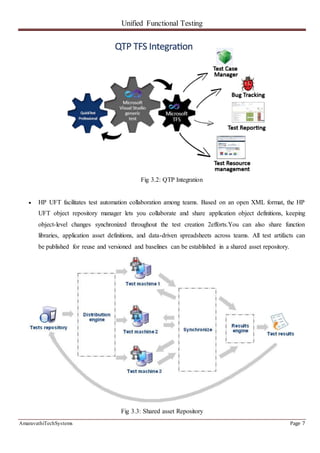
mobile testing. Team Foundation Server (commonly abbreviated to TFS) is a Microsoft product that
provides source code management (either with Team Foundation Version Control or Git),
reporting, requirements management, project management (for both agile software
development and waterfall teams), automated builds, lab management, testing and release
management capabilities.
Unified Functional Testing
AmaravathiTechSystems Page 7
Fig 3.2: QTP Integration
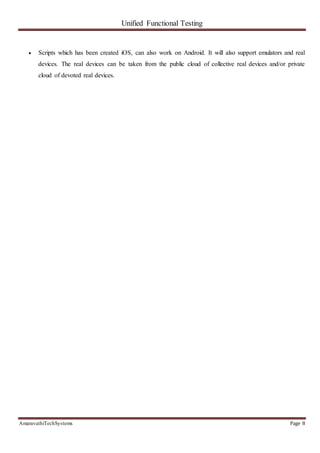
 HP UFT facilitates test automation collaboration among teams. Based on an open XML format, the HP
UFT object repository manager lets you collaborate and share application object definitions, keeping
object-level changes synchronized throughout the test creation 2efforts.You can also share function
libraries, application asset definitions, and data-driven spreadsheets across teams. All test artifacts can
be published for reuse and versioned and baselines can be established in a shared asset repository.
Fig 3.3: Shared asset Repository
Unified Functional Testing
AmaravathiTechSystems Page 8
 Scripts which has been created iOS, can also work on Android. It will also support emulators and real
devices. The real devices can be taken from the public cloud of collective real devices and/or private
cloud of devoted real devices.
Unified Functional Testing
AmaravathiTechSystems Page 9
4. TYPES OF TOOLS
Tool Type Used For Used By
Test Management Tool Test Managing, scheduling, defect logging,
tracking and analysis.
Testers
Configuration
management tool
For Implementation, execution, tracking
changes
All Team members
Static Analysis Tools Static Testing Developers
Test data Preparation
Tools
Analysis and Design, Test data generation Testers
Test Execution Tools Implementation, Execution Testers
Test Comparators Comparing expected and actual results All Team members
Coverage measurement
tools
Provides structural coverage Developers
Performance Testing tools Monitoring the performance, response time Testers
Project planning and
Tracking Tools
For Planning Project Managers
Incident Management
Tools
For managing the tests Testers
Table 1:Types of tools
4.1. Test Management Tool:(This will be used by the Testers)
Test management tools are used to store information on how testing is to be done, plan testing
activities and report the status of quality assurance activities. The tools have different approaches to testing
and thus have different sets of features. Generally they are used to maintain and plan manual testing, run or
gather execution data from automated tests, manage multiple environments and to enter information about
found defects. Test management tools offer the prospect of streamlining the testing process and allow quick
access to data analysis, collaborative tools and easy communication across multiple project teams. Tracking of
defects and project tasks are done within one application to further simplify the testing.
Unified Functional Testing
AmaravathiTechSystems Page 10
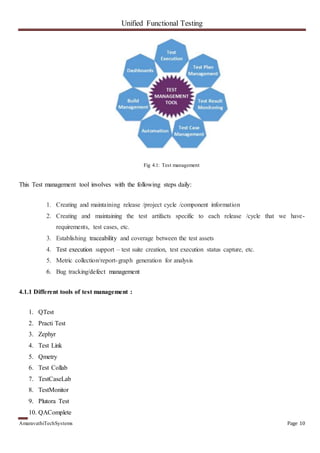
Fig 4.1: Test management
This Test management tool involves with the following steps daily:
1. Creating and maintaining release /project cycle /component information
2. Creating and maintaining the test artifacts specific to each release /cycle that we have-
requirements, test cases, etc.
3. Establishing traceability and coverage between the test assets
4. Test execution support – test suite creation, test execution status capture, etc.
5. Metric collection/report-graph generation for analysis
6. Bug tracking/defect management
4.1.1 Different tools of test management :
1. QTest
2. Practi Test
3. Zephyr
4. Test Link
5. Qmetry
6. Test Collab
7. TestCaseLab
8. TestMonitor
9. Plutora Test
10. QAComplete
Unified Functional Testing
AmaravathiTechSystems Page 11
11. QACoverage
12. XQual
13. TestFLO for JIRA
 QTest:
This tool is developed by QASymphony .It is simple to use and provides user friendly UI. QTest provides
software testing and development teams with an easy to learn , easy to use, lightning fast, scalable test
management that seamlessly integrates with JIRA, other ALMs, and automation tools. QTest has proven to
make every step of the QA process faster, simpler and more efficient. QTest Features are:
 Assigns Tasks
 Test Planning
 Import and Export of Test Cases
 Test Case Management
 Track Test Results
 Submit Defects
 Advance Search Facility.
 Practi Test:
It is a standalone ALM solution that can also smoothly integrate with other tools you may already be
working with: Bug trackers ( Jira , Redmine etc.);Automation tools (Selenium, Test Complete, etc);CI
platforms (Jenkins, CircleCI and more);and Slack. PractiTest Features are:
 Email Notifications
 Multiple Projects Support
 Unlimited Attachments
 Better Bug Life Cycle
 Requirements Management
Unified Functional Testing
AmaravathiTechSystems Page 12
 Zephyr:
Zephyr offers innovative applications and unparalleled, real-time visibility into the quality and status of
software projects. Integrate tools your teams are already using today such as JIRA, Selenium, QTP/UFT,
Bamboo, Jenkins, Confluence and so much more via well-documented REST APIs. Zephyr Features are:
 Create Test Case and Test Suites
 Create Test Plan
 Create Test Cycles
 Build Bug Reports
 Monitor Quality Metrics
 TestLink:
If you are wondering for an open source test management tool, then you should go for TestLink. This is a
web-based tool with all comforts for test management. TestLink Features are:
 Metrics Support
 Charts Support
 Customizable
 Test Creation and Execution
 Defects Reporting
 User Friendly UI
 Qmetry
QMetry is an efficient tool solves all issues related to test case management while performing testing for
any software application or device. It is a great test management tool to execute your written test cases.
Unified Functional Testing
AmaravathiTechSystems Page 13
QMetry is most liked among the users for its easy functionality and friendly environment that it offers.
QMetry Features are:
 Friendly User Interface (UI)
 Flexible and Easy to Operate
 Integration with JIRA
 Creates Test Cases
 Defects Reporting
 Provides Attachments
 Comments Facility
 Provides Defects Chart
4.2.Configuration management tool:(This will be used by All)
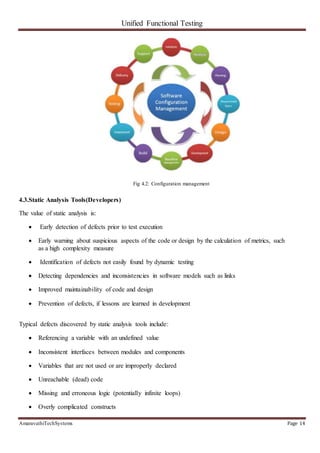
Configuration management (CM) is a systems engineering process for establishing and maintaining
consistency of a product's performance, functional, and physical attributes with its requirements, design, and
operational information throughout its life. CM applied over the life cycle of a system provides visibility and
control of its performance, functional, and physical attributes. CM verifies that a system performs as intended,
and is identified and documented in sufficient detail to support its projected life cycle. Configuration
management is also used in software development and deployment, where it is called software or unified
configuration management (SCM or UCM).
Developers and others involved in the project can use SCM to keep track of artifacts, including source
code, documentation, problems, changes requested and changes made. Software configuration management
tools, such as Chef and Puppet, can be used in concert with version-control tools for source code management,
such as Apache Subversion and Git.
Unified Functional Testing
AmaravathiTechSystems Page 14
Fig 4.2: Configuration management
4.3.Static Analysis Tools(Developers)
The value of static analysis is:
 Early detection of defects prior to test execution
 Early warning about suspicious aspects of the code or design by the calculation of metrics, such
as a high complexity measure
 Identification of defects not easily found by dynamic testing
 Detecting dependencies and inconsistencies in software models such as links
 Improved maintainability of code and design
 Prevention of defects, if lessons are learned in development
Typical defects discovered by static analysis tools include:
 Referencing a variable with an undefined value
 Inconsistent interfaces between modules and components
 Variables that are not used or are improperly declared
 Unreachable (dead) code
 Missing and erroneous logic (potentially infinite loops)
 Overly complicated constructs
Unified Functional Testing
AmaravathiTechSystems Page 15
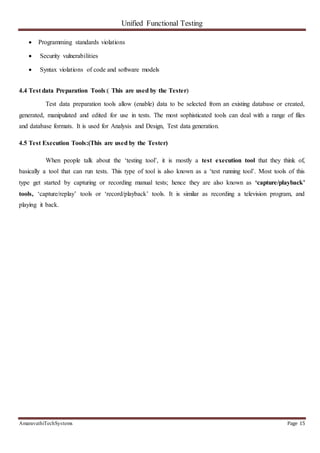
 Programming standards violations
 Security vulnerabilities
 Syntax violations of code and software models
4.4 Test data Preparation Tools:( This are used by the Tester)
Test data preparation tools allow (enable) data to be selected from an existing database or created,
generated, manipulated and edited for use in tests. The most sophisticated tools can deal with a range of files
and database formats. It is used for Analysis and Design, Test data generation.
4.5 Test Execution Tools:(This are used by the Tester)
When people talk about the ‘testing tool’, it is mostly a test execution tool that they think of,
basically a tool that can run tests. This type of tool is also known as a ‘test running tool’. Most tools of this
type get started by capturing or recording manual tests; hence they are also known as ‘capture/playback’
tools, ‘capture/replay’ tools or ‘record/playback’ tools. It is similar as recording a television program, and
playing it back.
Unified Functional Testing
AmaravathiTechSystems Page 16
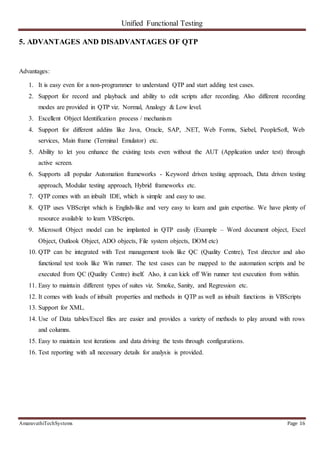
5. ADVANTAGES AND DISADVANTAGES OF QTP
Advantages:
1. It is easy even for a non-programmer to understand QTP and start adding test cases.
2. Support for record and playback and ability to edit scripts after recording. Also different recording
modes are provided in QTP viz. Normal, Analogy & Low level.
3. Excellent Object Identification process / mechanism
4. Support for different addins like Java, Oracle, SAP, .NET, Web Forms, Siebel, PeopleSoft, Web
services, Main frame (Terminal Emulator) etc.
5. Ability to let you enhance the existing tests even without the AUT (Application under test) through
active screen.
6. Supports all popular Automation frameworks - Keyword driven testing approach, Data driven testing
approach, Modular testing approach, Hybrid frameworks etc.
7. QTP comes with an inbuilt IDE, which is simple and easy to use.
8. QTP uses VBScript which is English-like and very easy to learn and gain expertise. We have plenty of
resource available to learn VBScripts.
9. Microsoft Object model can be implanted in QTP easily (Example – Word document object, Excel
Object, Outlook Object, ADO objects, File system objects, DOM etc)
10. QTP can be integrated with Test management tools like QC (Quality Centre), Test director and also
functional test tools like Win runner. The test cases can be mapped to the automation scripts and be
executed from QC (Quality Centre) itself. Also, it can kick off Win runner test execution from within.
11. Easy to maintain different types of suites viz. Smoke, Sanity, and Regression etc.
12. It comes with loads of inbuilt properties and methods in QTP as well as inbuilt functions in VBScripts
13. Support for XML.
14. Use of Data tables/Excel files are easier and provides a variety of methods to play around with rows
and columns.
15. Easy to maintain test iterations and data driving the tests through configurations.
16. Test reporting with all necessary details for analysis is provided.
Unified Functional Testing
AmaravathiTechSystems Page 17
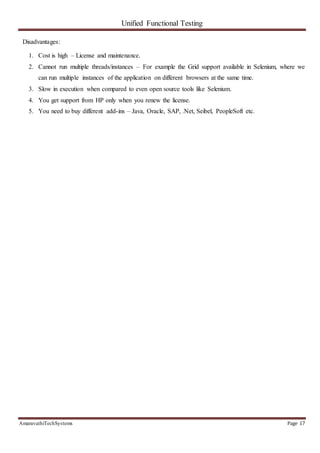
Disadvantages:
1. Cost is high – License and maintenance.
2. Cannot run multiple threads/instances – For example the Grid support available in Selenium, where we
can run multiple instances of the application on different browsers at the same time.
3. Slow in execution when compared to even open source tools like Selenium.
4. You get support from HP only when you renew the license.
5. You need to buy different add-ins – Java, Oracle, SAP, .Net, Seibel, PeopleSoft etc.
Unified Functional Testing
AmaravathiTechSystems Page 18
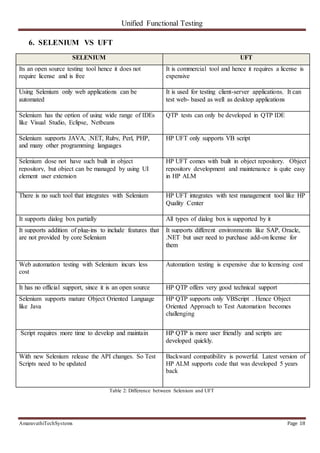
6. SELENIUM VS UFT
SELENIUM UFT
Its an open source testing tool hence it does not
require license and is free
It is commercial tool and hence it requires a license is
expensive
Using Selenium only web applications can be
automated
It is used for testing client-server applications. It can
test web- based as well as desktop applications
Selenium has the option of using wide range of IDEs
like Visual Studio, Eclipse, Netbeans
QTP tests can only be developed in QTP IDE
Selenium supports JAVA, .NET, Ruby, Perl, PHP,
and many other programming languages
HP UFT only supports VB script
Selenium dose not have such built in object
repository, but object can be managed by using UI
element user extension
HP UFT comes with built in object repository. Object
repository development and maintenance is quite easy
in HP ALM
There is no such tool that integrates with Selenium HP UFT integrates with test management tool like HP
Quality Center
It supports dialog box partially All types of dialog box is supported by it
It supports addition of plug-ins to include features that
are not provided by core Selenium
It supports different environments like SAP, Oracle,
.NET but user need to purchase add-on license for
them
Web automation testing with Selenium incurs less
cost
Automation testing is expensive due to licensing cost
It has no official support, since it is an open source HP QTP offers very good technical support
Selenium supports mature Object Oriented Language
like Java
HP QTP supports only VBScript . Hence Object
Oriented Approach to Test Automation becomes
challenging
Script requires more time to develop and maintain HP QTP is more user friendly and scripts are
developed quickly.
With new Selenium release the API changes. So Test
Scripts need to be updated
Backward compatibility is powerful. Latest version of
HP ALM supports code that was developed 5 years
back
Table 2: Difference between Selenium and UFT
Unified Functional Testing
AmaravathiTechSystems Page 19
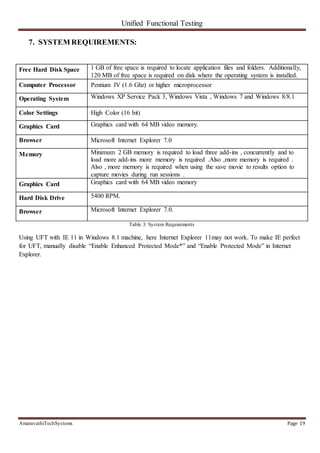
7. SYSTEM REQUIREMENTS:
Free Hard Disk Space 1 GB of free space is required to locate application files and folders. Additionally,
120 MB of free space is required on disk where the operating system is installed.
Computer Processor Pentium IV (1.6 Ghz) or higher microprocessor
Operating System Windows XP Service Pack 3, Windows Vista , Windows 7 and Windows 8/8.1
Color Settings High Color (16 bit)
Graphics Card Graphics card with 64 MB video memory.
Browser Microsoft Internet Explorer 7.0
Memory Minimum 2 GB memory is required to load three add-ins , concurrently and to
load more add-ins more memory is required .Also ,more memory is required .
Also , more memory is required when using the save movie to results option to
capture movies during run sessions .
Graphics Card Graphics card with 64 MB video memory
Hard Disk Drive 5400 RPM.
Browser Microsoft Internet Explorer 7.0.
Table 3: System Requirements
Using UFT with IE 11 in Windows 8.1 machine, here Internet Explorer 11may not work. To make IE perfect
for UFT, manually disable “Enable Enhanced Protected Mode*” and “Enable Protected Mode” in Internet
Explorer.
Unified Functional Testing
AmaravathiTechSystems Page 20
8. STEPS TO DOWNLOAD AND INSTALLATION:
Download:
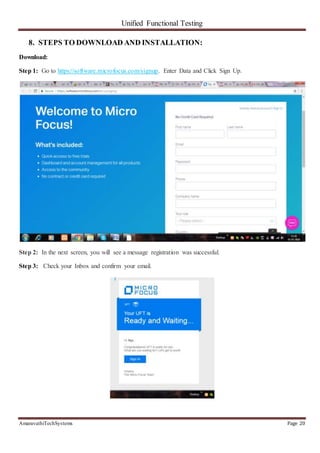
Step 1: Go to https://software.microfocus.com/signup. Enter Data and Click Sign Up.
Step 2: In the next screen, you will see a message registration was successful.
Step 3: Check your Inbox and confirm your email.
Unified Functional Testing
AmaravathiTechSystems Page 21
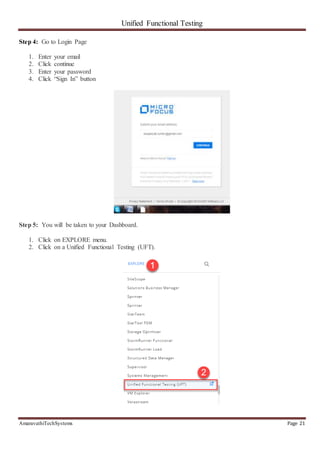
Step 4: Go to Login Page
1. Enter your email
2. Click continue
3. Enter your password
4. Click “Sign In” button
Step 5: You will be taken to your Dashboard.
1. Click on EXPLORE menu.
2. Click on a Unified Functional Testing (UFT).
Unified Functional Testing
AmaravathiTechSystems Page 22
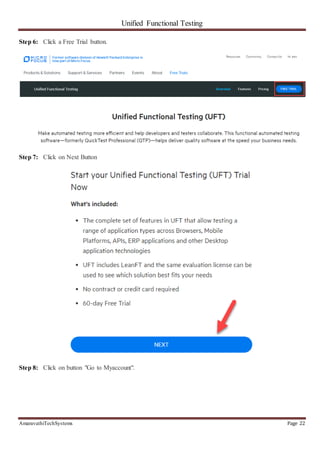
Step 6: Click a Free Trial button.
Step 7: Click on Next Button
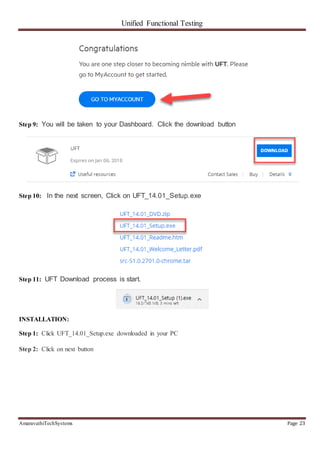
Step 8: Click on button "Go to Myaccount".
Unified Functional Testing
AmaravathiTechSystems Page 23
Step 9: You will be taken to your Dashboard. Click the download button
Step 10: In the next screen, Click on UFT_14.01_Setup.exe
Step 11: UFT Download process is start.
INSTALLATION:
Step 1: Click UFT_14.01_Setup.exe downloaded in your PC
Step 2: Click on next button
Unified Functional Testing
AmaravathiTechSystems Page 24
Step 3: Installation process starts
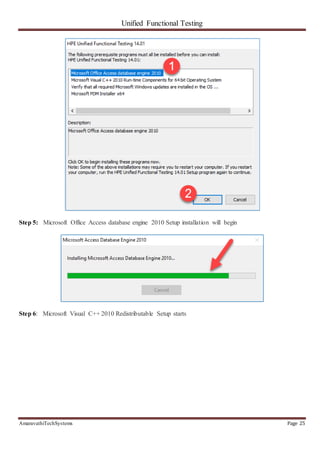
Step 4: In the next screen,
1. Select Microsoft Office Access database engine 2010
2. Click OK button
Unified Functional Testing
AmaravathiTechSystems Page 25
Step 5: Microsoft Office Access database engine 2010 Setup installation will begin
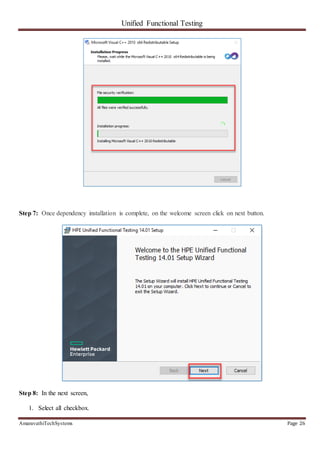
Step 6: Microsoft Visual C++ 2010 Redistributable Setup starts
Unified Functional Testing
AmaravathiTechSystems Page 26
Step 7: Once dependency installation is complete, on the welcome screen click on next button.
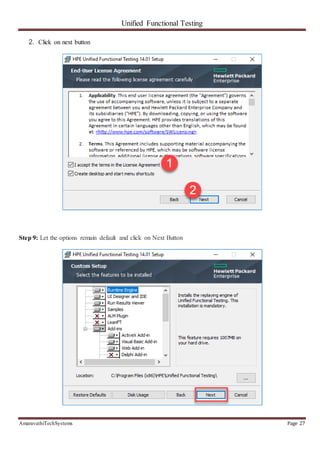
Step 8: In the next screen,
1. Select all checkbox.
Unified Functional Testing
AmaravathiTechSystems Page 27
2. Click on next button
Step 9: Let the options remain default and click on Next Button
Unified Functional Testing
AmaravathiTechSystems Page 28
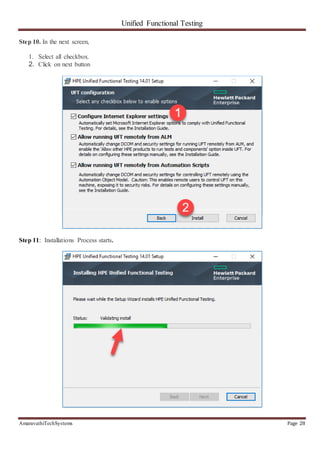
Step 10. In the next screen,
1. Select all checkbox.
2. Click on next button
Step 11: Installations Process starts.
Unified Functional Testing
AmaravathiTechSystems Page 29
Step 12: Installations Process is complete and click on finish button.
Step 13: In Restart confirmation box, select on Yes
Step 14. After reboot, Click on HPE UFT Icon on a desktop
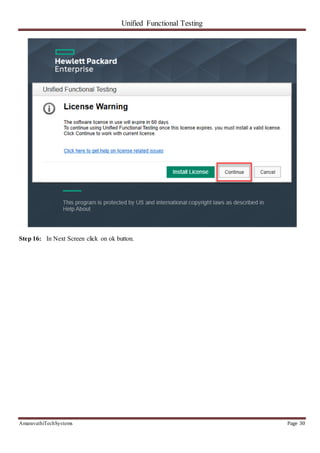
Step 15: Click on Continue Button.
Unified Functional Testing
AmaravathiTechSystems Page 30
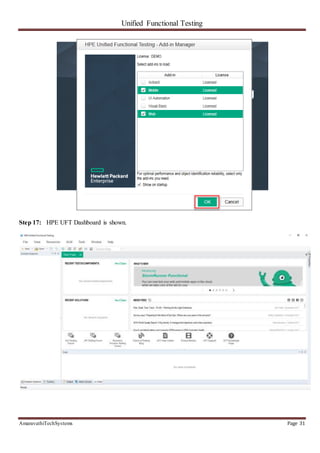
Step 16: In Next Screen click on ok button.
Unified Functional Testing
AmaravathiTechSystems Page 31
Step 17: HPE UFT Dashboard is shown.
Unified Functional Testing
AmaravathiTechSystems Page 32
9. REFERENCES
[1] http://www.softwaretestinghelp.com/15-best-test-management-tools-for-software-testers/
[2] https://www.guru99.com/quick-test-professional-qtp-tutorial-3.html
[3] https://www.tutorialspoint.com/qtp/index.htm

Qtp (2)

  • 1.
    Unified Functional Testing AmaravathiTechSystemsPage 1 UNIFIED FUNCTIONAL TESTING / QUICK TEST PROFESSIONAL (UFT/QTP)
  • 2.
    Unified Functional Testing AmaravathiTechSystemsPage 2 CONTENTS 1. History 4 2. Introduction 5 3. Features supported by UTF 7 4. Types of Tools 9-15 5. Advantages and Disadvantages of UFT 16-17 6. Selenium VS UFT 18 7. System Requirements 19 8. Steps to Download and Installation: 20-31 9. References 32
  • 3.
    Unified Functional Testing AmaravathiTechSystemsPage 3 FIGUER DETAILS FIGURE NO FIGURE NAME PAGE NO Fig 3.1 Combination of QTP and ST 6 Fig 3.2 QTP Integration 7 Fig 3.3 Shared asset Repository 7 Fig 4.1 Test Management 10 Fig 4.2 Configuration Management 14 TABLE DETAILS TABLE NO TABLE NAME PAGE NO Table 1 Types o tools 9 Table 2 Selenium VS UFT 18 Table 3 System Requirements 19
  • 4.
    Unified Functional Testing AmaravathiTechSystemsPage 4 1. HISTORY  In the year 2001 Mercury Interactive (Software company) developed and released QTP “Quick Test Professional” version 5.5 .  QTP is a software application used for Automation Testing process to test the software applications, more useful for “Functional” and “Regression” testing. This was testing with the GUI testing.  Later on QTP was developed by Hewlett Packard (HP) in 2006. In 2012, HP renewed QTP with the new name UFT “Unified; during renewal HP’s UFT version was 11.50.  The name “Unified” reveals that UTF is an advanced and combined “GUI and API (service)” testing tool, strongly test the functionalities of the front-end and back-end of the software application. HP said that the new released of UFT 12.01 provides better documentation support as compare to UFT 12.0.
  • 5.
    Unified Functional Testing AmaravathiTechSystemsPage 5 2. INTRODUCTION QTP stands for Quick Test Professional, a product of Hewlett Packard (HP). This tool helps testers to perform an automated functional testing seamlessly, without monitoring, once script development is complete. HP QTP uses Visual Basic Scripting (VBScript) for automating the applications. The Scripting Engine need not be installed exclusively, as it is available as a part of the Windows OS. The Current version of VBScript is 5.8, which is available as a part of Win 7. VBScript is NOT an object-oriented language but an object-based language. HP UFT is an automated functional Testing tool that helps testers to execute automated tests in order to identify any errors, defects or gaps in contrary to the expected results of the application under test..
  • 6.
    Unified Functional Testing AmaravathiTechSystemsPage 6 3. FEATURES SUPPORTED BY UTF  The HP Unified Functional Testing (UFT 11.5) is actually a combination of HP QTP (for testing GUI) and HP Service Test (for testing API). Mixture of QTP and ST will be available on a single graphic user interface. So from now onward, user does not have to download two different tools while working. Fig 3.1: Combination of QTP and ST  HP UFT will also facilitate open source Continuous Integration(CI) systems like Jenkins and Hudson.(Continuous integration (CI) is a software engineering practice in which isolated changes are immediately tested and reported on when they are added to a larger code base. The goal of CI is to provide rapid feedback so that if a defect is introduced into the code base, it can be identified and corrected as soon as possible.) While, understanding the need of phone (Smartphone’s + tablets) among users, HP is more giving attention on this HP’s UFT 11.5 will deliver an enhanced support for mobile testing. Team Foundation Server (commonly abbreviated to TFS) is a Microsoft product that provides source code management (either with Team Foundation Version Control or Git), reporting, requirements management, project management (for both agile software development and waterfall teams), automated builds, lab management, testing and release management capabilities.
  • 7.
    Unified Functional Testing AmaravathiTechSystemsPage 7 Fig 3.2: QTP Integration  HP UFT facilitates test automation collaboration among teams. Based on an open XML format, the HP UFT object repository manager lets you collaborate and share application object definitions, keeping object-level changes synchronized throughout the test creation 2efforts.You can also share function libraries, application asset definitions, and data-driven spreadsheets across teams. All test artifacts can be published for reuse and versioned and baselines can be established in a shared asset repository. Fig 3.3: Shared asset Repository
  • 8.
    Unified Functional Testing AmaravathiTechSystemsPage 8  Scripts which has been created iOS, can also work on Android. It will also support emulators and real devices. The real devices can be taken from the public cloud of collective real devices and/or private cloud of devoted real devices.
  • 9.
    Unified Functional Testing AmaravathiTechSystemsPage 9 4. TYPES OF TOOLS Tool Type Used For Used By Test Management Tool Test Managing, scheduling, defect logging, tracking and analysis. Testers Configuration management tool For Implementation, execution, tracking changes All Team members Static Analysis Tools Static Testing Developers Test data Preparation Tools Analysis and Design, Test data generation Testers Test Execution Tools Implementation, Execution Testers Test Comparators Comparing expected and actual results All Team members Coverage measurement tools Provides structural coverage Developers Performance Testing tools Monitoring the performance, response time Testers Project planning and Tracking Tools For Planning Project Managers Incident Management Tools For managing the tests Testers Table 1:Types of tools 4.1. Test Management Tool:(This will be used by the Testers) Test management tools are used to store information on how testing is to be done, plan testing activities and report the status of quality assurance activities. The tools have different approaches to testing and thus have different sets of features. Generally they are used to maintain and plan manual testing, run or gather execution data from automated tests, manage multiple environments and to enter information about found defects. Test management tools offer the prospect of streamlining the testing process and allow quick access to data analysis, collaborative tools and easy communication across multiple project teams. Tracking of defects and project tasks are done within one application to further simplify the testing.
  • 10.
    Unified Functional Testing AmaravathiTechSystemsPage 10 Fig 4.1: Test management This Test management tool involves with the following steps daily: 1. Creating and maintaining release /project cycle /component information 2. Creating and maintaining the test artifacts specific to each release /cycle that we have- requirements, test cases, etc. 3. Establishing traceability and coverage between the test assets 4. Test execution support – test suite creation, test execution status capture, etc. 5. Metric collection/report-graph generation for analysis 6. Bug tracking/defect management 4.1.1 Different tools of test management : 1. QTest 2. Practi Test 3. Zephyr 4. Test Link 5. Qmetry 6. Test Collab 7. TestCaseLab 8. TestMonitor 9. Plutora Test 10. QAComplete
  • 11.
    Unified Functional Testing AmaravathiTechSystemsPage 11 11. QACoverage 12. XQual 13. TestFLO for JIRA  QTest: This tool is developed by QASymphony .It is simple to use and provides user friendly UI. QTest provides software testing and development teams with an easy to learn , easy to use, lightning fast, scalable test management that seamlessly integrates with JIRA, other ALMs, and automation tools. QTest has proven to make every step of the QA process faster, simpler and more efficient. QTest Features are:  Assigns Tasks  Test Planning  Import and Export of Test Cases  Test Case Management  Track Test Results  Submit Defects  Advance Search Facility.  Practi Test: It is a standalone ALM solution that can also smoothly integrate with other tools you may already be working with: Bug trackers ( Jira , Redmine etc.);Automation tools (Selenium, Test Complete, etc);CI platforms (Jenkins, CircleCI and more);and Slack. PractiTest Features are:  Email Notifications  Multiple Projects Support  Unlimited Attachments  Better Bug Life Cycle  Requirements Management
  • 12.
    Unified Functional Testing AmaravathiTechSystemsPage 12  Zephyr: Zephyr offers innovative applications and unparalleled, real-time visibility into the quality and status of software projects. Integrate tools your teams are already using today such as JIRA, Selenium, QTP/UFT, Bamboo, Jenkins, Confluence and so much more via well-documented REST APIs. Zephyr Features are:  Create Test Case and Test Suites  Create Test Plan  Create Test Cycles  Build Bug Reports  Monitor Quality Metrics  TestLink: If you are wondering for an open source test management tool, then you should go for TestLink. This is a web-based tool with all comforts for test management. TestLink Features are:  Metrics Support  Charts Support  Customizable  Test Creation and Execution  Defects Reporting  User Friendly UI  Qmetry QMetry is an efficient tool solves all issues related to test case management while performing testing for any software application or device. It is a great test management tool to execute your written test cases.
  • 13.
    Unified Functional Testing AmaravathiTechSystemsPage 13 QMetry is most liked among the users for its easy functionality and friendly environment that it offers. QMetry Features are:  Friendly User Interface (UI)  Flexible and Easy to Operate  Integration with JIRA  Creates Test Cases  Defects Reporting  Provides Attachments  Comments Facility  Provides Defects Chart 4.2.Configuration management tool:(This will be used by All) Configuration management (CM) is a systems engineering process for establishing and maintaining consistency of a product's performance, functional, and physical attributes with its requirements, design, and operational information throughout its life. CM applied over the life cycle of a system provides visibility and control of its performance, functional, and physical attributes. CM verifies that a system performs as intended, and is identified and documented in sufficient detail to support its projected life cycle. Configuration management is also used in software development and deployment, where it is called software or unified configuration management (SCM or UCM). Developers and others involved in the project can use SCM to keep track of artifacts, including source code, documentation, problems, changes requested and changes made. Software configuration management tools, such as Chef and Puppet, can be used in concert with version-control tools for source code management, such as Apache Subversion and Git.
  • 14.
    Unified Functional Testing AmaravathiTechSystemsPage 14 Fig 4.2: Configuration management 4.3.Static Analysis Tools(Developers) The value of static analysis is:  Early detection of defects prior to test execution  Early warning about suspicious aspects of the code or design by the calculation of metrics, such as a high complexity measure  Identification of defects not easily found by dynamic testing  Detecting dependencies and inconsistencies in software models such as links  Improved maintainability of code and design  Prevention of defects, if lessons are learned in development Typical defects discovered by static analysis tools include:  Referencing a variable with an undefined value  Inconsistent interfaces between modules and components  Variables that are not used or are improperly declared  Unreachable (dead) code  Missing and erroneous logic (potentially infinite loops)  Overly complicated constructs
  • 15.
    Unified Functional Testing AmaravathiTechSystemsPage 15  Programming standards violations  Security vulnerabilities  Syntax violations of code and software models 4.4 Test data Preparation Tools:( This are used by the Tester) Test data preparation tools allow (enable) data to be selected from an existing database or created, generated, manipulated and edited for use in tests. The most sophisticated tools can deal with a range of files and database formats. It is used for Analysis and Design, Test data generation. 4.5 Test Execution Tools:(This are used by the Tester) When people talk about the ‘testing tool’, it is mostly a test execution tool that they think of, basically a tool that can run tests. This type of tool is also known as a ‘test running tool’. Most tools of this type get started by capturing or recording manual tests; hence they are also known as ‘capture/playback’ tools, ‘capture/replay’ tools or ‘record/playback’ tools. It is similar as recording a television program, and playing it back.
  • 16.
    Unified Functional Testing AmaravathiTechSystemsPage 16 5. ADVANTAGES AND DISADVANTAGES OF QTP Advantages: 1. It is easy even for a non-programmer to understand QTP and start adding test cases. 2. Support for record and playback and ability to edit scripts after recording. Also different recording modes are provided in QTP viz. Normal, Analogy & Low level. 3. Excellent Object Identification process / mechanism 4. Support for different addins like Java, Oracle, SAP, .NET, Web Forms, Siebel, PeopleSoft, Web services, Main frame (Terminal Emulator) etc. 5. Ability to let you enhance the existing tests even without the AUT (Application under test) through active screen. 6. Supports all popular Automation frameworks - Keyword driven testing approach, Data driven testing approach, Modular testing approach, Hybrid frameworks etc. 7. QTP comes with an inbuilt IDE, which is simple and easy to use. 8. QTP uses VBScript which is English-like and very easy to learn and gain expertise. We have plenty of resource available to learn VBScripts. 9. Microsoft Object model can be implanted in QTP easily (Example – Word document object, Excel Object, Outlook Object, ADO objects, File system objects, DOM etc) 10. QTP can be integrated with Test management tools like QC (Quality Centre), Test director and also functional test tools like Win runner. The test cases can be mapped to the automation scripts and be executed from QC (Quality Centre) itself. Also, it can kick off Win runner test execution from within. 11. Easy to maintain different types of suites viz. Smoke, Sanity, and Regression etc. 12. It comes with loads of inbuilt properties and methods in QTP as well as inbuilt functions in VBScripts 13. Support for XML. 14. Use of Data tables/Excel files are easier and provides a variety of methods to play around with rows and columns. 15. Easy to maintain test iterations and data driving the tests through configurations. 16. Test reporting with all necessary details for analysis is provided.
  • 17.
    Unified Functional Testing AmaravathiTechSystemsPage 17 Disadvantages: 1. Cost is high – License and maintenance. 2. Cannot run multiple threads/instances – For example the Grid support available in Selenium, where we can run multiple instances of the application on different browsers at the same time. 3. Slow in execution when compared to even open source tools like Selenium. 4. You get support from HP only when you renew the license. 5. You need to buy different add-ins – Java, Oracle, SAP, .Net, Seibel, PeopleSoft etc.
  • 18.
    Unified Functional Testing AmaravathiTechSystemsPage 18 6. SELENIUM VS UFT SELENIUM UFT Its an open source testing tool hence it does not require license and is free It is commercial tool and hence it requires a license is expensive Using Selenium only web applications can be automated It is used for testing client-server applications. It can test web- based as well as desktop applications Selenium has the option of using wide range of IDEs like Visual Studio, Eclipse, Netbeans QTP tests can only be developed in QTP IDE Selenium supports JAVA, .NET, Ruby, Perl, PHP, and many other programming languages HP UFT only supports VB script Selenium dose not have such built in object repository, but object can be managed by using UI element user extension HP UFT comes with built in object repository. Object repository development and maintenance is quite easy in HP ALM There is no such tool that integrates with Selenium HP UFT integrates with test management tool like HP Quality Center It supports dialog box partially All types of dialog box is supported by it It supports addition of plug-ins to include features that are not provided by core Selenium It supports different environments like SAP, Oracle, .NET but user need to purchase add-on license for them Web automation testing with Selenium incurs less cost Automation testing is expensive due to licensing cost It has no official support, since it is an open source HP QTP offers very good technical support Selenium supports mature Object Oriented Language like Java HP QTP supports only VBScript . Hence Object Oriented Approach to Test Automation becomes challenging Script requires more time to develop and maintain HP QTP is more user friendly and scripts are developed quickly. With new Selenium release the API changes. So Test Scripts need to be updated Backward compatibility is powerful. Latest version of HP ALM supports code that was developed 5 years back Table 2: Difference between Selenium and UFT
  • 19.
    Unified Functional Testing AmaravathiTechSystemsPage 19 7. SYSTEM REQUIREMENTS: Free Hard Disk Space 1 GB of free space is required to locate application files and folders. Additionally, 120 MB of free space is required on disk where the operating system is installed. Computer Processor Pentium IV (1.6 Ghz) or higher microprocessor Operating System Windows XP Service Pack 3, Windows Vista , Windows 7 and Windows 8/8.1 Color Settings High Color (16 bit) Graphics Card Graphics card with 64 MB video memory. Browser Microsoft Internet Explorer 7.0 Memory Minimum 2 GB memory is required to load three add-ins , concurrently and to load more add-ins more memory is required .Also ,more memory is required . Also , more memory is required when using the save movie to results option to capture movies during run sessions . Graphics Card Graphics card with 64 MB video memory Hard Disk Drive 5400 RPM. Browser Microsoft Internet Explorer 7.0. Table 3: System Requirements Using UFT with IE 11 in Windows 8.1 machine, here Internet Explorer 11may not work. To make IE perfect for UFT, manually disable “Enable Enhanced Protected Mode*” and “Enable Protected Mode” in Internet Explorer.
  • 20.
    Unified Functional Testing AmaravathiTechSystemsPage 20 8. STEPS TO DOWNLOAD AND INSTALLATION: Download: Step 1: Go to https://software.microfocus.com/signup. Enter Data and Click Sign Up. Step 2: In the next screen, you will see a message registration was successful. Step 3: Check your Inbox and confirm your email.
  • 21.
    Unified Functional Testing AmaravathiTechSystemsPage 21 Step 4: Go to Login Page 1. Enter your email 2. Click continue 3. Enter your password 4. Click “Sign In” button Step 5: You will be taken to your Dashboard. 1. Click on EXPLORE menu. 2. Click on a Unified Functional Testing (UFT).
  • 22.
    Unified Functional Testing AmaravathiTechSystemsPage 22 Step 6: Click a Free Trial button. Step 7: Click on Next Button Step 8: Click on button "Go to Myaccount".
  • 23.
    Unified Functional Testing AmaravathiTechSystemsPage 23 Step 9: You will be taken to your Dashboard. Click the download button Step 10: In the next screen, Click on UFT_14.01_Setup.exe Step 11: UFT Download process is start. INSTALLATION: Step 1: Click UFT_14.01_Setup.exe downloaded in your PC Step 2: Click on next button
  • 24.
    Unified Functional Testing AmaravathiTechSystemsPage 24 Step 3: Installation process starts Step 4: In the next screen, 1. Select Microsoft Office Access database engine 2010 2. Click OK button
  • 25.
    Unified Functional Testing AmaravathiTechSystemsPage 25 Step 5: Microsoft Office Access database engine 2010 Setup installation will begin Step 6: Microsoft Visual C++ 2010 Redistributable Setup starts
  • 26.
    Unified Functional Testing AmaravathiTechSystemsPage 26 Step 7: Once dependency installation is complete, on the welcome screen click on next button. Step 8: In the next screen, 1. Select all checkbox.
  • 27.
    Unified Functional Testing AmaravathiTechSystemsPage 27 2. Click on next button Step 9: Let the options remain default and click on Next Button
  • 28.
    Unified Functional Testing AmaravathiTechSystemsPage 28 Step 10. In the next screen, 1. Select all checkbox. 2. Click on next button Step 11: Installations Process starts.
  • 29.
    Unified Functional Testing AmaravathiTechSystemsPage 29 Step 12: Installations Process is complete and click on finish button. Step 13: In Restart confirmation box, select on Yes Step 14. After reboot, Click on HPE UFT Icon on a desktop Step 15: Click on Continue Button.
  • 30.
    Unified Functional Testing AmaravathiTechSystemsPage 30 Step 16: In Next Screen click on ok button.
  • 31.
    Unified Functional Testing AmaravathiTechSystemsPage 31 Step 17: HPE UFT Dashboard is shown.
  • 32.
    Unified Functional Testing AmaravathiTechSystemsPage 32 9. REFERENCES [1] http://www.softwaretestinghelp.com/15-best-test-management-tools-for-software-testers/ [2] https://www.guru99.com/quick-test-professional-qtp-tutorial-3.html [3] https://www.tutorialspoint.com/qtp/index.htm